
Introduction
This manual provides essential instructions for the proper setup, operation, and maintenance of your Spectra Projection Helios 100 inch Fresnel ALR Projector Screen. Designed specifically for ultra short throw (UST) projectors, this screen utilizes advanced Fresnel technology to deliver bright, vivid images even in well-lit environments by rejecting ambient light. Please read this manual thoroughly before installation and use to ensure optimal performance and longevity of your product.
Safety Information
Observe the following safety precautions during installation and use:
- Handle the screen with care to avoid damage to the delicate Fresnel surface. Do not touch the screen surface directly with bare hands.
- Ensure the mounting surface is structurally sound and capable of supporting the screen's weight (approximately 30 pounds).
- Use appropriate tools and follow all mounting hardware instructions. If unsure, seek professional assistance.
- Keep the screen away from direct sunlight or strong heat sources to prevent material degradation.
- Do not attempt to disassemble or modify the screen frame or surface. This will void the warranty and may cause damage.
Package Contents
Verify that all components are present before beginning installation:
- Spectra Projection Helios 100 inch Fresnel ALR Screen Surface
- Screen Frame Components
- Wall Mounting Brackets and Hardware
- Assembly Tools (e.g., Allen wrench, if required)
- Instruction Manual (this document)
Setup
1. Unpacking and Inspection
Carefully remove all components from the packaging. Lay them on a clean, soft surface to prevent scratches. Inspect all parts for any signs of damage. If any components are missing or damaged, contact customer support immediately.
2. Screen Assembly
Follow the detailed assembly instructions provided with the screen frame components. Ensure all frame pieces are securely connected and the screen material is stretched evenly and tautly across the frame. Refer to the specific diagrams for your model.

Image: An assembled Spectra Helios Fresnel ALR Projector Screen, ready for installation. This image illustrates the sleek design of the screen.
3. Choosing a Location
Select a wall for mounting that is flat and free from obstructions. For optimal performance, position the screen in a room where ambient light can be controlled, although the ALR technology significantly reduces its impact. The screen is designed for ultra short throw projectors, which are typically placed directly below the screen, very close to the wall.
4. Wall Mounting
Mark the desired mounting height and width on the wall. Use a level to ensure the marks are perfectly horizontal. Install the wall mounting brackets according to the provided template and hardware. Ensure the brackets are securely fastened to wall studs or appropriate anchors. Carefully lift the assembled screen and hook it onto the installed wall brackets.

Image: The Spectra Projection Helios 100 inch Fresnel ALR Projector Screen mounted on a wall, showcasing its slim bezel design.
5. Projector Placement
Position your ultra short throw projector directly below the screen. The exact distance will vary based on your projector model and desired image size. Consult your projector's manual for recommended throw distances. Adjust the projector's position and focus until the image fills the screen perfectly and is sharp.

Image: A diagram illustrating an Ultra Short Throw (UST) projector positioned below the screen, projecting an image upwards. This highlights the optimized design for UST projectors.
Operating the Screen
The Spectra Projection Helios screen is a passive display surface. Its operation is entirely dependent on the connected ultra short throw projector. Ensure your projector is correctly configured and calibrated for optimal image quality.
Ambient Light Rejection (ALR)
The Fresnel ALR technology is designed to absorb overhead and side ambient light while reflecting light from the UST projector directly to the viewer. This allows for vibrant images even in rooms with significant ambient light. For the best experience, minimize direct light sources hitting the screen surface from above or the sides.

Image: A diagram showing how the Fresnel ALR screen rejects ambient light from above and reflects projector light towards the viewer, enhancing image contrast and brightness.

Image: A diagram illustrating the precision light focusing capability of the screen, directing light from the projector to the viewer for a brighter, more focused image.
Maintenance
Cleaning the Screen Surface
The Fresnel ALR surface is delicate. Follow these guidelines for cleaning:
- Dust Removal: Gently wipe the screen with a soft, dry, lint-free microfiber cloth. Do not apply pressure.
- Smudges/Fingerprints: Lightly dampen a clean microfiber cloth with distilled water. Gently wipe the affected area in one direction. Do not use harsh chemicals, abrasive cleaners, or excessive moisture.
- Avoid: Solvents, alcohol, ammonia-based cleaners, or any abrasive materials, as these can permanently damage the screen surface.
General Care
- Keep the screen away from sharp objects to prevent punctures or scratches.
- Avoid prolonged exposure to extreme temperatures or humidity.
Troubleshooting
If you encounter issues with your screen, consider the following common solutions:
- Poor Image Brightness/Contrast:
- Ensure your UST projector is correctly aligned and positioned directly below the screen.
- Check for excessive ambient light hitting the screen from angles other than the projector. While ALR helps, extreme side or direct light can still impact performance.
- Verify your projector's brightness settings.
- Image Distortion/Unevenness:
- Confirm the screen is mounted perfectly flat and level.
- Check your projector's keystone correction and geometric correction settings.
- Ensure the screen material is taut and evenly stretched within the frame.
- Visible Dust/Smudges:
- Refer to the "Cleaning the Screen Surface" section under Maintenance for proper cleaning procedures.
If problems persist, contact Spectra Projection customer support.
Specifications
| Brand | Spectra Projection |
| Model Number | Spectra Projection Helios |
| Display Dimensions | 100.0 inches (diagonal) |
| Product Dimensions | 87"W x 49"H |
| Material | Fresnel ALR (Ambient Light Rejecting) |
| Mounting Type | Wall Mount |
| Item Weight | 30 pounds |
| Optimized For | Ultra Short Throw (UST) Projectors |
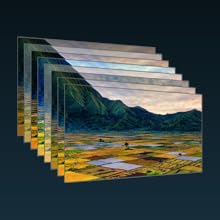
Image: A detailed diagram illustrating the 8-layer optical surface structure of the Spectra Helios screen, including layers like Anti-Glare, Color Plane, Diffusion, Columnal, Speckle Diffusion, Fresnel, Reflecting, and Blackened layers.
Warranty and Support
Spectra Projection products are manufactured to high-quality standards. For information regarding your product's warranty coverage, please refer to the warranty card included with your purchase or visit the official Spectra Projection website. For technical support, troubleshooting assistance, or to inquire about replacement parts, please contact Spectra Projection customer service through their official channels.
Manufacturer: Spectra Projection