
Introduction
Thank you for choosing the Dskeuzeew Pedal Exerciser Bike. This manual provides essential information for the safe assembly, operation, maintenance, and troubleshooting of your new fitness equipment. Please read this manual thoroughly before use and retain it for future reference.
The Dskeuzeew Pedal Exerciser Bike is designed for full-body exercise, offering modes for upright and recumbent cycling, as well as arm and back exercises. It features an 8-level magnetic resistance system and an interactive LCD monitor to track your workout progress.
Important Safety Instructions
WARNING: Before starting any exercise program, consult your physician. This is especially important for individuals over the age of 35 or those with pre-existing health conditions.
- Read all instructions in this manual before using the equipment.
- Keep children and pets away from the equipment during use.
- Place the exerciser on a flat, stable surface. Ensure adequate space around the equipment.
- Inspect the equipment before each use for loose parts, wear, or damage. Do not use if damaged.
- The maximum user weight capacity for this exerciser is 300 pounds (136 kg). Do not exceed this limit.
- Wear appropriate exercise clothing and athletic shoes. Avoid loose clothing that could get caught in moving parts.
- Stop exercising immediately if you feel faint, dizzy, or experience pain.
- Ensure all bolts and nuts are securely tightened before and during use.
- Do not attempt to modify the equipment.
Setup and Assembly
The Dskeuzeew Pedal Exerciser Bike is designed for straightforward assembly. Follow these general steps. Refer to the included assembly diagram for detailed visual guidance.
- Unpack Components: Carefully remove all parts from the packaging. Verify all components are present against the parts list (usually found in a separate leaflet).
- Attach Stabilizers: Secure the front and rear stabilizer bars to the main frame using the provided bolts and washers.
- Install Pedals: Attach the left and right pedals to their respective crank arms. Note that the left pedal typically tightens counter-clockwise.
- Assemble Seat and Backrest: Mount the seat and backrest onto the seat post. Adjust the seat height and position for comfort and secure it.
- Attach Handlebars and Monitor: Secure the handlebars to the main frame. Connect the LCD monitor cables and mount the monitor onto the handlebar post.
- Resistance Bands: If applicable, attach the resistance bands to their designated points on the frame.
- Final Check: Ensure all connections are tight and the exerciser is stable before first use.

Image: The Dskeuzeew Pedal Exerciser Bike fully assembled, demonstrating its use for a full-body workout including resistance bands.

Image: A close-up view of the exerciser's premium steel frame, emphasizing its robust construction and stability.
Operating Instructions
Adjusting the Exerciser
- Seat Height and Position: Loosen the adjustment knob under the seat. Slide the seat to your desired height and forward/backward position. Ensure your knees have a slight bend at the bottom of the pedal stroke. Tighten the knob securely.
- Resistance Level: The exerciser features 8 levels of magnetic resistance. Turn the tension control knob, typically located on the main frame, clockwise to increase resistance (levels 4-8 for intermediate to advanced) and counter-clockwise to decrease resistance (levels 1-3 for basic).

Image: A visual representation of the adjustable seat and backrest design, allowing users to customize their riding position.
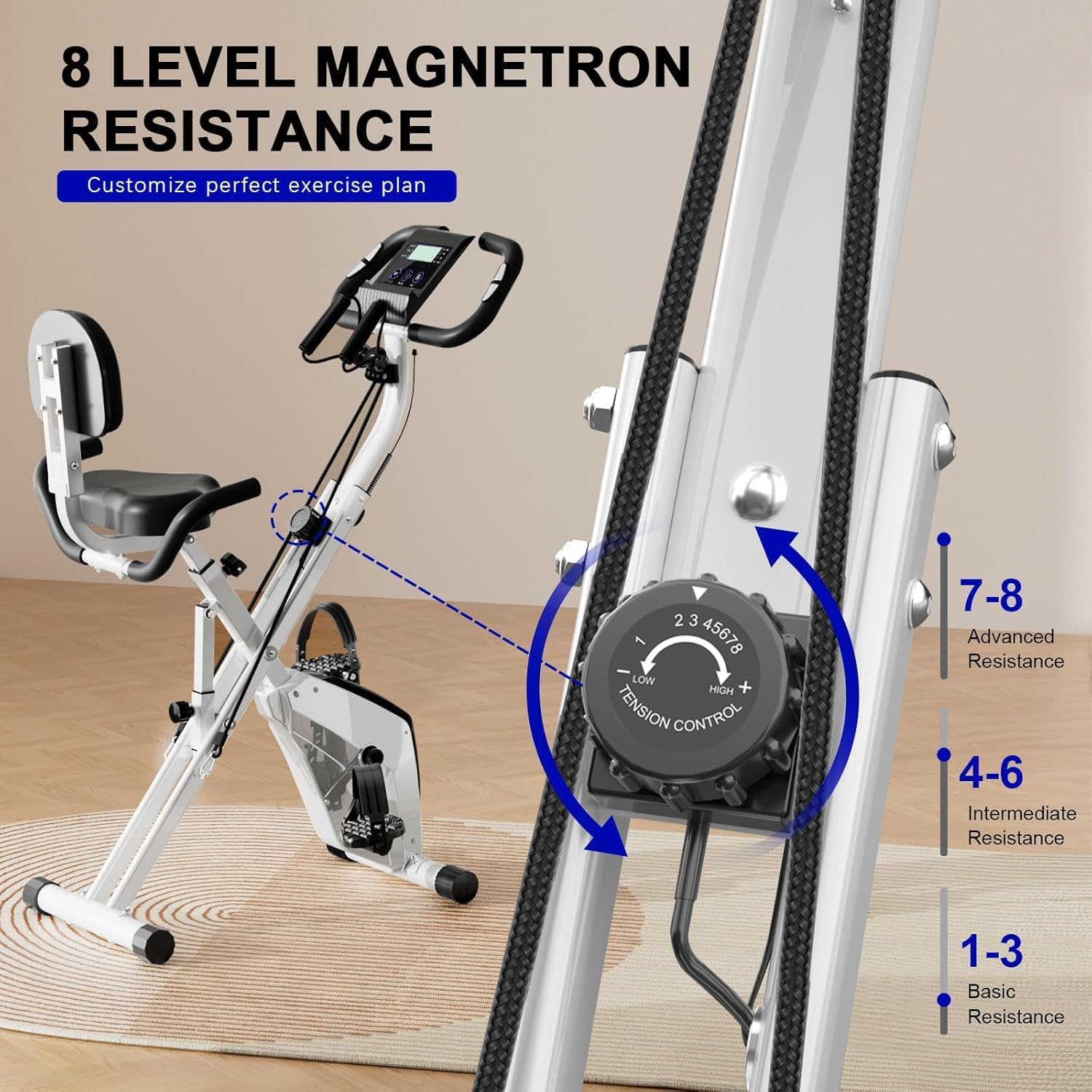
Image: A detailed view of the 8-level tension control knob for adjusting magnetic resistance.
Using the LCD Monitor
The interactive LCD monitor tracks your workout data. It typically displays the following metrics:
- TIME: Duration of your current workout.
- DISTANCE: Total distance covered during the workout.
- SPEED: Current speed.
- CALORIES: Estimated calories burned.
- PULSE: Heart rate (if equipped with pulse sensors on handlebars).
- SCAN: Automatically cycles through all metrics.
- ODO (Odometer): Total accumulated distance over all workouts.
Buttons:
- MODE: Press to select a specific display function or to activate the SCAN function.
- RESET: Press and hold to clear all current workout data (TIME, DISTANCE, CALORIES, SPEED). ODO usually cannot be reset.
- SET: Used for setting target values for time, distance, or calories (if available).

Image: The multifunctional LCD monitor displaying workout metrics such as distance, calories, pulse, time, scan, speed, and odometer.
Workout Modes
This 4-in-1 exerciser supports various workout configurations:
- Leg Cycling: Sit on the seat and place your feet on the pedals. Adjust resistance as desired.
- Arm Pedaling: Sit comfortably and place your hands on the arm pedals. Adjust resistance for upper body workout.
- Resistance Band Exercises: Utilize the integrated resistance bands for additional upper body and core strengthening exercises.

Image: An internal view highlighting the quiet magnetic resistance system, ensuring smooth and silent operation.
Maintenance
Regular maintenance ensures the longevity and safe operation of your Dskeuzeew Pedal Exerciser Bike.
- Cleaning: Wipe down the equipment with a damp cloth after each use to remove sweat and dust. Avoid abrasive cleaners or solvents.
- Inspection: Periodically check all bolts, nuts, and moving parts for tightness and wear. Tighten any loose fasteners.
- Lubrication: The magnetic resistance system is generally maintenance-free. Do not lubricate internal components unless specifically instructed by customer service.
- Storage: Store the exerciser in a clean, dry environment away from extreme temperatures and direct sunlight.
Troubleshooting
| Problem | Possible Cause | Solution |
|---|---|---|
| Equipment is unstable or wobbly. | Uneven surface; loose bolts; damaged stabilizer caps. | Ensure the exerciser is on a flat, level surface. Check and tighten all assembly bolts. Inspect stabilizer caps for damage. |
| Resistance is too easy or too hard. | Resistance knob not adjusted correctly; internal mechanism issue. | Turn the tension control knob to adjust resistance. If the issue persists, contact customer service. |
| LCD monitor not displaying data. | Loose cable connection; dead batteries; sensor malfunction. | Check that all monitor cables are securely connected. Replace batteries in the monitor. If the problem continues, contact customer service. |
| Unusual noise during operation. | Loose parts; friction between components. | Inspect all connections and tighten any loose bolts. Ensure no foreign objects are near moving parts. |
Specifications
| Feature | Detail |
|---|---|
| Brand | Dskeuzeew |
| Model Number | X23N00C017 |
| Material | Alloy Steel |
| Product Dimensions (D x W x H) | 42.13" x 20.87" x 45.67" (107cm x 53cm x 116cm) |
| Maximum Weight Recommendation | 300 pounds (136 kg) |
| Number of Resistance Levels | 8 |
| Color | White |

Image: Product dimensions and user height guidelines for the Dskeuzeew Pedal Exerciser Bike.
Warranty and Customer Support
Dskeuzeew is committed to providing excellent customer service. If you encounter any issues with your product or have questions regarding its operation, assembly, or warranty, please contact our support team.
Our customer service team aims to respond to inquiries within 24 hours.
For warranty details, please refer to the documentation included with your purchase or contact Dskeuzeew customer support directly. Keep your purchase receipt as proof of purchase.
Contact Information: Please refer to the contact details provided on the product packaging or the official Dskeuzeew website for the most current support information.