
1. Introduction
This manual provides essential information for the safe and effective operation, setup, and maintenance of your PUSUN PP-Smart PRO Pickleball Machine. Please read this manual thoroughly before using the machine to ensure optimal performance and longevity.
2. Product Overview
Key Features
- Ball Capacity: Over 85 pickleball balls.
- Adjustable Speed: 20-120 km/h.
- Serving Frequency: 1.8-8 seconds per ball.
- Elevation Angle: 5-45 degrees.
- Control: Smart App control and Remote control.
- Battery Life: 4-6 hours of continuous use with built-in lithium battery (DC25.6V/6AH).
- Material: High-quality ABS and metal components.
- Portability: Equipped with wheels for easy transport.
Included Components
- Pickleball machine
- Lithium battery
- Remote control
- Charger for battery

Figure 2.1: Labeled components of the PUSUN PP-Smart PRO Pickleball Machine, including adjustable trolley bar, ball loading frame, window, launch port, serve wheel, moving wheel, power indicator, power switch, and DC port.

Figure 2.2: Front and back views of the pickleball machine, showing the ball hopper and control panel.
3. Setup
Initial Assembly and Powering On
- Attach the top cover (funnel) to the machine.
- Load pickleball balls into the hopper.
- Press the power switch to turn on the machine.
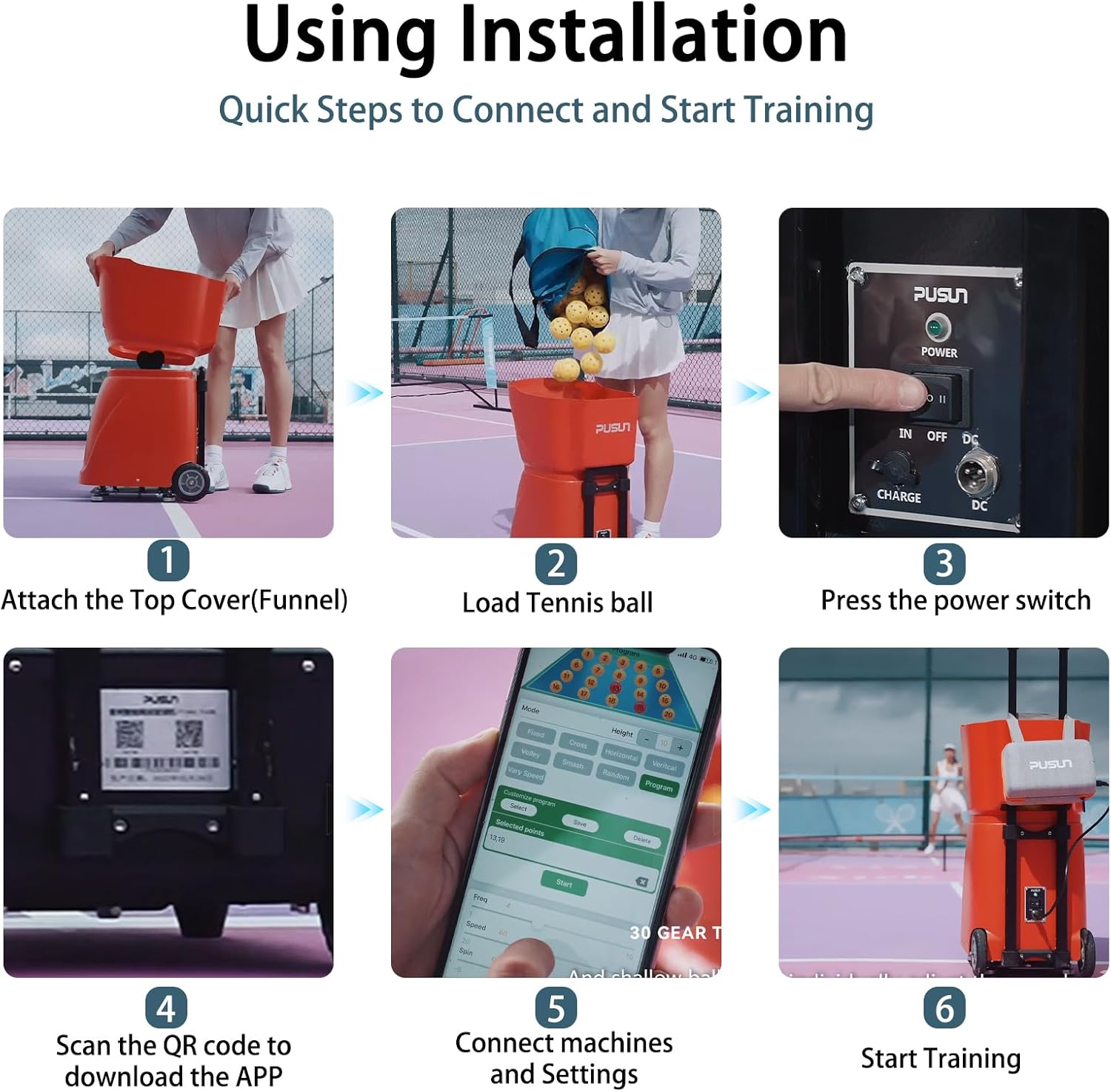
Figure 3.1: Quick steps for connecting and starting training, including attaching the top cover, loading balls, pressing the power switch, scanning the QR code for the app, connecting machines and settings, and starting training.
App Connection
To utilize the smart app control features, download the PUSUN app on your smartphone. Scan the QR code located on the machine or search for "PusunTennis" in your device's app store (Google Play for Android, App Store for iOS). Follow the in-app instructions to connect your device to the machine via Bluetooth.
Video 3.2: This video demonstrates the process of connecting the PUSUN PP-Smart PRO Pickleball Machine to its companion smartphone application, including downloading the app and establishing a connection.
4. Operating Instructions
App Control
The smartphone app provides comprehensive control over all serving parameters. You can adjust ball speed (20-120km/h), serving frequency (1.8-8 seconds per ball), elevation angles (5-45 degrees), and spin settings. The app also allows for programming custom training drills.

Figure 4.1: The app interface on a smartphone, showing various controls for mode, height, frequency, speed, and program customization. The physical remote control is also shown.
Video 4.2: This video provides an overview of the PUSUN PP-Smart PRO Pickleball Machine in action, demonstrating its automatic ball serving capabilities and various adjustable parameters.
Remote Control
The included remote control offers an alternative method for adjusting basic settings such as start/stop, fixed shot, cross-court, horizontal, and vertical oscillation, as well as speed, interval, and spin. Ensure the remote control has fresh batteries for optimal performance.
Training Modes
The PP-Smart PRO offers multiple training modes to enhance your practice sessions:
- High-pressure ball
- Horizontal two-line ball
- Volley
- Deep and shallow ball
- Introduction Exercise
- Cross ball combinations (2 types)
- Topspin ball / backspin ball

Figure 4.3: Visual representation of multiple training modes, including high-pressure, two-line, volley, deep/shallow, cross-court, topspin, and backspin shots, controlled via the app.
Internal Smart Oscillation
The machine features internal smart oscillation, providing unpredictable shots for more dynamic and realistic training. This internal rotation mechanism ensures a wider feeding window and angle compared to models with external rotation.

Figure 4.4: Illustration of the internal smart oscillation system, highlighting the larger feeding window and angle, and the high ball capacity of 80+ balls.
5. Maintenance
Regular maintenance ensures the longevity and optimal performance of your pickleball machine.
- Cleaning: Wipe down the exterior of the machine with a soft, damp cloth after each use. Ensure no debris or dirt accumulates in the ball feeding mechanism or launch port.
- Ball Type: Use only standard pickleball balls. Avoid using damaged, wet, or dirty balls, as they can affect performance and potentially damage the machine.
- Battery Care: Fully charge the battery after each use. If storing the machine for an extended period, charge the battery every 3 months to maintain its health. Store in a cool, dry place.
- Storage: Store the machine in a dry, protected area when not in use.
6. Troubleshooting
If you encounter issues with your PUSUN PP-Smart PRO Pickleball Machine, refer to the following common solutions:
- Machine not powering on: Ensure the battery is fully charged and properly connected. Check the power switch is in the 'ON' position.
- Balls not launching: Verify that the ball hopper is not empty and that balls are not jammed in the feeding mechanism. Ensure the launch port is clear.
- App connection issues: Make sure Bluetooth is enabled on your smartphone and the machine. Restart both the app and the machine, then attempt to reconnect.
- Inconsistent ball speed/frequency: Check battery level. Ensure settings in the app or on the remote are correctly configured.
- Remote control not responding: Replace the batteries in the remote control. Ensure there are no obstructions between the remote and the machine.
If problems persist, please contact customer support.
7. Specifications
| Specification | Detail |
|---|---|
| Brand | PUSUN |
| Model Number | PP SMART PRO |
| Material | Acrylonitrile Butadiene Styrene (ABS) |
| Color | Black |
| Item Weight | 16 kg |
| Ball Capacity | 85+ pcs |
| Speed Range | 20-120 km/h |
| Serve Frequency | 1.8-8 seconds/ball |
| Elevation Angle Control | 5-45 degrees |
| Maximum Distance | 20 M |
| Full Battery Life | 5-8 hours |
| Power Adapter | 110v-240v |
| Rated Voltage | DC24V10AH |
| Product Power | 100W |
| Dimensions (L x W x H) | 43.5 x 32 x 43 cm |

Figure 7.1: Overview of the machine's specifications including ball capacity, speed range, elevation angle, serve frequency, maximum distance, battery life, power adapter details, and dimensions.

Figure 7.2: Detailed dimensions of the machine and a visual comparison to two footballs, highlighting its compact size and weight of 16 kg.
8. Warranty and Support
Warranty Information
The PUSUN PP-Smart PRO Pickleball Machine comes with a 3-year manufacturer warranty. This warranty covers defects in materials and workmanship under normal use. Please retain your proof of purchase for warranty claims.
Customer Support
For technical assistance, troubleshooting, or warranty inquiries, please contact Odison Innovation, the seller and manufacturer. You can typically find their contact information on your purchase receipt or through the Amazon seller page. For general inquiries, visit the PUSUN Store on Amazon.
