
1. Introduction
The KOSPET Tank M3 Ultra is a rugged GPS smartwatch designed for outdoor enthusiasts and daily wear. It features a durable stainless steel unibody, a vibrant AMOLED display, and advanced health and fitness tracking capabilities. This manual provides essential information for setting up, operating, maintaining, and troubleshooting your device.

Image: The KOSPET Tank M3 Ultra Smart Watch, featuring a square AMOLED display with a digital watch face showing time, date, steps, and weather. The watch has a dark metal band and orange accents on its side buttons.
2. What's in the Box
- 1* Smart Watch
- 1* Charging Station
- 1* Usual Manual
- 1* Warranty Card
- 1* Silicone Watch Band & 1* Stainless Steel Watch Band
3. Setup
3.1 Charging the Smartwatch
Before initial use, fully charge your KOSPET Tank M3 Ultra. Connect the provided charging station to a USB power source and place the watch onto the magnetic charging pins. The watch display will indicate charging status.

Image: The KOSPET Tank M3 Ultra Smart Watch being charged on its dedicated magnetic charging dock. The watch screen displays the time and battery percentage, indicating it is receiving power.
3.2 Attaching the Watch Strap
The KOSPET Tank M3 Ultra comes with quick-release watch straps. To attach, align the spring bar with the lug holes on the watch body and slide the pin into place. Ensure both sides are securely fastened.
3.3 Initial Power-On and Language Selection
Press and hold the power button on the side of the watch to turn it on. Upon first boot, you will be prompted to select your preferred language from the available options.
3.4 App Download and Connection
To unlock the full potential of your smartwatch, download the 'KOSPET FIT' app from the Google Play Store (for Android) or Apple App Store (for iOS). Follow the in-app instructions to pair your watch via Bluetooth and grant necessary permissions for notifications and data synchronization.

Image: A visual guide illustrating the five steps to connect the KOSPET Tank M3 Ultra Smart Watch to a smartphone, including downloading the 'KOSPET FIT' app, enabling Bluetooth, adding a new device, pairing, and enabling notifications.
4. Operating the Smartwatch
4.1 Display and Navigation
The KOSPET Tank M3 Ultra features a 1.96-inch AMOLED display. Navigation is primarily done through touch gestures (swipes) and physical buttons on the side of the watch. The 'UP' and 'DOWN' buttons allow for scrolling through menus and pages, while the 'BACK' and 'SEL' buttons provide selection and return functions.
4.2 Quick Toggles and Summary Cards
Swipe down from the watch face to access quick toggles for settings like brightness, do not disturb mode, and more. Swipe up to view summary cards that provide a quick overview of your daily activity, health metrics, and other relevant information.
4.3 App List and Notifications
Swipe right from the watch face or press the dedicated button to access the app list. Swipe left to view incoming notifications from your paired smartphone. While various alphabets are supported for notifications, the watch does not support sending predefined responses or visualizing emojis.
4.4 Bluetooth Call Functionality
The smartwatch supports Bluetooth calling, allowing you to make and receive calls directly from your wrist when connected to your phone. This feature is particularly useful for maintaining connectivity while your phone is stored away.
4.5 AI Voice Assistant
Utilize the integrated AI Voice Assistant for hands-free control. You can activate the voice assistant from the app list to perform various tasks such as playing music, checking the weather, setting alarms, and initiating calls.
5. Features and Functions
5.1 Display
The KOSPET Tank M3 Ultra features a 1.96-inch AMOLED display with a resolution of 410x502 pixels and 1000 nits peak brightness, ensuring clear visibility even in bright sunlight. The display is protected by Corning Gorilla Glass 3.

Image: The KOSPET Tank M3 Ultra Smart Watch display, emphasizing its 1.96-inch HD AMOLED screen, 331 PPI, 410*502 pixel resolution, and 1000nit peak brightness, all protected by Corning Gorilla Glass.
5.2 Durability
Built with a fully stainless steel unibody, the Tank M3 Ultra has passed 15 Military Tests (MIL-STD-810H) and 28 Reliable Internal Tests, including salt spray, rain, and impact. It is designed to withstand extreme conditions.

Image: A collage demonstrating the KOSPET Tank M3 Ultra's durability, including being encased in ice, submerged in mud, exposed to fire, and undergoing impact testing. It highlights MIL-STD-810H quality with anti-impact, 5ATM & IP69K waterproof, anti-fluid corrosion, and temperature/dust-proof features.
5.3 GPS and Navigation
Equipped with built-in GPS and support for 6 satellite positioning systems (GPS/GLONASS/GALILEO/BDS/QZSS/NAVIC), the watch ensures accurate location tracking. It also includes a compass, barometer, and altimeter for comprehensive outdoor navigation.

Image: The KOSPET Tank M3 Ultra Smart Watch displaying a tracked route on its screen, with a smartphone showing a more detailed map in the background, emphasizing its built-in GPS capabilities for outdoor adventures.

Image: Three close-up views of the KOSPET Tank M3 Ultra Smart Watch displaying its compass, altitude (barometric altimeter), and air pressure (barometric altimeter) functions, with a mountaineer in the background, illustrating its utility for intrepid explorers.
5.4 Sports Modes
The watch offers over 170 sports modes, including football, basketball, surfing, and skiing. It provides professional data tracking and analysis for various activities, with intelligent recognition for 6 common sports (Still, Walking, Running, Cycling, Elliptical Trainer, Rowing Machine).
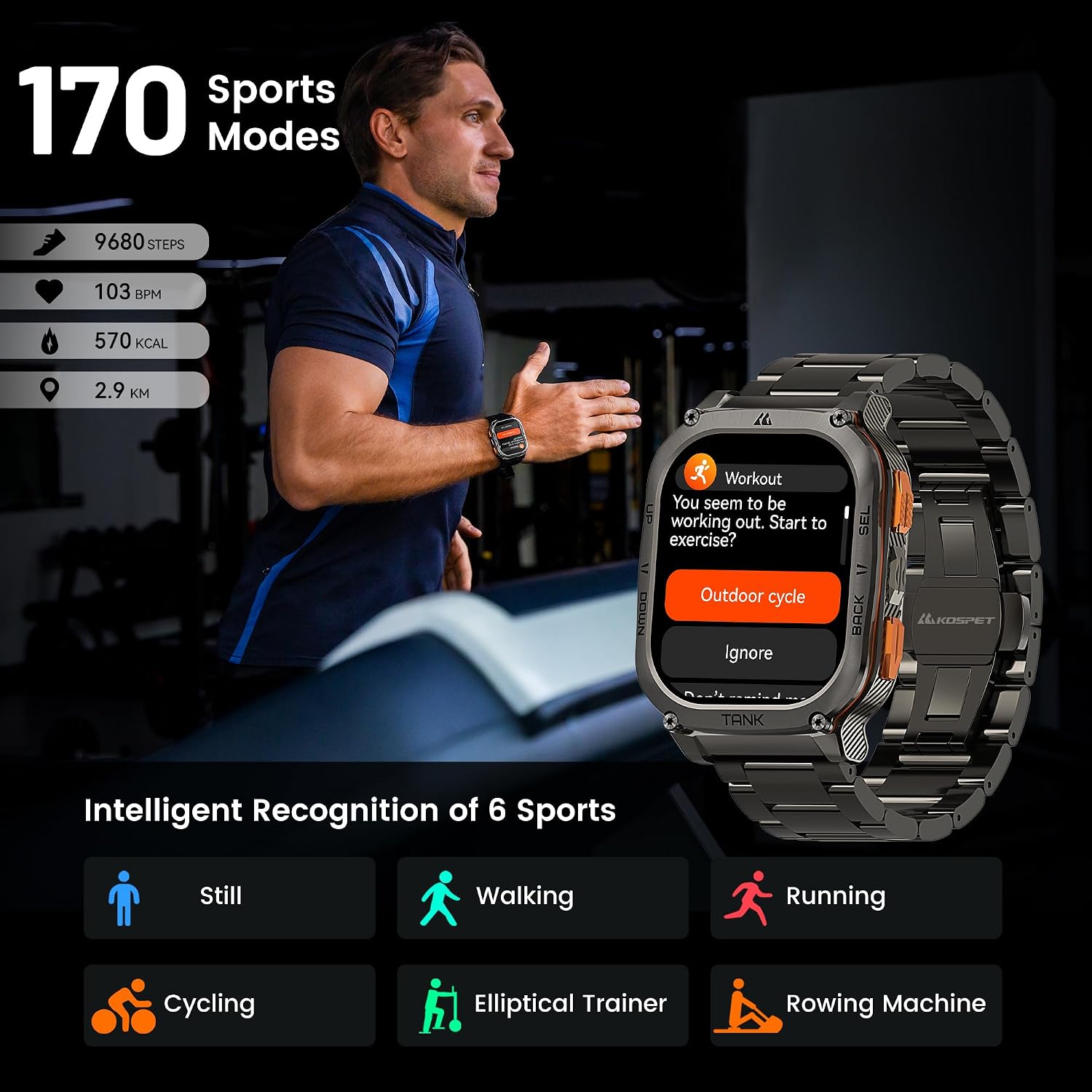
Image: A man running on a treadmill, with the KOSPET Tank M3 Ultra Smart Watch on his wrist displaying workout information. The image highlights '170 Sports Modes' and 'Intelligent Recognition of 6 Sports' with icons for Still, Walking, Running, Cycling, Elliptical Trainer, and Rowing Machine.
5.5 Health Monitoring
The Tank M3 Ultra provides comprehensive health monitoring, including 24-hour heart rate tracking, real-time blood oxygen saturation (SpO2) measurement, and all-day sleep analysis. It also features sedentary reminders to promote a healthy lifestyle.
5.6 Battery Life
Powered by a 480mAh pure cobalt battery, the smartwatch offers extended battery life. It can be fully charged in approximately one hour, providing over 2 weeks of typical use and up to 40 days in standby mode. Continuous exercise with GPS can yield 30-35 hours of usage.
6. Maintenance
6.1 Cleaning Instructions
Regularly clean your smartwatch and strap to prevent skin irritation and maintain device longevity. Wipe the watch body and strap with a soft, damp cloth. For stubborn dirt, use a mild soap solution and rinse thoroughly. Ensure the watch is completely dry before wearing or charging.
6.2 Water Resistance Guidelines
The KOSPET Tank M3 Ultra is 5ATM and IP69K waterproof, allowing immersion up to 50 meters. It is suitable for swimming, handwashing, and exposure to rain. Avoid pressing buttons underwater or exposing the watch to hot water or steam, as this may compromise the water seal.

Image: A diver underwater wearing the KOSPET Tank M3 Ultra Smart Watch, with icons indicating its 5ATM & IP69K water-resistance for swimming, handwashing, and rain. The watch display shows swimming metrics.
7. Troubleshooting
7.1 GPS Accuracy Issues
The KOSPET Tank M3 Ultra's RTOS-based smartwatch with GPS implementation may sometimes take longer than usual to acquire a GPS signal and may not always show accurate location. Improvements are expected via OTA (Over-The-Air) updates. Ensure you are in an open area for optimal signal acquisition.
7.2 Connectivity Problems
If your watch is not connecting to the app or maintaining a stable Bluetooth connection, ensure Bluetooth is enabled on your phone and the watch. Try restarting both devices. If issues persist, unpair and re-pair the watch through the 'KOSPET FIT' app.
7.3 Display Not Responding
If the display is unresponsive, try restarting the watch by pressing and holding the power button. Ensure the screen is clean and dry. If wearing gloves or if hands are wet, use the physical buttons for navigation as touch sensitivity may be affected.
8. Specifications
| Feature | Specification |
|---|---|
| Product Dimensions | 2.13 x 1.69 x 0.55 inches |
| Item Weight | 7.1 ounces (7.05 Ounces) |
| Item Model Number | Tank M3 Ultra |
| Batteries | 1 Lithium Polymer batteries required (included) |
| Battery Capacity | 480 Milliamp Hours |
| Standing Screen Display Size | 1.96 Inches |
| Memory Storage Capacity | 256 MB |
| RAM Memory Installed Size | 256 MB |
| Operating System | Compatible for Android and iOS |
| Connectivity Technology | Bluetooth |
| Wireless Communication Standard | Bluetooth |
| GPS | Built-in GPS (6 Satellite Positioning Systems) |
| Manufacturer | KOSPET |
| Language | English |
9. Warranty and Support
KOSPET products are covered by a manufacturer's warranty. Please refer to the included Warranty Card for specific terms and conditions. For technical support, troubleshooting assistance, or warranty claims, please visit the official KOSPET website or contact their customer service as detailed in your warranty documentation.


