
1. Introduction
Thank you for choosing the JSAUX 10000mAh PD VR Neck Power Bank. This device is designed to extend the playtime of your VR headset and enhance tracking stability in low-light conditions with its integrated infrared function. This manual provides essential information for setup, operation, maintenance, and troubleshooting to ensure optimal performance and user experience.
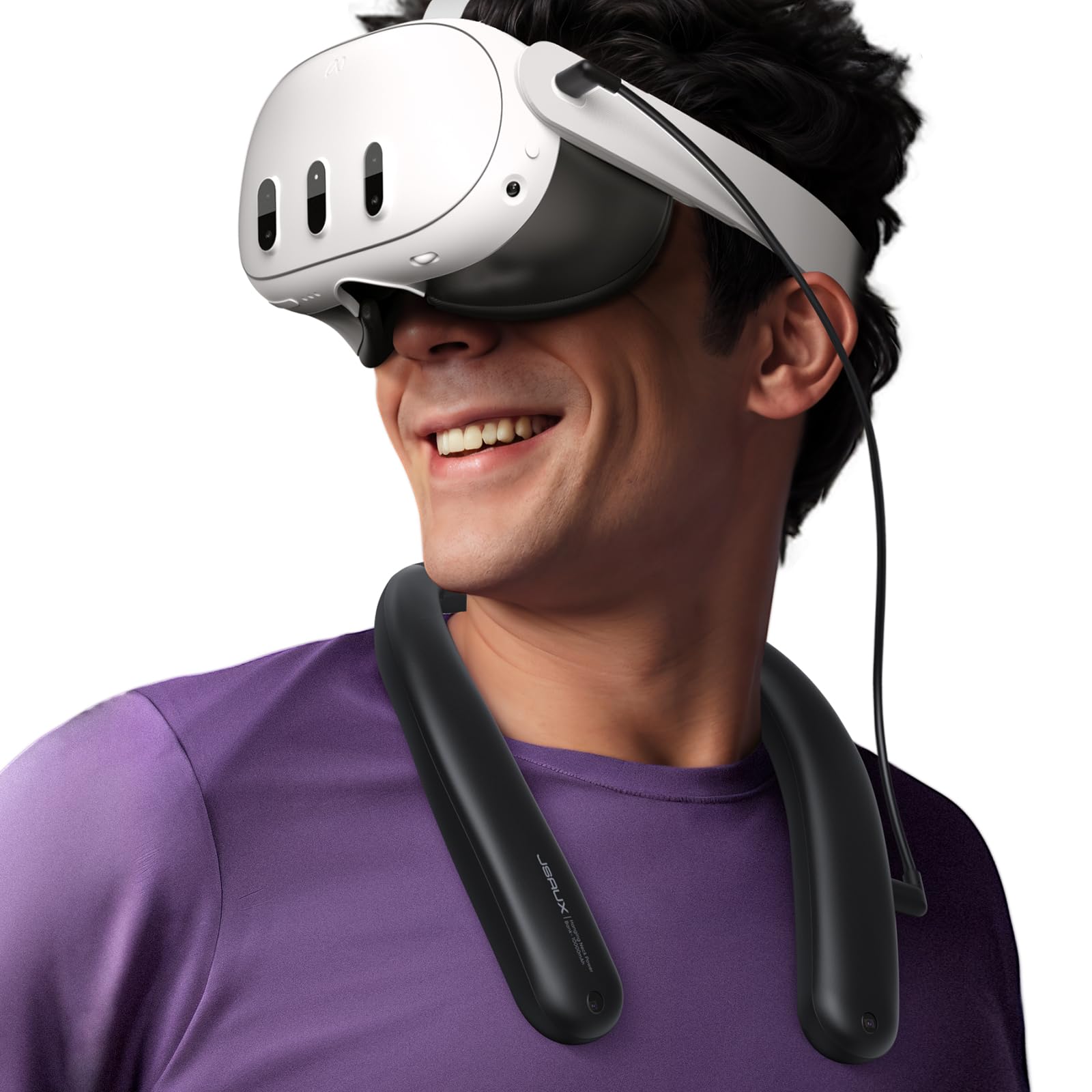
The JSAUX 10000mAh PD VR Neck Power Bank in black, worn around the neck and connected to a VR headset, illustrating its primary use.
2. Product Overview
2.1 Package Contents
- JSAUX 10000mAh PD VR Neck Power Bank
- Built-in USB-C Cables
- Silicone Tape Cable Manager (x2)
2.2 Key Features
- Extended Playtime: 10000mAh high-capacity battery provides approximately 4 to 6 extra hours of VR playtime.
- Infrared Function: Patented infrared feature stabilizes VR tracking in dark or low-light environments, reducing low light warnings.
- Comfortable Design: Worn around the neck to distribute weight, preventing head and neck strain often associated with head-mounted battery packs.
- PD Fast Charging: Supports Power Delivery (PD) fast charging up to 18W for efficient power delivery to your VR headset.
- Wide Compatibility: Compatible with Meta Quest 3S, Meta Quest 3, Meta Quest 2, and other USB-C devices.

Visual representation of the 10000mAh battery capacity extending VR playtime.

Diagram showing the infrared function in action, ensuring player safety and stable tracking in low-light conditions.
3. Setup
3.1 Wearing the Power Bank
- Place the JSAUX Neck Power Bank around your neck, ensuring it rests comfortably on your shoulders.
- Adjust its position for optimal comfort and balance. The flexible design allows for easy adjustment.

The flexible design of the power bank allows it to be freely bent and twisted for a comfortable fit.
3.2 Connecting to Your VR Headset
- Locate the built-in USB-C cable on the power bank.
- Connect the USB-C cable to the charging port of your Meta Quest 3S, 3, or 2 headset.
- Use the provided silicone tape cable managers to secure the cable along your headset strap, preventing it from dangling or interfering with your movement.

A user demonstrating the use of silicone tape cable managers to secure the power bank cable to the VR headset.
4. Operating Instructions
4.1 Charging the Power Bank
To charge the JSAUX Neck Power Bank:
- Connect a USB-C charging cable to the Type-C1 Input/Output port on the power bank.
- Connect the other end of the charging cable to a power adapter (not included).
- The power bank supports PD fast charging up to 18W.

Detailed view of the power bank's ports, highlighting the Type-C1 port for charging and power delivery.
4.2 Powering Your VR Headset
Once connected, the power bank will automatically begin charging your VR headset, extending your playtime.
4.3 Infrared Function
The infrared function is designed to improve VR tracking in low-light conditions. It operates silently in the background.
- Activation: The infrared function is typically active by default when the power bank is on.
- Deactivation: To extend battery life when the infrared function is not needed, long-press the designated button (refer to the power bank's physical buttons) to turn it off.

The infrared function helps maintain stable VR tracking even in dimly lit environments.
4.4 Battery Indicator Lights
The power bank features indicator lights to show the remaining battery level:
- Four lights: 100% charged
- Three lights: >75% charged
- Two lights: >50% charged
- One light: >25% charged

The indicator lights provide a clear visual of the power bank's remaining battery capacity.
5. Maintenance
5.1 Cleaning
Wipe the power bank with a soft, dry cloth. Avoid using harsh chemicals or abrasive materials.
5.2 Storage
Store the device in a cool, dry place away from direct sunlight and extreme temperatures. For long-term storage, ensure the battery is partially charged (around 50%) to preserve battery health.
5.3 Battery Life Preservation
If the infrared function is not required, long-press the button to turn it off. This will reduce power consumption and extend the overall battery life of the power bank.
6. Troubleshooting
- Reduced Playtime: If the power bank provides less playtime than expected, ensure the infrared function is turned off when not in use, as it doubles power consumption.
- "Headset port has water or debris" error: This error message on your VR headset can sometimes appear when the external battery pack is fully drained. Ensure the power bank is charged. If the issue persists, inspect the headset's USB-C port for actual debris.
- Input/Output Anomaly (All four indicator lights flashing simultaneously): This indicates an issue with the power bank's input or output. Disconnect all cables, restart the power bank (if applicable), and try again. If the problem persists, contact customer support.
- Power Bank Not Charging: Ensure the charging cable is securely connected to the Type-C1 port and the power adapter is functioning correctly.
7. Specifications
| Feature | Specification |
|---|---|
| Brand | JSAUX |
| Model Number | PB2004A |
| Battery Capacity | 10000 mAh |
| Battery Cell Type | Lithium |
| Battery Weight | 137.6 g |
| Color | Black |
| Compatible Devices | Meta Quest 3S, Meta Quest 3, Meta Quest 2, Smartphone, Valve Index, HTC Vive, ROG Ally, Steam Deck, Switch |
| Included Components | Battery Pack, Built-in Cables, Silicone Tape Cable Manager (x2) |
| Manufacturer | Shenzhen Wuyishi Technology Co.,Ltd |
8. Warranty and Support
8.1 Warranty Information
For detailed warranty information, please refer to the warranty card included with your product or visit the official JSAUX website. Keep your proof of purchase for warranty claims.
8.2 Customer Support
If you encounter any issues or have questions regarding your JSAUX 10000mAh PD VR Neck Power Bank, please contact JSAUX customer support through their official website or the retailer where you purchased the product.
You can also visit the JSAUX Store on Amazon for more information and support resources.