
Introduction
The BFADEHA UCN3735 Bluetooth Tracker is an Apple MFi Certified device designed to help you locate your personal items using the Apple Find My network. This manual provides instructions for setup, operation, maintenance, and troubleshooting to ensure optimal performance of your tracker.

Image: The BFADEHA UCN3735 Bluetooth Tracker, a wallet, and an iPhone showing the "Add New Item" interface for pairing.
Setup Instructions
Follow these steps to pair your BFADEHA UCN3735 Bluetooth Tracker with your iPhone:
- Activate the Tracker: Long press the function button on the tracker for approximately 5 seconds until you hear a beep. This indicates the tracker is in pairing mode.
- Open Find My App: On your iPhone, open the "Find My" application.
- Enable Bluetooth: Ensure Bluetooth is enabled on your iPhone.
- Add Item: In the Find My app, tap on "Items" at the bottom of the screen, then tap the "+" icon and select "Add Other Item".
- Connect: The app will detect your BFADEHA tracker. Select it from the list and tap "Connect."
- Confirm Pairing: Follow any on-screen prompts to complete the pairing process. You may be asked to name your item.

Image: An iPhone displaying the Apple Find My app interface, indicating compatibility with the BFADEHA tracker.
Operating Instructions
Locating Nearby Items
If your item is within Bluetooth range, you can make the tracker emit a sound:
- Open the "Find My" app on your iPhone.
- Navigate to the "Items" tab.
- Select your BFADEHA tracker from the list.
- Tap the "Play Sound" button. The tracker will emit a loud beep (up to 100dB) to help you locate it.

Image: A BFADEHA tracker emitting sound, visually represented by sound waves, to indicate its location within a room.
Locating Far Away Items
If your item is not nearby, the Find My network can help you locate it:
- Open the "Find My" app.
- Select your BFADEHA tracker.
- The app will display the last known location of your tracker on a map. You can then use the navigation feature to get directions to its location.

Image: An iPhone showing map navigation to the location of a lost wallet containing the BFADEHA tracker.
Left-Behind Alerts and Lost Mode
The tracker can notify you if you leave an item behind:
- Left-Behind Alerts: Configure the "Notify When Left Behind" feature in the Find My app to receive alerts on your iPhone if you move away from your tracked item.
- Lost Mode: If an item is lost, activate "Lost Mode" in the Find My app. You can enter your contact information, which can be viewed by anyone who finds your tracker via NFC, allowing them to return your item.

Image: An iPhone displaying a "Wallet left behind" notification, indicating the tracker has moved out of range.
Maintenance
Battery Life
The BFADEHA UCN3735 tracker is equipped with a long-lasting Lithium Manganese Dioxide cell, providing an estimated battery life of 5-10 years. The battery is non-replaceable and designed for extended use without maintenance.
Water and Dust Resistance
The tracker has an IP67 rating, meaning it is resistant to dust and can withstand immersion in water up to 1 meter (3 feet) for 30 minutes. While it is designed to be durable against splashes and rain, prolonged submersion or exposure to high-pressure water jets should be avoided.
Troubleshooting
- Tracker not pairing:
- Ensure the tracker's function button was pressed for 5 seconds until a beep is heard.
- Verify Bluetooth is enabled on your iPhone.
- Make sure the iPhone is running a compatible iOS version.
- Try restarting your iPhone and the tracker (if applicable, by re-entering pairing mode).
- Cannot hear the alarm sound:
- Ensure the tracker is within Bluetooth range of your iPhone.
- Check for obstructions that might muffle the sound (e.g., inside a thick wallet, under cushions).
- The alarm volume is up to 100dB, but environmental noise can affect audibility.
- Inaccurate location or delayed updates:
- Location accuracy depends on the density of the Apple Find My network. In areas with fewer Apple devices, updates may be less frequent or precise.
- Ensure your iPhone has a stable internet connection (Wi-Fi or cellular data).
- Tracker not responding:
- The tracker has a long-life battery. If it's completely unresponsive, contact customer support.
Specifications
| Model Number | UCN3735 |
| Dimensions (L x W x H) | 3.35 x 2.09 x 0.1 inches (85 x 53 x 2.5 mm) |
| Weight | 1.44 ounces (9 grams) |
| Connectivity | Bluetooth |
| Supported Application | Apple Find My (iOS Only) |
| Battery Life | 5-10 years (non-replaceable) |
| Water & Dust Resistance | IP67 |
| Manufacturer | Jiangxi Kingtron Technology Co., Ltd. |
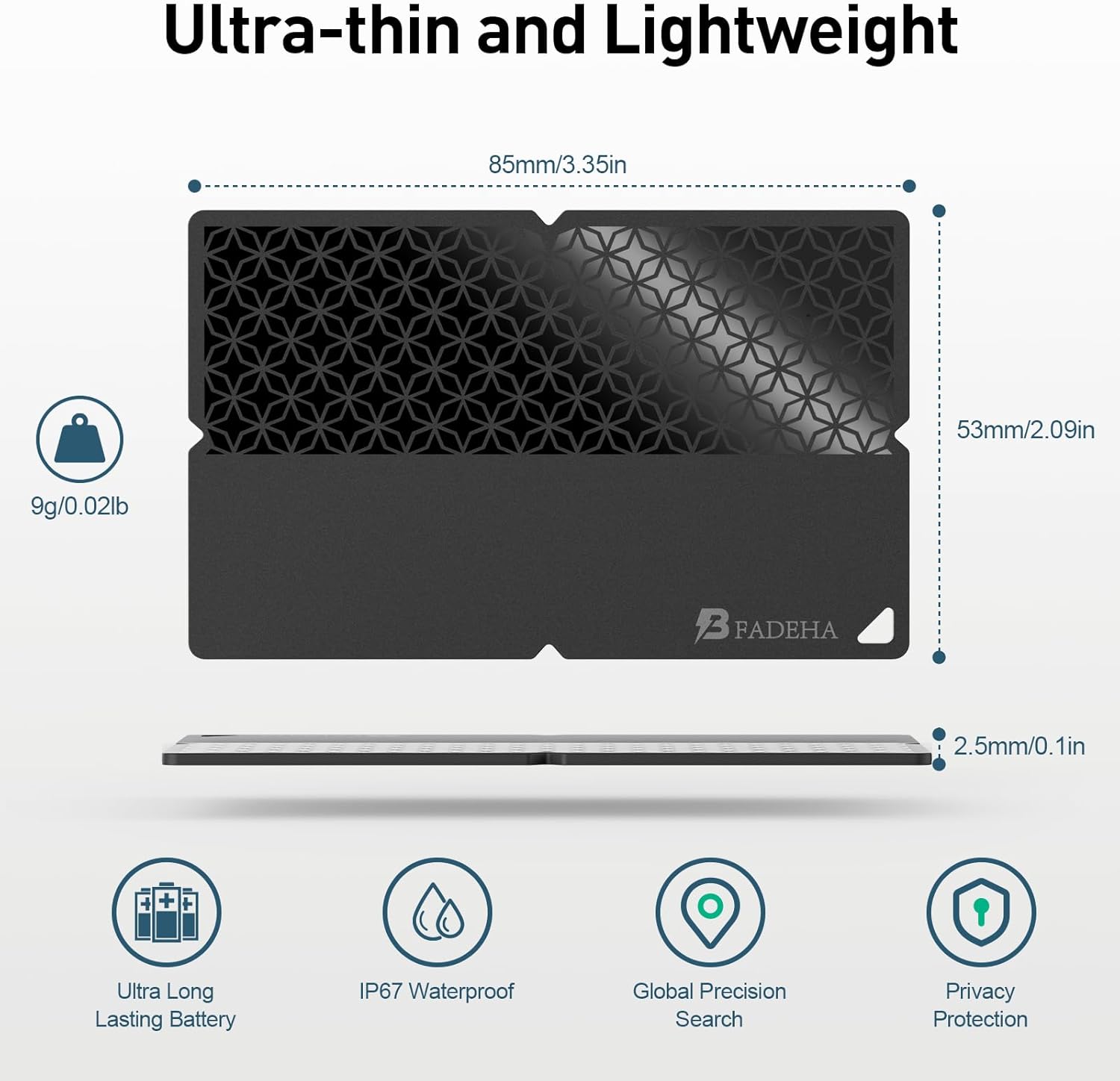
Image: A diagram illustrating the ultra-thin and lightweight design of the BFADEHA tracker, highlighting its dimensions and key features like long battery life and IP67 rating.
Warranty Information
The BFADEHA UCN3735 Bluetooth Tracker comes with a 3-year limited warranty from the date of purchase. This warranty covers manufacturing defects and ensures the product functions as described under normal use. Please retain your proof of purchase for warranty claims. For detailed warranty terms and conditions, please refer to the official BFADEHA website or contact customer support.
Customer Support
For further assistance, technical support, or warranty inquiries, please contact BFADEHA customer service through the following channels:
- Online Support: Visit the official BFADEHA website for FAQs and support resources.
- Email: Refer to your product packaging or the BFADEHA website for the customer support email address.
- Amazon Store: You can also visit the BFADEHA Store on Amazon for product information and seller contact options.


