
Introduction
Thank you for choosing the Gritin G1328 Rechargeable Neck Reading Light. This manual provides essential information for the safe and efficient use of your device. Please read it thoroughly before operation and retain it for future reference.
What's in the Box
- 1 x Gritin G1328 Neck Reading Light
- 1 x USB-C Charging Cable (1M)
- 1 x User Manual
Note: A power adapter is not included.
Product Features
Adjustable Brightness Levels
The Gritin G1328 offers both stepped and stepless dimming options to suit various lighting needs.
- 5 Levels of Brightness: Short press the brightness button to cycle through 10%, 25%, 50%, 75%, and 100% brightness levels.
- Stepless Dimming: Long press the brightness button for 3 seconds to smoothly adjust brightness from 0% to 100%.

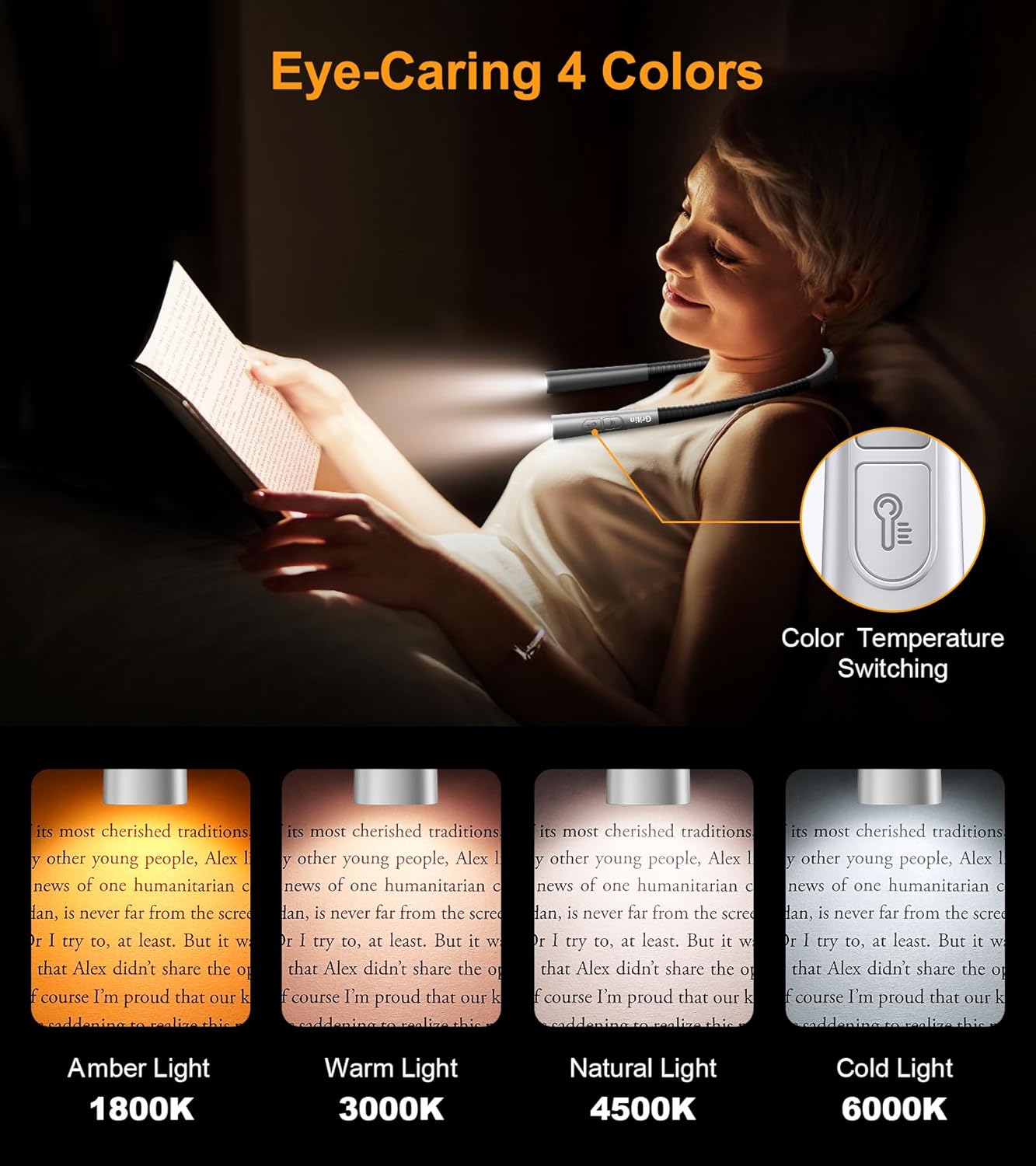
4 Color Temperature Options
Select from four distinct color temperatures to optimize your reading experience and reduce eye strain.
- Amber Light: 2000K
- Warm White: 3000K
- Natural White: 4500K
- White Light: 6000K
Ergonomic and Comfortable Design
The neck light is designed for comfort during extended use, featuring a neck curve fit and lightweight construction.
- Neck Curve Fit: Ergonomically designed to fit comfortably around your neck, minimizing pressure.
- Lightweight: Weighing only 4.3 ounces (122g), it ensures comfort even during long reading sessions.
- Flexible & Bendable Arms: The arms can be bent to any angle, allowing precise light positioning.


30-Minute Smart Timer
A built-in timer automatically turns off the light after 30 minutes, promoting healthy reading habits and preventing accidental battery drain.

Rechargeable Battery & Long Runtime
Equipped with a 1000mAh battery, the light provides extended use on a single charge.
- Battery Capacity: 1000mAh.
- Runtime: Over 80 hours of light (depending on brightness settings).
- Charging: USB-C charging, fully recharges in 2-3 hours.
- Power Indicators: 4 clear indicators show the current battery status.

Eye-Caring Illumination
High-quality LED beads provide soft, even illumination to reduce eye fatigue, making it ideal for extended reading sessions without disturbing others.

Setup
Initial Charging
- Before first use, fully charge the neck reading light.
- Connect the provided USB-C charging cable to the charging port on the neck light.
- Plug the other end of the cable into a USB power source (e.g., computer, wall adapter, power bank).
- The power indicators will illuminate to show charging progress. All 4 indicators will be solid when fully charged.
- Charging typically takes 2 to 3 hours.
Operating Instructions
Power On/Off
- Press the power button once to turn the light on.
- Press the power button again to turn the light off.
Adjusting Brightness
- Stepped Brightness: Short press the brightness adjustment button (usually marked with three horizontal lines) to cycle through the 5 preset brightness levels (10%, 25%, 50%, 75%, 100%).
- Stepless Dimming: Long press the brightness adjustment button for approximately 3 seconds to activate stepless dimming. Release the button when the desired brightness is reached.
Changing Color Temperature
- Short press the color temperature button (usually marked with a light bulb icon) to cycle through the 4 color temperature options: Amber (2000K), Warm White (3000K), Natural White (4500K), and White (6000K).
Using the 30-Minute Timer
- To activate the 30-minute timer, long press the power on/off button. A green indicator light will illuminate, confirming the timer is active.
- The light will automatically turn off after 30 minutes.
- To deactivate the timer before 30 minutes, simply press the power button again to turn off the light manually.
Memory Function
The light features a memory function that recalls your last used brightness and color temperature settings when turned back on.
Maintenance
- Clean the device with a soft, dry cloth. Do not use abrasive cleaners or solvents.
- Avoid exposing the light to extreme temperatures, direct sunlight, or high humidity.
- Store the light in a cool, dry place when not in use.
- Do not attempt to disassemble or repair the device yourself. This will void the warranty.
Troubleshooting
| Problem | Possible Cause | Solution |
|---|---|---|
| Light does not turn on. | Battery is depleted. | Charge the device fully using the provided USB-C cable. |
| Light flickers or is dim. | Low battery. | Recharge the device. |
| Cannot change brightness/color. | Incorrect button press. | Ensure you are using the correct button (brightness or color) and applying the correct press duration (short press for stepped, long press for stepless/timer). |
| Timer not activating. | Incorrect button press. | Long press the power button to activate the 30-minute timer. A green light should appear. |
Specifications
| Feature | Detail |
|---|---|
| Model Number | G1328 |
| Brand | Gritin |
| Light Source Type | LED |
| Color Temperatures | Amber (2000K), Warm White (3000K), Natural White (4500K), White (6000K) |
| Brightness Levels | 5 stepped levels (10%-100%), Stepless dimming (0%-100%) |
| Battery Capacity | 1000mAh Lithium Polymer |
| Charging Port | USB-C |
| Charging Time | 2-3 hours |
| Runtime | 80+ hours (at lowest brightness) |
| Timer Function | 30-minute auto shut-off |
| Item Weight | 4.3 ounces (122g) |
| Product Dimensions | 8.66"D x 5.23"W x 0.87"H |
| Material | Acrylonitrile Butadiene Styrene, Silicone |
Warranty and Support
Gritin products are designed for reliability and performance. For warranty information, technical support, or customer service inquiries, please refer to the contact information provided with your purchase or visit the official Gritin website.
Please retain your proof of purchase for warranty claims.


