Introduction
Thank you for purchasing the KingSom 2025 Upgrade Pool Chlorine Floater. This innovative device combines a floating chlorine dispenser with a solar-powered LED light, designed to maintain clean, sanitized water while enhancing your pool or hot tub's ambiance. Please read this manual thoroughly before use to ensure proper operation and longevity of your product.
Safety Information
- Always handle chlorine tablets with gloves and avoid direct skin contact.
- Keep the chlorine floater out of reach of children and pets.
- Do not ingest chlorine tablets or water treated with high concentrations of chlorine.
- Ensure the floater is properly closed before placing it in water to prevent tablets from escaping.
- Do not attempt to disassemble or modify the product beyond the instructions provided.
- Store the floater in a cool, dry place when not in use.
Product Features
- Brilliant Lights Controlled by Button: Patented chlorinator with unique, exclusive light effects. Features geometric colorful lights and shadows on the water surface. Offers both dynamic and static light modes via a simple button control.
- 2-in-1 Pool Chlorine Floater: Functions as both a floating chlorine dispenser and a pool light. Energy-saving solar-powered design charges during the day and lights up automatically at night (after initial switch activation).

Image: The KingSom Pool Chlorine Floater, demonstrating its solar charging capability during the day and automatic illumination at night.
- Adjustable Release Chlorine Floater: Features a rotatable ring to easily adjust the slot opening, regulating chlorine release for balanced water.
- Original US Design & Easy Loading: Patented sliding window design for effortless loading of chlorine tablets. No tools or disassembly required; simply rotate to open, add tablets, and rotate to close. Designed to stay upright and not flip or sink.
- Ultra-Large Capacity & Collapsible Design: Holds up to 4 standard 3-inch tablets or several 1-inch tablets. Large enough to avoid skimmer interference. Collapsible design for compact storage, suitable for pools and hot tubs.
- Enhanced Pool Ambiance: The integrated solar light adds a touch of beauty to your backyard, creating a captivating display on the water surface.

Image: The KingSom Pool Chlorine Floater casting vibrant, colorful lights across a pool at night, enhancing the overall aesthetic.
Parts List
Your KingSom Pool Chlorine Floater includes the following components:
- KingSom 2025 Upgrade Pool Chlorine Floater (main unit with solar panel and light)
- Integrated Chlorine Tablet Compartment
- Adjustable Flow Ring

Image: The KingSom Pool Chlorine Floater, showcasing its integrated light and chlorine dispensing capabilities. The top section houses the solar panel and light, while the bottom section is for chlorine tablets.
Setup
- Initial Charge: Before first use, ensure the floater is exposed to direct sunlight for at least 6-8 hours to fully charge the solar battery.
- Activate Light Switch: Locate the power button on the top of the floater (near the solar panel). Press it once to turn on the light function. The light will then automatically activate at dusk and turn off at dawn.
- Load Chlorine Tablets:
- Hold the floater and rotate the orange ring at the bottom to open the chlorine tablet compartment. This is a patented sliding window design.
- Carefully insert up to four 3-inch chlorine tablets or several 1-inch tablets into the compartment. (Tablets not included).
- Rotate the orange ring back to the closed position, ensuring it is securely sealed to prevent tablets from escaping.

Image: Demonstrates how to rotate the orange ring to open the chlorine tablet compartment for easy loading, highlighting the large capacity for 3-inch or 1-inch tablets.
- Adjust Flow Vents: The orange ring also controls the flow vents. Rotate it to select your desired chlorine release rate (High Flow or Low Flow) based on your pool size and chlorine needs.
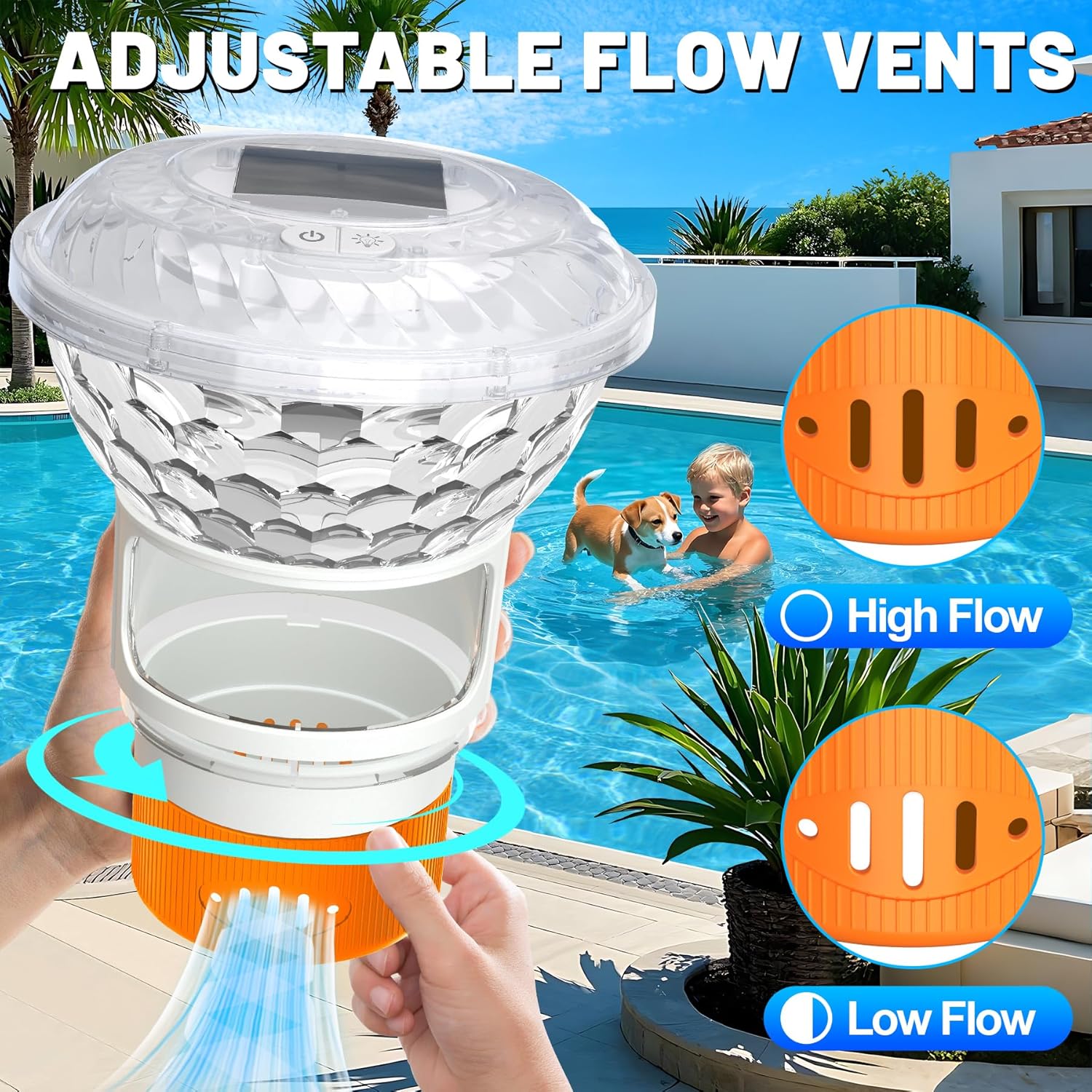
Image: Illustrates the adjustable flow vents on the KingSom floater, allowing users to select between high and low chlorine release rates by rotating the orange ring.
- Place in Water: Gently place the floater into your pool or hot tub. It is designed to float upright.
Operation
Chlorine Dispensing:
The KingSom floater continuously dispenses chlorine into your pool or hot tub water. Monitor your water's chlorine levels regularly using a test kit and adjust the flow vents as needed to maintain optimal sanitation.
Light Operation:
Once the light switch is activated (as per Setup), the solar panel will charge the internal battery during the day. At night, the lights will automatically illuminate, creating a captivating display.
- Power Button: Press the power button (marked with a power symbol) on the top of the floater to turn the light function ON or OFF.
- Mode Button: Press the mode button (marked with a light bulb symbol) to cycle through different light modes: RGB Fixed (single color), Fast Flash, Flash Slowly, and Dynamic (color changing).

Image: Displays the top of the KingSom floater with its power and mode buttons, illustrating the different light effects such as RGB fixed colors, fast flash, slow flash, and dynamic color changes.
Maintenance
- Regular Cleaning: Periodically remove the floater from the water and rinse it with fresh water to remove any chemical residue or debris.
- Solar Panel Care: Keep the solar panel clean and free of dirt or obstructions to ensure efficient charging. Wipe it gently with a soft, damp cloth.
- Winter Storage: If you live in an area with freezing temperatures, remove the floater from the pool before winter. Clean it thoroughly, allow it to dry completely, and store it in a cool, dry place indoors. The collapsible design allows for compact storage.

Image: Illustrates the collapsible design of the KingSom floater, showing its compact storage size (5.9 inches height) and extended operational size (8.3 inches height), along with its 6.5-inch width.
Troubleshooting
| Problem | Possible Cause | Solution |
|---|---|---|
| Lights not turning on at night. |
|
|
| Chlorine not dissolving or dispensing properly. |
|
|
| Floater is sinking or flipping over. |
|
|
Specifications
| Attribute | Detail |
|---|---|
| Product Dimensions | 6.5 inches (width) x 5.9 inches (height, collapsed) / 8.3 inches (height, extended) |
| Item Weight | 13.4 ounces |
| Manufacturer | KingSom |
| Model Number | 706Orange-US |
| Power Source | Solar Powered |
| Chlorine Tablet Capacity | Up to 4 standard 3-inch tablets or several 1-inch tablets |
| Product Benefits | Maintains Clean Sanitized Water, Pool Lighting |
Warranty & Support
For warranty information or technical support, please contact KingSom customer service directly. Refer to the product packaging or the official KingSom website for contact details.