
Introduction
Thank you for choosing the BougeRV CRD2 49L Portable Fridge. This manual provides essential information for the safe and efficient operation, maintenance, and troubleshooting of your new portable refrigerator. Please read it thoroughly before use and retain it for future reference.
The BougeRV CRD2 is a versatile dual-zone portable fridge/freezer designed for various applications, including automotive, camping, and outdoor use. It features a 173Wh rechargeable battery, app control, and robust construction for reliable performance.

Image: Overview of the BougeRV CRD2 49L Portable Fridge, showcasing its compact design and dual-lid access.
Safety Instructions
- Ensure the power supply voltage matches the specifications of the appliance.
- Do not operate the appliance if the power cord is damaged. Contact customer support for replacement.
- Keep the ventilation openings clear of obstructions.
- Do not use electrical appliances inside the storage compartments unless they are of the type recommended by the manufacturer.
- Avoid placing the appliance in direct sunlight or near heat sources.
- Do not immerse the appliance in water or expose it to heavy rain.
- Always disconnect the power supply before cleaning or performing maintenance.
- This appliance is not intended for use by persons (including children) with reduced physical, sensory or mental capabilities, or lack of experience and knowledge, unless they have been given supervision or instruction concerning use of the appliance by a person responsible for their safety.
What's in the Box
Upon unpacking, please verify that all components are present:
- BougeRV CRD2 Portable Fridge
- 173 Wh Rechargeable Battery
- 2 x Storage Baskets
- DC Power Cable (12/24V)
- AC Adapter (220V)
- User Manual (this document)
Setup
1. Unpacking and Placement
- Remove all packaging materials.
- Place the fridge on a flat, stable surface. Ensure there is adequate ventilation around the unit (at least 10 cm clearance on all sides).
- Allow the fridge to stand upright for at least 6 hours before connecting to power, especially if it was transported horizontally. This allows the refrigerant to settle.
2. Battery Installation
The 173Wh rechargeable battery provides wireless operation for extended periods.
- Locate the battery compartment on the side of the fridge.
- Insert the 173Wh battery into the compartment until it clicks securely into place.
- Close the battery compartment cover.
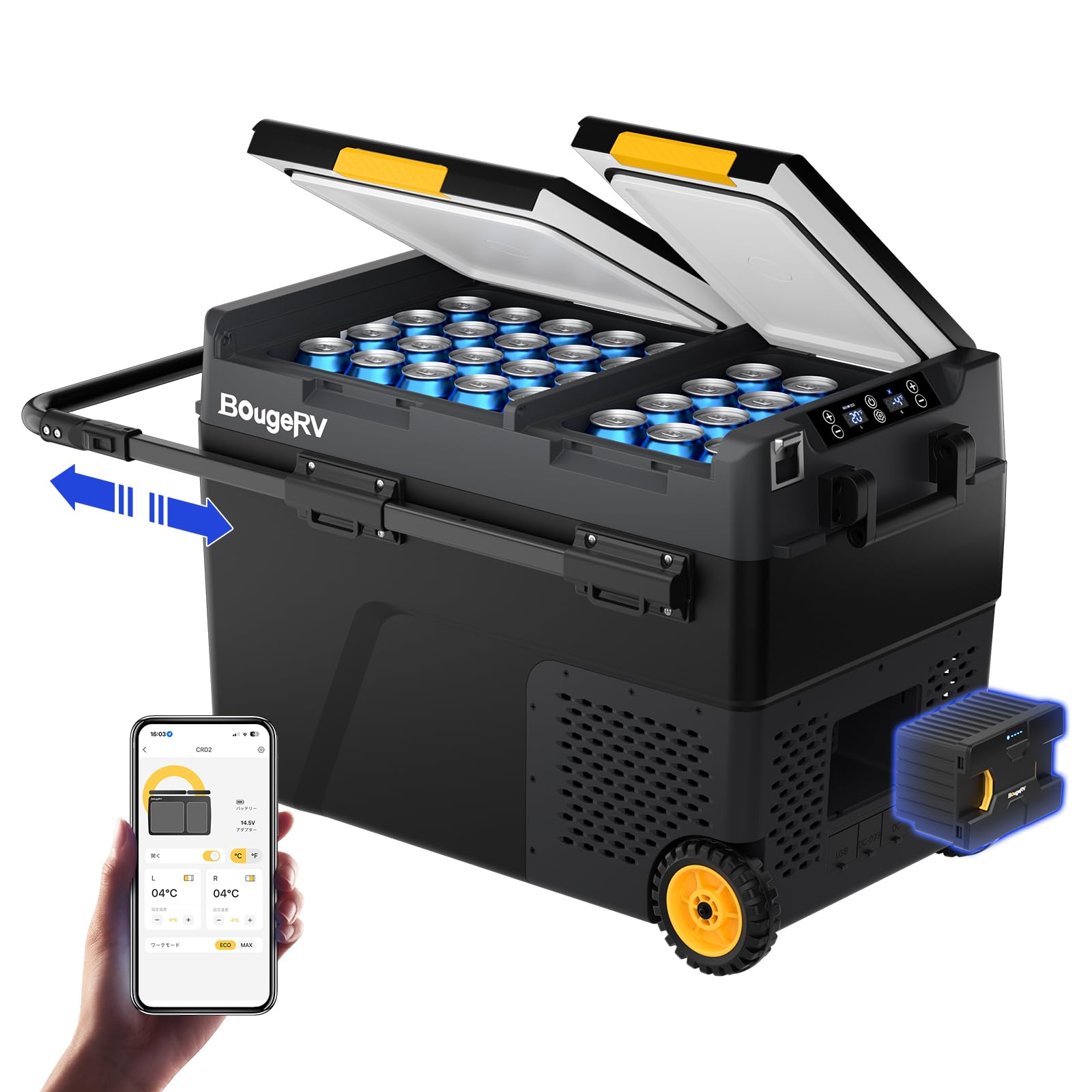
Image: Illustration of the 173Wh BougeRV battery being installed into the side compartment of the portable fridge.
3. Power Connection
The BougeRV CRD2 offers multiple power options:
- AC Power (220V): Use the provided AC adapter to connect the fridge to a standard wall outlet.
- DC Power (12/24V): Use the provided DC cable to connect the fridge to a car cigarette lighter socket or other 12V/24V power source.
- Solar Charging: The integrated 173Wh battery can be directly charged by a compatible BougeRV 100W foldable solar panel (sold separately). Connect the solar panel to the designated input port.

Image: Demonstrates the various power options for the BougeRV CRD2, including AC (220V), DC (12/24V) from a vehicle, and direct charging via a solar panel.
4. App Control Setup
Control your fridge remotely via the BougeRV app:
- Download the BougeRV app from your smartphone's app store.
- Ensure your fridge is powered on and Bluetooth is enabled on your smartphone.
- Open the app and follow the on-screen instructions to pair with your CRD2 fridge. The app allows you to turn the unit on/off, adjust temperatures, set modes, and monitor status within a 10-meter range.
Operating Instructions
1. Powering On/Off
Press and hold the power button on the control panel to turn the fridge on or off. The display will illuminate when powered on.
2. Dual Zone Temperature Control
The CRD2 features two independently controllable zones with separate doors, preventing temperature and odor mixing. Each zone can be set between -20°C and 20°C.
- Use the control panel or the BougeRV app to select and adjust the temperature for each zone (Left and Right).
- You can configure the zones in four ways: Freezer/Fridge, Fridge/Freezer, two Freezer compartments, or two Fridge compartments.
- It is also possible to deactivate one zone if not needed.

Image: Illustrates the dual-zone functionality of the BougeRV CRD2, showing how each compartment can be set as a fridge or freezer independently.
3. Cooling Modes (ECO/MAX)
Select the desired cooling mode based on your needs:
- ECO Mode (40W): For energy saving, ideal for maintaining temperature over longer periods.
- MAX Mode (55W): For rapid cooling, quickly bringing the temperature down from 25°C to 0°C in approximately 15 minutes.
4. Battery Protection System
The fridge features a 3-stage battery monitoring system to protect your vehicle's battery from excessive discharge. It will automatically shut off if the voltage drops below a set level. Adjust the protection level (High, Medium, Low) via the control panel or app as needed.
5. Portability Features
The CRD2 is designed for easy transport:
- Rugged Wheels: All-terrain wheels allow for easy movement over various surfaces.
- Extendable Aluminum Handle: Pull the retractable handle for comfortable towing.
- Anti-Vibration Design: Ensures reliable cooling performance even on inclines up to 40°.

Image: A family demonstrates the portability of the BougeRV CRD2, highlighting its rugged wheels and retractable aluminum handle for easy transport.
6. Additional Features
- LED Lighting: Internal LED light for visibility in low-light conditions.
- USB Ports: Two USB ports for charging small electronic devices.
- Adjustable Side Door: Provides flexibility for access.
Maintenance
1. Cleaning
- Always disconnect the power supply before cleaning.
- Clean the interior and exterior surfaces with a damp cloth and mild detergent. Avoid abrasive cleaners or solvents.
- Ensure the drainage plug is open to remove any accumulated water.
- Regularly clean the ventilation grilles to ensure proper airflow and prevent overheating.
2. Storage
- When storing the fridge for an extended period, ensure it is clean and dry.
- Leave the lids slightly ajar to prevent odors and mold growth.
- Store in a dry, well-ventilated area, away from direct sunlight and extreme temperatures.
3. Battery Care
- For optimal battery life, fully charge the 173Wh battery before long-term storage.
- Recharge the battery every 3-6 months if not in use to prevent deep discharge.
Troubleshooting
| Problem | Possible Cause | Solution |
|---|---|---|
| Fridge does not turn on | No power supply; Damaged power cord; Battery depleted; Blown fuse. | Check power connection; Replace power cord; Charge battery; Check/replace fuse. |
| Fridge not cooling effectively | Temperature setting too high; Poor ventilation; Overloaded compartment; Door not sealed properly; ECO mode active. | Lower temperature setting; Ensure proper clearance; Do not overload; Check door seal; Switch to MAX mode. |
| Unusual noise | Appliance not level; Objects inside rattling; Fan obstruction. | Place on a level surface; Secure items inside; Check for fan obstructions. |
| App connection issues | Bluetooth off; Fridge out of range; App not updated. | Ensure Bluetooth is on; Move closer to fridge (within 10m); Update app to latest version. |
Specifications
| Feature | Detail |
|---|---|
| Model | CRD2 |
| Capacity | 49 Liters |
| Dimensions (L x W x H) | 83 cm x 49 cm x 57 cm |
| Temperature Range | -20°C to 20°C (Dual Zone) |
| Cooling Method | Compressor |
| Power Input | 12V/24V DC, 220V AC |
| Battery Capacity | 173 Wh (Integrated) |
| Noise Level | ≤45 dB |
| Special Features | Dual Zone, Dual Door, App Control, Wheels, Extendable Handle, USB Ports |

Image: Visual representation of the 49L internal capacity of the BougeRV CRD2, illustrating how many cans or bottles it can hold.

Image: A graphic demonstrating the quiet operation of the BougeRV CRD2, with a noise level of 45dB, comparable to a quiet conversation.
Warranty and Support
Warranty Information
BougeRV products are covered by a limited warranty. Please refer to the warranty card included with your purchase or visit the official BougeRV website for detailed warranty terms and conditions. The warranty typically covers manufacturing defects and malfunctions under normal use.
Customer Support
If you encounter any issues or have questions regarding your BougeRV CRD2 Portable Fridge, please contact BougeRV customer support. You can find contact information on the official BougeRV website or through your purchase platform.
When contacting support, please have your model number (CRD2) and purchase details readily available.


