
Lenovo 12JM0023US
Lenovo ThinkCentre M90a Pro Gen 4 Business PC User Manual
Model: 12JM0023US
1. Introduction
The Lenovo ThinkCentre M90a Pro Gen 4 is a premium all-in-one business PC designed for high performance, security, and manageability. Featuring a 13th Generation Intel Core i7-13700 vPro Processor, a vibrant 27-inch QHD display, and NVIDIA GeForce RTX Graphics, this system is built to ensure uninterrupted productivity. This manual provides essential information for setting up, operating, maintaining, and troubleshooting your ThinkCentre M90a Pro Gen 4.
2. Setup
Follow these steps to set up your new Lenovo ThinkCentre M90a Pro Gen 4 Business PC.
2.1 Unboxing and Initial Placement
Carefully remove all components from the packaging. Ensure you have the ThinkCentre M90a Pro Gen 4 PC, wireless keyboard, and wireless mouse. Place the PC on a stable, flat surface, ensuring adequate ventilation around the unit.

Figure 2.1: Front view of the ThinkCentre M90a Pro Gen 4.
2.2 Connecting Peripherals
Connect the wireless keyboard and mouse. These typically connect via a USB receiver. Insert the receiver into an available USB port on the PC. Ensure batteries are installed in the keyboard and mouse.
2.3 Power Connection
Connect the power cable to the PC's power input port and then to a grounded electrical outlet. The power input port is located on the rear of the unit.
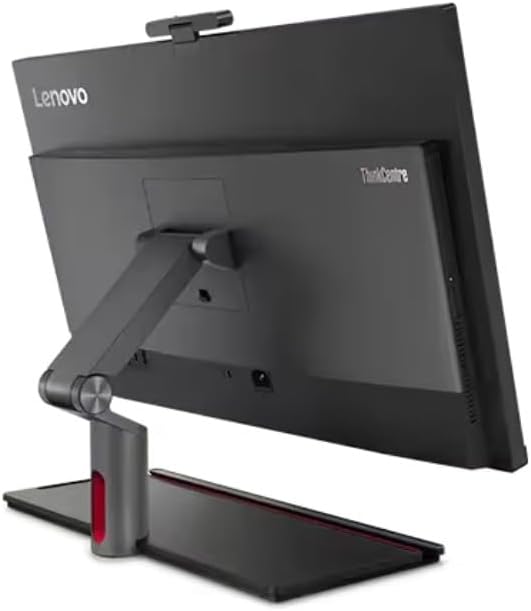
Figure 2.2: Rear view of the ThinkCentre M90a Pro Gen 4, highlighting connectivity options.
2.4 Initial Boot-up
Press the power button, usually located on the side or front of the unit. The system will begin the initial boot process. Follow the on-screen prompts to complete the Windows 11 Pro setup, including language selection, network connection, and user account creation.
3. Operating Your PC
This section covers the basic operation and key features of your ThinkCentre M90a Pro Gen 4.
3.1 Windows 11 Pro Operating System
Your PC comes pre-installed with Windows 11 Pro 64-bit, offering a secure and productive environment for business use. Familiarize yourself with the Start Menu, Taskbar, and File Explorer for efficient navigation.
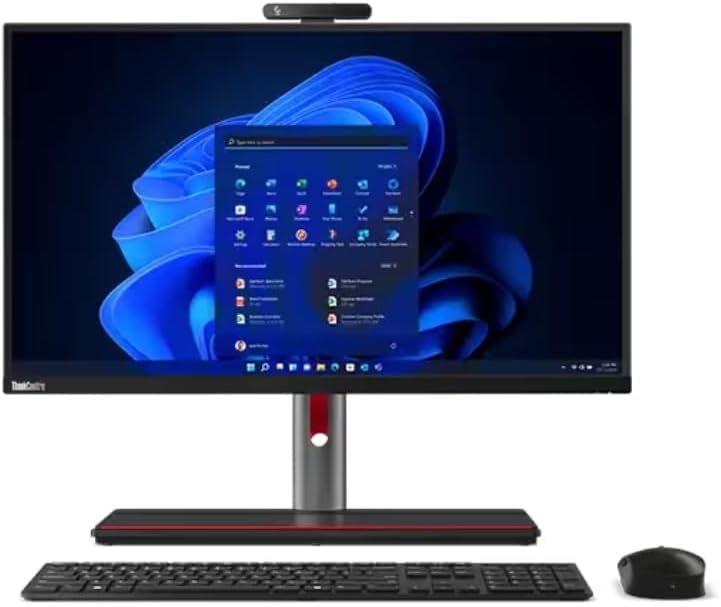
Figure 3.1: ThinkCentre M90a Pro Gen 4 with wireless keyboard and mouse.
3.2 Display and Graphics
The 27-inch QHD (2560 x 1440) IPS Anti-Glare display provides crisp visuals with 99% sRGB color accuracy. The integrated NVIDIA GeForce RTX 4050 6GB GDDR6 graphics card ensures excellent performance for demanding applications. The display also features low blue light technology to reduce eye fatigue.
3.3 Connectivity and Ports
The ThinkCentre M90a Pro Gen 4 offers extensive connectivity options:
- 1x Thunderbolt 4 / USB4 40Gbps (support data transfer, 15W charging and DisplayPort 1.4)
- 1x USB-C 3.2 Gen 2 (support data transfer and 15W charging)
- 3x USB 3.2 Gen 1
- 1x HDMI (HDMI in 1.4 / HDMI out 2.1 TMDS combo port)
- 1x DisplayPort 1.4
- 1x Ethernet (RJ-45)
- 2x USB 3.2 Gen 2
- 1x headphone / microphone combo jack (3.5mm)
Wireless connectivity includes Intel Wi-Fi 6E AX211 2x2 AX vPro and Bluetooth 5.3 for seamless network access and peripheral connections.
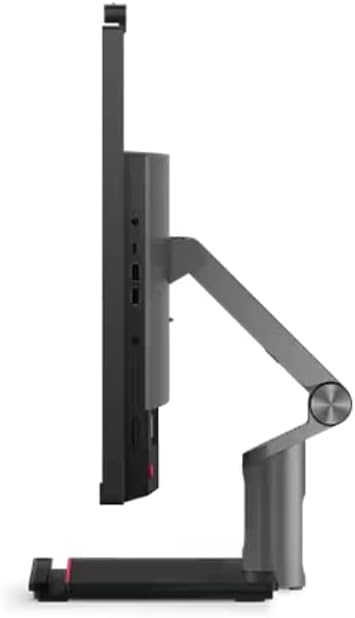
Figure 3.2: Right side view showing accessible ports.
3.4 Security Features
Your ThinkCentre M90a Pro Gen 4 is equipped with advanced security features:
- ThinkShield: A built-in security solution protecting your data and device.
- Discrete Trusted Platform Module (TPM): Encrypts critical data to prevent unauthorized access.
- 5MP IR/RGB Camera with Radar Sensor: Provides next-generation human presence protection, enhancing security and privacy.
- Intel vPro Platform: Offers hardware-based security, manageability, and stability, including remote management capabilities for IT support.
4. Maintenance
Proper maintenance ensures the longevity and optimal performance of your PC.
4.1 Cleaning
Regularly clean the display with a soft, lint-free cloth specifically designed for screens. For the chassis, use a soft, damp cloth. Avoid abrasive cleaners or solvents. Ensure ventilation grilles are free from dust accumulation to maintain proper airflow.
4.2 Software Updates
Keep your Windows 11 Pro operating system and device drivers updated. Windows Update automatically manages OS updates. For driver updates, visit the official Lenovo support website or use Lenovo Vantage software if pre-installed.
4.3 Optimal Temperature and Cable Management
The ThinkCentre M90a Pro Gen 4 is designed to maintain optimal temperatures. Ensure the PC is placed in an environment with good airflow and avoid blocking ventilation openings. Utilize the built-in clutter-free cable management features to keep your workspace tidy and improve airflow.
5. Troubleshooting
This section provides solutions to common issues you might encounter.
5.1 No Power
- Ensure the power cable is securely connected to both the PC and the electrical outlet.
- Verify the electrical outlet is functional by plugging in another device.
- Try a different power cable if available.
5.2 Display Issues
- If the screen is black, ensure the PC is powered on and not in sleep mode.
- Check display settings in Windows to ensure correct resolution (2560x1440) and refresh rate (60Hz).
- Restart the PC.
5.3 Peripheral Not Responding
- For wireless keyboard/mouse, check battery levels and ensure the USB receiver is properly inserted.
- Try connecting the peripheral to a different USB port.
- Reinstall or update the peripheral drivers.
5.4 System Performance Issues
- Close unnecessary applications running in the background.
- Ensure your system has the latest Windows updates and drivers.
- Check for malware or viruses using reputable antivirus software.
- The Intel Dynamic Tuning feature with Energy Performance Optimizer uses machine learning to optimize performance and conserve energy.
5.5 Contacting Support
If you encounter issues that cannot be resolved using the above steps, please refer to the warranty and support information in Section 7 or visit the official Lenovo support website.
6. Specifications
Detailed technical specifications for the Lenovo ThinkCentre M90a Pro Gen 4 Business PC.
| Feature | Specification |
|---|---|
| Model Number | 12JM0023US |
| Processor | 13th Generation Intel Core i7-13700 vPro Processor (E-cores up to 4.10 GHz P-cores up to 5.10 GHz) |
| Operating System | Windows 11 Pro 64 |
| Display | 27" QHD (2560 x 1440), IPS, Anti-Glare, Non-Touch, 99%sRGB, 350 nits, 60Hz, 14 ms, LED Backlight |
| Memory (RAM) | 16 GB DDR5-5600MHz (SODIMM) |
| Storage | 512 GB SSD M.2 2280 PCIe Gen4 Performance TLC Opal |
| Graphics | NVIDIA GeForce RTX 4050 6GB GDDR6 |
| Camera | 5MP IR/RGB with Dual Array Microphone |
| Optical Device | Slim Ultrabay DVD-RW |
| Wireless Connectivity | Intel Wi-Fi 6E AX211 2x2 AX vPro & Bluetooth 5.3 |
| Ports (Front/Side) | 1x Thunderbolt 4 / USB4 40Gbps, 1x USB-C 3.2 Gen 2, 3x USB 3.2 Gen 1, 1x headphone / microphone combo jack |
| Ports (Rear) | 1x HDMI (in 1.4 / out 2.1 TMDS combo), 1x DisplayPort 1.4, 1x Ethernet (RJ-45), 1x Thunderbolt 4 / USB4 40Gbps, 2x USB 3.2 Gen 2 |
| Dimensions (H x W x D) | 30.1 x 9.3 x 21.5 inches (approximate) |
| Weight | Approximately 24.8 lbs |
| Color | Black |
7. Warranty and Support
Your Lenovo ThinkCentre M90a Pro Gen 4 Business PC comes with comprehensive support options.
7.1 Warranty Information
The product includes a One Year Onsite Lenovo Warranty. This warranty covers manufacturing defects and hardware failures under normal use conditions. For detailed terms and conditions, please refer to the warranty documentation included with your product or visit the official Lenovo support website.
7.2 Extended Support Options
You have the option to add up to 5 years of Lenovo Premier Support by registering your computer with Lenovo. Premier Support offers advanced technical support, including dedicated phone support, hardware and software assistance, and next-business-day onsite service.
7.3 Online Resources and Contact
For additional support, drivers, and troubleshooting guides, visit the official Lenovo support website. You can also find more information and products at the Lenovo Store on Amazon.
8. What's in the Box
The retail packaging for your Lenovo ThinkCentre M90a Pro Gen 4 Business PC typically includes:
- ThinkCentre M90a Pro Gen 4 Business PC
- Wireless Keyboard
- Wireless Mouse
- Power Adapter and Cable
- Documentation (Quick Start Guide, Warranty Information)
Related Documents - 12JM0023US
 |
Lenovo P1 Gen 5 Technical Specifications and Overview Detailed technical specifications, component information, and overview for the Lenovo P1 Gen 5 workstation laptop, including CPU, memory, storage, display, ports, and environmental data. |
 |
Lenovo ThinkStation P3 Ultra Power Configurator Guide Detailed guide to the Lenovo ThinkStation P3 Ultra power configurations, including CPU and GPU power ratings, architectural design, and external power adapter options. |
 |
Lenovo ThinkCentre M90a Gen 6: High-Performance Business All-in-One Desktop Specifications Explore the features and technical specifications of the Lenovo ThinkCentre M90a Gen 6, a powerful and versatile all-in-one desktop designed for modern business professionals. Learn about its Intel Core Ultra processor, NVIDIA graphics, memory, storage, connectivity, and environmental certifications. |
 |
Lenovo Legion T5 28IMB05 Product Specifications Detailed specifications for the Lenovo Legion T5 28IMB05 desktop computer, covering performance, processor, graphics, memory, storage, connectivity, design, security, warranty, and certifications. |
 |
Lenovo LOQ Tower 17IRR9 User Guide Comprehensive user guide for the Lenovo LOQ Tower 17IRR9 desktop computer. Learn about setup, hardware specifications, troubleshooting, and component replacement for your Lenovo PC. |
 |
Lenovo ThinkPad P15 Gen 2 Technical Specifications Detailed technical specifications for the Lenovo ThinkPad P15 Gen 2 workstation laptop, covering system overview, supported components, CPU, memory, storage, display, I/O, audio, battery, BIOS, security, environmental, and manageability features. |