
1. Important Safety Information
Please read all safety instructions carefully before assembly and operation. Failure to follow these guidelines may result in injury or damage to the product.
- Always follow the assembly instructions carefully.
- Keep fingers and other body parts away from moving parts when adjusting the desk height.
- Do not exceed the weight limit of 150 lbs (68 kg) for the desktop.
- Ensure the desk is properly anchored to the floor to prevent tipping.
- Keep children and pets away from the desk during operation.
- Do not sit or stand on the desk.
- Disconnect power before cleaning or maintenance.
2. Product Overview
The TIQLAB Electric Standing Desk is designed to provide a versatile and ergonomic workspace. It features an adjustable height mechanism, integrated storage, and a durable construction.
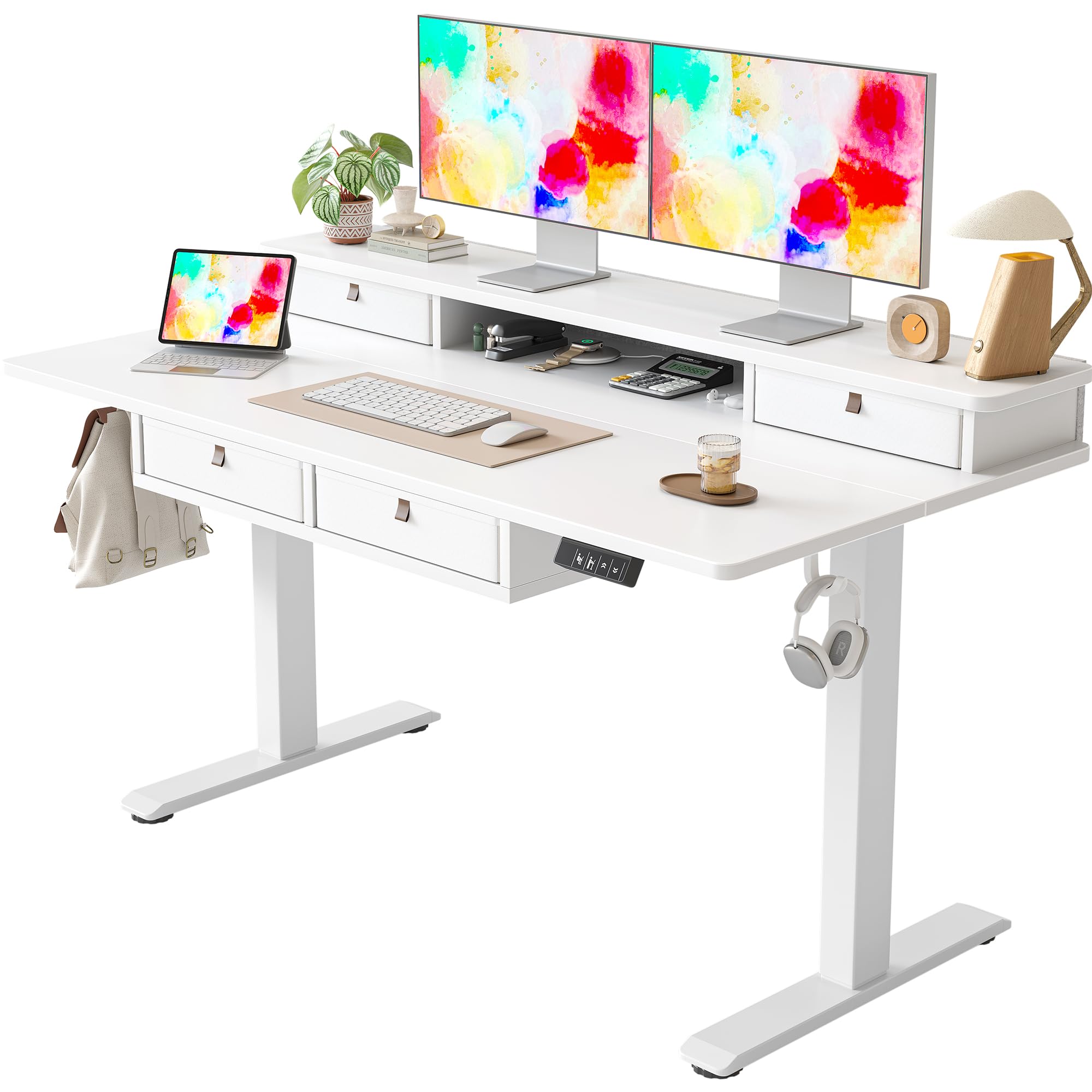
Figure 2.1: TIQLAB Electric Standing Desk in a typical office environment, showcasing its design and functionality.
Key Features:
- Electric Height Adjustment
- Four Integrated Drawers
- Storage Shelf / Monitor Stand
- Durable Multi-Layer Steel Frame
- Multifunctional Controller with Memory Presets
- Anti-Collision Technology

Figure 2.2: Desk dimensions (55"W x 27.6"D, height 28.3"-45.6") and maximum static load capacity (176 lbs / 80 kg).
3. Setup and Assembly
Assembly is required for this product. Please ensure all components are present before beginning. While specific step-by-step instructions are not provided here, general guidance for key features is included. Refer to the included assembly guide for detailed steps.
3.1 Components and Features

Figure 3.1: Detailed view of the monitor stand, storage cube, and wooden stand features.
3.2 Cable Management and Stability
- Cable Hole: Utilize the integrated cable hole for organized wire routing.
- Adjustable Foot Pads: Ensure the desk is level and stable on uneven floors by adjusting the four foot pads.
- Desk Hooks: Use the two included desk hooks for hanging headphones or other accessories.

Figure 3.2: Features for cable management, stability, and accessory storage.
4. Operating Instructions
Your TIQLAB Electric Standing Desk is equipped with an intuitive control panel for easy height adjustment.
4.1 Multifunctional Controller

Figure 4.1: The desk's control panel, highlighting its features.
- Up / Down Movement: Use the arrow buttons to smoothly raise or lower the desk to your desired height.
- 3 Memorable Heights: Press and hold one of the numbered memory buttons (e.g., '1', '2', '3') to save a preferred height. Briefly press the button to recall the saved height.
- LED Screen Display: Shows the current desk height in inches.
- Anti-collision Technology: The desk is equipped with a sensor that detects obstacles during movement and automatically stops to prevent damage or injury.
4.2 Quiet Operation
The desk operates with minimal noise, typically below 45dB, ensuring a peaceful work environment.

Figure 4.2: Noise level comparison during desk operation.
5. Maintenance
To ensure the longevity and optimal performance of your TIQLAB Electric Standing Desk, follow these simple maintenance guidelines:
- Cleaning: Wipe the desk surfaces with a soft, damp cloth. Avoid abrasive cleaners or harsh chemicals that could damage the finish.
- Inspection: Periodically check all screws and fasteners to ensure they are tight. Retighten if necessary.
- Cable Management: Ensure cables are not pinched or tangled, which could affect desk movement or damage wiring.
- Weight Distribution: Distribute weight evenly across the desktop and avoid placing excessively heavy items on one side.
6. Troubleshooting
If you encounter any issues with your TIQLAB Electric Standing Desk, refer to the following common troubleshooting steps:
- Desk Not Moving:
- Check if the power cord is securely plugged into both the desk and a working power outlet.
- Ensure no objects are obstructing the desk's movement.
- If the anti-collision system was triggered, clear the obstruction and try again.
- Uneven Height:
- Check the adjustable foot pads to ensure they are properly leveled.
- Perform a reset procedure (refer to the specific assembly guide for your model if available, or contact support).
- Unusual Noises:
- Ensure all assembly screws are tightened.
- Verify that no cables or objects are rubbing against moving parts.
If these steps do not resolve the issue, please contact TIQLAB customer support for further assistance.
7. Specifications
| Feature | Detail |
|---|---|
| Brand | TIQLAB |
| Model Number | B0F1N5G2JV |
| Product Dimensions (D x W x H) | 28"D x 55"W x 29"H (Minimum Height, as per specifications) |
| Adjustable Height Range | 28.3" - 45.6" (As shown in product imagery) |
| Color | White |
| Style | Modern |
| Base Material | Electric (Metal Frame) |
| Top Material Type | Engineered Wood |
| Number of Drawers | 4 |
| Number of Shelves | 1 (Storage Shelf) |
| Maximum Static Load Capacity | 176 lbs (80 kg) |
| Special Feature | Electric Height Adjustment, Anti-collision, Memory Presets |
| Recommended Uses | Office, Working, Gaming |
| Included Components | Desk, Keyboard Tray, Monitor Arm (Note: Keyboard tray and monitor arm may be optional or integrated depending on specific package.) |

Figure 7.1: Illustration of the desk's multi-layer steel frame for enhanced stability.
8. Warranty and Support
8.1 Warranty Information
This TIQLAB Electric Standing Desk comes with a Limited Warranty. For specific terms and conditions of your warranty, please refer to the documentation included with your purchase or visit the official TIQLAB website.
8.2 Customer Support
For any questions, technical assistance, or warranty claims, please contact TIQLAB customer support:
- Website: Visit the TIQLAB Store on Amazon
- Email: [Insert Customer Support Email Here]
- Phone: [Insert Customer Support Phone Number Here]
Please have your model number (B0F1N5G2JV) and purchase date ready when contacting support.