1. Introduction
The lulaven UTag is a discreet and secure GPS tracking device designed to help you monitor the location of children, elderly individuals, pets, or valuable items. It operates seamlessly with Apple's Find My network, offering location tracking without monthly subscription fees. This manual provides essential information for setting up, operating, and maintaining your UTag device.

Image 1.1: The lulaven UTag GPS Tracker shown alongside a child and a smartphone interface demonstrating its tracking capabilities.
2. Product Overview
The lulaven UTag offers a reliable solution for location tracking, integrating with the Apple Find My network. Key features include:
- No Monthly Fees: Utilizes the Apple Find My network for tracking without recurring subscription costs.
- Discreet and Secure Design: Features an anti-removal pin for secure attachment to clothing or bags, detachable only with the included magnetic unlocker.
- Location Sharing: Allows sharing of location data with up to 6 trusted contacts via the Find My app.
- Instant Left-Behind Alerts: Notifies you if the UTag disconnects from your phone's Bluetooth range.
- Long Battery Life: Equipped with a CR2032 battery that lasts approximately one year, with two additional batteries included.
- Child-Safe Battery Compartment: Designed to prevent accidental opening by children.
- IP67 Waterproof Rating: Provides protection against dust and water immersion up to 1 meter for 30 minutes.
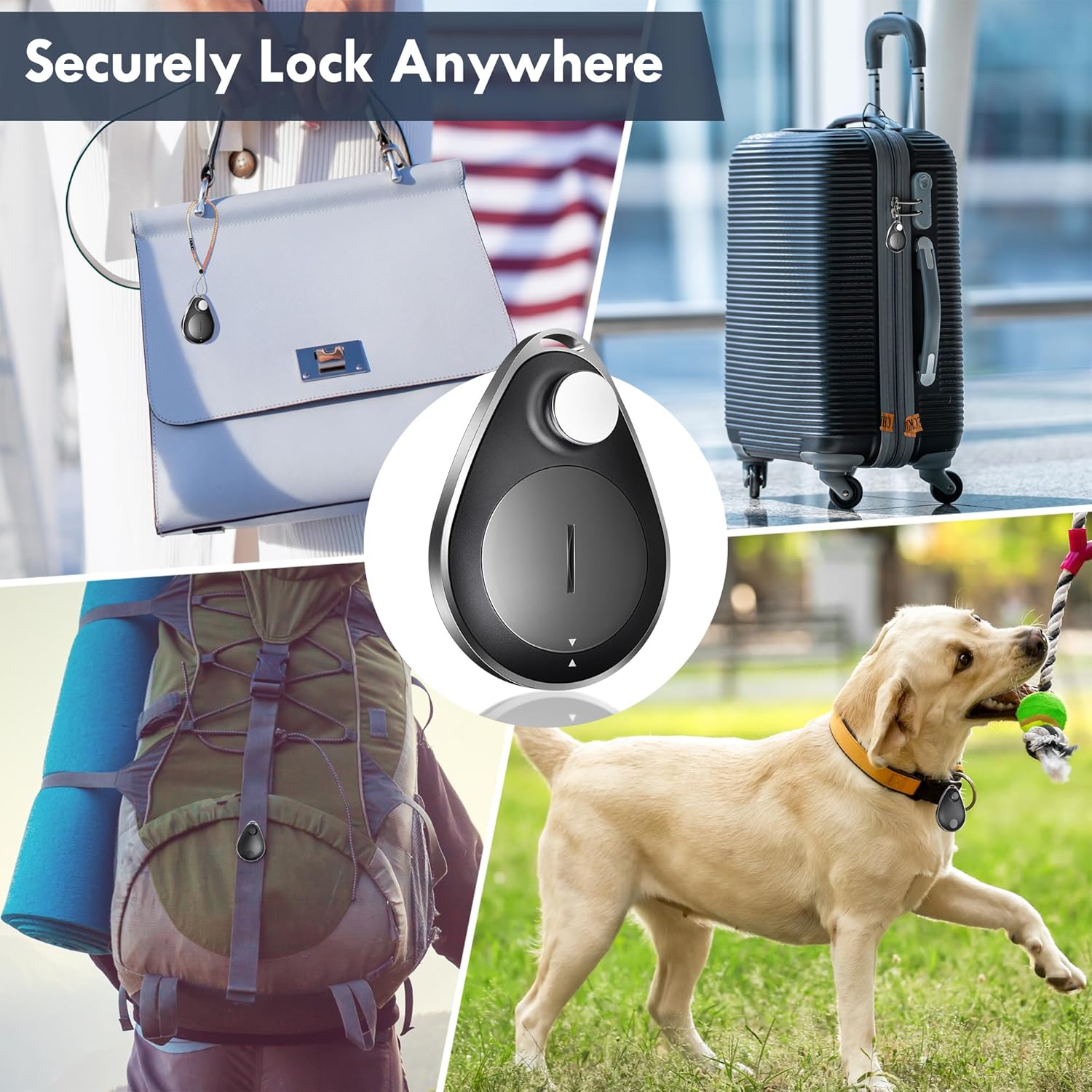
Image 2.1: The UTag's versatility, demonstrating its attachment to a handbag, luggage, a backpack, and a dog collar.
3. What's in the Box
Your lulaven UTag package includes the following items:
- lulaven UTag GPS Tracker (4-pack)
- Pre-installed CR2032 Battery (in each tracker)
- Magnetic Unlocker
- Additional CR2032 Batteries (2 units)
4. Setup Instructions
Follow these steps to set up your lulaven UTag GPS Tracker:
4.1. Device Compatibility
The lulaven UTag works exclusively with Apple's Find My network. It requires an iOS, iPadOS, or macOS device running the latest operating system version. Note: This device is not compatible with Android phones.
4.2. Pairing with Apple Find My
- Ensure your Apple device (iPhone, iPad, or Mac) has Bluetooth enabled and is running the latest iOS/iPadOS/macOS version.
- Open the Find My app on your Apple device.
- Navigate to the 'Items' tab at the bottom of the screen.
- Tap the 'Add Item' button (usually a '+' icon) and select 'Other Supported Item'.
- Follow the on-screen prompts to connect your UTag. The app will guide you through the pairing process.
- Once connected, the UTag will be linked to your Apple ID and appear in your 'Items' list.

Image 4.1: Visual guide for connecting the UTag to the Apple Find My app.
4.3. Attaching the UTag
The UTag is designed for discreet and secure attachment to fabric items such as clothing, backpacks, or jackets using its anti-removal pin mechanism.
- Identify a suitable location on the item where the UTag can be discreetly attached.
- Push the pin through the fabric from the back side.
- Align the UTag with the pin on the front side of the fabric and press firmly until it clicks into place.

Image 4.2: Illustration of attaching the UTag to fabric and using the magnetic unlocker for removal.
4.4. Removing the UTag
To remove the UTag, use the provided magnetic unlocker:
- Place the magnetic unlocker onto the bottom of the UTag.
- The magnet will release the internal locking mechanism.
- Gently pull out the pin to detach the UTag from the fabric.
5. Operating Instructions
Once your UTag is set up, you can utilize the Apple Find My app for various tracking functions.
5.1. Locating Your UTag
- Find Nearby: If the UTag is within Bluetooth range, you can make it play a sound to help you locate it. Open the Find My app, select your UTag from the 'Items' list, and tap 'Play Sound'.
- Find Far Away: If the UTag is out of Bluetooth range, the Find My app will display its last known location on a map. The location is updated approximately every 15 minutes, leveraging the vast network of Apple devices. This is not real-time tracking due to Apple's privacy standards.

Image 5.1: Tracking the UTag's location on a map via the Find My app.
5.2. Left-Behind Alerts
The UTag can notify you if it is separated from your Apple device. To enable this feature:
- In the Find My app, select your UTag.
- Scroll down to the 'Notifications' section.
- Toggle on 'Notify When Left Behind'. You can also set 'Notify Me, Except At' for specific safe locations.
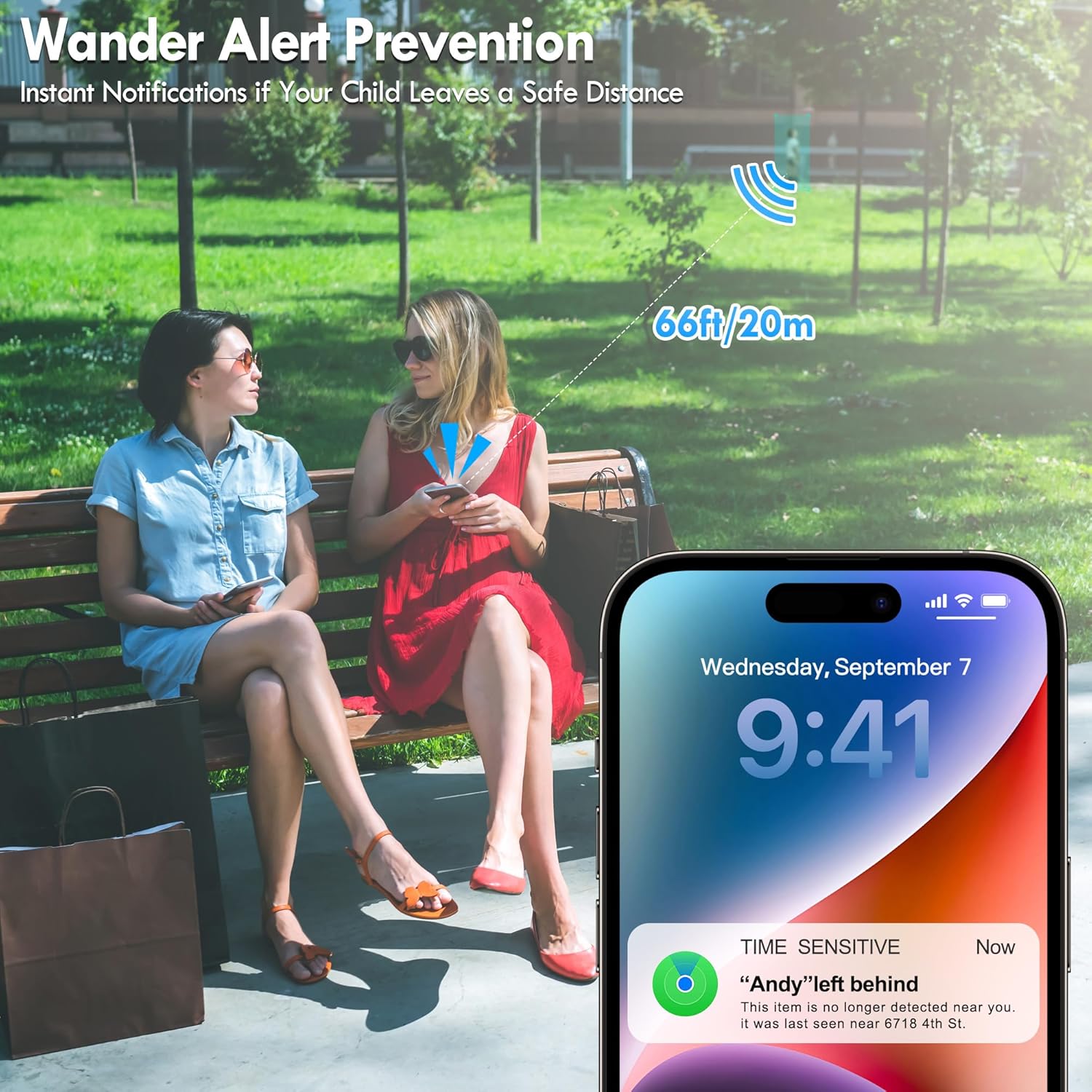
Image 5.2: A smartphone displaying a 'left behind' alert from the UTag.
5.3. Lost Mode
If your UTag is lost, you can activate 'Lost Mode' in the Find My app. This allows you to:
- Display a message and contact number to anyone who finds your UTag.
- Receive a notification when your UTag's location is updated.
5.4. Sharing Location
You can share the location of your UTag with up to 6 other individuals who use the Find My app. This is useful for family members, caregivers, or teachers.
- In the Find My app, select your UTag.
- Scroll down and tap 'Share This Item'.
- Select contacts to share the UTag's location with.

Image 5.3: Sharing UTag location with multiple contacts on the Find My app.
6. Maintenance
6.1. Battery Replacement
The UTag uses a standard CR2032 coin cell battery, which typically lasts for one year. When the battery is low, you will receive a notification in the Find My app. To replace the battery:
- Locate the battery compartment on the UTag. It is designed to be child-safe, requiring a specific tool or method to open.
- Carefully open the compartment. You may need a small flat-head screwdriver or similar tool to gently pry it open.
- Remove the old CR2032 battery.
- Insert a new CR2032 battery with the positive (+) side facing up.
- Close the battery compartment securely.
Warning: Keep batteries out of reach of small children. If swallowed, seek immediate medical attention.
6.2. Cleaning
To clean your UTag, wipe it with a soft, damp cloth. Avoid using harsh chemicals or abrasive materials, as these can damage the device. The UTag is IP67 waterproof, meaning it can withstand splashes and brief immersion, but it is not recommended for prolonged submersion or use during swimming.
7. Troubleshooting
If you encounter issues with your lulaven UTag, refer to the following troubleshooting tips:
- UTag Not Appearing in Find My App:
- Ensure Bluetooth is enabled on your Apple device.
- Verify that your Apple device is running the latest iOS/iPadOS/macOS.
- Check the UTag's battery. A depleted battery will prevent it from being detected.
- Try resetting the UTag (refer to manufacturer's website for specific reset instructions if not covered here).
- Attempt to re-pair the UTag with your Find My app.
- Inaccurate Location or Infrequent Updates:
- Location updates occur approximately every 15 minutes, not in real-time. This is normal behavior for Find My network devices.
- Ensure the UTag is in an area with sufficient Apple device density for effective crowd-sourced location updates.
- Check for any physical obstructions that might interfere with Bluetooth signals if trying to locate nearby.
- Left-Behind Alerts Not Working:
- Confirm that 'Notify When Left Behind' is enabled for your UTag in the Find My app.
- Ensure your Apple device's Bluetooth is active and functioning correctly.
- Check if you have set 'Notify Me, Except At' for your current location, which might suppress alerts.
- Magnetic Unlocker Not Working:
- Ensure the magnetic unlocker is placed correctly and firmly on the designated spot on the UTag.
- Apply gentle pressure while attempting to pull the pin.
8. Specifications
| Feature | Detail |
|---|---|
| Model | UTag (B0F1N4JLG2) |
| Brand | lulaven |
| Connectivity Technology | Bluetooth |
| Supported Application | Apple Find My (iOS only) |
| Special Features | Alert Notification, Anti-Theft |
| Battery Type | CR2032 Lithium Metal (included) |
| Battery Life | Approximately 1 year |
| Waterproof Rating | IP67 |
| Item Weight | 5 ounces |
| Package Dimensions | 6.14 x 4.69 x 0.91 inches |

Image 8.1: Visual representation of UTag's durable material, child-safe battery design, replaceable battery, and IP67 waterproof rating.
9. Warranty and Support
For warranty information, technical support, or any inquiries regarding your lulaven UTag GPS Tracker, please refer to the official lulaven website or contact their customer service directly. Contact details are typically available on the product packaging or the brand's online presence.