1. Introduction
The ANVAR VEDO 10-in-1 Bluetooth Turntable is a versatile audio system designed to play various media formats. This unit combines vintage aesthetics with modern functionality, allowing you to enjoy music from vinyl records, CDs, cassette tapes, FM radio, and digital files via Bluetooth, USB, or SD card. It also features a direct LP/CD/Cassette to MP3 recording function.

Image 1.1: Front view of the ANVAR VEDO 10-in-1 Bluetooth Turntable with the lid open, showcasing its retro design and various playback options.
2. Safety Information
- Read all instructions before operating the unit.
- Keep the unit away from water or moisture.
- Do not block ventilation openings.
- Use only attachments/accessories specified by the manufacturer.
- Unplug the unit during lightning storms or when unused for long periods.
- Refer all servicing to qualified service personnel.
3. Package Contents
Please check that the following items are included in your package:
- ANVAR VEDO 10-in-1 Bluetooth Turntable Unit
- Power Adapter
- Remote Control
- Instruction Manual
4. Product Overview: Controls and Ports
Familiarize yourself with the main controls and connection ports of your ANVAR VEDO unit.
4.1 Front Panel Controls

Image 4.1: Detailed view of the front panel, showing the power knob, mode selector, tuning knob, volume knob, CD tray, and various playback buttons.
- Power/Mode Knob: Turns the unit ON/OFF and selects playback mode (Phono, CD, AUX, FM/BT, Tape, Radio).
- Tuning Knob: Adjusts FM radio frequency.
- Volume Knob: Controls the overall sound volume.
- CD Tray: For inserting and ejecting CDs.
- Playback Buttons: Play/Pause, Stop, Skip Forward/Backward for CD/USB/SD.
- Headphone Jack: For private listening.
4.2 Rear Panel Ports

Image 4.2: Rear view of the unit, highlighting the FM antenna, RCA Line Out, USB port, and SD card slot.
- FM ANT: Connect the FM antenna for improved radio reception.
- LINE OUT (RCA): Connect to external amplifiers or powered speakers.
- USB Port: For playing MP3 files from a USB drive or recording to USB.
- SD Card Slot: For playing MP3 files from an SD card or recording to SD.
5. Setup
5.1 Unpacking and Placement
- Carefully remove the unit from its packaging.
- Place the unit on a flat, stable surface away from direct sunlight, heat sources, and excessive dust or vibration.
- Ensure adequate ventilation around the unit.
5.2 Power Connection
Connect the power adapter to the DC IN jack on the back of the unit, then plug it into a wall outlet. The unit supports 110V/220V voltage.
5.3 Antenna Connection
For optimal FM radio reception, connect the provided FM antenna to the FM ANT port on the rear of the unit and extend it fully.
6. Operating Instructions
6.1 Turntable (Vinyl Playback)

Image 6.1: A hand placing the tonearm onto a vinyl record, demonstrating the turntable in operation.
- Lift the turntable lid.
- Place a vinyl record on the platter.
- Select the appropriate speed (33⅓, 45, or 78 RPM) using the speed selector switch.
- Move the tonearm to the desired position on the record and gently lower it.
- Adjust the volume using the Volume knob.
6.2 CD Player
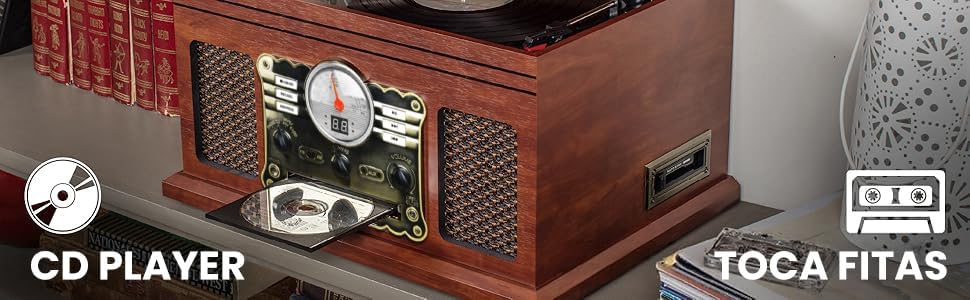
Image 6.2: Close-up of the CD player tray and cassette slot, indicating their locations on the unit.
- Press the Power/Mode knob to select 'CD' mode.
- Press the 'Open/Close' button to open the CD tray.
- Place a CD in the tray with the label side up and close the tray.
- The CD will begin playing automatically. Use the playback buttons for control.
6.3 Cassette Player
- Press the Power/Mode knob to select 'Tape' mode.
- Insert a cassette tape into the cassette slot on the side of the unit.
- The tape will begin playing automatically. Use the cassette controls (Play, Stop, Fast Forward, Rewind) for operation.
6.4 FM Radio

Image 6.3: The unit's display showing FM radio tuning, with icons for AM/FM Radio and Bluetooth connectivity.
- Press the Power/Mode knob to select 'Radio' mode.
- Turn the Tuning knob to find your desired FM station.
- Adjust the volume as needed.
6.5 Bluetooth Connectivity

Image 6.4: A smartphone displaying its Bluetooth settings, connected to the ANVAR VEDO turntable, illustrating wireless music streaming.
- Press the Power/Mode knob to select 'BT' (Bluetooth) mode. The Bluetooth indicator will flash.
- Enable Bluetooth on your external device (smartphone, tablet, etc.).
- Search for 'MUSITREND' in your device's Bluetooth list and select it to pair.
- Once paired, the Bluetooth indicator will stop flashing. You can now stream audio wirelessly.
6.6 USB/SD Playback

Image 6.5: A USB drive and SD card inserted into their respective slots on the side of the unit, ready for digital audio playback.
- Insert a USB drive into the USB port or an SD card into the SD card slot.
- Press the Power/Mode knob to select 'USB' or 'SD' mode.
- The unit will automatically detect and play MP3 files. Use the playback buttons for control.
6.7 AUX Input
- Connect an external audio device (e.g., MP3 player) to the AUX IN jack using a 3.5mm audio cable.
- Press the Power/Mode knob to select 'AUX' mode.
- Play audio from your external device.
6.8 Headphone Output
- Plug your headphones into the headphone jack on the front panel.
- Audio will be routed to your headphones, muting the built-in speakers.
6.9 RCA Line Out
- Connect an RCA cable from the LINE OUT ports on the rear of the unit to the audio input of an external amplifier or powered speakers.
- Ensure the external audio system is powered on and set to the correct input.
7. Recording (LP/CD/Cassette to MP3)

Image 7.1: Visual representation of the unit's capability to convert audio from vinyl and CD to MP3 format via USB or SD card.
The ANVAR VEDO unit allows direct recording of vinyl records, CDs, and cassette tapes to MP3 format on a USB drive or SD card without requiring a computer.
- Insert a USB drive or SD card into the corresponding slot.
- Select the desired source mode (Phono, CD, or Tape).
- Begin playback of the source audio (record, CD, or cassette).
- Press the 'REC' button on the unit or remote control to start recording. The recording indicator will light up.
- Press the 'REC' button again to stop recording. The recorded MP3 file will be saved to your USB drive or SD card.
8. Maintenance
8.1 Cleaning the Unit
- Wipe the unit with a soft, dry cloth.
- Do not use abrasive cleaners, waxes, or solvents.
8.2 Stylus Care
- Gently clean the stylus regularly with a soft brush designed for turntable styli.
- Replace the stylus when it shows signs of wear to prevent damage to your records.
9. Troubleshooting
| Problem | Possible Cause | Solution |
|---|---|---|
| No power | Power cord not connected; Power outlet not active. | Ensure power cord is securely connected; Try a different outlet. |
| No sound | Volume too low; Incorrect mode selected; Headphones connected. | Increase volume; Select correct input mode; Disconnect headphones. |
| Turntable not spinning | Power off; Belt dislodged. | Ensure unit is powered on; Contact support for belt issues. |
| Bluetooth not connecting | Unit not in BT mode; Device too far; Incorrect pairing. | Select BT mode; Move device closer; Re-attempt pairing with 'MUSITREND'. |
10. Specifications
- Brand: ANVAR
- Model: VEDO
- Product Dimensions: 46 x 34 x 24 cm
- Product Weight: 6.2 Kilograms
- Material: Wood
- Turntable Speeds: 33⅓, 45, 78 RPM
- Special Features: Multimedia and Recording (LP/CD/Cassette to MP3)
- Compatible Devices: Speaker, External Sound System
- Power Source Type: AC (110V/220V)
- Components Included: VEDO (Main Unit)
11. Warranty and Support
For warranty information and technical support, please refer to the contact details provided with your purchase documentation or visit the ANVAR official website. Keep your proof of purchase for any warranty claims.
12. Product Video Overview
Video 12.1: A comprehensive overview of the ANVAR VEDO 10-in-1 Bluetooth Turntable, demonstrating its various functions including vinyl playback, radio, cassette, CD, USB, Bluetooth, AUX, and RCA connections.


