Introduction
The Kortyio Talkbuds Translator Earbuds are advanced AI-powered devices designed to facilitate seamless communication across language barriers. Featuring real-time two-way translation in 144 languages and accents, these earbuds offer high accuracy and multiple operating modes to suit various communication needs. This manual provides detailed instructions for setting up, operating, maintaining, and troubleshooting your Talkbuds Translator Earbuds.
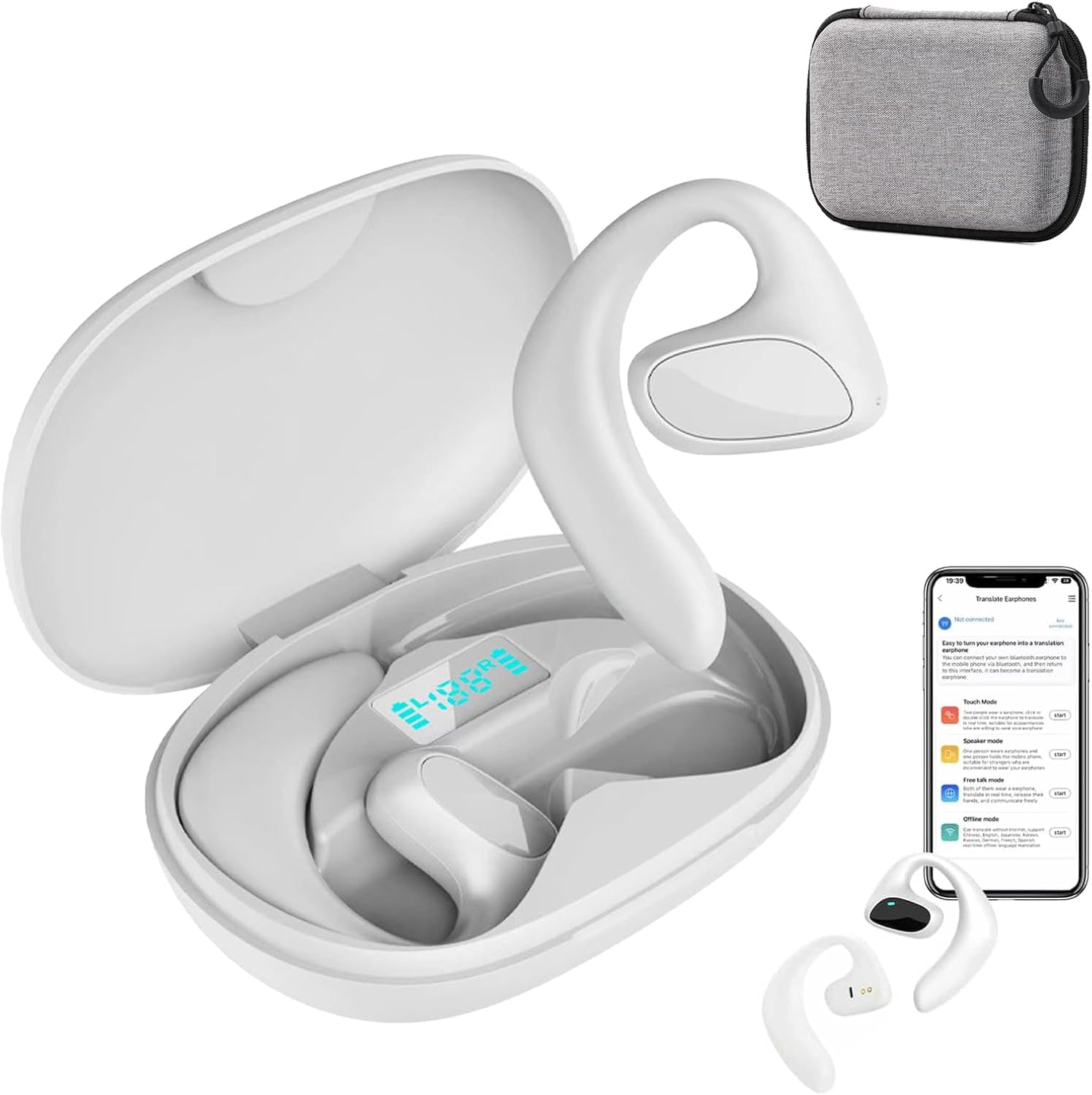
Image: The Kortyio Talkbuds Translator Earbuds, shown in their white charging case, alongside a smartphone displaying the companion translation application. This image highlights the product's design and its primary function as a translation tool.
Setup
1. Charging the Earbuds and Case
Before first use, ensure both the earbuds and the charging case are fully charged. Use the provided Type-C charging cable.
- Connect the Type-C cable to the charging port on the case.
- Connect the other end to a compatible USB power adapter (not included).
- The charging indicator on the case will show charging status. A full charge for the earbuds takes approximately 1 hour, and the charging case takes about 1.5 hours.
2. Initial Pairing with Your Device
The Talkbuds Translator Earbuds connect via Bluetooth 5.4.
- Ensure the earbuds are in the charging case and the case lid is open.
- On your smartphone or tablet, enable Bluetooth.
- Search for available devices and select "Talkbuds Translator" (or similar name).
- Once connected, a confirmation sound will play, and the earbuds will be ready for use.
For optimal performance, download the dedicated translation application from your device's app store. This app is essential for utilizing the full range of translation features.
Operating Instructions
The Talkbuds Translator Earbuds offer four primary translation modes, accessible through the companion application.
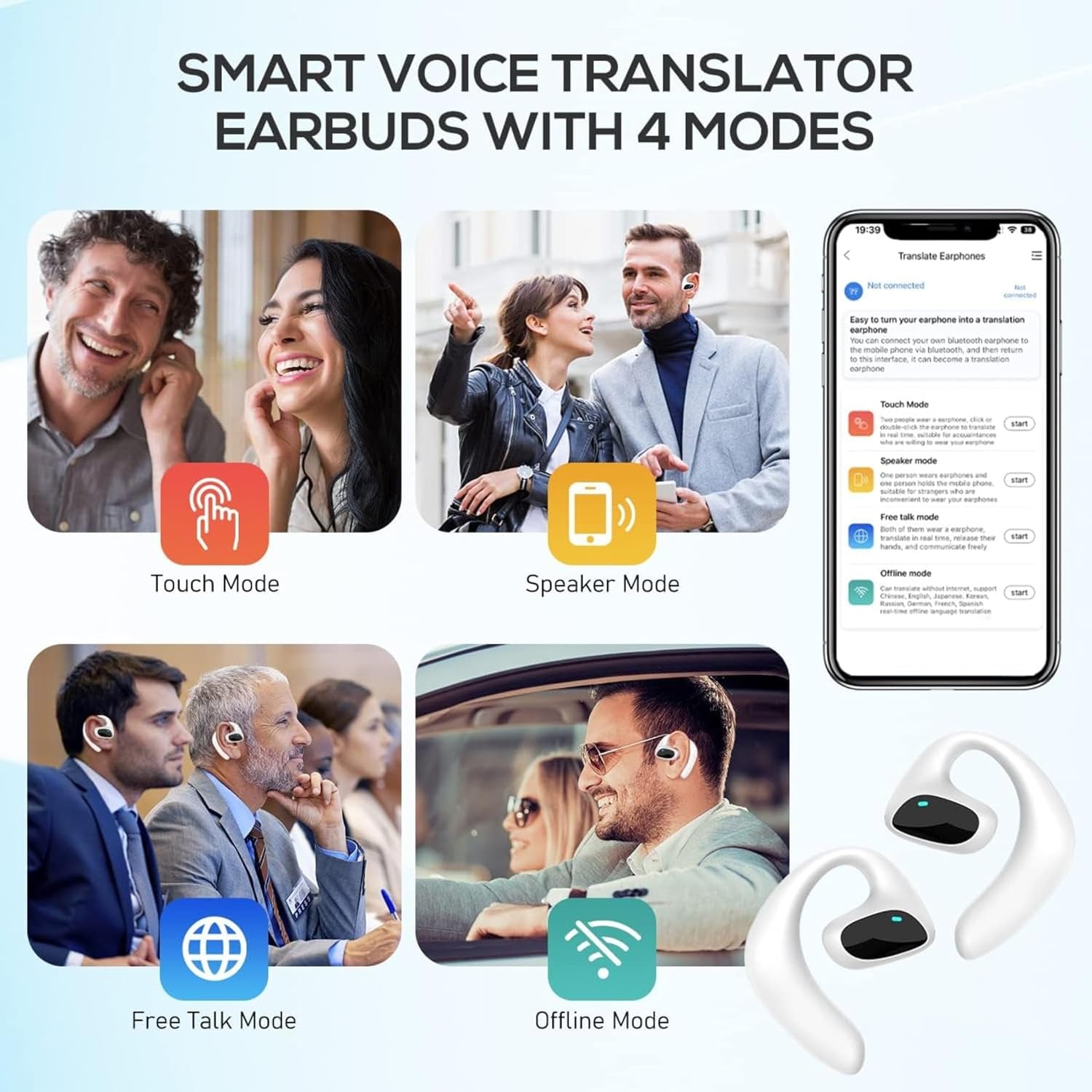
Image: A visual representation of the four distinct translation modes available with the Talkbuds Translator Earbuds: Touch Mode, Speaker Mode, Free Talk Mode, and Offline Mode, illustrating their respective use cases.
Translation Modes:
- Touch Mode: Ideal for one-on-one conversations. Each person wears an earbud. To speak, touch the earbud. The spoken words are translated and played through the other person's earbud.
- Speaker Mode: Suitable for small groups. One person wears an earbud, and the other person speaks into the smartphone. The translation is played through the earbud and the phone's speaker.
- Free Talk Mode: For continuous, natural conversations. Both users wear earbuds, and the system automatically detects and translates speech in real-time without manual input.
- Offline Mode: Allows translation without an internet connection. Requires pre-downloaded language packs within the application.
General Use and Features:
- Touch Controls: The earbuds feature intuitive touch controls for managing calls, music playback, and activating translation functions. Refer to the app for specific touch gestures.
- HD Noise Reduction: The earbuds incorporate noise reduction technology to ensure clear audio quality during translation and calls, even in noisy environments.
- Music and Calls: Beyond translation, the earbuds can be used for listening to music and making phone calls, functioning as standard Bluetooth earbuds.

Image: A user wearing a Talkbuds Translator earbud, illustrating its versatility for listening to music, making phone calls, and its integration with Bluetooth technology.
Product Use Demonstration:
Video: This video demonstrates the practical use of the Talkbuds Translator earbuds in a business conversation setting, showcasing real-time translation. It highlights the ease of use and effectiveness of the device in facilitating cross-language communication.
Maintenance
Proper maintenance ensures the longevity and optimal performance of your Talkbuds Translator Earbuds.
- Cleaning: Use a soft, dry, lint-free cloth to clean the earbuds and charging case. Do not use abrasive cleaners, alcohol, or chemical solvents.
- Storage: When not in use, store the earbuds in their charging case to protect them and keep them charged. Store in a cool, dry place away from direct sunlight and extreme temperatures.
- Water Resistance: The earbuds are waterproof. However, avoid prolonged submersion in water and do not expose them to saltwater or other liquids that may cause corrosion. Dry thoroughly if exposed to moisture.
- Charging Port: Keep the Type-C charging port free of dust and debris.
Troubleshooting
If you encounter issues with your Talkbuds Translator Earbuds, refer to the following common problems and solutions:
| Problem | Solution |
|---|---|
| Earbuds not pairing/connecting. |
|
| Poor translation accuracy. |
|
| No sound from earbuds. |
|
| Charging case not charging. |
|
Specifications
| Feature | Detail |
|---|---|
| Model Name | Earbuds |
| Model Number | W76BD5FB000 |
| Brand | Kortyio |
| Material | Acrylonitrile Butadiene Styrene (ABS) |
| Color | White |
| Connectivity Technology | Wireless (Bluetooth) |
| Bluetooth Version | 5.4 |
| Bluetooth Range | 10 Meters |
| Translation Languages | 144 (74 languages + 70 accents) |
| Earbud Battery Capacity | 80mAh |
| Earbud Play Time | 4 hours (7 hours headset usage time) |
| Earbud Charging Time | 1 hour |
| Charging Case Battery Capacity | 400mAh |
| Charging Case Charging Time | 1.5 hours |
| Charging Interface | Type-C |
| Control Type | Touch Control |
| Water Resistance Level | Waterproof |
| Noise Control | Active Noise Cancellation |
Warranty and Support
For warranty information and technical support, please contact the seller, Ear Savvy Official Shop, or refer to the product packaging for specific warranty terms and contact details. Keep your proof of purchase for any warranty claims.
For further assistance, visit the Kortyio brand store on Amazon: Kortyio Store.