
LEDIARY LEDIARY 23 Inch Caged Ceiling Fan (B0F1MX2GGZ)
LEDIARY 23" Caged Ceiling Fan with Light User Manual
Model: 23 Inch Caged Ceiling Fan (ASIN: B0F1MX2GGZ)
Brand: LEDIARY
Introduction
This user manual provides comprehensive instructions for the installation, operation, and maintenance of your LEDIARY 23-inch Caged Ceiling Fan with Light. This low-profile, bladeless fan features a farmhouse and modern design with a vintage white and gold finish. It offers 6 wind speeds, a reversible mode for year-round comfort, and convenient control via both a remote and a mobile application. Please read this manual thoroughly before installation and use to ensure safe and efficient operation.
Safety Information
WARNING: To reduce the risk of fire, electric shock, or personal injury, always follow these basic precautions:
- Read all instructions carefully before installing the fan.
- Ensure the power is turned off at the circuit breaker before beginning installation or performing any maintenance.
- All electrical connections must be in accordance with local codes, ordinances, and the National Electric Code. If you are unfamiliar with proper electrical wiring, consult a qualified electrician.
- Mounting structure must be capable of supporting the fan's weight (approximately 10 pounds).
- Do not operate the fan with a damaged power cord or plug.
- Keep hands, hair, and clothing away from moving parts.
- Do not attempt to repair or modify the fan yourself. Contact customer support for assistance.
What's in the Box
Carefully unpack all components and ensure you have received all items listed below. If any parts are missing or damaged, contact LEDIARY customer service.
- Caged Ceiling Fan Unit
- Remote Control (2 AAA batteries included)
- Instruction Manual
- Mounting Hardware Kit

Image: Overview of the LEDIARY 23-inch Caged Ceiling Fan, including the main unit, remote control, and a visual representation of the app control.
Setup and Installation
This section provides step-by-step instructions for installing your ceiling fan. It is recommended to have a second person assist during installation.
1. Prepare for Installation
- Turn off power at the main circuit breaker to prevent electrical shock.
- Ensure the mounting location is suitable and the electrical box is securely attached to the building structure and can support the fan's weight.
- Gather necessary tools: screwdriver, wire strippers, electrical tape, ladder.
2. Mounting the Bracket
Attach the mounting bracket to the electrical junction box using the screws provided. Ensure it is firmly secured.
3. Wiring Connections
Connect the fan's electrical wires to the household wiring. This fan typically requires two wires (live and neutral) plus a ground wire. Use wire nuts to secure connections. The fan comes with a hook on a wire to temporarily hang the fan during wiring, making installation easier.
- Connect the green/yellow ground wire from the fan to the bare copper or green ground wire from the outlet box.
- Connect the white (neutral) wire from the fan to the white (neutral) wire from the outlet box.
- Connect the black (live) wire from the fan to the black (live) wire from the outlet box.
4. Attaching the Fan Unit
Carefully lift the fan unit and align it with the mounting bracket. Secure the fan to the bracket using the provided screws. Ensure all connections are tight and secure.

Image: The LEDIARY 23-inch Caged Ceiling Fan installed, demonstrating its low-profile, flush-mount design suitable for various rooms.
5. Install Light Bulbs (Not Included)
This fan requires 4 E26 base bulbs. Recommended bulbs include A19, ST19, T45 incandescent bulbs (up to 60W) or LED bulbs (up to 10W). Screw the bulbs into the sockets.

Image: Dimensional diagram of the 23-inch fan, highlighting its 23-inch diameter and 5.3-inch height, along with visual examples of compatible E26 bulb types (A19, ST19, T45).
6. Restore Power
Once installation is complete, turn the power back on at the main circuit breaker.
Operating Instructions
Your LEDIARY ceiling fan can be controlled via the included remote control or a dedicated mobile application.
Remote Control Functions
The remote control allows for easy adjustment of fan speed, light settings, and other features.
- Power On/Off: Turns the fan and light on or off.
- Fan Speed: Select from 6 wind speeds (1-6).
- Light On/Off: Controls the light independently.
- Timer: Set the fan to automatically turn off after 1, 2, 4, or 8 hours.
- Reversible Mode (F/R): Changes the direction of fan rotation.
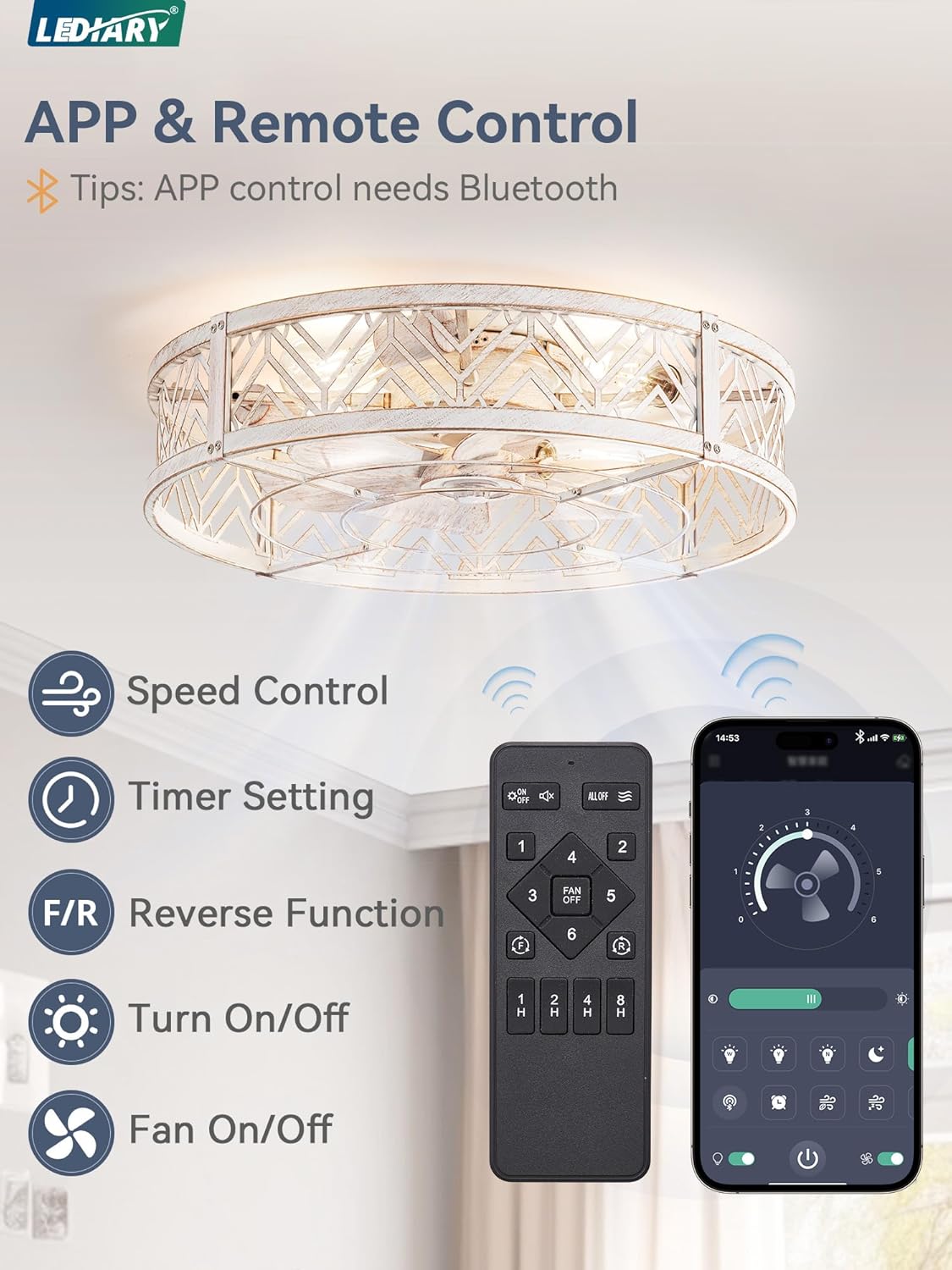
Image: The remote control and a smartphone displaying the LEDIARY app, illustrating the various control options including speed, timer, reverse function, and light/fan on/off.
App Control Functions
For enhanced control, download the LEDIARY app (requires Bluetooth connection). The app provides all remote control functions and potentially more advanced settings.
- Download App: Search for "LEDIARY" in your device's app store.
- Pairing: Follow in-app instructions to pair your fan via Bluetooth.
- Features: Access speed control, timer settings, reversible mode, light and fan on/off, and potentially natural breeze mode.
Reversible Mode
The reversible motor allows for year-round use:
- Summer Mode (Downward Airflow): Creates a cooling breeze by pushing air downwards.
- Winter Mode (Upward Airflow): Circulates warm air trapped near the ceiling, distributing it throughout the room.

Image: Visual explanation of the reversible motor, depicting how downward airflow provides cooling in summer and upward airflow helps distribute warm air in winter.
Maintenance
Regular maintenance ensures optimal performance and longevity of your LEDIARY ceiling fan.
- Cleaning: Dust the fan and light fixture regularly with a soft, damp cloth. Do not use abrasive cleaners or solvents. Ensure power is off before cleaning.
- Bulb Replacement: Turn off power before replacing bulbs. Allow bulbs to cool before handling.
- Motor: The pure copper DC motor is designed for quiet operation and energy efficiency, requiring minimal maintenance.

Image: Detailed views of the fan's internal components, showcasing the powerful copper motor, the light golden painted finish of the cage, and the 7 fan blades, emphasizing the quality of construction.
Troubleshooting
If you encounter issues with your fan, refer to the following common problems and solutions:
| Problem | Possible Cause | Solution |
|---|---|---|
| Fan does not operate. | No power; loose wiring; remote control battery dead. | Check circuit breaker. Ensure all wiring connections are secure. Replace remote control batteries. |
| Light does not turn on. | Bulbs not installed or faulty; loose wiring; light switch off. | Install or replace bulbs. Check wiring connections. Ensure light function is activated on remote/app. |
| Fan makes excessive noise. | Loose screws; fan not mounted securely. | Tighten all mounting screws. Ensure the fan is flush with the ceiling. |
| Remote control not working. | Dead batteries; remote not paired. | Replace AAA batteries. Refer to pairing instructions in the full manual (if applicable). |
Specifications
| Feature | Detail |
|---|---|
| Brand | LEDIARY |
| Model | 23 Inch Caged Ceiling Fan (ASIN: B0F1MX2GGZ) |
| Color | Gold-dusted White |
| Material | Iron |
| Style | Farmhouse |
| Light Fixture Form | Ceiling Fan Light |
| Fan Diameter | 23 inches |
| Height | Approximately 5.3 inches (flush mount) |
| Indoor/Outdoor Usage | Indoor |
| Power Source | DC Motor |
| Special Features | Remote Controlled, Energy Efficient, Timer, 6 Wind Speeds, Reversible Mode |
| Control Method | App, Remote Control |
| Number of Light Sources | 4 |
| Voltage | 120 Volts |
| Bulb Base | E26 (Bulbs Not Included) |
| Recommended Bulb Wattage | Incandescent up to 60W, LED up to 10W |
| Mounting Type | Flush Mount |
| Item Weight | 10 pounds |
| Batteries (Remote) | 2 AAA batteries (included) |
Warranty and Support
LEDIARY is committed to providing high-quality products and customer satisfaction. For any technical support or warranty inquiries, please contact LEDIARY customer service.
- Customer Service: Refer to the contact information provided with your product packaging or visit the official LEDIARY website.
- Warranty: Information regarding product warranty can be found on the LEDIARY official website or by contacting customer support.

Image: The LEDIARY brand logo, representing the manufacturer.
Related documentsLEDIARY 23 Inch Caged Ceiling Fan (B0F1MX2GGZ)

Ask a question about this manual
Ask about setup, troubleshooting, compatibility, parts, safety, or missing instructions. Manuals+ will review the question and use this page’s manual context to help answer it.