
Product Overview
The K&F Concept Flexible Magnetic Phone Tripod MS36 is a versatile accessory designed for stable photography and videography with smartphones and action cameras. Its flexible legs allow for various mounting configurations, and the magnetic attachment provides quick and secure device placement.

Image: The K&F Concept Flexible Magnetic Phone Tripod shown with its magnetic phone holder, a metal ring, a GoPro adapter, and a Bluetooth remote control.
What's in the Box
- Magnetic Flexible Phone Holder x1
- Magnetizer x1
- Safety Strap x1
- Bluetooth Remote Control x1
- Action Camera Adapter x1
Setup Instructions
1. Attaching Your Device
The tripod features a magnetic mounting system for quick attachment. For MagSafe-compatible phones (iPhone 12 and newer), simply snap the phone onto the magnetic holder. For non-MagSafe phones, use the included metal plate or a magnetic case.
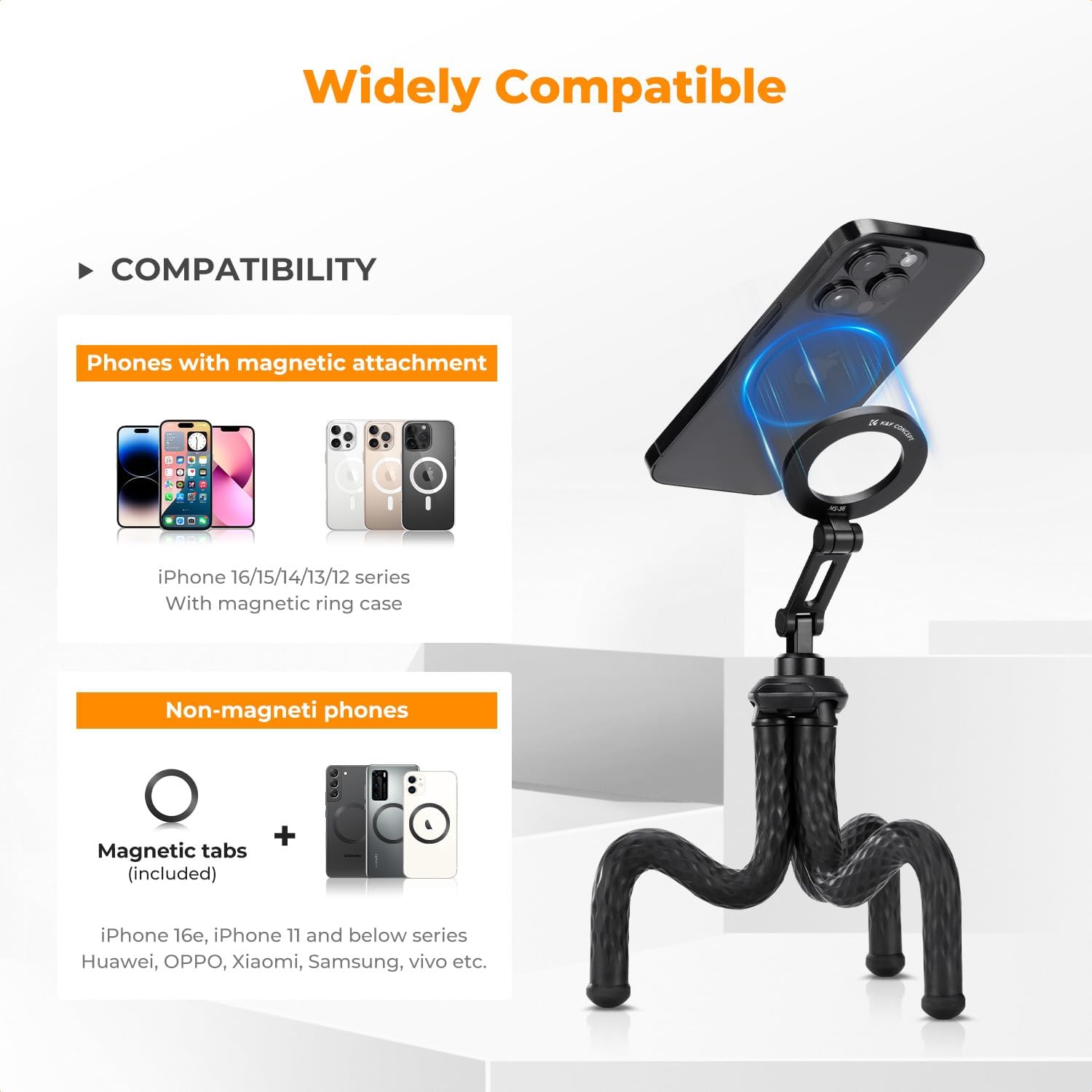
Image: Illustration showing how to attach MagSafe phones directly and non-MagSafe phones using a magnetic tab or case.
For action cameras or other 1/4" screw accessories, attach the appropriate adapter to the tripod head.
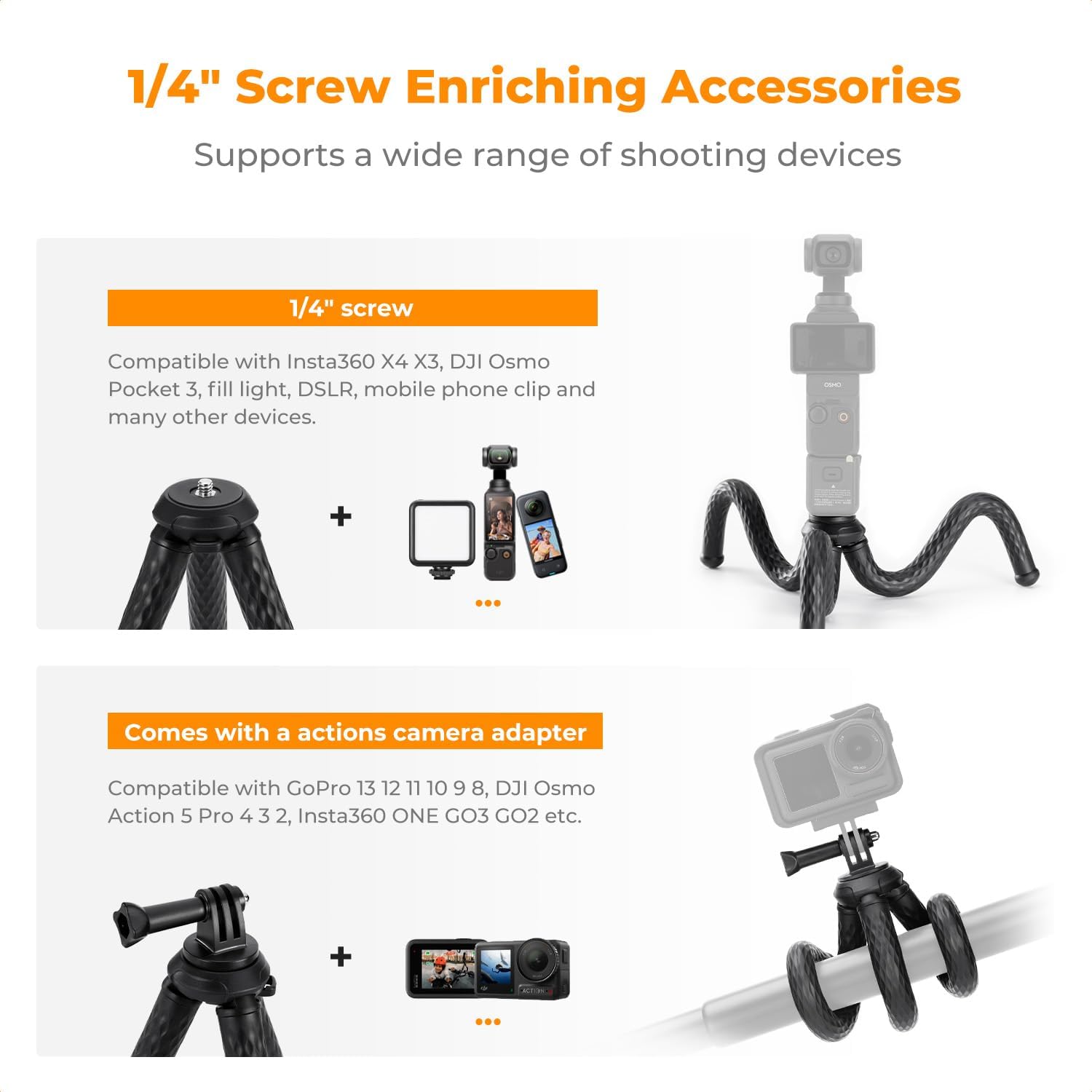
Image: The tripod head with a 1/4" screw mount and an attached GoPro adapter, demonstrating compatibility with various devices.
2. Pairing the Bluetooth Remote Control
- Switch on the Bluetooth remote control. A blue light will blink.
- After the LED light blinks, it enters Bluetooth pairing mode.
- On your smartphone, go to Bluetooth settings and find "AB Shutter 3" (or similar name) and connect to use.

Image: Visual guide demonstrating the three steps to pair the Bluetooth remote control with a smartphone.
Operating Instructions
1. Adjusting the Flexible Legs
The tripod features bendable aluminum core legs with an anti-slip coating. These can be adjusted 360° to achieve horizontal, vertical, or overhead shooting angles. Wrap the legs around objects like poles or branches for secure mounting in various environments.

Image: Close-up of the flexible legs of the tripod, highlighting their bendable nature and silicone anti-slip material.
2. Adjusting the Device Angle
The tripod head allows for precise angle adjustment. Loosen the knob on the side to freely rotate and tilt your device. Tighten the knob to secure the desired position. This enables seamless switching between portrait and landscape orientations.

Image: Examples of the tripod in use, showcasing its flexibility for different shooting scenarios like floating mode, vlogging, and outdoor mounting.
3. Using as a Selfie Stick
The tripod legs can be brought together to form a comfortable grip, allowing it to function as a mini selfie stick. Extend the central column for additional reach.
4. Official Product Videos
Video: K&F Concept MS36 Flexible Magnetic Phone Tripod - A brief overview of the tripod's features and magnetic attachment.
Video: Lightweight Flexible Tripod - Demonstrates the tripod's lightweight design and flexible legs in various usage scenarios.
Maintenance
To ensure the longevity of your K&F Concept Flexible Magnetic Phone Tripod, follow these simple maintenance guidelines:
- Cleaning: Wipe the tripod body and legs with a soft, damp cloth. Avoid using harsh chemicals or abrasive materials that could damage the silicone coating or magnetic surface.
- Storage: Store the tripod in a cool, dry place away from direct sunlight and extreme temperatures.
- Magnetic Care: Keep the magnetic surface clean and free from debris to ensure optimal grip.
Troubleshooting
1. Phone Not Attaching Securely
- Check MagSafe: Ensure your phone is MagSafe compatible (iPhone 12 or newer) or has a MagSafe-compatible case.
- Metal Plate: If your phone is not MagSafe compatible, ensure the included metal plate is correctly attached to your phone or phone case.
- Clean Surface: Verify that both the magnetic holder and your phone/plate surface are clean and free of obstructions.
2. Bluetooth Remote Not Connecting
- Battery Check: Ensure the remote control has sufficient battery power.
- Re-pair: Turn off and on the remote, then re-attempt the pairing process as described in the Setup section.
- Device Bluetooth: Ensure your phone's Bluetooth is enabled and discoverable.
Specifications
| Feature | Detail |
|---|---|
| Product Dimensions | 2.36 x 1.73 x 12.99 inches |
| Item Weight | 13 ounces |
| Item Model Number | KF09.164 |
| Batteries | 1 Lithium Metal battery (included) |
| Brand | K&F CONCEPT |
| Color | Black |
| Compatible Devices | Accessories for 1/4 screw holes, Camera, iPhone, Phone |
| Special Feature | Flexible bending, MagSafe Magnets, Support horizontal and vertical shooting |
| Material | Aluminum, Magnet, Silicone |
| Model Name | MS36 |
| Maximum Height | 23.6 Inches |
| Minimum Height | 30 Centimeters |
| Number of Leg Sections | 3 |
| Folded Size | 30cm |
Warranty and Support
Specific warranty information for the K&F Concept Flexible Magnetic Phone Tripod MS36 is not provided in the product details. For warranty claims or technical support, please contact K&F Concept customer service directly or refer to the official product packaging for detailed information.