
1. Introduction
The ANLEON S0-PRo is a wired, in-ear headphone amplifier designed for personal monitoring applications. It provides a simple and effective solution for musicians, particularly those in fixed stage positions like drummers and keyboard players, to monitor their own performance audio. Its user-friendly design ensures quick setup and operation.
2. Product Features
- Personal Monitoring: Specifically designed for in-ear monitoring, allowing musicians to hear their own mix clearly.
- Volume Control: Features a dedicated volume knob with an integrated on/off switch for easy level adjustment.
- Robust Connectivity: Equipped with a locking XLR input for secure connection and a 3.5mm jack for headphones.
- Compact and Portable: Small dimensions and lightweight design make it easy to transport and integrate into any setup.
- Long Battery Life: Internal 350mAh battery provides approximately 14 hours of operation.
- Quick Charging: Fully charges in approximately 2 hours.
3. Package Contents
The ANLEON S0-PRo package typically includes:
- ANLEON S0-PRo Personal In-Ear Monitor Headphone Amplifier
- User Manual
- Note: A 1/4" TRS to XLR Male cable is not included and must be purchased separately.
4. Setup
- Power On/Off: Rotate the volume knob clockwise to turn the unit on. A green LED indicator will illuminate. Rotate counter-clockwise until it clicks to turn off.
- Connect Audio Input: Connect an XLR cable (not included) from your audio source (e.g., mixing console, audio interface) to the XLR input port on the S0-PRo. The XLR input features a locking mechanism for secure connection.
- Connect Headphones: Plug your in-ear monitors or headphones into the 3.5mm stereo jack output.
- Charging: To charge the device, connect a USB charging cable (not included) to the charging port. The charging time is approximately 2 hours.

Image: The ANLEON S0-PRo unit shown connected to an XLR cable at the bottom and a USB charging cable on the side. This illustrates the input and charging connections.

Image: A close-up view of the bottom of the ANLEON S0-PRo, highlighting the 3.5mm headphone output jack and the volume control knob with its triangular indicator.
XLR Pinout Information:
For proper connection, note the XLR pinout configuration:
- XLR pin 1 is connected to the 1/4″ plug sleeve.
- XLR pin 2 is connected to the 1/4″ plug tip.
- XLR pin 3 is connected to the 1/4″ plug ring.
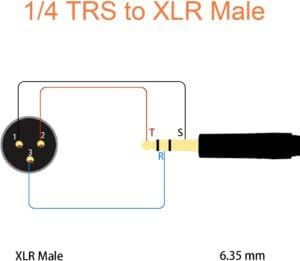
Image: A wiring diagram illustrating the connection between a 1/4" TRS plug and an XLR Male connector, detailing which pins correspond to the tip, ring, and sleeve for proper audio signal transmission.
5. Operating Instructions
- Power On: Ensure the S0-PRo is charged or has sufficient battery life. Turn the volume knob clockwise to power on the device. The green indicator light will confirm it is active.
- Set Volume: Slowly rotate the volume knob to adjust the monitoring level to a comfortable listening volume. Start with a low volume and gradually increase it to avoid sudden loud sounds.
- Monitor Audio: Once connected and powered on, you will hear the audio signal from your source through your connected headphones.
- Power Off: When finished, rotate the volume knob counter-clockwise until it clicks to power off the unit. This conserves battery life.
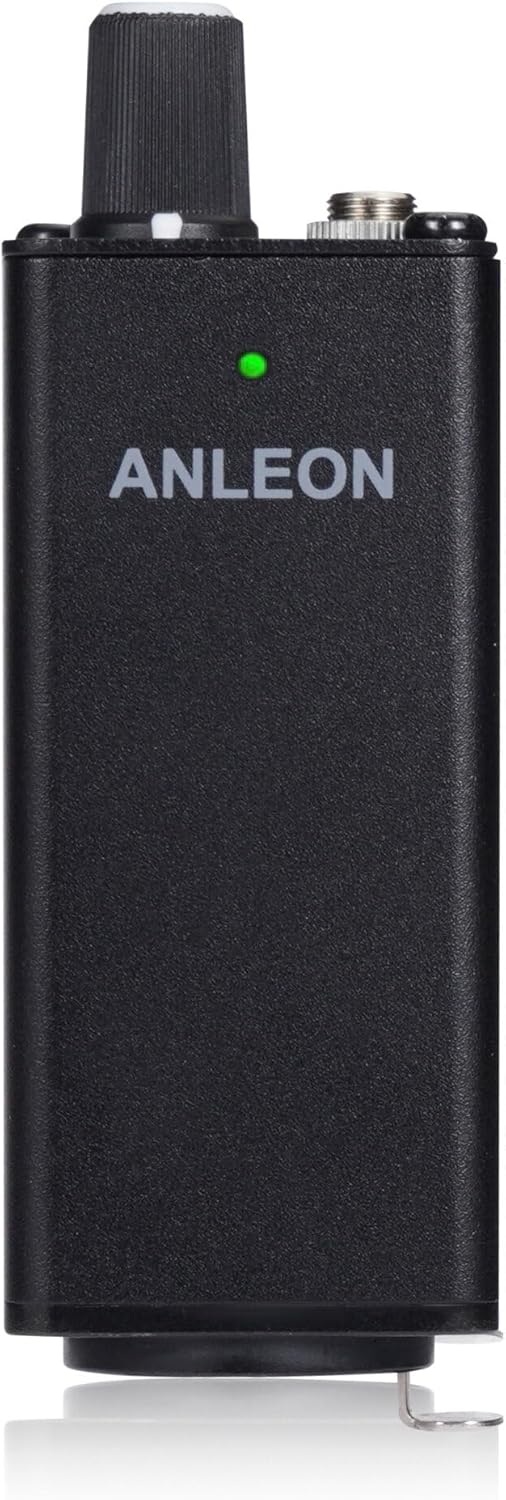
Image: The front view of the ANLEON S0-PRo, showing the brand name and a small green LED indicator light, which signifies the unit is powered on.
6. Maintenance
- Cleaning: Use a soft, dry cloth to clean the exterior of the device. Do not use liquid cleaners or solvents.
- Storage: Store the S0-PRo in a cool, dry place away from direct sunlight and extreme temperatures.
- Battery Care: For optimal battery life, avoid fully discharging the battery frequently. Charge the device regularly, even if not in use for extended periods.
- Avoid Moisture: Keep the device away from water and high humidity to prevent damage to internal components.
7. Troubleshooting
| Problem | Possible Cause | Solution |
|---|---|---|
| No sound from headphones. |
|
|
| Distorted sound. |
|
|
| Unit not charging. |
|
|
8. Specifications
| Feature | Detail |
|---|---|
| Input | XLR, stereo (XLR pin 1 to 1/4″ plug sleeve, XLR pin 2 to 1/4″ plug tip, XLR pin 3 to 1/4″ plug ring) |
| Output | 3.5 mm jack, stereo |
| Max. Output Power | 2 x 100 mW @ 16 Ω |
| Headphone Impedance | 32-600 Ohm |
| Dimensions | 30 x 30 x 90 mm (approx. 1.18"D x 1.18"W x 3.54"H) |
| Battery | 350mAh |
| Battery Life | ~14 hours |
| Charging Time | Typ. 2 hours |
| Weight | 90g (approx. 3.17 oz) |
| Color | Black |
| Material | Aluminum |
9. Warranty and Support
ANLEON products are designed for reliability and performance. For warranty information and technical support, please refer to the official ANLEON website or contact your local distributor.
Please retain your proof of purchase for any warranty claims.


