
ZMISHIBO Y23FSD0019- 4801
ZMISHIBO 52" Ceiling Fan with Lights User Manual
Model: Y23FSD0019- 4801
1. Introduction
Thank you for purchasing the ZMISHIBO 52" Ceiling Fan with Lights. This manual provides detailed instructions for the safe installation, operation, and maintenance of your new ceiling fan. Please read this manual thoroughly before attempting to install or operate the fan and retain it for future reference.
This ceiling fan features a quiet DC motor, integrated LED lighting with adjustable color temperatures, and convenient remote control functionality. It is designed for indoor use in rooms ranging from 12 ft. x 12 ft. to 18 ft. x 18 ft.
2. Safety Information
WARNING: To reduce the risk of fire, electric shock, or personal injury, always follow these basic precautions:
- Read all instructions and safety information carefully before installing your fan and save these instructions.
- All wiring must be in accordance with national and local electrical codes. Electrical installation should be performed by a qualified licensed electrician.
- The fan must be mounted to an outlet box securely fastened to the building structure and capable of supporting a minimum of 35 lbs (15.9 kg).
- Ensure the installation site does not allow the rotating fan blades to contact any object. The minimum distance from the blade edge to the wall or nearest obstruction should be 7 feet (2.1 meters).
- Do not operate the fan with damaged wiring or if the fan is not functioning properly.
- Do not insert objects into the path of the fan blades while the fan is operating.
- Turn off power at the circuit breaker or fuse box before beginning installation or performing maintenance.
3. Package Contents
Verify that all components listed below are included in your package. If any parts are missing or damaged, contact ZMISHIBO customer support.
- Motor Housing Assembly
- Fan Blades (5 pieces, dual-sided black/white finish)
- Light Kit with LED Module
- Remote Control (requires 2 AAA batteries, included)
- Downrods (4-inch and 8-inch options)
- Mounting Bracket
- Canopy
- Hardware Pack (screws, washers, wire nuts, etc.)
- Instruction Manual
4. Specifications
| Feature | Specification |
|---|---|
| Brand | ZMISHIBO |
| Model Name | Y23FSD0019- 4801 |
| Size | 52 Inch |
| Color | Gold |
| Power Source | DC Motor |
| Voltage | 120 Volts |
| Number of Fan Speeds | 6 |
| Light Type | Integrated LED (18W, 1500LM) |
| Color Temperatures | 3 (3000K Warm, 4500K Neutral, 6000K Cool) |
| Noise Level | ≤30 dB |
| Control Method | Remote Control |
| Timer Settings | 1H, 4H, 8H |
| Recommended Room Size | 12 ft. x 12 ft. to 18 ft. x 18 ft. |
| Mounting Options | Flat Ceiling, Sloped Ceiling (<15°) |
| Included Downrods | 4-inch and 8-inch |
5. Installation (Setup)
Before beginning installation, ensure the power is turned off at the circuit breaker. It is recommended to have a second person assist with the installation.
5.1 Prepare for Installation
- Unpack all components and lay them out on a soft surface to prevent scratches.
- Identify the mounting location. Ensure the ceiling joist can support the fan's weight and that there is sufficient clearance for the blades.
- Choose the desired downrod length (4-inch or 8-inch) based on your ceiling height.
- Decide on the blade finish (black or white) and ensure all blades are oriented consistently.

Image: Product dimensions and mounting options, including 4-inch and 8-inch downrods, and compatibility with flat or sloped ceilings (up to 15 degrees).
5.2 Mounting the Bracket
- Secure the mounting bracket to the ceiling outlet box using the screws and washers provided. Ensure the bracket is firmly attached and can support the fan's weight.
5.3 Assembling the Fan
- Feed the electrical wires from the motor housing through the chosen downrod.
- Attach the downrod to the motor housing and secure it with the provided pin and screw.
- Carefully lift the fan assembly and hang it on the mounting bracket hook.
- Connect the electrical wires from the fan to the household wiring according to the wiring diagram in the full instruction manual (Live to Live, Neutral to Neutral, Ground to Ground). Use the provided wire nuts.
- Attach the fan blades to the motor housing using the blade screws. Ensure they are securely fastened. The blades are reversible, offering a black or white finish.

Image: Dual-sided fan blades with black and white finishes.
5.4 Installing the Light Kit and Canopy
- Connect the light kit wires to the corresponding wires from the motor housing.
- Attach the light kit to the bottom of the motor housing.
- Slide the canopy up to the ceiling and secure it to the mounting bracket with the canopy screws.
6. Operation
Your ZMISHIBO ceiling fan is controlled by the included remote control. Ensure the 2 AAA batteries are correctly installed in the remote.

Image: Remote control with labeled functions.
6.1 Fan Control
- Fan ON/OFF: Press the fan button to turn the fan on or off.
- Speed Control: Use the speed buttons (1-6) to adjust the fan speed. Level 1-2 is for low wind (sleeping), 3-4 for medium wind (working), and 5-6 for high wind (sports/strong airflow).
- Reversible Mode: Press the reverse button on the remote to change the direction of the fan blades. This allows for downward cooling airflow in summer and upward circulating warm airflow in winter.

Image: Reversible fan mode for summer cooling and winter warmth circulation.
6.2 Light Control
- Light ON/OFF: Press the light button to turn the LED light on or off.
- Adjust Color Temperature: While the light is on, press the light button repeatedly to cycle through the three color temperatures: 3000K (Warm Light), 4500K (Neutral Light), and 6000K (Cool Light). The fan features a light memory function, retaining the last selected color temperature.
- Wall Switch Control: The light can also be turned on/off using a standard wall switch. Short time flipping the wall switch can also change the color temperature.
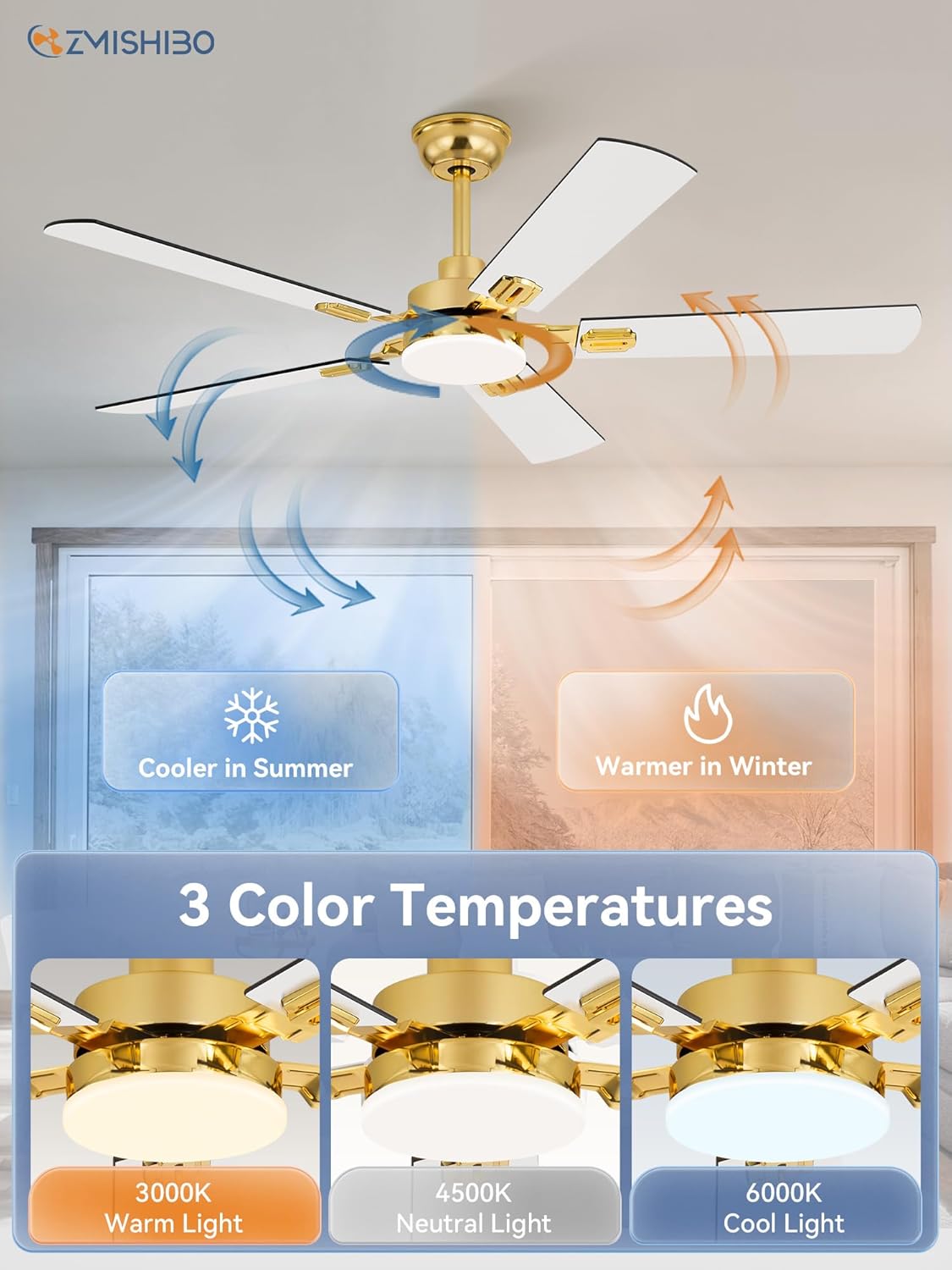
Image: Three adjustable color temperatures: 3000K Warm, 4500K Neutral, 6000K Cool.
6.3 Timer Function
- Press the 1H, 4H, or 8H button on the remote to set the fan to automatically turn off after 1, 4, or 8 hours, respectively.
7. Maintenance
Regular maintenance helps ensure the longevity and optimal performance of your ceiling fan.
- Cleaning: To clean the fan, wipe with a soft, damp cloth. Do not use abrasive cleaners or solvents, as these may damage the finish or electrical components.
- Blade Cleaning: Dust the fan blades regularly to prevent dust buildup, which can affect balance and airflow.
- Tighten Fasteners: Periodically check all screws and fasteners on the fan and mounting hardware to ensure they are secure. Loose connections can cause noise or wobble.
- No Lubrication Needed: The DC motor is permanently lubricated and does not require oiling.
8. Troubleshooting
If you experience issues with your ceiling fan, refer to the following troubleshooting guide. If the problem persists, contact ZMISHIBO customer support.
| Problem | Possible Cause | Solution |
|---|---|---|
| Fan does not start | No power to the fan; Loose wire connections; Remote control battery dead or not paired. | Check circuit breaker/fuse; Ensure all wire connections are secure; Replace remote batteries or re-pair remote (refer to full manual for pairing instructions). |
| Light does not work | Loose wire connection to light kit; LED module failure; Remote control issue. | Check light kit wiring; Ensure remote batteries are fresh; Contact customer support if LED module is suspected to be faulty. |
| Fan wobbles | Loose blade screws; Unbalanced blades; Loose mounting bracket. | Tighten all blade screws; Ensure blades are installed correctly; Check mounting bracket for secure attachment. |
| Noisy operation | Loose screws; Fan not properly balanced; Obstruction. | Check and tighten all screws; Ensure no wires are rubbing against the canopy; Verify blades are balanced. |
| Remote control not responding | Dead batteries; Remote not paired with receiver. | Replace AAA batteries; Refer to the full instruction manual for remote pairing procedures. |
9. Warranty and Support
ZMISHIBO stands behind the quality of its products.
- Motor Warranty: The fan motor is covered by a 5-year warranty.
- Other Parts Warranty: All other parts of the fan are covered by a 2-year warranty.
For technical assistance, warranty claims, or to order replacement parts, please contact ZMISHIBO customer support. Please have your model number (Y23FSD0019- 4801) and purchase date available when contacting support.
Related documentsY23FSD0019- 4801


Ask a question about this manual
Ask about setup, troubleshooting, compatibility, parts, safety, or missing instructions. Manuals+ will review the question and use this page’s manual context to help answer it.