
1. Introduction and Overview
This manual provides comprehensive instructions for the ALLIMITY Replacement Remote Control, designed specifically for use with TaoTronics Soundbar models TT-SK016 and TT-SK017. This remote serves as a direct replacement for your original or damaged remote control, offering seamless functionality without the need for complex setup or programming.
The remote control is engineered for ease of use, allowing you to manage your soundbar's functions efficiently, including power, volume, input selection, and playback controls.
2. Product Features
- Direct replacement for TaoTronics Soundbar TT-SK016 remote control.
- Compatible with TaoTronics Soundbar models TT-SK016 and TT-SK017.
- No setup or programming required; ready to use with new batteries.
- Ergonomic design for comfortable handling.
- Durable construction for long-lasting performance.
3. Package Contents
Please verify that all items are present and in good condition upon opening the package:
- 1 x ALLIMITY Replacement Remote Control (Batteries not included)
4. Setup: Battery Installation
The remote control requires two AAA batteries (not included) for operation. Follow these steps to install the batteries:
- Locate the battery compartment on the back of the remote control.
- Slide the battery compartment cover downwards or in the direction indicated by the arrow to open it.
- Insert two 1.5V AAA batteries, ensuring the positive (+) and negative (-) terminals align correctly with the markings inside the compartment.
- Slide the battery compartment cover back into place until it clicks securely.
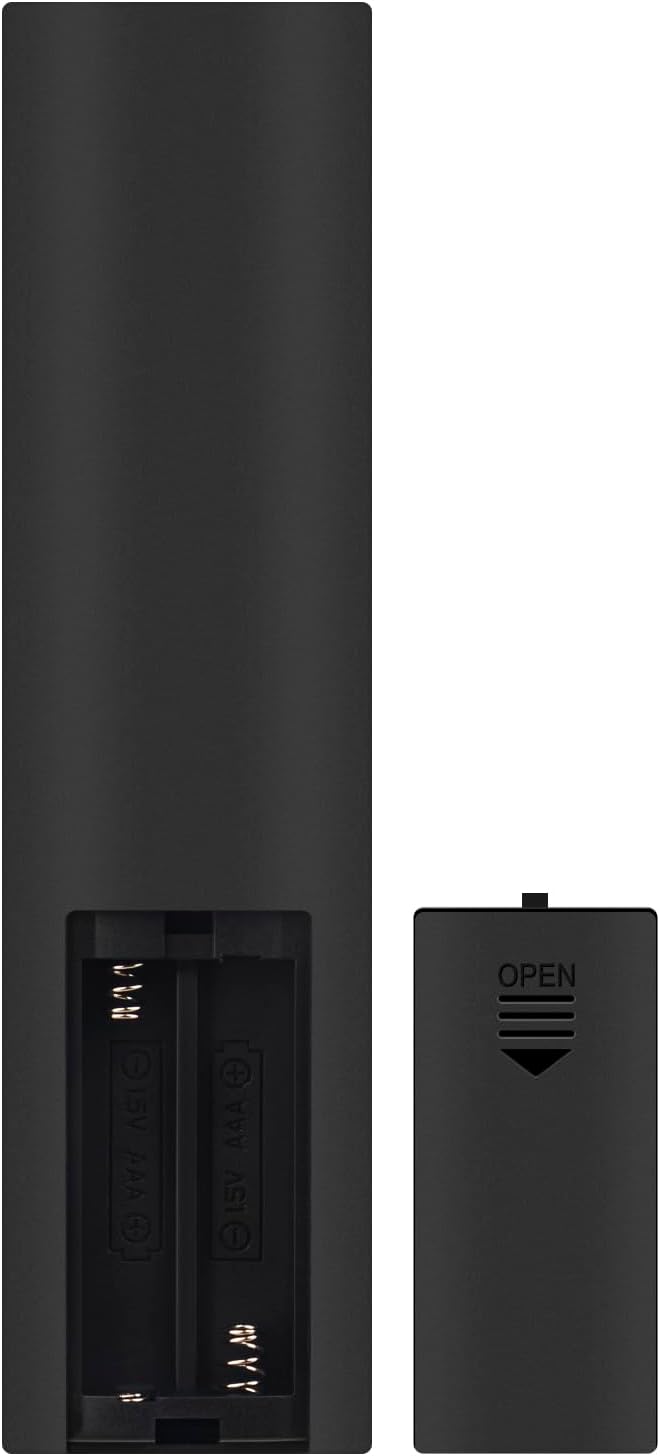 Figure 4.1: Battery compartment on the back of the remote control.
Once batteries are installed, the remote is ready for use. No additional pairing or programming is necessary for compatible TaoTronics soundbars.
5. Operating Instructions
This remote control provides full functionality for your TaoTronics Soundbar TT-SK016 or TT-SK017. Ensure there is a clear line of sight between the remote and the soundbar's infrared receiver.
 Figure 5.1: Layout of the remote control buttons.
Button Functions:
| Button | Function |
|---|---|
| Power (⏻) | Turns the soundbar On or Off. |
| Mute (🔇) | Mutes or unmutes the sound. |
| Volume Up (+) | Increases the soundbar volume. |
| Volume Down (-) | Decreases the soundbar volume. |
| Play/Pause (⏸) | Plays or pauses audio playback. |
| Previous Track (⏮) | Skips to the beginning of the current track or the previous track. |
| Next Track (⏭) | Skips to the next track. |
| AUDIO | Selects the Audio input source. |
| AUX | Selects the AUX input source. |
| BT | Selects the Bluetooth input source. |
| OPT | Selects the Optical input source. |
| COAX | Selects the Coaxial input source. |
For detailed information on specific soundbar functions, please refer to the original instruction manual of your TaoTronics Soundbar TT-SK016 or TT-SK017.
6. Maintenance
To ensure the longevity and optimal performance of your remote control, follow these maintenance guidelines:
- Cleaning: Wipe the remote control with a soft, dry cloth. Do not use liquid cleaners or abrasive materials, as they may damage the surface or internal components.
- Battery Replacement: Replace batteries when the remote's responsiveness decreases or it stops functioning. Always replace both batteries at the same time with new ones of the same type (AAA).
- Storage: If the remote will not be used for an extended period, remove the batteries to prevent leakage and potential damage. Store the remote in a cool, dry place.
- Avoid Damage: Do not drop the remote control or expose it to extreme temperatures, humidity, or direct sunlight.
7. Troubleshooting
If you experience issues with your remote control, please consult the following troubleshooting tips:
- Remote not responding:
- Check if the batteries are inserted correctly with the correct polarity (+/-).
- Replace old batteries with new 1.5V AAA alkaline batteries.
- Ensure there is a clear line of sight between the remote control and the soundbar's infrared receiver. Remove any obstructions.
- Make sure you are within the effective operating range of the soundbar.
- Specific buttons not working:
- This may indicate a faulty button or a specific issue with the soundbar's function. Try replacing batteries first.
- Remote works intermittently:
- Batteries may be low. Replace them.
- Ensure no strong light sources (like direct sunlight or bright fluorescent lights) are interfering with the IR signal.
If the problem persists after trying these steps, please contact the seller or manufacturer for further assistance.
8. Specifications
| Attribute | Detail |
|---|---|
| Model Number | CV-TT-SK016-SH |
| Compatible Models | TaoTronics Soundbar TT-SK016, TT-SK017 |
| Power Supply | 2 x 1.5V AAA Batteries (not included) |
| Dimensions (L x W x H) | 5 x 1.38 x 0.72 inches (12.7 x 3.5 x 1.8 cm) |
| Item Weight | 1.59 ounces (45 grams) |
| Color | Black |
| Connectivity Technology | Infrared (IR) |
 Figure 8.1: Remote control dimensions.
9. Warranty and Support
This ALLIMITY replacement remote control is designed to provide reliable performance. Specific warranty details may vary depending on your purchase location and retailer. Please retain your proof of purchase for any warranty claims.
For technical support, troubleshooting assistance beyond what is provided in this manual, or inquiries regarding warranty, please contact the seller or ALLIMITY customer service through the platform where the product was purchased. Provide your order number and a detailed description of the issue for prompt assistance.
For general information about ALLIMITY products, you may visit their official channels or the product listing page.