
1. Introduction
This manual provides essential information for the safe and efficient use of your E-LekTech 48V 100Ah LiFePO4 Lithium Battery. This battery is designed for various applications including off-grid systems, home energy storage, recreational vehicles (RVs), and marine environments. Please read this manual thoroughly before installation and operation to ensure optimal performance and longevity of your battery.
2. Product Features
- Touch Screen & APP Monitoring: Features a touchable smart display for real-time battery monitoring and an accompanying mobile application for remote access to battery information.
- Upgraded LiFePO4 Cells: Constructed with high-energy-density cells for stable performance and increased power output. Offers 5.12kWh energy capacity with a maximum output power of 2.56kW.
- Long Life & Deep Cycle: Designed for over 10,000 cycles and a lifespan of up to 10 years, providing a reliable alternative to traditional lead-acid batteries.
- Built-in 200A BMS: Integrated 200A intelligent Battery Management System (BMS) provides protection against overcharge, overdischarge, overcurrent, short circuit, high-temperature cut-off, and low-temperature cut-off.
- Expandable Capacity: Supports expansion up to 6 parallel circuits for increased capacity, compatible with solar panels, MPPT controllers, and inverters.
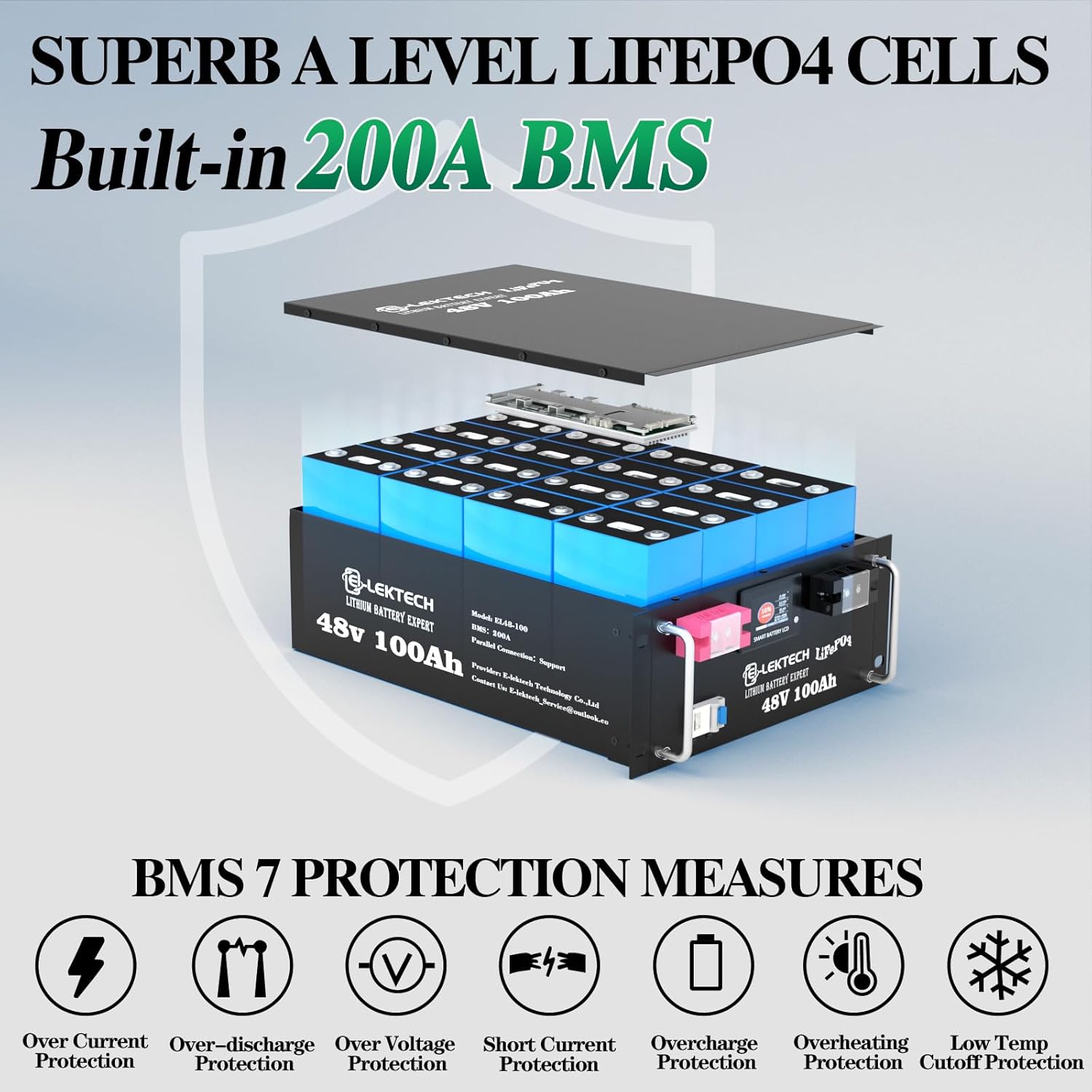
Figure 2.1: Internal structure and BMS protection features. The 200A BMS provides comprehensive protection including overcurrent, over-discharge, over-voltage, short circuit, overcharge, overheating, and low-temperature cutoff.
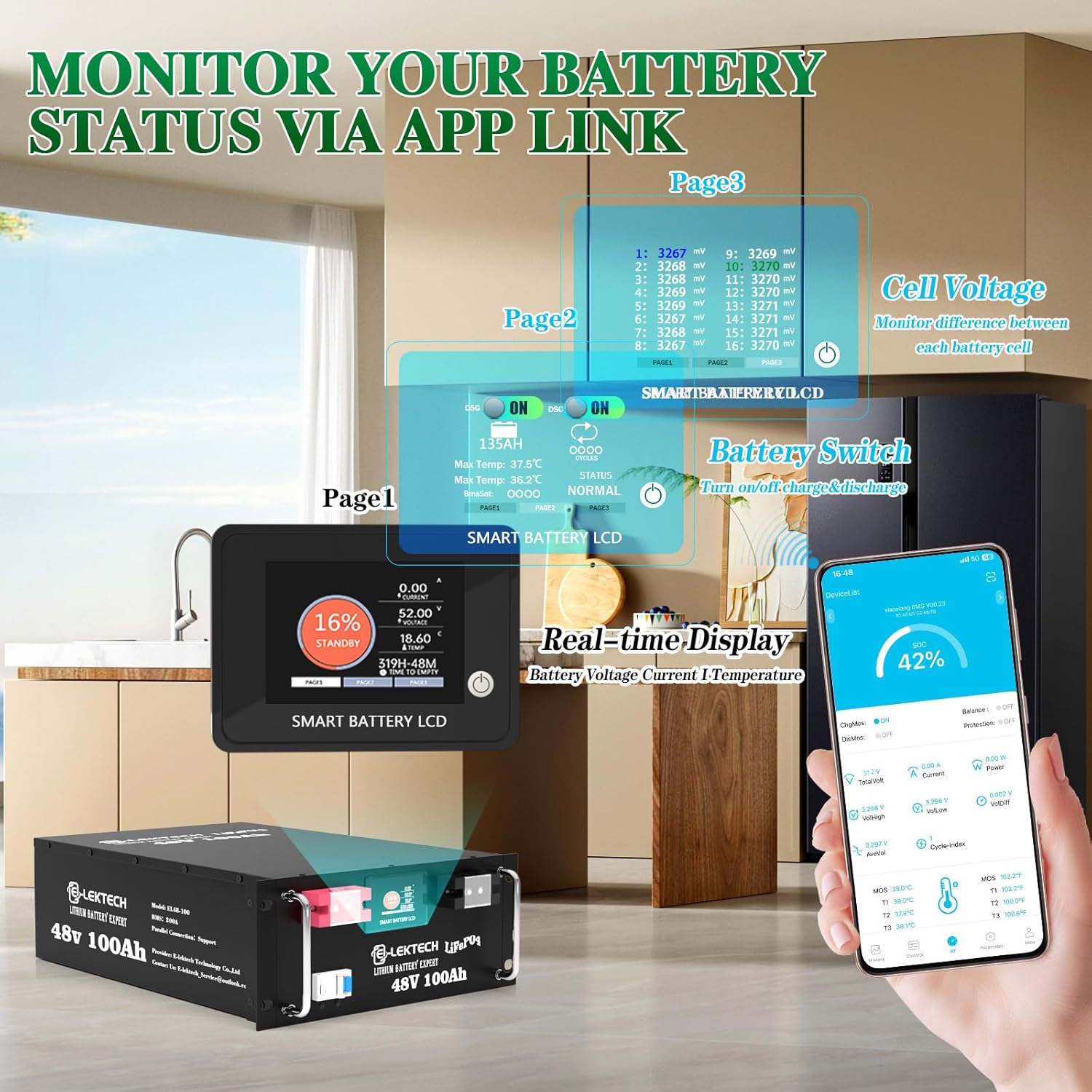
Figure 2.2: Battery monitoring via integrated touch screen and smartphone application. The display shows real-time voltage, current, temperature, and state of charge, while the app provides detailed cell voltage and overall battery status.
3. Setup and Installation
Before installation, ensure all components are present and undamaged. Position the battery in a well-ventilated area, away from direct sunlight, heat sources, and flammable materials. Ensure proper clearance for air circulation around the battery.
3.1 Parallel Connection
The E-LekTech 48V 100Ah LiFePO4 battery supports expansion up to 6 parallel circuits. When connecting multiple batteries in parallel, it is crucial to fully charge each battery separately to a voltage-balanced state before making connections. Always use batteries of the same brand and model for parallel connections to ensure compatibility and optimal performance. Connect the positive terminals together and the negative terminals together. Ensure all connections are secure and properly torqued.
3.2 Charging Methods
The battery can be charged using various methods, including solar systems, dedicated battery chargers, and generators. Ensure that the charging source is compatible with 48V LiFePO4 batteries and provides appropriate charging parameters (voltage and current) to prevent damage.

Figure 3.1: Multiple charging methods for the battery, including solar power, AC charger, and generator.

Figure 3.2: Example of the battery integrated into a home solar system for balanced power and energy storage.
4. Operating Instructions
4.1 Powering On/Off
To power on the battery, press and hold the power button on the integrated touch screen until the display illuminates. To power off, repeat the process. Ensure all loads are disconnected before powering off for safety.
4.2 Monitoring with Touch Screen and APP
The integrated touch screen provides real-time data such as voltage, current, temperature, and state of charge. For advanced monitoring, download the E-LekTech application on your smartphone. The app allows you to view detailed battery information, including individual cell voltages, and manage settings remotely. Refer to the app's instructions for pairing and usage.
Video 4.1: An overview of the E-LekTech LiFePO4 battery, demonstrating its compact size and suitability for various portable applications like RVs, camping, and marine use. This video highlights the battery's versatility for powering your adventures.
5. Maintenance
The E-LekTech LiFePO4 battery requires minimal maintenance. Regularly inspect the battery terminals for cleanliness and tightness. Ensure the battery is kept within its specified operating temperature range. The built-in BMS manages cell balancing and protection, reducing the need for manual intervention.
5.1 Temperature Considerations
The battery features automatic temperature cut-off protection. Charging will stop if the temperature drops below -20°C (-4°F) and will resume when the temperature recovers to -20°C (-4°F) or above. Discharging will stop if the temperature drops below -30°C (-22°F) to prevent damage. Avoid operating the battery outside these temperature limits for extended periods.

Figure 5.1: Automatic temperature cut-off features protect the battery in cold conditions, stopping charging below -20°C (-4°F) and discharging below -30°C (-22°F).
6. Troubleshooting
If you encounter issues with your E-LekTech battery, consider the following general troubleshooting steps:
- No Power Output: Check all cable connections for tightness and proper polarity. Verify the battery's state of charge via the display or app. Ensure the battery is not in a protective state (e.g., due to over-discharge, over-temperature).
- Charging Issues: Confirm the charger is compatible and functioning correctly. Check charging cable connections. Ensure ambient temperature is within the allowed charging range.
- APP Connectivity Problems: Ensure Bluetooth is enabled on your device and the battery is within range. Restart the app and the battery if necessary.
- Unusual Behavior: If the battery exhibits unexpected behavior, disconnect it from all loads and charging sources immediately. Contact customer support for further assistance.
7. Specifications
| Feature | Specification |
|---|---|
| Brand | E-LekTech |
| Model Name | 48V-TB-004 |
| Voltage | 48 Volts |
| Capacity | 100Ah |
| Energy Capacity | 5.12kWh |
| Maximum Output Power | 2.56kW |
| BMS | Built-in 200A Intelligent BMS |
| Battery Cell Composition | Lithium Iron Phosphate (LiFePO4) |
| Cycle Life | More than 10,000 cycles |
| Lifespan | Up to 10 years |
| Parallel Connection | Supports up to 6 units in parallel |
| Item Weight | 89 pounds |
| Package Dimensions | 22 x 16 x 7 inches |
| Charging Temperature Range | Above -20°C (-4°F) |
| Discharging Temperature Range | Above -30°C (-22°F) |

Figure 7.1: Product dimensions (L*H*W: 19.30 x 6.1 x 15.07 inches) and weight (89 lbs).
8. Applications
The E-LekTech 48V 100Ah LiFePO4 battery is highly versatile and suitable for a wide range of applications requiring reliable and long-lasting power. Its robust design and advanced features make it ideal for:
- Off-Grid Solar Systems
- Home Energy Storage
- Recreational Vehicles (RVs) and Motorhomes
- Marine Applications
- Golf Carts
- Emergency Backup Power

Figure 8.1: The battery providing backup power for a solar-equipped home.

Figure 8.2: Diverse applications of the E-LekTech LiFePO4 battery, including RVs, off-grid setups, marine vessels, golf carts, and emergency power for camping.
9. Warranty and Support
For warranty information, please refer to the product packaging or the official E-LekTech website. If you require technical assistance, have questions about installation, or need to report an issue, please contact E-LekTech customer support. You can typically find contact details on the product's purchase page or the manufacturer's website.
Customer Support: For inquiries, please visit the E-LekTech Store on Amazon or refer to the contact information provided with your purchase.