
Introduction
The FrSky Tandem X18RS is a high-performance aircraft radio transmitter designed for precision control and long-range capabilities in RC helicopters and FPV drones. It features a built-in TD-ISRM RS Dual-Band Internal RF Module supporting 900M/2.4G frequencies, ensuring reliable signal transmission. This manual provides essential information for the safe and effective use of your X18RS radio system.
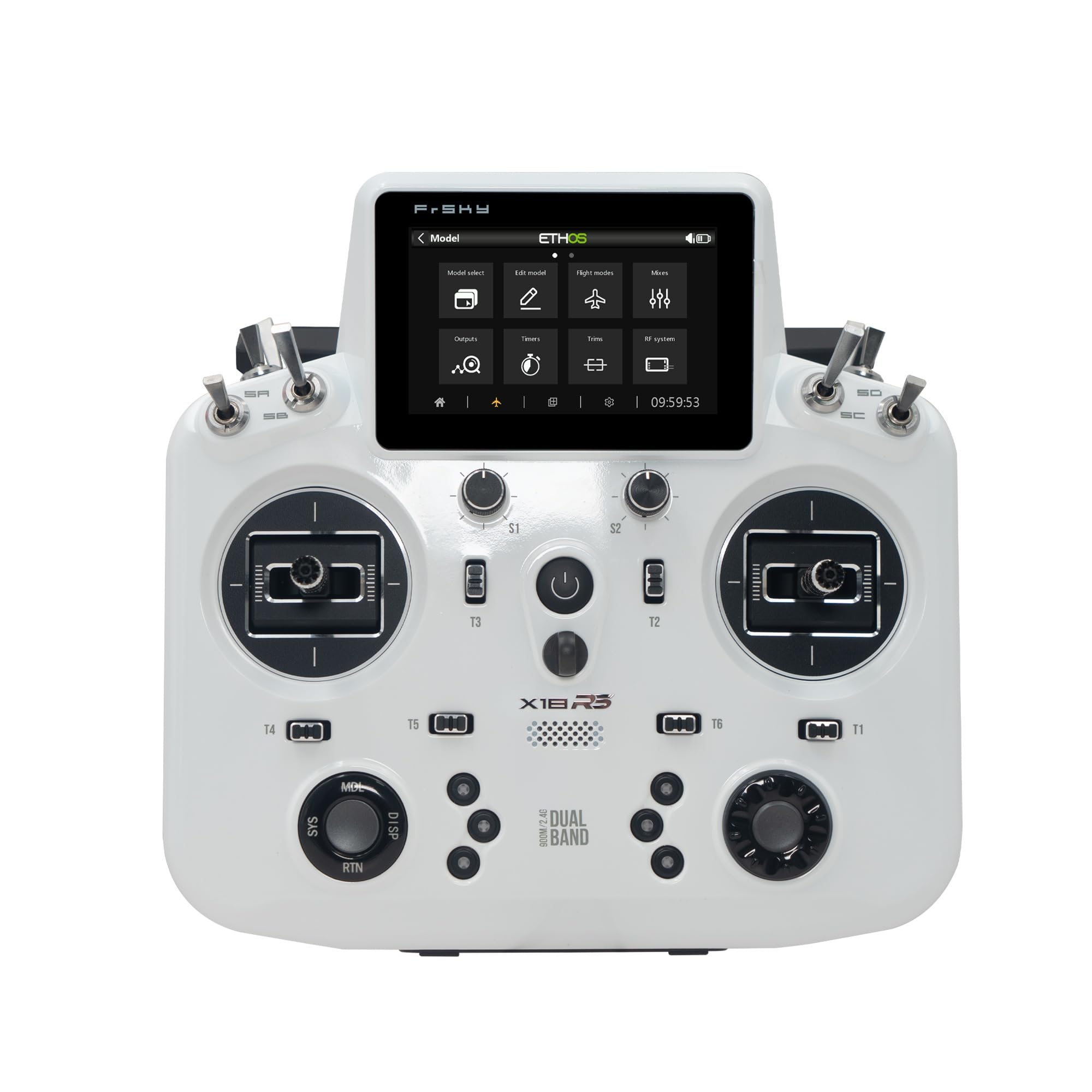
Image 1: The FrSky Tandem X18RS TD-ISRM RS RF Module, showcasing its design and controls. This radio transmitter is designed for remote control aircraft applications.
Safety Information
Important: This product is not intended for use by children. Always operate the radio transmitter responsibly and in accordance with local regulations and guidelines for remote-controlled aircraft. Failure to do so may result in injury or damage to property. Ensure you understand all functions and safety procedures before operating your aircraft.
Features
- Built-in TD-ISRM RS Dual-Band Internal RF Module: Supports 900M/2.4G TD Mode, Dual 2.4G TW Mode, ACCESS 2.4G & ACCESS R9 Modes, and 2.4G ACCST D16 Mode.
- Low-Latency and Long-Range Control: Provides reliable control with telemetry feedback.
- Upgraded Robust Antenna Handle: Designed for durability and optimal signal transmission.
- External Antenna Connectors: Includes 900M/2.4G connectors for LoRa mode, enhancing range and stability.
- High Brightness Touchscreen: An 800x480 resolution display ensures clear visibility, even outdoors.
- Ergonomic Controls: Features easy-to-reach top switches, sliders, 2 knobs, 4 standard trims, and 2 extra trims.
- Customizable Buttons: Includes 6 quick-mode custom buttons on the front and 2 momentary buttons on the rear.
- Premium Build Quality: All knobs and trims are equipped with CNC metal caps.
- Internal Storage: Built-in 512MB Flash Drive for data storage.
- Integrated Gyroscope: Features a built-in 6-axis gyroscope sensor for enhanced control and stability.
- Wireless Training System: High-Speed PARA Wireless Training System for practice and instruction.
- USB Type-C Interface: Supports data transmission and recharging for 2S Li-ion batteries.
- Feedback Systems: Provides haptic vibration alerts and voice speech outputs.
- High-Precision Gimbals: MC18 All CNC Hall-Sensor Gimbals with 10 ball-bearings.
- Adjustable Stick Travel: Gimbals allow for adjustable 45° / 60° stick travel (requires additional limiter tool).
What's in the Box
Upon unpacking your FrSky Tandem X18RS, you should find the following components:
- FrSky Tandem X18RS Radio Transmitter
- (Additional accessories such as USB-C cable, neck strap, or manual may be included depending on the package version.)
Setup
- Initial Charge: Before first use, fully charge the internal 2S Li-ion battery using a compatible USB Type-C charger (5V, >2.0A). The charging current is approximately 1A.
- Power On: Press and hold the power button to turn on the transmitter. The ETHOS operating system will boot up.
- System Language: Configure the system language and initial settings via the touchscreen interface.
- Model Creation: Create a new model for your aircraft. Refer to the ETHOS operating system manual for detailed instructions on model setup, including channel assignments, mixes, and flight modes.
- Receiver Binding: Bind your FrSky receiver to the X18RS transmitter. The binding procedure varies depending on the receiver type (TD, TW, ACCESS, ACCST D16). Consult your receiver's manual for specific binding steps. Ensure the transmitter's internal RF module is set to the correct mode (e.g., TD Mode, ACCESS Mode).
- Range Check: Always perform a range check before flying to ensure proper communication between the transmitter and receiver.
- Gimbal Calibration: If necessary, calibrate the MC18 Hall-Sensor Gimbals through the system settings for optimal precision.
Operation
The FrSky Tandem X18RS operates on the ETHOS system, providing a user-friendly interface for controlling your RC models.
- Touchscreen Navigation: Use the 800x480 touchscreen to navigate menus, adjust settings, and monitor telemetry data.
- Gimbal Control: The MC18 Hall-Sensor Gimbals provide precise control over your aircraft's movements. Adjust stick travel if desired using the appropriate limiter tool.
- Switches and Knobs: Utilize the various switches, sliders, and knobs for controlling auxiliary functions, flight modes, and fine-tuning adjustments. Customize their functions within the ETHOS system.
- Telemetry: Monitor real-time telemetry data from your receiver and sensors, such as battery voltage, signal strength, and GPS information, directly on the transmitter's display.
- Voice and Haptic Alerts: The transmitter provides audible voice alerts and haptic (vibration) feedback for critical warnings or status changes.
- Wireless Training: Connect wirelessly to another FrSky transmitter for training purposes using the PARA Wireless Training System.
Maintenance
- Cleaning: Use a soft, dry cloth to clean the transmitter's exterior. Avoid using harsh chemicals or solvents. For the touchscreen, use a screen-specific cleaner if necessary.
- Battery Care: Store the transmitter with the battery partially charged (around 3.8V per cell) if not used for extended periods. Avoid fully discharging or overcharging the battery.
- Firmware Updates: Regularly check the official FrSky website for firmware updates for both the ETHOS operating system and the internal RF module. Follow the provided instructions carefully for updating.
- Storage: Store the transmitter in a cool, dry place, away from direct sunlight and extreme temperatures.
- Antenna Inspection: Periodically inspect the antenna handle and external antenna connectors for any signs of damage.
Troubleshooting
- Transmitter Not Powering On: Ensure the battery is sufficiently charged. Connect the USB-C cable to a power source and check for charging indicators.
- No Receiver Connection:
- Verify that the receiver is powered on and correctly bound to the transmitter.
- Check that the internal RF module is set to the correct mode (e.g., TD, ACCESS, ACCST D16) matching your receiver.
- Perform a range check to confirm signal integrity.
- Incorrect Control Response:
- Check model settings for correct channel assignments and mixes.
- Recalibrate gimbals if stick inputs are erratic.
- Ensure servo directions are correctly set in the model setup.
- Touchscreen Unresponsive: Try restarting the transmitter. If the issue persists, check for firmware updates or contact support.
- Firmware Update Issues: Ensure the correct firmware file is used and follow the update instructions precisely. Do not disconnect power during an update.
Specifications
| Dimension (L×W×H) | 200×192×98mm |
| Weight (Battery Incl.) | 880g |
| Operating System | ETHOS |
| Internal RF Module | TD-ISRM RS |
| Number of Channels | Up to 24 |
| Built-in Flash Storage | 512MB |
| Operating Voltage Range | 6.5 ~ 8.4V (2S Li-battery) |
| Operating Temperature | -10°C~60°C (14°F~140°F) |
| Operating Current | 500mA@7.4V (typ.) |
| Charging Current | ≤1A ±200mA |
| Recharge System | For 2S Li-ion Battery (USB Type-C Interface) |
| USB Adaptor Voltage | 5V+0.2V |
| USB Adaptor Current | >2.0A |
| LCD Resolution | 800*480 (Backlit Touchable) |
| Compatibility | ACCST D16 & ACCESS 2.4G & R9 ACCESS & TD & TW receivers |
| External Module Bay | Lite Type |
Warranty and Support
For warranty information, technical support, or service inquiries, please contact the retailer where you purchased the FrSky Tandem X18RS or visit the official FrSky website. Keep your proof of purchase for warranty claims. Regular firmware updates are available on the official FrSky website to ensure optimal performance and access to new features.
Manufacturer: Frsky - Helidirect
Brand: Helidirect