
Sena R1-EVO
Sena R1-EVO Smart Cycling Helmet User Manual
Model: R1-EVO | Brand: Sena
1. Introduction
Welcome to the user manual for your Sena R1-EVO Smart Cycling Helmet. This guide provides comprehensive instructions for setting up, operating, maintaining, and troubleshooting your helmet to ensure a safe and enjoyable riding experience. Please read this manual thoroughly before using your helmet.
1.1 Safety Information
Always prioritize safety. Improper use can lead to serious injury or death. Adhere to all local traffic laws and regulations. Ensure the helmet fits correctly and is securely fastened before each ride. Do not attempt to repair or modify the helmet's electronic components yourself.
- Always wear the helmet correctly and securely.
- Do not use the communication features in situations where it could distract you from safe riding.
- Keep the helmet away from extreme temperatures and moisture.
- Use only Sena-approved charging cables and adapters.
2. Product Overview
The Sena R1-EVO is a smart cycling helmet designed to enhance your riding experience with integrated communication features, including Mesh Intercom and Bluetooth connectivity, along with an integrated tail light for increased visibility.

Figure 2.1: The Sena R1-EVO Smart Cycling Helmet in Matte Black.

Figure 2.2: Integrated microphone and built-in speakers for communication.

Figure 2.3: Side view of the helmet with control buttons for easy access to functions.

Figure 2.4: Rear view highlighting the integrated tail light and USB charging port.
2.1 Comparison with R1 and R1 EVO CS
The R1-EVO features Mesh Intercom technology, offering virtually limitless users and an included visor, distinguishing it from the R1 model which uses Bluetooth and has a separate visor. It shares Mesh Intercom capabilities with the R1 EVO CS, but the R1 EVO CS has speakers attached to helmet straps.
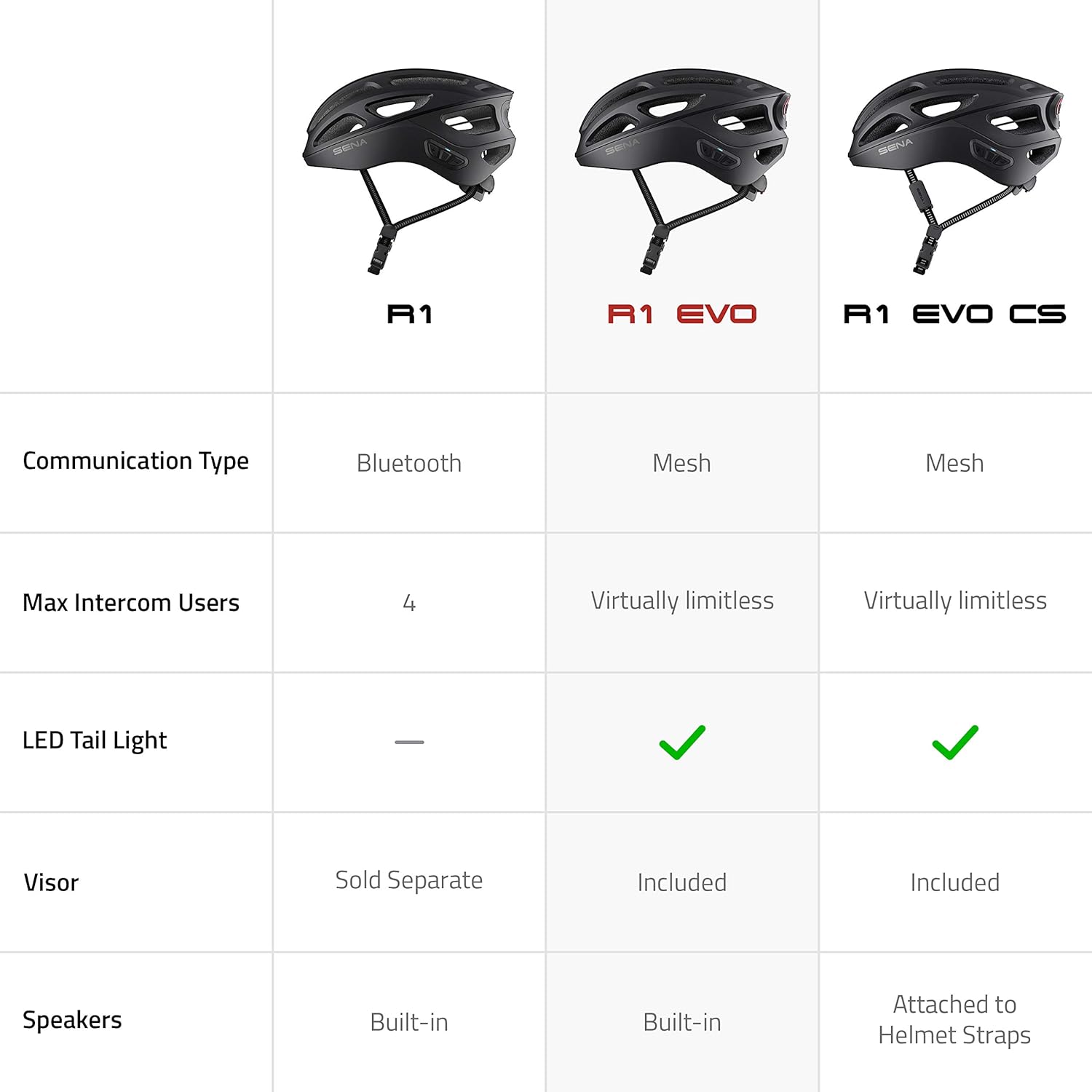
Figure 2.5: Feature comparison across Sena R1 series helmets.
3. Setup
3.1 Charging the Helmet
Before first use, fully charge the helmet. Connect the provided USB charging cable to the helmet's charging port (located at the rear, near the tail light) and plug the other end into a USB power source. The LED indicator will show charging status.
3.2 Powering On/Off
- Power On: Press and hold the Center Button and Plus Button for 1 second.
- Power Off: Press and hold the Center Button and Plus Button for 1 second.
3.3 Pairing with Your Smartphone (Bluetooth)
- With the helmet powered off, press and hold the Center Button for 5 seconds until you hear "Phone pairing."
- On your smartphone, go to Bluetooth settings and select "Sena R1-EVO" from the list of available devices.
- Once paired, you will hear "Your headset is paired."
3.4 Mesh Intercom Pairing
The R1-EVO uses Mesh Intercom for communication with other Sena Mesh-enabled devices. Simply press the Mesh Intercom Button to enter Open Mesh mode and connect with nearby riders.
4. Operating Instructions
4.1 Volume Control
- Volume Up: Tap the Plus Button.
- Volume Down: Tap the Minus Button.
4.2 Music Playback
- Play/Pause: Press the Center Button for 1 second.
- Next Track: Press the Plus Button for 1 second.
- Previous Track: Press the Minus Button for 1 second.
4.3 Phone Calls
- Answer Call: Tap the Center Button.
- End Call: Press the Center Button for 2 seconds.
- Reject Call: Press the Center Button for 2 seconds when ringing.
4.4 Mesh Intercom Usage
The R1-EVO utilizes Mesh 2.0 Intercom, allowing for communication with a virtually limitless number of other R1 EVO & R1 EVO CS users. It supports multi-channel open mesh with 9 channels.
- Start/End Mesh Intercom: Tap the Mesh Intercom Button.
- Channel Switching: Use the Sena Cycling App to switch between the 9 available channels.

Figure 4.1: Seamless group communication via Mesh Intercom.
4.5 Voice Commands
The R1-EVO supports voice commands for hands-free control of helmet features. Simply say "Hello Sena" followed by a command. Refer to the full Sena R1-EVO manual online for a complete list of commands.
4.6 Tail Light Operation
The integrated tail light has three lighting settings to enhance your visibility to others.
- LED On and Solid: Constant illumination.
- Night Flash: Slower, rhythmic flashing for night visibility.
- Day Flash: Faster, irregular flashing for daytime visibility.

Figure 4.2: Built-in taillight with multiple modes for enhanced safety.
5. Maintenance
5.1 Cleaning the Helmet
Clean the helmet shell with a soft, damp cloth and mild soap. Do not use harsh chemicals or abrasive cleaners. The inner padding can be removed and hand-washed with mild detergent.
5.2 Storage
Store the helmet in a cool, dry place away from direct sunlight and extreme temperatures. Ensure the helmet is clean and dry before storing.
5.3 Battery Care
To prolong battery life, charge the helmet at least once every 3-6 months, even if not in use. Avoid fully discharging the battery frequently.
6. Troubleshooting
If you encounter issues with your Sena R1-EVO helmet, refer to the table below for common problems and solutions.
| Problem | Solution |
|---|---|
| Helmet does not power on. | Ensure the battery is charged. Connect to a power source and try again. |
| Cannot pair with smartphone. | Ensure the helmet is in phone pairing mode. Turn off and on your phone's Bluetooth. |
| No audio from speakers. | Check volume level. Ensure helmet is connected to audio source. |
| Mesh Intercom not connecting. | Ensure all devices are in Open Mesh mode. Check range and obstacles. |
| Tail light not working. | Check battery level. Ensure the tail light is activated via controls or app. |
7. Specifications
- Brand: Sena
- Model: R1-EVO
- Color: Matte Black
- Age Range: Adult
- Special Feature: Universal Phone Control
- Communication Type: Mesh Intercom, Bluetooth
- Safety Certification: 16 CFR Part 1203 certified
8. Warranty and Support
8.1 Warranty Information
Sena products are covered by a limited warranty against defects in materials and workmanship. Please refer to the official Sena website or your purchase documentation for specific warranty terms and conditions applicable to your region.
8.2 Customer Support
For technical assistance, troubleshooting beyond this manual, or warranty claims, please contact Sena Customer Support through their official website or the contact information provided with your product packaging. Online resources, including FAQs and firmware updates, are also available on the Sena website.
Related documentsR1-EVO


Ask a question about this manual
Ask about setup, troubleshooting, compatibility, parts, safety, or missing instructions. Manuals+ will review the question and use this page’s manual context to help answer it.