
1. Introduction
This manual provides detailed instructions for the proper use and maintenance of your XINFUTE 100015717 Remote Control. This remote is specifically designed for seamless operation with the ONN Blast 5.1 Sound Bar Bluetooth System.
2. Product Overview
2.1 Package Contents
- 1 x XINFUTE 100015717 Remote Control
- (Batteries are not included)
2.2 Remote Control Layout
Familiarize yourself with the buttons and their functions. Refer to the images below for a visual guide.
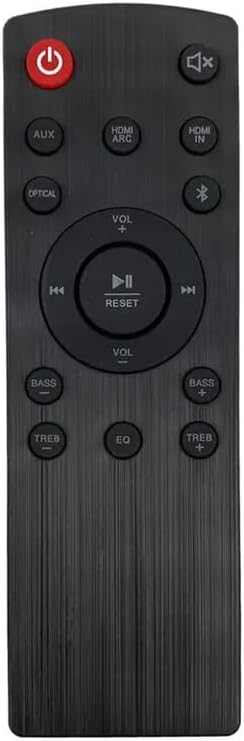
Image 1: Front view of the XINFUTE 100015717 remote control, showing power, volume, input, and sound adjustment buttons.
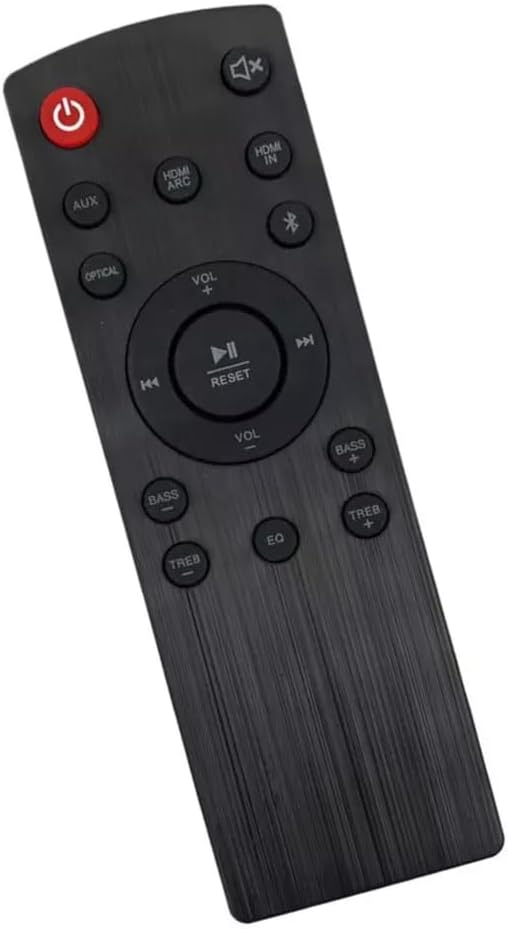
Image 2: Angled view of the XINFUTE 100015717 remote control, highlighting its ergonomic design.

Image 3: Back view of the XINFUTE 100015717 remote control, showing the battery compartment cover and model number.

Image 4: Close-up of the back of the XINFUTE 100015717 remote control, displaying the model number '100015717'.
3. Setup
3.1 Battery Installation
- Locate the battery compartment on the back of the remote control.
- Slide the battery cover downwards to open it.
- Insert two (2) AAA batteries, ensuring correct polarity (+ and -) as indicated inside the compartment.
- Slide the battery cover back into place until it clicks securely.
Note: Batteries are not included with the remote control. Please use new AAA alkaline batteries for optimal performance.
4. Operating Instructions
This remote control is pre-programmed for the ONN Blast 5.1 Sound Bar Bluetooth System. No additional programming is required. Simply point the remote at your sound bar and press the desired button.
4.1 Button Functions
- Power Button (Red): Turns the sound bar On or Off.
- Mute Button: Mutes or unmutes the sound.
- AUX: Selects Auxiliary input.
- HDMI ARC: Selects HDMI ARC input.
- HDMI IN: Selects HDMI input.
- OPTICAL: Selects Optical input.
- Bluetooth Button: Activates Bluetooth pairing mode or selects Bluetooth input.
- Volume Up (+) / Down (-): Adjusts the main volume level.
- Play/Pause (▶❚❚): Plays or pauses media.
- Previous Track (◀◀): Skips to the previous track.
- Next Track (▶▶): Skips to the next track.
- RESET: Resets sound settings to default.
- BASS + / -: Adjusts bass levels.
- TREB + / -: Adjusts treble levels.
- EQ: Cycles through equalizer presets.
5. Maintenance
- Keep the remote control dry. Liquids can damage the internal circuits.
- Avoid exposing the remote to extreme temperatures.
- Do not drop or subject the remote to strong impacts.
- Clean the remote with a soft, dry cloth. Do not use abrasive cleaners or solvents.
- If the remote will not be used for an extended period, remove the batteries to prevent leakage.
6. Troubleshooting
6.1 Remote Not Responding
- Check Batteries: Ensure batteries are inserted correctly with the correct polarity. Replace old batteries with new AAA batteries.
- Line of Sight: Make sure there is a clear line of sight between the remote control and the sound bar's infrared receiver. Obstructions can block the signal.
- Distance: Ensure you are within the effective operating range of the sound bar.
- Sound Bar Power: Confirm that the ONN Blast 5.1 Sound Bar is powered on.
7. Specifications
| Model Number | 100015717 |
| Compatible Devices | ONN Blast 5.1 Sound Bar Bluetooth System |
| Power Source | 2 x AAA Batteries (not included) |
| Product Dimensions | 6 x 3 x 1 inches |
| Item Weight | 2.82 ounces |
| Material | ABS Material |
8. Warranty and Support
8.1 Warranty Information
This XINFUTE remote control comes with a one-year warranty from the date of purchase. This warranty covers manufacturing defects under normal use.
8.2 Customer Support
If you encounter any issues or have questions regarding your remote control, please contact the seller within 24 hours of receipt of your purchase. All goods are inspected before shipment to ensure quality.
For further assistance, you may visit the XINFUTE Store on Amazon.