
1. Introduction
This manual provides instructions for the XINFUTE YT1F replacement remote control, designed for use with various Gree air conditioner models. This remote control offers full functionality comparable to the original unit, ensuring seamless operation of your air conditioning system. Please read this manual carefully before use to ensure proper setup and operation.
2. Product Overview
The XINFUTE YT1F remote control features an ergonomic design with clearly labeled buttons for intuitive use. It includes a display screen to show current settings such as temperature, mode, and timer status.
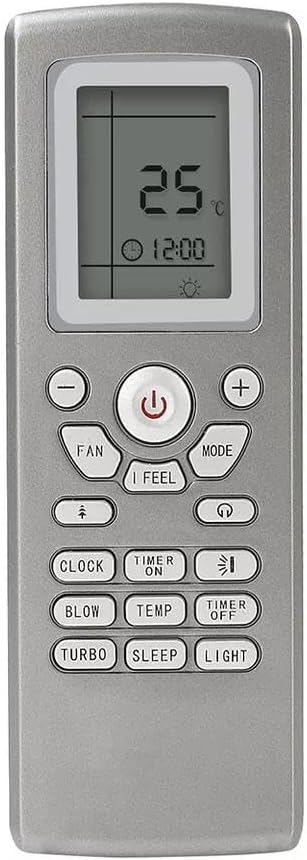
Image 2.1: Front view of the XINFUTE YT1F remote control. The display shows the current temperature and time, with various function buttons clearly visible below.
Key Components:
- LCD Display: Shows current settings, temperature, mode, and time.
- Power Button: Turns the air conditioner on or off.
- Mode Button: Cycles through operating modes (e.g., Cool, Heat, Fan, Dry, Auto).
- Fan Button: Adjusts fan speed.
- Temperature Adjustment Buttons (+/-): Increases or decreases the set temperature.
- Timer Buttons (ON/OFF): Sets the automatic on/off times.
- Clock Button: Sets the current time.
- Special Function Buttons: Includes 'I FEEL', 'BLOW', 'TEMP', 'TURBO', 'SLEEP', and 'LIGHT' for advanced control.
3. Setup
3.1 Battery Installation
The remote control requires two AAA 1.5V batteries (not included).
- Locate the battery compartment on the back of the remote control.
- Slide the battery compartment cover downwards to open it.
- Insert two AAA batteries, ensuring the positive (+) and negative (-) terminals align correctly with the markings inside the compartment.
- Slide the cover back into place until it clicks securely.

Image 3.1: Back view of the remote control, highlighting the battery compartment.
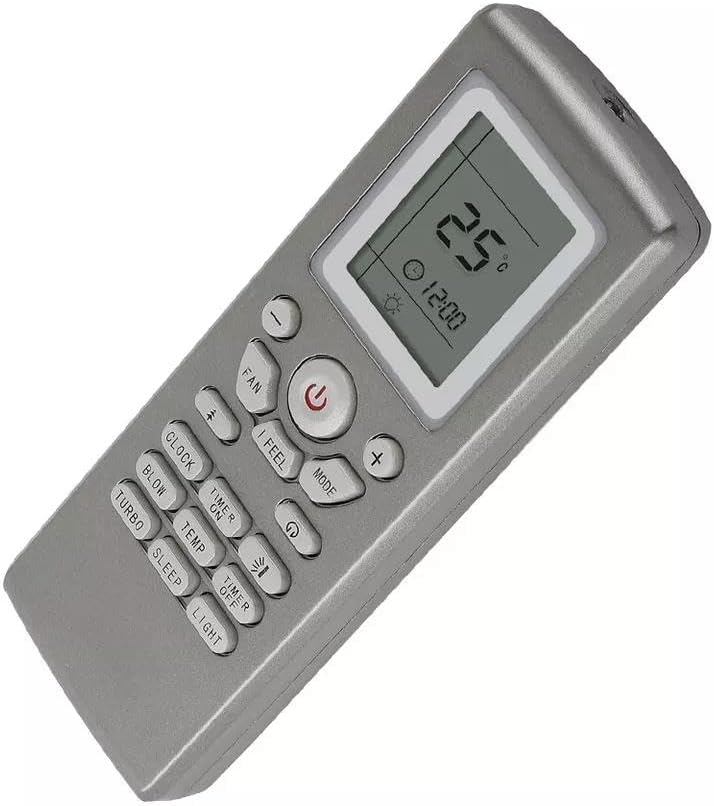
Image 3.2: The battery compartment opened, ready for battery insertion.
Warning: Do not dispose of batteries in fire. Batteries may explode or leak. Always dispose of used batteries responsibly according to local regulations.
4. Operating Instructions
Point the remote control directly at the air conditioner's receiver when operating.
4.1 Power On/Off
- Press the Power button (
 ) to turn the air conditioner on or off.
4.2 Selecting Operating Mode
- Press the MODE button repeatedly to cycle through available modes: Auto, Cool, Dry, Fan, Heat (if applicable to your AC model). The selected mode will be displayed on the LCD screen.
4.3 Adjusting Temperature
- Use the + button to increase the set temperature.
- Use the - button to decrease the set temperature.
4.4 Adjusting Fan Speed
- Press the FAN button repeatedly to cycle through different fan speeds (e.g., Auto, Low, Medium, High).
4.5 Setting the Timer
- TIMER ON: Press the TIMER ON button to set a time for the AC to turn on automatically. Use the + and - buttons to adjust the time, then press TIMER ON again to confirm.
- TIMER OFF: Press the TIMER OFF button to set a time for the AC to turn off automatically. Use the + and - buttons to adjust the time, then press TIMER OFF again to confirm.
4.6 Setting the Clock
- Press the CLOCK button. The time display will flash.
- Use the + and - buttons to adjust the current time.
- Press the CLOCK button again to confirm the setting.
4.7 Special Functions
- I FEEL: Activates a comfort mode where the remote senses the ambient temperature and adjusts the AC accordingly.
- BLOW: Initiates a fan-only operation to dry the indoor unit and prevent mold.
- TURBO: Activates maximum cooling or heating for rapid temperature change.
- SLEEP: Adjusts temperature and fan speed for comfortable sleep, often increasing temperature slightly during cooling or decreasing during heating over time.
- LIGHT: Controls the display light on the indoor unit.
5. Maintenance
5.1 Cleaning the Remote Control
- Wipe the remote control with a soft, dry cloth.
- Do not use liquid cleaners, abrasive materials, or chemical solvents, as these may damage the remote's surface or internal components.
5.2 Battery Replacement
- Replace batteries when the remote's response becomes sluggish or the display fades.
- If the remote will not be used for an extended period, remove the batteries to prevent leakage and potential damage.
6. Troubleshooting
6.1 Remote Control Not Responding
- Check Batteries: Ensure batteries are inserted correctly with the correct polarity (+/-) and are not depleted. Replace with fresh AAA batteries if necessary.
- Line of Sight: Ensure there are no obstructions between the remote control and the air conditioner's receiver. The remote requires a clear line of sight.
- Distance: Make sure you are within the effective operating range of the air conditioner.
6.2 Air Conditioner Not Responding to Commands
- AC Power: Verify that the air conditioner is powered on and receiving electricity.
- AC Receiver: Ensure the infrared receiver on the air conditioner unit is clean and not obstructed.
7. Specifications
- Model: YT1F
- Compatible Brands: Gree
- Compatible Models: YTOF, YT1FF, YT1F1, YT1F2, YT1F3
- Power Source: 2 x AAA 1.5V batteries (not included)
- Material: ABS
- Dimensions: Approximately 4 x 3 x 1 inches
- Weight: Approximately 2.4 ounces (without batteries)
8. Warranty and Support
8.1 Warranty Information
This XINFUTE remote control comes with a one-year warranty from the date of purchase. This warranty covers manufacturing defects. Please retain your proof of purchase for warranty claims.
8.2 Customer Support
If you encounter any issues or have questions regarding your XINFUTE YT1F remote control, please contact the seller within 24 hours of receipt for assistance. For further support, refer to the contact information provided with your purchase.