
Flydigi B7
FLYDIGI B7 Phone Cooler Instruction Manual
Model: B7 | Brand: Flydigi
1. Introduction
The FLYDIGI B7 Phone Cooler is an advanced cooling fan designed to maintain optimal temperature for your mobile device during intensive use, such as gaming or video streaming. Featuring FlyOC overclocking cooling technology and intelligent temperature control, it provides efficient heat dissipation while preventing condensation. Its universal clip design ensures compatibility with a wide range of smartphones.

Image 1.1: The FLYDIGI B7 Phone Cooler, showcasing its sleek design and central cooling fan.
2. Safety Information
- Ensure the device is connected to a power source of 33W or above for optimal performance.
- Do not disassemble or attempt to repair the device yourself. Refer to qualified personnel for service.
- Keep the device away from water or excessive moisture, despite its waterproof features, to prevent damage to internal components.
- Avoid blocking the fan vents during operation to ensure proper airflow and prevent overheating of the cooler itself.
- The metal mesh design is intended to prevent accidental contact with the fan blades. Do not insert fingers or foreign objects into the fan.
- Keep out of reach of children.
3. Package Contents
Please check the package contents upon unboxing. If any items are missing or damaged, contact customer support.
- FLYDIGI B7 Phone Cooler
- USB-C Power Cable (may vary by region)
- Instruction Manual (this document)
4. Product Overview & Features
The FLYDIGI B7 is engineered for superior phone cooling with several key features:
- Powerful 27W Cooling: Utilizes FlyOC overclocking cooling technology for rapid temperature reduction, capable of cooling to 32°F (0°C) in one minute under ideal conditions.
- Intelligent Temperature Control 2.0: Automatically adjusts fan speed and power based on ambient temperature, significantly reducing condensation risk (up to 95% prevention). Manual adjustment is also available.
- Universal Compatibility: Designed with a universal back clip, compatible with most mobile phones with screen sizes between 4.7 and 6.7 inches.
- Large Cooling Area: Features a 36x36mm semiconductor cooling plate with high thermal conductivity silicone pad for efficient heat transfer.
- Ultra-Low Noise Operation: Operates below 37dB even at full power, ensuring minimal disturbance.
- Lightweight & Portable: Weighs only 95g, designed for comfortable grip and easy portability.
- Durable Design: Innovative cold and heat insulation structure, safe, waterproof, and anti-short circuit for long service life.

Image 4.1: The FLYDIGI B7 highlighting its Temperature Control Master 2.0 feature, indicating 27W intelligent frequency conversion for high-efficiency cooling.
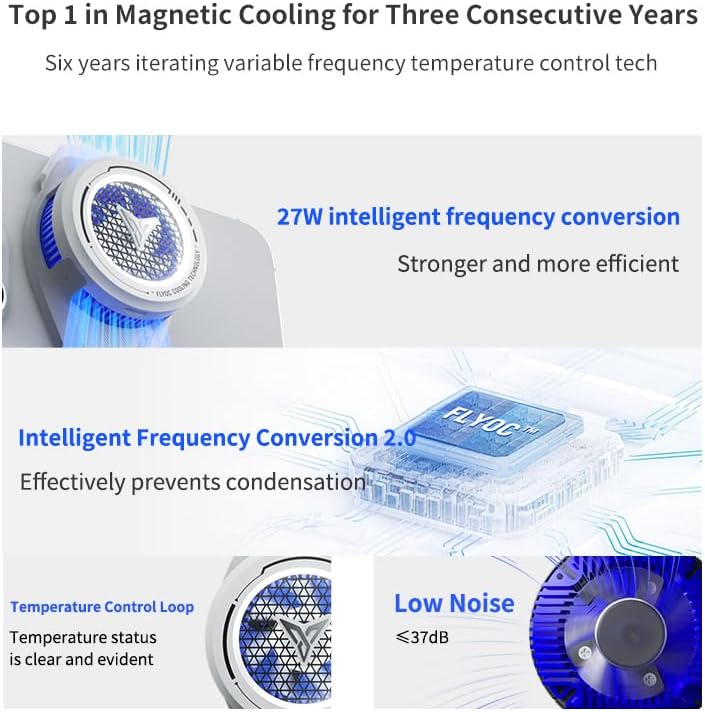
Image 4.2: Visual representation of the B7's cooling technology, including 27W intelligent frequency conversion, Intelligent Frequency Conversion 2.0 for condensation prevention, clear temperature control loop, and low noise operation (below 37dB).

Image 4.3: An exploded view of the FLYDIGI B7's internal components, illustrating the 3 temperature sensors, 27W powerful cooling mechanism, and the 36x36mm extra-large cooling fins, which contribute to its high-efficiency inverter cooling.

Image 4.4: Diagram illustrating the ultra-low noise operation of the FLYDIGI B7, showing that full power operation remains below 37dB, comparable to a quiet bedroom environment, and does not interfere with microphone use.

Image 4.5: Close-up view of the FLYDIGI B7's aluminium alloy thermal surface, highlighting its high thermal conductivity for faster heat dissipation.
5. Setup
- Attach to Phone: Gently open the universal back clip of the FLYDIGI B7 and securely attach it to the back of your smartphone. Ensure the cooling plate makes full contact with the phone's surface, ideally near the CPU area for maximum effectiveness. The clip is compatible with phones between 4.7 and 6.7 inches.
- Connect Power: Connect the provided USB-C power cable to the cooler's power input port. Connect the other end of the cable to a power adapter (not included) with a minimum output of 33W. Using a lower wattage adapter may result in reduced cooling performance.
- Power On: Once connected to power, the cooler will automatically activate and begin cooling.

Image 5.1: Illustration demonstrating the easy adaptation and secure clamping mechanism of the FLYDIGI B7, showing its compatibility with various smartphones, including the iPhone 15 Pro Max, and providing dimensions for the clip (61mm width, 27mm height).

Image 5.2: The FLYDIGI B7 attached to a smartphone, held in hand, emphasizing its lightweight design at 96g, which ensures comfort and does not affect grip during use.
6. Operating Instructions
6.1 Intelligent Frequency Conversion Mode
By default, the FLYDIGI B7 operates in Intelligent Frequency Conversion mode. In this mode, the cooler automatically adjusts its wind speed and power output based on the current ambient temperature and the phone's temperature. This intelligent adjustment helps to prevent condensation buildup on your phone while maintaining optimal cooling performance.
- Simply connect the cooler to power, and it will begin operating in this mode.
- No manual intervention is required for basic cooling.
6.2 Manual Adjustment (via Flydigi APP)
For advanced control and to access additional functions, you can download the official Flydigi APP.
- Download APP: Search for "Flydigi" in your device's App Store (iOS) or Google Play Store (Android) and download the official application.
- Connect Cooler: Follow the in-app instructions to connect your FLYDIGI B7 Phone Cooler via Bluetooth.
- Adjust Settings: Within the app, you can switch between cooling modes, manually adjust fan speed, monitor temperature, and access other customizable settings.
7. Maintenance
- Cleaning: Use a soft, dry cloth to wipe the exterior of the cooler. For the fan area, use a soft brush or compressed air to gently remove dust and debris. Do not use liquid cleaners directly on the fan or cooling plate.
- Storage: When not in use, store the cooler in a cool, dry place away from direct sunlight and extreme temperatures.
- Cable Care: Avoid bending or crimping the power cable excessively to prevent internal damage.
8. Troubleshooting
| Problem | Possible Cause | Solution |
|---|---|---|
| Cooler not turning on. | No power, or insufficient power supply. | Ensure the USB-C cable is securely connected. Use a power adapter with a minimum output of 33W. Try a different power outlet or adapter. |
| Poor cooling performance. | Insufficient power, poor contact with phone, or blocked vents. | Verify power adapter is 33W or higher. Ensure the cooler's cooling plate is in full contact with the phone's back. Clear any obstructions from the fan vents. |
| Excessive noise. | Dust buildup in fan, or foreign object. | Clean the fan area gently with a soft brush or compressed air. Ensure no foreign objects are interfering with the fan blades. |
| Condensation on phone. | Extreme ambient humidity or prolonged use in very cold mode. | The intelligent frequency conversion mode is designed to prevent this. If it occurs, reduce cooling intensity via the Flydigi APP or temporarily disconnect the cooler. Wipe off any condensation immediately. |
| Cannot connect to Flydigi APP. | Bluetooth issue, or app not updated. | Ensure Bluetooth is enabled on your phone. Restart the cooler and your phone. Update the Flydigi APP to the latest version. |
9. Specifications
| Feature | Detail |
|---|---|
| Model | FLYDIGI B7 |
| Cooling Technology | FlyOC Overclocking Cooling, Semiconductor Cooling |
| Maximum Power | 27W |
| Cooling Plate Size | 36x36mm |
| Noise Level | ≤ 37dB (Full Power Operation) |
| Compatibility | Smartphones 4.7-6.7 inch screen |
| Weight | 95g (Product only) / 170g (Package) |
| Material | Metal (Aluminium Alloy Thermal Surface) |
| Special Features | Intelligent Temperature Control 2.0, Waterproof, Anti-short circuit |
| Power Source | Battery Powered (requires external 33W+ charging plug) |
| Product Dimensions | 2D x 8W x 12H centimeters (approximate) |
10. Warranty & Support
For warranty information and customer support, please refer to the official Flydigi website or contact your local retailer. Keep your purchase receipt as proof of purchase.
- Official Website: Visit www.flydigi.com for product registration, FAQs, and support resources.
- App Support: The Flydigi APP may also provide direct support options or links to customer service.
Related documentsB7


Ask a question about this manual
Ask about setup, troubleshooting, compatibility, parts, safety, or missing instructions. Manuals+ will review the question and use this page’s manual context to help answer it.