
PAKRYS DM58
PAKRYS Military Smart Watch User Manual
Model: DM58
1. Introduction
The PAKRYS Military Smart Watch is a rugged and versatile device designed for active lifestyles, offering advanced features such as precision GPS tracking, comprehensive fitness monitoring, and robust military-grade durability. This manual provides detailed instructions to help you set up, operate, and maintain your smartwatch.
Key Features:
- 1.43'' HD AMOLED Always-On Display (466*466 pixels)
- Precision Dual-Frequency GPS, Compass, Altimeter, and Barometer
- 5ATM Water Resistance and Military-Grade Durability
- 500mAh Long-Lasting Battery (5-10 days normal use)
- Bluetooth Calling and Smart Notifications
- 170+ Sport Modes and Comprehensive Fitness Tracking
- Heart Rate, Sleep, Stress, and Blood Oxygen Monitoring

Image 1.1: The PAKRYS Military Smart Watch, showcasing its robust design and clear display.
2. Getting Started
2.1 What's in the Box
Upon unboxing your PAKRYS Military Smart Watch, please ensure all the following items are present:
- 1 x Pakrys Smart Watch
- 1 x Watch Band
- 1 x Magnetic Charging Cable
- 1 x User Manual (this document)
- 1 x Gift Box
2.2 Charging the Smartwatch
Before first use, fully charge your smartwatch. Connect the magnetic charging cable to the charging contacts on the back of the watch and plug the USB end into a standard USB power adapter (not included).
- Charging Time: Approximately 2-3 hours for a full charge.
- Battery Indicator: The watch display will show the charging status.

Image 2.1: The smartwatch connected to its magnetic charging cable.
2.3 App Installation and Pairing
To unlock the full potential of your smartwatch, download and install the GloryFitPro app on your smartphone.
- Download App: Search for "GloryFitPro" in the Apple App Store (for iOS) or Google Play Store (for Android), or scan the QR code provided in the quick start guide (if applicable).
- Create Account: Open the app and follow the on-screen instructions to create an account or log in.
- Enable Bluetooth: Ensure Bluetooth is enabled on your smartphone.
- Pair Device: In the GloryFitPro app, navigate to the "Device" or "Add Device" section. The app will search for nearby smartwatches. Select "DM58" or the corresponding device name when it appears.
- Confirm Pairing: A pairing request may appear on your watch and phone. Confirm the pairing on both devices.
Once paired, the watch will synchronize time and data with your phone, and you can customize settings through the app.
3. Operating Your Smartwatch
3.1 Display and Navigation
The 1.43-inch AMOLED display provides clear visuals. Navigate through menus by swiping left, right, up, or down, and tap to select. The physical buttons on the side provide quick access to specific functions (e.g., Sport, Select, Back, GPS).

Image 3.1: Details of the 1.43" AMOLED display and its features.
3.2 GPS and Outdoor Features
The smartwatch features advanced dual-frequency GPS for accurate location tracking, along with a built-in compass, altimeter, and barometer for outdoor activities.
- GPS Tracking: Activate GPS for outdoor activities like running or hiking to record your route, distance, and pace.
- Compass: Access the compass feature to determine your current heading.
- Altimeter & Barometer: Monitor altitude and air pressure changes, useful for mountaineering and weather awareness.

Image 3.2: Visual representation of the smartwatch's outdoor features including GPS, compass, altitude, and air pressure.
3.3 Communication: Calls and Notifications
Stay connected by receiving calls and notifications directly on your wrist.
- Bluetooth Calling: With high-quality speakers and microphones, you can answer or make calls directly from the watch when connected to your phone via Bluetooth.
- Smart Notifications: Receive alerts for incoming calls, text messages, and notifications from various apps (e.g., Facebook, WhatsApp, Twitter) configured through the GloryFitPro app.

Image 3.3: The smartwatch's Bluetooth calling and smart notification capabilities.
3.4 Comprehensive Fitness Tracking
The smartwatch supports over 170 sport modes and offers automatic recognition for 5 common activities (walking, running, cycling, elliptical machine, rowing machine).
- Sport Modes: Select your activity from the extensive list to track specific metrics like duration, distance, calories burned, and heart rate zones.
- Activity Data: All workout data is seamlessly uploaded to the GloryFitPro app for in-depth analysis and progress tracking.

Image 3.4: The smartwatch's extensive sport modes and activity tracking.
3.5 Health Monitoring
Monitor your health with integrated sensors for various vital signs.
- Heart Rate Monitoring: Continuously track your heart rate throughout the day and during workouts.
- Sleep Tracking: Analyze your sleep patterns, including light, deep, and REM sleep stages.
- Stress Monitoring: Understand your stress levels and manage them effectively.
- Blood Oxygen (SpO2): Measure your blood oxygen saturation levels.
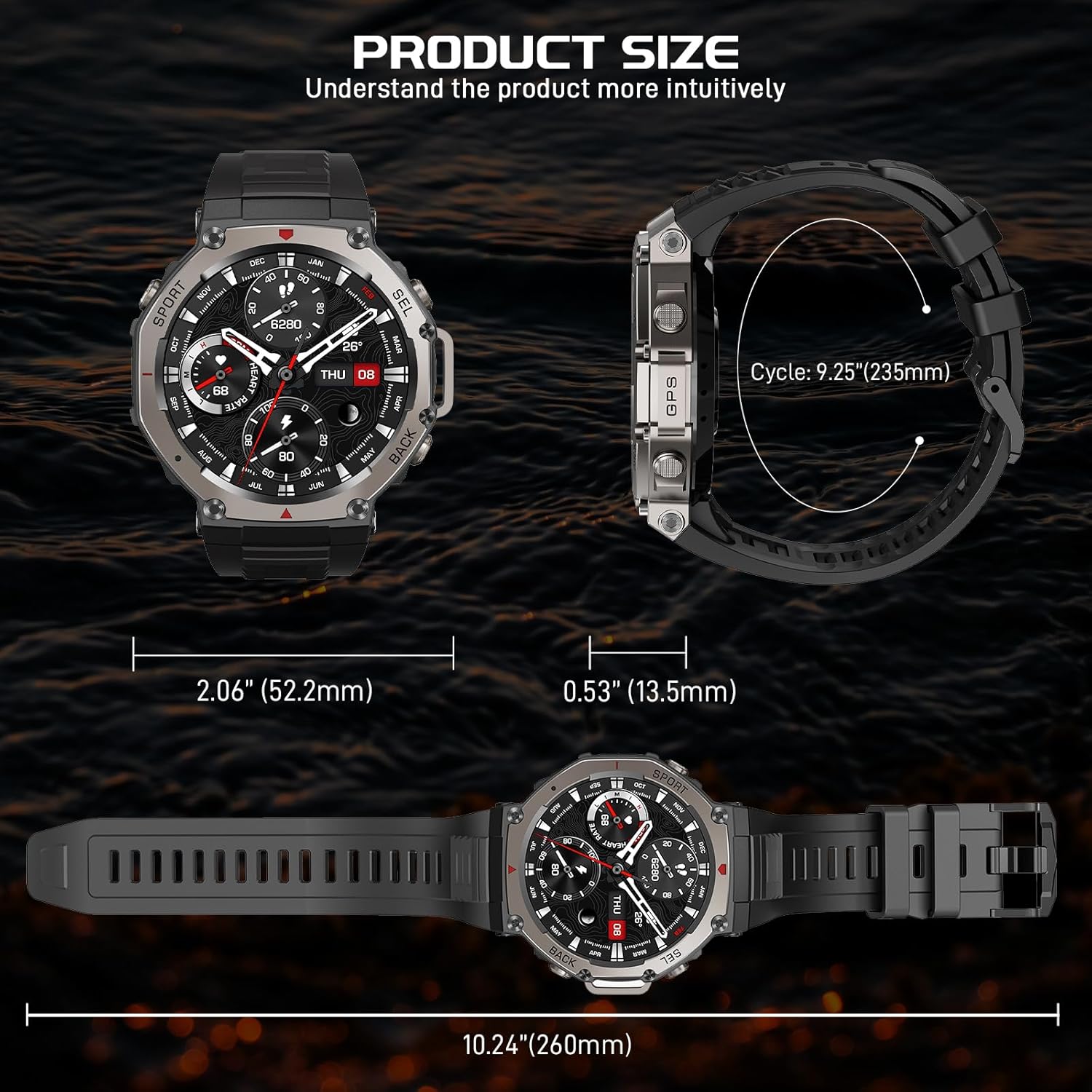
Image 3.5: Overview of the smartwatch's health monitoring capabilities.
4. Care and Maintenance
4.1 Cleaning Your Smartwatch
Regular cleaning helps maintain the watch's appearance and functionality.
- Wipe the screen and body with a soft, lint-free cloth.
- For stubborn dirt, slightly dampen the cloth with water. Avoid using harsh chemicals or abrasive materials.
- Clean the charging contacts periodically to ensure proper charging.
4.2 Water Resistance (5ATM)
The PAKRYS Military Smart Watch has a 5ATM water resistance rating, meaning it can withstand pressures equivalent to a depth of 50 meters. This makes it suitable for:
- Daily use and hand washing
- Rain and splashes
- Showering (cold water recommended, avoid hot water and steam)
- Swimming in shallow water
Note:
- Do not press buttons underwater.
- Avoid exposure to hot water, steam, or strong jets of water.
- The 5ATM rating does not mean the watch can be used for scuba diving or high-speed water sports.

Image 4.1: The smartwatch's 5ATM water resistance and military-grade durability.
4.3 Storage
When not in use for extended periods, store the smartwatch in a cool, dry place away from direct sunlight and extreme temperatures. It is recommended to charge the watch to about 50% before long-term storage.
5. Troubleshooting
If you encounter issues with your smartwatch, refer to the following common problems and solutions:
| Problem | Possible Solution |
|---|---|
| Watch not turning on | Ensure the watch is fully charged. Press and hold the power button for several seconds. |
| Cannot connect to the GloryFitPro app | Ensure Bluetooth is enabled on your phone. Restart both the watch and your phone. Make sure the app is updated to the latest version. Forget the device in your phone's Bluetooth settings and try pairing again. |
| Inaccurate heart rate/sleep data | Ensure the watch is worn snugly on your wrist, not too tight or too loose. Clean the sensor on the back of the watch. Avoid excessive movement during measurements. |
| GPS signal is weak or inaccurate | Ensure you are in an open outdoor area with a clear view of the sky. Wait for the watch to acquire a stable GPS signal before starting an activity. |
| Notifications not appearing | Check notification permissions for the GloryFitPro app in your phone's settings. Ensure notifications are enabled within the GloryFitPro app for specific applications. Keep the watch connected to your phone via Bluetooth. |
6. Technical Specifications
| Feature | Specification |
|---|---|
| Product Name | AMOLED Smart Watch |
| Model Number | DM58 |
| Screen Size | 1.43 inches |
| Screen Type | AMOLED |
| Resolution | 466*466 pixels |
| Battery Capacity | 500mAh |
| Waterproof Level | 5ATM |
| Working Hours | About 7-10 days (normal use) |
| Standby Time | About 25-30 days |
| Charging Type | Magnetic charging |
| Charging Time | About 2-3 hours |
| Watch Weight | About 0.6lb / 244g |
| APP Name | GloryFitPro |
| Bluetooth Version | BLE 5.3 |
| Compatible System | Android 5.0 or above; iOS 12.0 or above |
7. Warranty and Support
PAKRYS offers a 1-year after-sales replacement service for your smartwatch. This warranty covers manufacturing defects and ensures that you receive a functional product.
For any inquiries, technical assistance, or to claim warranty service, please contact PAKRYS customer support through the platform where you purchased the product or refer to the contact information provided in the product packaging.
Please have your purchase details and product model number (DM58) ready when contacting support to facilitate a quicker resolution.
Ask a question about this manual
Ask about setup, troubleshooting, compatibility, parts, safety, or missing instructions. Manuals+ will review the question and use this page’s manual context to help answer it.