
1. Product Overview
The Maple Systems PLC-ES1616P-KIT is a compact programmable logic controller designed for industrial automation applications. This kit includes the PLC-ES1616P CPU module, a terminal block, and a terminal block cable, providing a complete solution for control tasks. It features a compact design, extensive I/O capabilities, high-performance specifications, and multiple communication options for versatile integration into various systems.
Key Features:
- Compact Design: Mini CPU module measuring 3.6 x 1.2 x 3.1 inches with lightweight construction of 0.26 pounds for efficient installation in space-constrained environments.
- I/O Capabilities: Features 16 digital inputs (sink/sourcing) and 16 digital outputs (sourcing), expandable up to 384 I/O points with 11 additional modules.
- Performance Specs: Lightning-fast 300ns/STEP execution speed with 55 basic and 389 advanced instructions for comprehensive programming flexibility.
- Communication Options: Multiple connectivity through RS-232, RS-422/485, and Ethernet ports, plus Mini-B USB and SD card support for versatile integration.
- Operating Parameters: Operates in temperatures from +14 to +140°F with 5-95% non-condensing humidity, featuring robust shock resistance up to 15G.
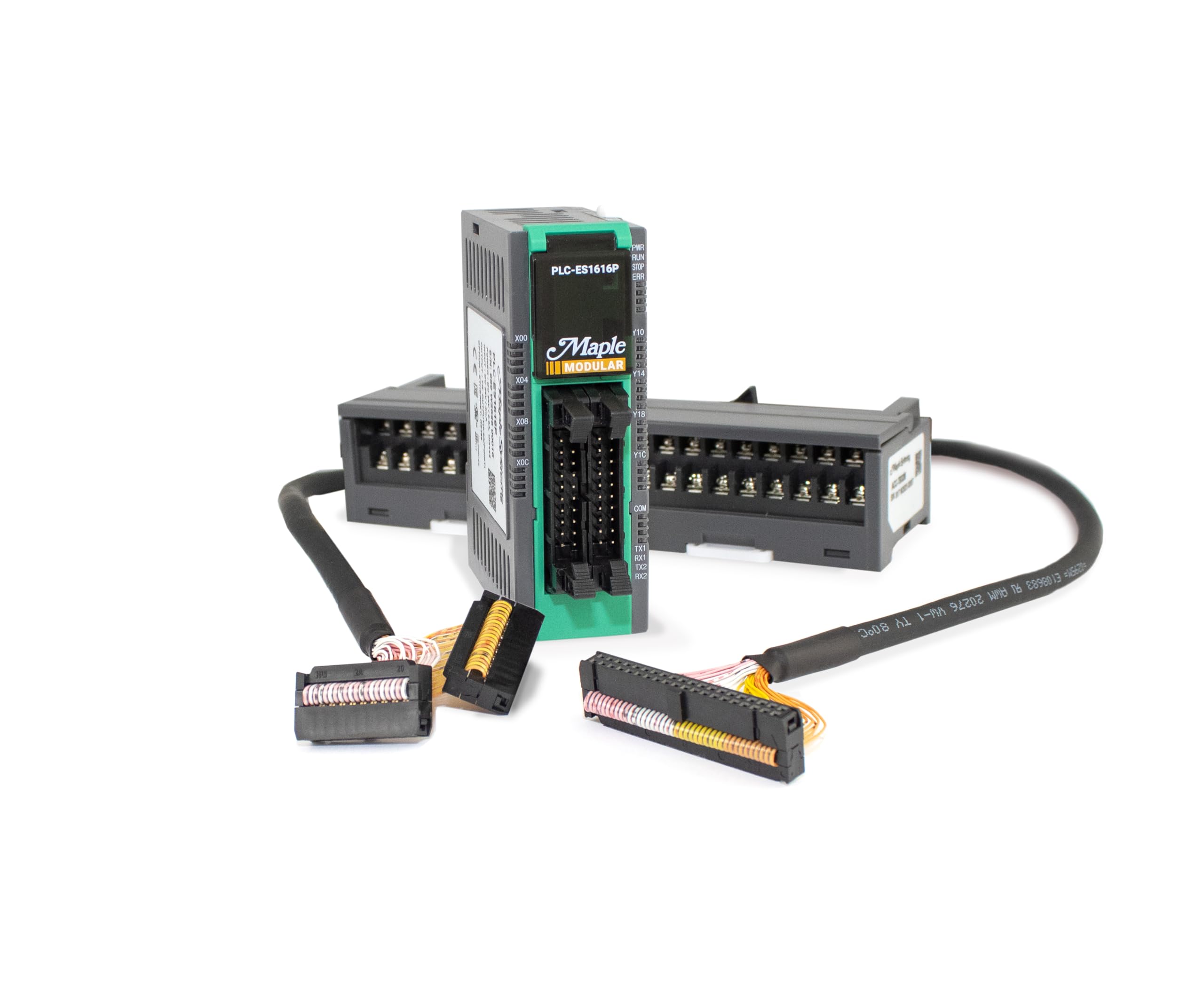
Figure 1: Front view of the Maple Systems PLC-ES1616P CPU module, showing its compact size and branding.
2. What's in the Box
Upon opening the packaging for your Maple Systems PLC-ES1616P-KIT, you will find the following components:
- PLC-ES1616P CPU Module
- Terminal Block Cable (ACC-SBC15M)
- Terminal Block (ACC-TB32M)
- User Manual
- Warranty & Limitation of Liability Document
Video 1: Unboxing the Maple Systems PLC-ES1616P, demonstrating the contents of the kit including the CPU module, terminal block, and connecting cable.
3. Component Identification
PLC-ES1616P CPU Module
The PLC-ES1616P CPU module is the core of your programmable logic controller system. It features various ports and indicators for operation and expansion.
- Digital Inputs/Outputs: 16 digital inputs (sink/sourcing) and 16 digital outputs (sourcing) are integrated into the module.
- Built-in HSC Channels: Two High-Speed Counter (HSC) channels are available, supporting frequencies up to 20 kHz.
- PTO Channels: Two Pulse Train Output (PTO) channels are provided, supporting up to 100 kHz for 2-axis direction, position, and speed control.
- PID Control: Built-in PID control with auto-tuning capabilities for precise process management.
- Run/Stop Switch: A physical switch to toggle the PLC between Run and Stop modes.
- Mini-B USB Port: Used for uploading and downloading programs, and establishing an online connection with the PLC.
- SD Card Slot: Available for scanning programs and firmware upgrades.
- Ethernet Port: Supports uploading, downloading, and online connections, also functions as a Modbus TCP Slave.
- Serial Port: Configurable for RS-232 or RS-485 communication, supporting Modbus RTU Slave or Master.
- 24V DC Power Supply: Dedicated terminals for connecting the 24V DC power supply.
- Expansion Connector: Allows connection of up to 11 additional I/O modules to expand system capabilities.

Figure 2: Top view of the PLC-ES1616P module, highlighting the Run/Stop switch, Mini-B USB port, and SD card slot.
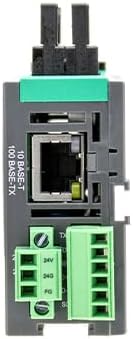
Figure 3: Bottom view of the PLC-ES1616P module, showing the Ethernet port, serial communication terminals, and 24V DC power supply terminals.

Figure 4: Side view of the PLC-ES1616P module with the expansion connector, used for attaching additional I/O modules.
Terminal Block (ACC-TB32M)
The ACC-TB32M terminal block provides convenient and secure wiring connections for the digital inputs and outputs of the PLC-ES1616P module. It connects to the CPU module via the ACC-SBC15M terminal block cable.

Figure 5: The PLC-ES1616P module shown connected to several expansion I/O modules and a terminal block, illustrating a complete system setup.
4. Setup and Installation
Follow these steps to set up your Maple Systems PLC-ES1616P-KIT:
- Connect Terminal Block Cable: Attach the ACC-SBC15M terminal block cable to the corresponding connectors on the PLC-ES1616P CPU module and the ACC-TB32M terminal block. Ensure a secure connection by pressing down on the plastic pieces until they click into place.
- Power Supply Connection: Connect a 24V DC power supply to the designated terminals on the PLC-ES1616P module. Refer to the wiring diagram in the user manual for correct polarity.
- Communication Connections: Connect your programming device to the PLC using either the Mini-B USB port or the Ethernet port. For serial communication, use the RS-232/RS-485 terminals.
- Attach Expansion I/O Modules (Optional): If expanding your system, remove the protective cover from the expansion connector on the side of the PLC-ES1616P module. Align the pins of the expansion I/O module with the connector and slide it into place until it clicks. Secure it with the locking mechanism. Up to 11 expansion modules can be added.

Figure 6: The PLC-ES1616P module connected to its terminal block using the provided cable.
Video 2: This video highlights high-end features of Maple Systems PLCs, including the modular design and expansion capabilities, which are relevant to the PLC-ES1616P.
5. Operating Instructions
To operate your Maple Systems PLC-ES1616P, follow these general guidelines:
- Power On: Ensure the 24V DC power supply is correctly connected and then apply power. The PWR LED indicator should illuminate.
- Run/Stop Mode: Use the physical RUN/STOP switch located under the top cover to control the PLC's operational state. In RUN mode, the PLC executes the loaded program. In STOP mode, the program execution is halted, allowing for program modifications or troubleshooting.
- Program Upload/Download: Connect your PC to the PLC via the Mini-B USB port or the Ethernet port. Use the Maple Systems programming software to upload programs to the PLC or download existing programs from the PLC for editing.
- Online Monitoring: Establish an online connection through the USB or Ethernet port to monitor the PLC's status, I/O states, and program execution in real-time.
- PID Control: Utilize the built-in PID control features for precise regulation of process variables. The auto-tuning function assists in optimizing PID parameters.
- High-Speed Counter (HSC): Configure the two built-in HSC channels for applications requiring high-frequency pulse counting, such as encoder inputs.
- Pulse Train Output (PTO): Use the two PTO channels for precise motion control applications, including direction, position, and speed control of stepper or servo motors.
6. Maintenance
Regular maintenance ensures the longevity and reliable operation of your PLC-ES1616P-KIT:
- Keep Clean: Periodically clean the exterior of the PLC module and terminal block to prevent dust and debris accumulation, which can affect performance and cooling.
- Check Connections: Regularly inspect all wiring connections, including power, I/O, and communication cables, to ensure they are secure and free from damage.
- Environmental Conditions: Ensure the PLC operates within the specified temperature and humidity ranges to prevent damage. Provide adequate ventilation.
- Firmware Upgrades: Check the Maple Systems website for available firmware updates. Firmware can be upgraded using an SD card inserted into the dedicated slot on the CPU module.
7. Troubleshooting
If you encounter issues with your PLC-ES1616P, consider the following troubleshooting steps:
- LED Indicators: Observe the PWR, RUN, STOP, and ERR LEDs on the CPU module. A flashing or solid ERR LED indicates a fault. Refer to the user manual for specific error code interpretations.
- Power Check: Verify that the 24V DC power supply is providing the correct voltage and that all power connections are secure.
- Communication Issues: If unable to connect to the PLC, check the USB or Ethernet cable connections. Ensure correct communication parameters are set in your programming software.
- I/O Verification: Use the online monitoring feature in the programming software to check the status of digital inputs and outputs. Verify wiring to sensors and actuators.
- Program Logic: Review your PLC program logic for any errors or unintended behavior. Use the offline simulator feature to test program logic before downloading to the PLC.
- Expansion Modules: If using expansion modules, ensure they are correctly seated and locked into the expansion connector.
8. Specifications
| Specification | Value |
|---|---|
| Manufacturer | Maple Systems |
| Item Model Number | PLC-ES1616P-KIT |
| Item Weight | 0.26 Pounds (CPU module) / 4.2 ounces (total package) |
| Voltage | 24 Volts DC |
| Digital Inputs | 16 (Sink/Sourcing) |
| Digital Outputs | 16 (Sourcing) |
| High-Speed Counter Channels | 2 (up to 20 kHz) |
| Pulse Train Output Channels | 2 (up to 100 kHz for 2-axis control) |
| PID Control | Built-in with Auto Tuning |
| Communication Ports | RS-232, RS-422/485, Ethernet, Mini-B USB |
| Memory Card Support | SD Card |
| Operating Temperature | +14 to +140°F |
| Operating Humidity | 5-95% non-condensing |
| Shock Resistance | Up to 15G |
9. Warranty Information
Maple Systems provides a warranty for new hardware products. The warranty period for MLE expansion modules is 90 days from the date of shipment. For Basic HMIs, MLCs, IR Series, and Accessories, the warranty is one (1) year. For Advanced HMIs (L, P, and XL Series), cMTs, and OITs, the warranty is two (2) years.
Optional protection plans are available for purchase to extend coverage:
- 4-Year Protection Plan: One-time payment of $84.99 for 48 months of coverage.
- Complete Protect: Monthly payment of $16.99 for comprehensive coverage on eligible past and future purchases.
10. Support
For additional support, resources, and software downloads, please visit the official Maple Systems website. Our HMI configuration software is included and available for download. We offer solutions for various industries including Packaging, Medical, Pharmaceutical, Oil & Gas, Food & Beverage, Agriculture, Energy, and Water.
Maple Systems was founded in 1983 and specializes in the design, manufacture, and support of Human Machine Interfaces (HMIs), Industrial PCs (IPCs), and Programmable Logic Control (PLCs) solutions.