
Introduction
The HOBBYWING EZRUN MAX5 G2 Plus ESC is a high-performance electronic speed controller designed for 1/5, 1/7, and 1/8 scale remote control vehicles. This manual provides essential information for the proper installation, operation, and maintenance of your ESC, ensuring optimal performance and longevity.
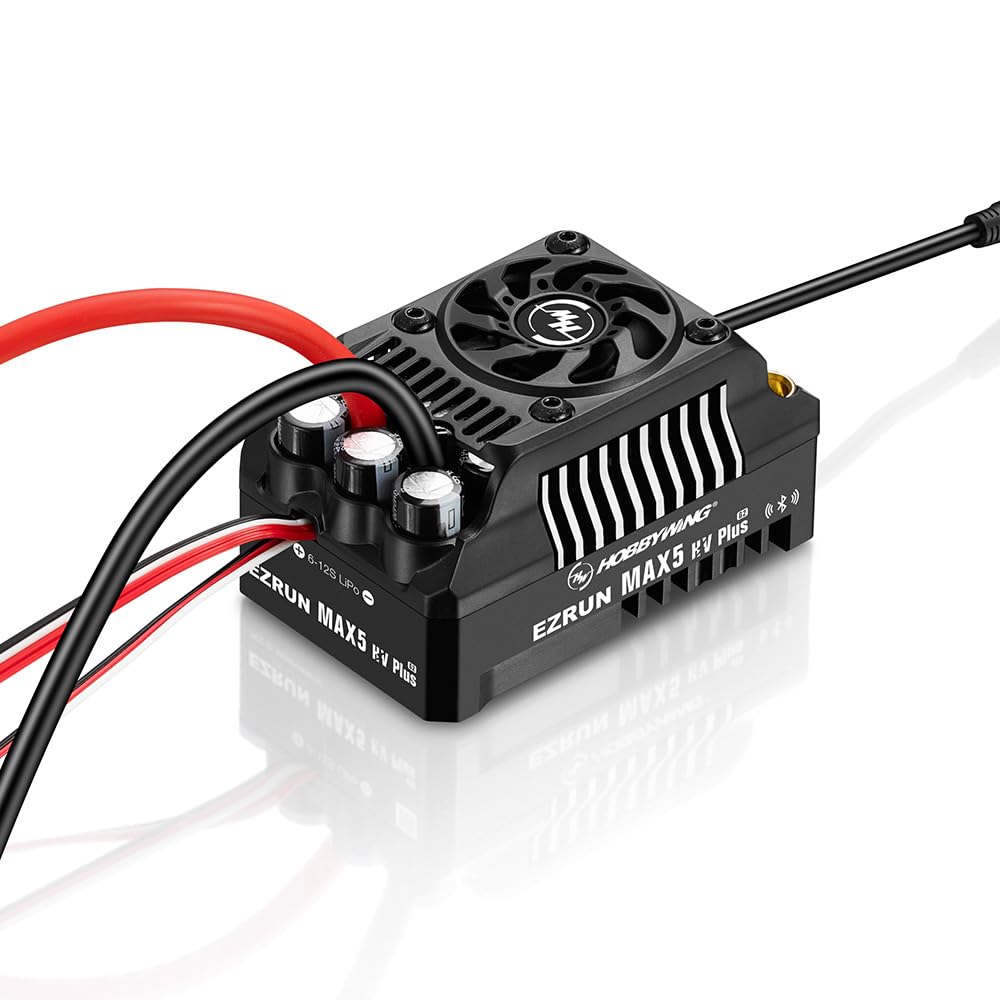
This image displays the HOBBYWING EZRUN MAX5 G2 Plus Electronic Speed Controller. It features a black casing with cooling fins, a central cooling fan, and various input/output wires for motor, battery, and receiver connections. A small external switch is also visible.
Safety Information
Please read and understand the following safety precautions before using the HOBBYWING EZRUN MAX5 G2 Plus ESC:
- Carefully check power devices and the car frame manual to ensure reasonable power pairing. Avoid incorrect pairing to prevent overload and motor damage.
- Always wire all parts of the equipment carefully. If any connections loosen due to vibration, your RC model may lose control.
- Never apply full throttle if the pinion is not installed. Extremely high RPMs without load can damage the motor.
- Never allow the motor case to exceed 100 degrees Celsius (212 degrees Fahrenheit), as high temperatures can demagnetize the magnets.
Product Features
The EZRUN MAX5 G2 Plus ESC incorporates advanced design and technology, offering the following key features:
- Waterproof Sensor Interface: Features an innovative waterproof sensor interface, enhancing overall waterproof and dustproof performance. It is designed to handle harsh conditions, including sediment, ice, snow, and water accumulation.
- Powerful BEC: Built-in ultra-powerful switch-mode BEC with support for 6V/7.4V/8.4V switching, compatible with a wide range of powerful, high-voltage servos.
- Turbo Timing Settings: Supports turbo timing settings, delivering remarkable timing response when paired with a compatible motor.
- Integrated Bluetooth: The built-in Bluetooth function (integrated into the switch) allows users to configure and upgrade the ESC directly via the mobile app (HW LINK), eliminating the need for additional devices and making the process simpler and more convenient.
- Data Logging: Includes a data logging function to view various performance metrics on the HW LINK app.
- Firmware Upgrades: Supports firmware upgrades for the ESC, ensuring access to the latest features and enhancements.
Specifications
| Feature | Detail |
|---|---|
| Continuous / Peak Current | 330A / 2000A |
| Motor Type | Sensored and sensorless brushless motor |
| Applications | 1/7 and 1/8 vehicles for Extreme Speed, 1/5 Truck, Monster for Extreme Bashing |
| Lipo Cells | 6-12S LiPo |
| BEC Output | 6V/7.4V/8.4V adjustable, continuous current 8A (Switch-mode) |
| Cooling Fan | Powered by the BEC voltage |
| Dimensions (L x W x H) | 94.5mm x 59.4mm x 51.6mm (3.72 x 2.34 x 2.03 inches) |
| Weight | 450g (1.08 pounds, included wires & connectors) |
| Programming Method | iOS or Android smart phone (installed with the HW LINK app) |
| Manufacturer Recommended Age | 5 years and up |
Setup Guide
Follow these steps for initial setup of your HOBBYWING EZRUN MAX5 G2 Plus ESC:
- Connect the Motor: Connect the motor wires to the corresponding output terminals on the ESC. Ensure correct polarity for sensored motors.
- Connect to Receiver: Plug the ESC's throttle cable into the throttle channel (usually channel 2) of your RC receiver.
- Connect Battery: Connect your LiPo battery pack to the ESC's battery input connectors. Ensure correct polarity.
- Calibrate Throttle Range: Turn on your transmitter, then the ESC. Follow the specific calibration procedure outlined in the full HOBBYWING manual or via the HW LINK app to set the throttle endpoints.
- Initial Testing: Perform a low-speed test to ensure all connections are secure and the motor responds correctly to throttle input.
Operating Instructions
To operate your RC vehicle with the EZRUN MAX5 G2 Plus ESC:
- Always power on your transmitter first, then the ESC. Power off the ESC first, then the transmitter.
- Monitor battery voltage and motor temperature during operation to prevent damage.
- Utilize the HW LINK app for advanced settings, parameter adjustments, and real-time data monitoring.
- Avoid continuous full throttle operation without adequate cooling, especially in high-stress conditions.
Maintenance
Regular maintenance helps ensure the longevity and performance of your ESC:
- Keep the ESC clean and free from dirt, dust, and debris. Use a soft brush or compressed air for cleaning.
- Regularly inspect all electrical connections (motor, battery, receiver) for tightness and signs of wear or corrosion.
- Ensure the cooling fan is unobstructed and functioning properly. Clean any blockages to maintain effective cooling.
- Store the ESC in a dry, cool environment when not in use.
Troubleshooting
If you encounter issues with your EZRUN MAX5 G2 Plus ESC, consider the following:
- ESC does not power on: Check battery connections, ensure the battery is charged, and verify the power switch is functioning.
- Motor stutters or runs irregularly: Inspect motor wire connections, check the sensor cable (if applicable) for damage, and ensure the motor is not overloaded.
- No throttle response: Re-calibrate the throttle range. Check receiver connection and transmitter battery.
- Overheating: Ensure proper ventilation, check for motor overload, and verify the cooling fan is operational.
- Refer to HW LINK App: The HW LINK app often provides diagnostic information and error codes that can help identify specific problems.
What's in the Box
Your HOBBYWING EZRUN MAX5 G2 Plus ESC package includes:
- (1) Ezrun MAX5 PLUS ESC
- (1) Manual (this document)
Warranty and Support
For detailed warranty information, technical support, or service inquiries regarding your HOBBYWING EZRUN MAX5 G2 Plus ESC, please contact HOBBYWING customer service directly or visit the official HOBBYWING website. Keep your purchase receipt as proof of purchase for warranty claims.


