
MAONO WM-760
MAONO WM760 A2 Wireless Microphone System User Manual
Model: WM-760
1. Introduction
Thank you for choosing the MAONO WM760 A2 Wireless Microphone System. This system is designed to provide clear, stable audio for a variety of applications, including vocal performances, public speaking, karaoke, and more. It features two wireless handheld microphones and a compact receiver, ensuring reliable performance and ease of use.
Please read this manual thoroughly before operating the device to ensure proper setup, optimal performance, and safe handling.
2. Product Overview and Components
The MAONO WM760 A2 system includes the following components:
- 2 x Wireless Handheld Microphones
- 1 x Wireless Receiver (with 6.35mm jack)
- 1 x 6.35mm to 3.5mm Jack Adapter
- 2 x Anti-roll Rings (for microphones)
- 2 x Foam Microphone Covers
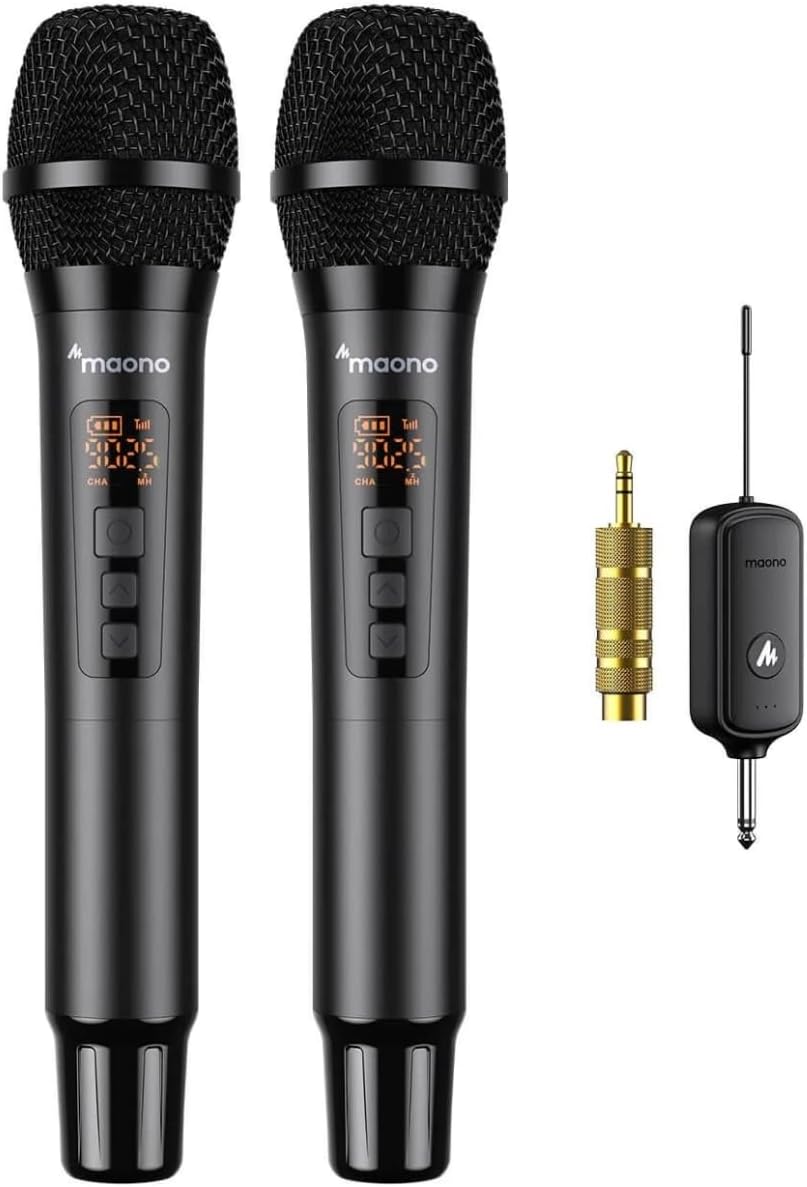
Figure 2.1: Overview of the MAONO WM760 A2 Wireless Microphone System, showing two microphones, the receiver, and the 6.35mm to 3.5mm adapter.

Figure 2.2: The complete MAONO WM760 A2 system, including two microphones, the receiver, jack adapter, anti-roll rings, and foam covers.
3. Setup Guide
3.1 Battery Installation
The MAONO WM760 A2 system requires a total of 6 AA batteries (not included) for operation: 2 for each microphone and 2 for the receiver.
- For Microphones: Unscrew the bottom part of each microphone. Insert 2 AA batteries, ensuring correct polarity (+/-). Screw the bottom part back on securely.
- For Receiver: Open the battery compartment on the receiver. Insert 2 AA batteries, ensuring correct polarity (+/-). Close the battery compartment.

Figure 3.1: Illustration of battery installation for both the wireless microphone and the receiver unit.
3.2 Connecting the Receiver
The receiver features a standard 6.35mm (1/4 inch) jack. Connect it to the audio input of your desired sound system. This can include:
- Vocal systems
- Active speakers
- Sound cards
- Amplifiers
- Karaoke systems
- Mixers
If your audio system has a 3.5mm (1/8 inch) input, use the included 6.35mm to 3.5mm jack adapter.

Figure 3.2: The receiver being plugged into an audio input, demonstrating its direct connection capability.
3.3 Powering On and Automatic Pairing
- After connecting the receiver to your audio system, turn on the receiver.
- Turn on both handheld microphones.
- The microphones and receiver will automatically pair within a few seconds. The display on the microphones will show connection status.
- Once paired, you can begin using the microphones.
4. Operation
4.1 Using the Microphones
Hold the microphone firmly and speak or sing directly into the top mesh grille. The microphone features a cardioid polar pattern, which means it primarily picks up sound from the front, reducing background noise.

Figure 4.1: An exploded view illustrating the internal components of the microphone and a diagram of its cardioid polar pattern, showing sound pickup directionality.
4.2 Changing Frequencies (UHF Channels)
The WM760 A2 system offers 20 UHF channels to prevent interference. If you experience signal drops or interference, you can manually change the frequency on the microphone:
- Locate the frequency adjustment buttons on the microphone (usually labeled 'CHA' and 'MH' or similar, near the display).
- Press the appropriate button to cycle through available channels until you find a clear frequency.
- The receiver will automatically sync to the new frequency.
4.3 Using Multiple Systems
The WM760 A2 system is designed to allow multiple units to operate simultaneously without interference. Each system will automatically select available channels upon power-on. If you need more than two microphones, you can use additional WM760 A2 systems.
4.4 Operating Range
The system has an operating range of up to 80 meters (approximately 260 feet) in open areas. Performance may vary depending on environmental factors such as obstacles, Wi-Fi signals, and other wireless devices.
5. Maintenance
- Cleaning: Use a soft, dry cloth to clean the microphones and receiver. Do not use liquid cleaners or solvents.
- Storage: When not in use for extended periods, remove batteries from both microphones and the receiver to prevent leakage. Store the system in a cool, dry place.
- Handling: Avoid dropping the microphones or exposing them to excessive shock, moisture, or extreme temperatures.
6. Troubleshooting
| Problem | Possible Cause | Solution |
|---|---|---|
| No sound from microphones. |
|
|
| Interference or static. |
|
|
| Short operating range. |
|
|
7. Specifications
| Feature | Detail |
|---|---|
| Brand | MAONO |
| Model Name | WM-760 (Draadloos microfoonsysteem) |
| Microphone Type | Wireless Handheld |
| Number of Microphones | 2 |
| Wireless Technology | UHF (20 Channels) |
| Operating Range | Up to 80 meters (approx. 260 feet) |
| Power Source | 6 x AA Batteries (2 per mic, 2 for receiver) |
| Recommended Uses | Singing, Karaoke, Videoconferencing, Public Speaking |
| Included Components | Microphone, Receiver, Pop Filter (Foam Covers) |
| Manufacturer | Redshow |
| Country of Origin | China |
8. Safety Information
- Do not expose the device to rain, moisture, or extreme temperatures.
- Do not attempt to disassemble or modify the device. This will void the warranty and may cause damage or injury.
- Keep out of reach of children.
- Dispose of batteries responsibly according to local regulations.
9. Warranty and Support
For warranty information and technical support, please refer to the documentation provided with your purchase or visit the official MAONO website. If you encounter any issues not covered in this manual, please contact MAONO customer service for assistance.
Online Resources:
Related documentsWM-760


Ask a question about this manual
Ask about setup, troubleshooting, compatibility, parts, safety, or missing instructions. Manuals+ will review the question and use this page’s manual context to help answer it.