
1. Introduction
This manual provides essential instructions for the safe and efficient operation, installation, and maintenance of your SUNGOLDPOWER 11.4KW 48V Hybrid Solar Inverter. Please read this manual thoroughly before installation and use, and retain it for future reference.

Image 1.1: Front view of the SUNGOLDPOWER 11.4KW 48V Hybrid Solar Inverter.
2. Safety Information
Always adhere to local electrical codes and regulations. Installation and maintenance should only be performed by qualified personnel. Disconnect all power sources before servicing. This inverter operates at high voltages and currents, which can be hazardous.
- Do not attempt to disassemble or repair the inverter yourself.
- Ensure proper grounding.
- Keep away from flammable materials.
- Avoid contact with live terminals.
- Use appropriate personal protective equipment (PPE).
3. Product Overview and Features
The SUNGOLDPOWER 11.4KW 48V Hybrid Solar Inverter is designed for both on-grid and off-grid applications, offering robust performance and flexibility for energy storage systems.

Image 3.1: The SUNGOLDPOWER SGN11.4KHB-48 Hybrid Inverter as part of an energy storage system.
Key Features:
- High Solar Input: Features 3 MPPTs, each supporting up to 600V PV input, with a total solar input capacity of 15KW and a maximum charging current of 210A.
- Scalable Power: Up to 9 inverters can be connected in parallel to create a system with a maximum output of 102.6KW for both off-grid and grid-tie applications.
- Advanced AC Coupling: Seamless integration with existing grid-tie systems and smart load management.
- Monitoring and Control: Equipped with an LCD display and mobile application for real-time data monitoring and settings adjustment via Bluetooth.
- Battery Compatibility: Compatible with various battery types including Flooded (FLD), AGM, LiFePO4 (Li), GEL, Sealed Lead Acid (SLD), and user-defined settings.
- Certifications: UL 1741/CSA C22.2/UL 1699B UL 1741SB, IEEE 1547:2018, HECO SRD 2.0 certified.
- Durability: IP65 rated, wall-mounted design.

Image 3.2: Overview of the inverter's key product features including high solar input, scalability, and certifications.

Image 3.3: The inverter supports various battery types including Flooded, AGM, LiFePO4, GEL, Sealed Lead Acid, and user-defined settings.
4. Setup and Installation
4.1 Unboxing and Components
Carefully unpack the inverter and verify all components are present. The package typically includes the inverter unit, WiFi module, BTS cable, parallel cable, CT cable, mounting bracket, 1x9-Pin terminal, 3x4-Pin terminal, and M6 expansion/security screws.

Image 4.1: Contents of the inverter package and its dimensions.
4.2 Physical Installation
The inverter is designed for wall-mounted installation. Ensure the mounting location is secure, well-ventilated, and protected from direct sunlight and moisture. Refer to the provided mounting bracket for proper installation procedures.
4.3 Connections
Identify the various connection ports on the inverter for PV input, battery, grid, and communication. Proper wiring is critical for safety and performance. Consult the detailed wiring diagrams in the full manual for specific instructions.

Image 4.2: Detailed view of the inverter's external features and connection ports, including PV, Battery, COM, and GEN connections.

Image 4.3: Diagram illustrating the typical application system for the inverter, showing connections to PV array, battery, grid, and loads.
5. Operating Modes
The inverter supports four primary AC output modes to optimize energy usage based on your requirements:
- Self-consumption Mode: Prioritizes using solar power for loads, then charging batteries, and finally feeding excess to the grid.
- Feed-in Priority Mode: Prioritizes feeding solar power to the grid, then powering loads, and finally charging batteries.
- Back-up Mode: Ensures continuous power to critical loads using battery backup when the grid fails.
- Off-Grid Mode: Operates independently from the utility grid, powering loads directly from solar and battery storage.

Image 5.1: Visual representation of the four AC output work modes: Self-consumption, Feed-in Priority, Back-up, and Off-Grid.
5.1 Forced Charge/Discharge Function
The inverter allows users to set specific time periods for forced battery charging or discharging, regardless of the current working mode. This feature is useful for optimizing battery life or taking advantage of variable electricity rates.
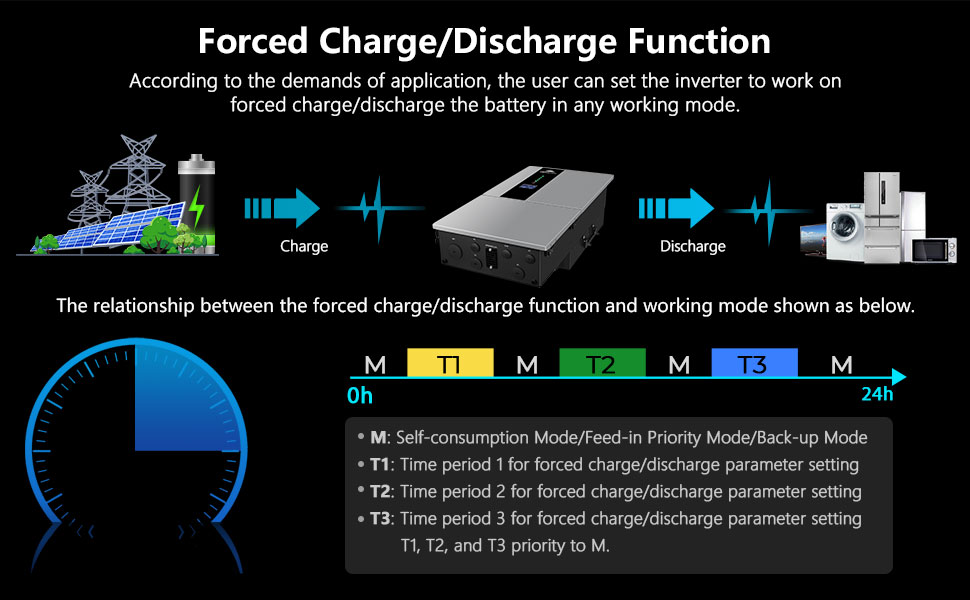
Image 5.2: Diagram explaining the forced charge/discharge function and its relationship with different time periods (T1, T2, T3) and main operating modes (M).
6. Monitoring and Control
The inverter features an integrated LCD display and supports remote monitoring and control via a mobile application.
6.1 LCD Display
The LED and LCD HD display provides real-time information on PV input, battery status, grid connection, backup status, communication, and alarm notifications. Users can monitor various parameters and adjust settings directly from the unit.

Image 6.1: Close-up of the inverter's LED and LCD HD display, showing various status indicators and real-time data.
6.2 Mobile Application (APP)
Connect the inverter to your smartphone via Bluetooth to access real-time data, customize settings, and manage the system remotely through the dedicated mobile application.

Image 6.2: Illustration of monitoring and customizing the inverter via a smartphone application.
7. Maintenance
Regular maintenance ensures the longevity and optimal performance of your inverter. Always disconnect power before performing any maintenance.
- Cleaning: Keep the inverter's ventilation openings clear of dust and debris. Use a dry cloth for cleaning the exterior.
- Connections: Periodically check all electrical connections for tightness and signs of corrosion.
- Environment: Ensure the operating environment remains within specified temperature and humidity ranges.
- Firmware: Keep the inverter firmware updated as recommended by the manufacturer.
8. Troubleshooting
This section provides general guidance for common issues. For complex problems, contact technical support.
| Problem | Possible Cause | Solution |
|---|---|---|
| Inverter not powering on | No DC input from battery/PV; AC breaker tripped | Check battery connections and voltage; inspect AC breakers. |
| Low power output | Insufficient PV input; battery low; overload | Verify PV array performance; check battery charge; reduce load. |
| Alarm indicator active | System fault; over-temperature; communication error | Refer to LCD display for specific error code; ensure proper ventilation; check communication cables. |
For detailed troubleshooting steps, consult the comprehensive manual or contact SGPWATT technical support.
9. Specifications
The following table outlines the technical specifications for the SUNGOLDPOWER SGN11.4KHB-48 Hybrid Solar Inverter.

Image 9.1: Detailed technical specifications for the SGN11.4KHB-48 inverter model.
| Parameter | Value |
|---|---|
| Model Name | SGN11.4KHB-48 |
| Rated Output Power | 11,400W (AC) / 15,000W (DC) |
| DC Voltage | 48V DC |
| Rated Output Voltage | 120V/240V (split phase) / 208V (2/3 phase) VAC |
| Parallel Capability | Yes, up to 9 units |
| Max. AC Output Power (PF=1) | 11,400W |
| Peak Power | 20,000VA |
| Nominal Output Frequency | 50Hz/60Hz |
| Nominal Grid Output Power | 11,400W |
| Nominal Grid AC Current | 47.5A |
| Solar Charger Type | MPPT |
| Maximum PV Array Power | 15,000W |
| MPPT Operation Voltage | 70-540VDC |
| Maximum PV Array Open Circuit Voltage | 600VDC |
| Number of MPPT Tracker | 3 |
| Max. Charge/Discharge Current | 210A/210A |
| Ingress Protection Degree | IP65/NEMA 3R |
| Dimensions (W*H*D) | 16.5"x31.5"x9.4" (420*800*240mm) |
| Net Weight | 88lb/40Kg |
| Communication Interface | RS485/CAN (for BMS), DRM/RS485 (for meter), RS485, Optional: Wi-Fi/LAN |
10. Warranty and Support
The SUNGOLDPOWER 11.4KW 48V Hybrid Solar Inverter comes with a 10-year warranty. For warranty claims, technical assistance, or further inquiries, please contact SGPWATT customer support.
Customer Support: Refer to your purchase documentation or the official SGPWATT website for contact information.