
1. Introduction
This manual provides detailed instructions for the installation, operation, and maintenance of your Reobiux K1-1P 2K HD WiFi Outdoor/Indoor Security Camera. Please read this manual thoroughly before use to ensure proper functionality and safety. Keep this manual for future reference.
Safety Information
- Ensure the camera is installed in a stable location to prevent falling.
- Use only the provided power adapter to avoid damage.
- Do not expose the camera to extreme temperatures or humidity.
- Avoid direct exposure to strong sunlight for extended periods.
- Keep the camera away from children.
2. Package Contents
Verify that all items are present in your package:
- Reobiux K1-1P Security Camera (1 unit)
- Mounting Accessories (screws, wall plugs)
- Power Adapter
- User Manual (this document)
3. Product Overview
The Reobiux K1-1P is a 2K HD WiFi security camera designed for both outdoor and indoor surveillance. It features a 360° pan and tilt function, two-way audio, intelligent motion detection with auto-tracking, and color night vision. The camera connects via 2.4GHz WiFi and supports local SD card storage or cloud storage.

Image: The Reobiux K1-1P security camera shown alongside a smartphone displaying its 2K live feed, illustrating its high-definition monitoring capabilities.
4. Setup
4.1 Installation
The camera can be wall-mounted for optimal coverage. Choose a location that provides a clear view of the area you wish to monitor and has access to a power outlet. Ensure the WiFi signal is strong at the chosen installation point.
- Mounting Type: Wall Mount
- Usage: Suitable for both outdoor and indoor environments.

Image: The Reobiux K1-1P camera securely mounted on an exterior wall, demonstrating a typical installation scenario.
4.2 App Download and Account Registration
To operate the camera, you need to download the iCSee app on your smartphone or tablet. The app is available for both iOS and Android devices.
- Activate Permissions: Enable Bluetooth and 2.4G WiFi on your mobile device.
- Download the App: Scan the QR code provided in the camera's packaging or visit http://d.xmeye.net/CSee to download the iCSee app.
- Register an Account: Open the iCSee app and follow the on-screen instructions to register a new user account.
- Add Camera via Bluetooth: Within the app, select the option to add a new device. The app will guide you through connecting the camera via Bluetooth.
- Successful Configuration: Once connected, the camera will appear in your device list, indicating successful setup.

Image: A visual guide demonstrating the five steps for setting up the camera using the iCSee mobile application, from activating permissions to successful configuration.
4.3 Wi-Fi Connection
The Reobiux K1-1P camera supports 2.4GHz WiFi networks only. It is not compatible with 5GHz WiFi networks. Ensure your router is configured to broadcast a 2.4GHz signal or that your device is connected to the 2.4GHz band during setup. The effective WiFi range is approximately 7-8 meters.
5. Operating Instructions
5.1 PTZ Control and 360° Panorama
The camera features Pan-Tilt-Zoom (PTZ) functionality, allowing you to remotely adjust its viewing angle through the iCSee app. This provides comprehensive coverage without blind spots.
- Horizontal Rotation (Pan): Up to 355°
- Vertical Tilt: Up to 90°

Image: An illustration demonstrating the camera's extensive 355° horizontal and 90° vertical rotation, ensuring full panoramic coverage around a property.
5.2 Intelligent Motion Detection and Auto Tracking
The camera is equipped with a smart motion detection sensor. When human movement is detected, the camera will send a notification to your phone. The camera's lens can automatically track the detected person until they move out of the camera's field of view.
- Customizable Detection Zones: You can define specific areas within the camera's view for motion detection, reducing false alarms from irrelevant movements.
- Adjustable Sensitivity: The detection sensitivity can be adjusted to suit your environment and minimize unwanted alerts.

Image: The camera's automatic tracking feature in action, following a child playing soccer, with an iCSee app notification indicating motion detection.

Image: A visual representation of the camera's precise detection capabilities, showing how sensitivity can be adjusted (Low, Medium, High) to effectively reduce false alarms by focusing on humanoids.

Image: An example of customizing non-detection areas within the camera's field of view, allowing users to mask out unnecessary detection zones like a swimming pool to prevent irrelevant alerts.
5.3 2K HD Resolution and Color Night Vision
The camera provides a high resolution of up to 2K, ensuring clear and detailed images. It offers two night vision modes for enhanced visibility in low-light conditions:
- Black and White Mode: Utilizes 4 infrared LEDs to capture clear images in monochrome.
- Color Night Vision Mode: Activates built-in spotlights to provide sharp, full-color images even in complete darkness.
The night vision range extends up to 20 meters (approximately 65 feet).
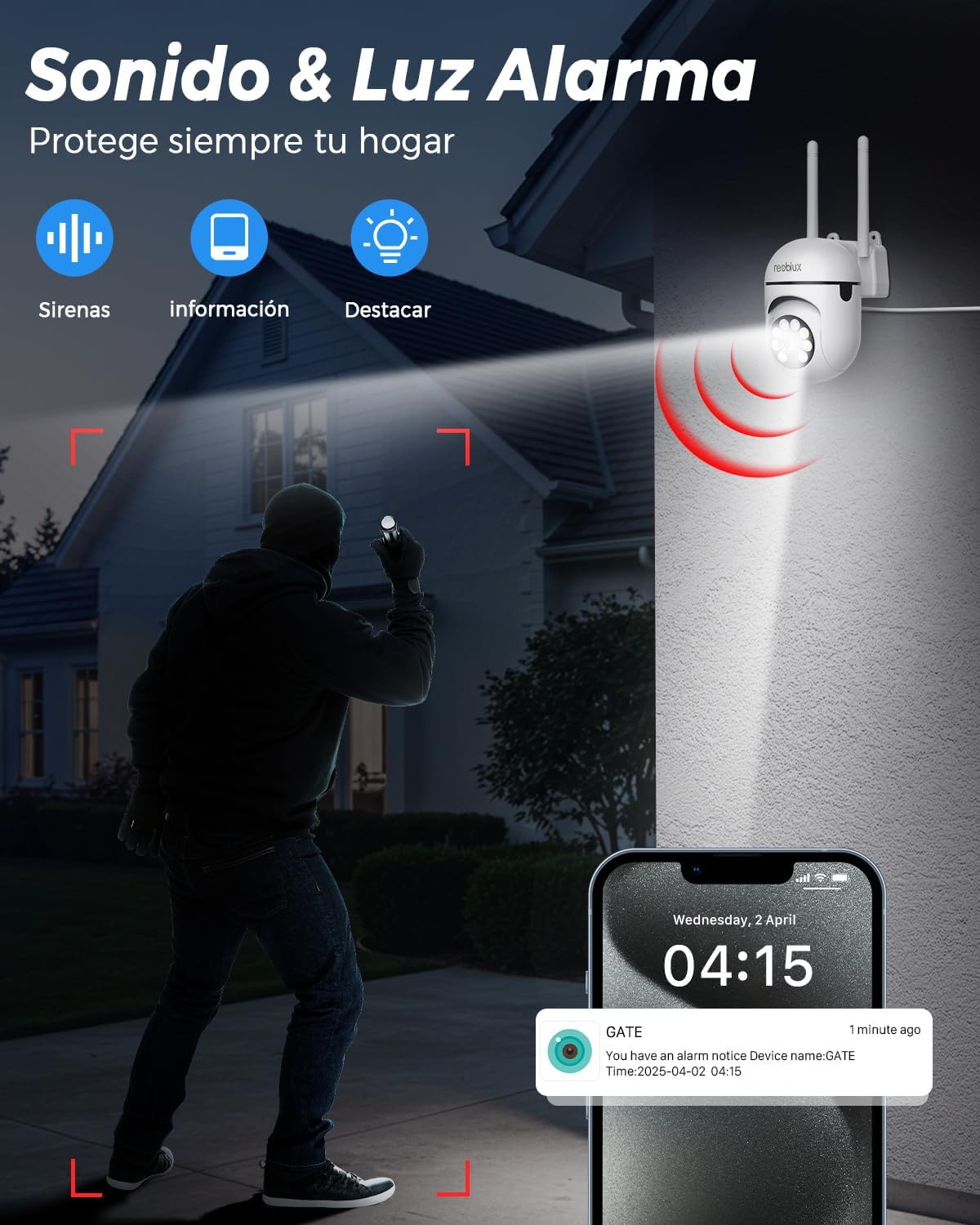
Image: A side-by-side comparison illustrating the camera's night vision capabilities, showing a scene in infrared black and white and the same scene in vivid color night vision with spotlights activated.
5.4 Two-Way Audio and Alarm
The integrated two-way intercom allows you to communicate with visitors or family members in real-time through the camera. This feature can also be used to deter potential intruders.
- Sound and Light Alarm: You can configure the camera to emit an audible siren and flash its spotlights when a suspicious intruder is detected, providing an active deterrent.

Image: A user communicating with a delivery person via the camera's two-way audio feature, illustrating its practical use for remote interaction.

Image: The camera's sound and light alarm system activating to deter a potential intruder in a dark environment, with a notification appearing on a smartphone.
5.5 24/7 Recording and Storage
The Reobiux K1-1P camera supports continuous 24/7 recording, providing constant surveillance for your property. Video footage and images can be stored in two ways:
- Micro SD Card: Insert a compatible micro SD card (not included) into the camera for local storage.
- Cloud Storage: Optional cloud storage services are available through the iCSee app for remote access and backup of your recordings.

Image: A visual timeline depicting the camera's continuous 24/7 recording and playback functionality, ensuring constant protection throughout the day and night.
5.6 Voice Assistant Integration
The camera is compatible with Amazon Alexa, allowing for convenient voice control of your home security system.

Image: A user utilizing voice commands with an Amazon Alexa device to control the camera, highlighting the seamless integration with smart home ecosystems.
6. Maintenance
Regular maintenance ensures the longevity and optimal performance of your Reobiux K1-1P camera.
- Cleaning: Gently wipe the camera lens and body with a soft, dry cloth. Do not use harsh chemicals or abrasive cleaners.
- Firmware Updates: Periodically check the iCSee app for available firmware updates to ensure your camera has the latest features and security enhancements.
- Power Supply: Ensure the power adapter and cable are free from damage. Replace if necessary.
- Environmental Protection: While the camera is water-resistant, avoid direct exposure to high-pressure water jets or prolonged submersion.
7. Troubleshooting
If you encounter issues with your Reobiux K1-1P camera, refer to the following common problems and solutions:
- Camera cannot connect to Wi-Fi:
- Ensure your Wi-Fi network is 2.4GHz. The camera does not support 5GHz Wi-Fi.
- Check if the camera is within the 7-8 meter range of your Wi-Fi router.
- Verify that the Wi-Fi password entered in the iCSee app is correct.
- Restart your router and the camera, then attempt to reconnect.
- SD card not detected or recording:
- Ensure the SD card is inserted correctly and fully into the slot.
- Try re-inserting the SD card multiple times.
- Format the SD card through the iCSee app settings.
- Test with a different, reputable brand SD card (up to 128GB supported).
- If the issue persists, the SD card slot may be faulty.
- Frequent disconnections from the app:
- Ensure your phone has a stable internet connection.
- Check if the iCSee app is updated to the latest version.
- Clear the app's cache or reinstall the app.
- Verify that the camera's Wi-Fi signal strength is adequate.
- Motion detection is too sensitive or not detecting:
- Adjust the detection sensitivity levels in the iCSee app settings.
- Configure custom detection zones to exclude areas with frequent, irrelevant movement (e.g., trees swaying).
8. Specifications
| Feature | Specification |
|---|---|
| Model Number | K1-1P |
| Video Capture Resolution | 2K (2MP) |
| Color | White |
| Mounting Type | Wall Mount |
| Wireless Communication Technology | Wi-Fi (2.4GHz only), Bluetooth |
| Pan Angle | 355° |
| Tilt Angle | 90° |
| Night Vision Range | Up to 20 meters (65 feet) |
| Frame Rate | 30fps |
| Material | Plastic |
| Voltage | 12 Volts |
| Wattage | 3 Watts |
| Water Resistance Level | Water Resistant |
| Dimensions (L x W x H) | 12.7 x 10.2 x 15.2 cm (approx. 5 x 4 x 6 inches) |
| Special Features | Two-way audio, Motion detector, Local recording, PTZ technology, Night vision |
| Compatible Devices | Smartphone, Tablet, Television |
| Controller Type | iCSee App |
9. Warranty and Support
Reobiux is committed to providing high-quality products and customer service. For any questions or technical assistance, please contact our support team. All inquiries will be responded to within 24 hours during business days.

Image: An icon representing efficient customer service, available to assist with product inquiries.
Please refer to your purchase documentation for specific warranty details.