1. Introduction and Overview
Thank you for choosing the HOOBRO Narrow Side Table with Charging Station. This compact and functional table is designed to fit into small spaces, providing convenient storage and a built-in charging solution for your electronic devices. Please read this manual thoroughly before assembly and use to ensure proper setup and safe operation.
2. Product Features
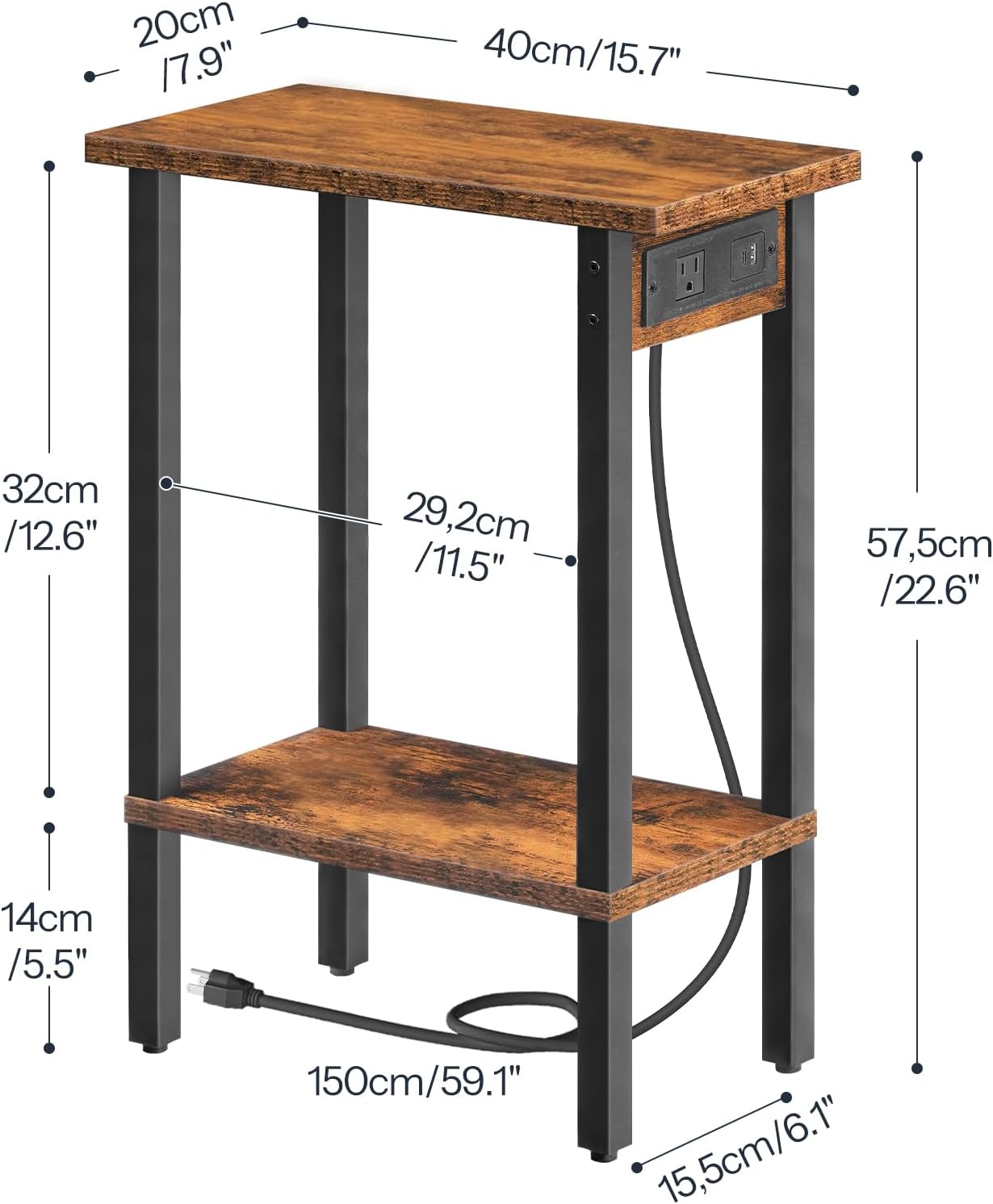
- Integrated Charging Station: Features 1 AC outlet, 1 USB port, and 1 Type-C port with a 4.9-foot power cord for convenient device charging.
- Dual-Layer Open Storage: Two open shelves provide space for books, snacks, remotes, or decorative items.
- Space-Saving Design: Slim dimensions (15.7"D x 7.9"W x 22.4"H) make it suitable for tight spaces.
- Durable Construction: Crafted from high-quality particleboard for stability and longevity. Each shelf supports up to 22.6 lbs.
- Easy Assembly: Simplified installation process with detailed instructions and numbered hardware.


3. Safety Information
Always follow the assembly instructions carefully. Do not exceed the maximum weight recommendation of 50 pounds for the top shelf to ensure stability and prevent accidents. Ensure all electrical connections are secure before use. Do not expose the charging station to liquids.
4. Package Contents
Before beginning assembly, please check that all parts listed below are present and undamaged:
- Side Table Components (Engineered Wood Panels, Metal Frame)
- Assembly Guide
- Accessory Kit (Screws, Bolts, etc.)
- Allen Key
- Instructions
5. Assembly Instructions
Assembly is designed to be straightforward. It is recommended that two people assemble the table for ease and safety. An Allen key is included; no additional complex tools are required.
- Unpack and Identify Parts: Carefully unpack all components and lay them out on a clean, soft surface to prevent scratches. Refer to the parts list in the included Assembly Guide to identify each piece.
- Attach Legs to Bottom Shelf: Secure the metal legs to the bottom engineered wood shelf using the provided screws and Allen key. Do not overtighten.
- Attach Top Shelf: Connect the top engineered wood shelf to the metal legs. Ensure the side with the pre-drilled hole for the charging station is correctly oriented.
- Install Charging Station: Insert the charging station unit into the designated slot on the top shelf and secure it with the provided screws.
- Tighten All Connections: Once all parts are loosely assembled, gently tighten all screws to ensure stability. Do not overtighten to avoid damaging the wood.
- Place and Connect: Position the table in your desired location. Plug the power cord into a wall outlet.
6. Operating Instructions
The HOOBRO Narrow Side Table is designed for simple operation.
6.1 Using the Charging Station
- Ensure the table's power cord is securely plugged into a functional wall outlet.
- To charge devices, connect them to the available AC outlet, USB port, or Type-C port on the charging station.
- The charging station is always active when plugged in. No additional switches are required for power delivery.
6.2 Utilizing Storage
- Place items on the top surface or the lower open shelf for easy access and organization.
- Adhere to the maximum weight capacity of 22.6 lbs per shelf to maintain stability.
7. Maintenance
To maintain the appearance and longevity of your side table:
- Wipe surfaces with a soft, damp cloth. Avoid harsh chemicals or abrasive cleaners.
- Periodically check all screws and connections to ensure they remain tight. Retighten if necessary.
- Keep the table away from direct sunlight and excessive moisture to prevent warping or discoloration.
8. Troubleshooting
If you encounter issues with your HOOBRO Narrow Side Table, refer to the following common solutions:
- Table is Wobbly: Ensure all screws are fully tightened. Check that the table is placed on a level surface. Adjust the leveling feet if present.
- Charging Station Not Working: Verify that the table's main power cord is securely plugged into a live wall outlet. Test the outlet with another device to confirm it has power. Ensure your device's charging cable is properly connected to the charging station.
- Missing Parts: If any parts are missing upon unpacking, please contact HOOBRO customer support with your purchase details.
9. Specifications
| Attribute | Detail |
|---|---|
| Brand | HOOBRO |
| Model Number | BF240UBZ01 |
| Product Dimensions (D x W x H) | 15.7" x 7.9" x 22.6" |
| Item Weight | 2.6 Kilograms |
| Maximum Weight Recommendation (Top Shelf) | 49.82 Pounds (approx. 22.6 kg) |
| Frame Material | Engineered Wood |
| Top Material Type | Engineered Wood |
| Color | Rustic Brown + Black |
| Charging Station | 1 AC Outlet (125V/12A), 1 USB Port (5V/2A), 1 Type-C Port (5V/2A) |
| Power Cord Length | 4.9 feet |
| Required Assembly | Yes |
10. Warranty and Support
For warranty information or customer support, please refer to the contact details provided with your purchase or visit the official HOOBRO website. Keep your purchase receipt for any warranty claims.


