HOOBRO Narrow Side Table with Charging Station
Model: BG240UBZ01
Introduction
This manual provides detailed instructions for the assembly, operation, maintenance, and troubleshooting of your HOOBRO Narrow Side Table, Model BG240UBZ01. Please read all instructions carefully before assembly and use to ensure safe and proper functioning of the product.
Safety Information
Always follow the assembly instructions carefully. This table may tip if not properly assembled or anchored. Keep away from children and pets.
- Ensure all parts are securely fastened before use.
- Do not overload the shelves; refer to specifications for maximum weight capacity.
- Keep liquids away from the charging station to prevent electrical hazards.
- Do not attempt to modify the electrical components of the charging station.
Package Contents
Verify that all components listed below are present before beginning assembly. If any parts are missing or damaged, please contact customer support.
- Side Table Components (Particleboard panels, metal frame parts)
- Accessory Kit (Screws, nuts, washers, etc.)
- Allen Key
- Assembly Guide
- Charging Station Unit (Pre-installed in top panel)
Setup and Assembly
The HOOBRO Narrow Side Table is designed for straightforward assembly. Follow the detailed illustrated instructions provided in the package. No complex tools are required beyond the included Allen key and a screwdriver (not included).
- Unpack and Identify Parts: Carefully remove all components from the packaging. Lay them out and compare them against the parts list in the included Assembly Guide. Each part is typically numbered for easy identification.
- Assemble the Frame: Attach the metal frame components according to the diagrams in the Assembly Guide. Ensure all screws are finger-tightened initially.
- Attach Shelves: Secure the particleboard shelves to the assembled frame. The top panel with the pre-installed charging station should be placed last.
- Final Tightening: Once all parts are in place, systematically tighten all screws using the provided Allen key and a screwdriver. Do not overtighten.
- Positioning: Place the assembled table in your desired location. Ensure it is stable and level.

Image: The HOOBRO Narrow Side Table, Model BG240UBZ01, positioned next to a sofa in a living room. It features a greige top and black metal legs, with a phone charging on the top surface.

Image: A diagram illustrating the dimensions of the HOOBRO Narrow Side Table. The table measures 15.7 inches deep, 7.9 inches wide, and 22.6 inches high. The power cord is 59.1 inches long.
Operating Instructions
The integrated charging station provides convenient power access for your devices.
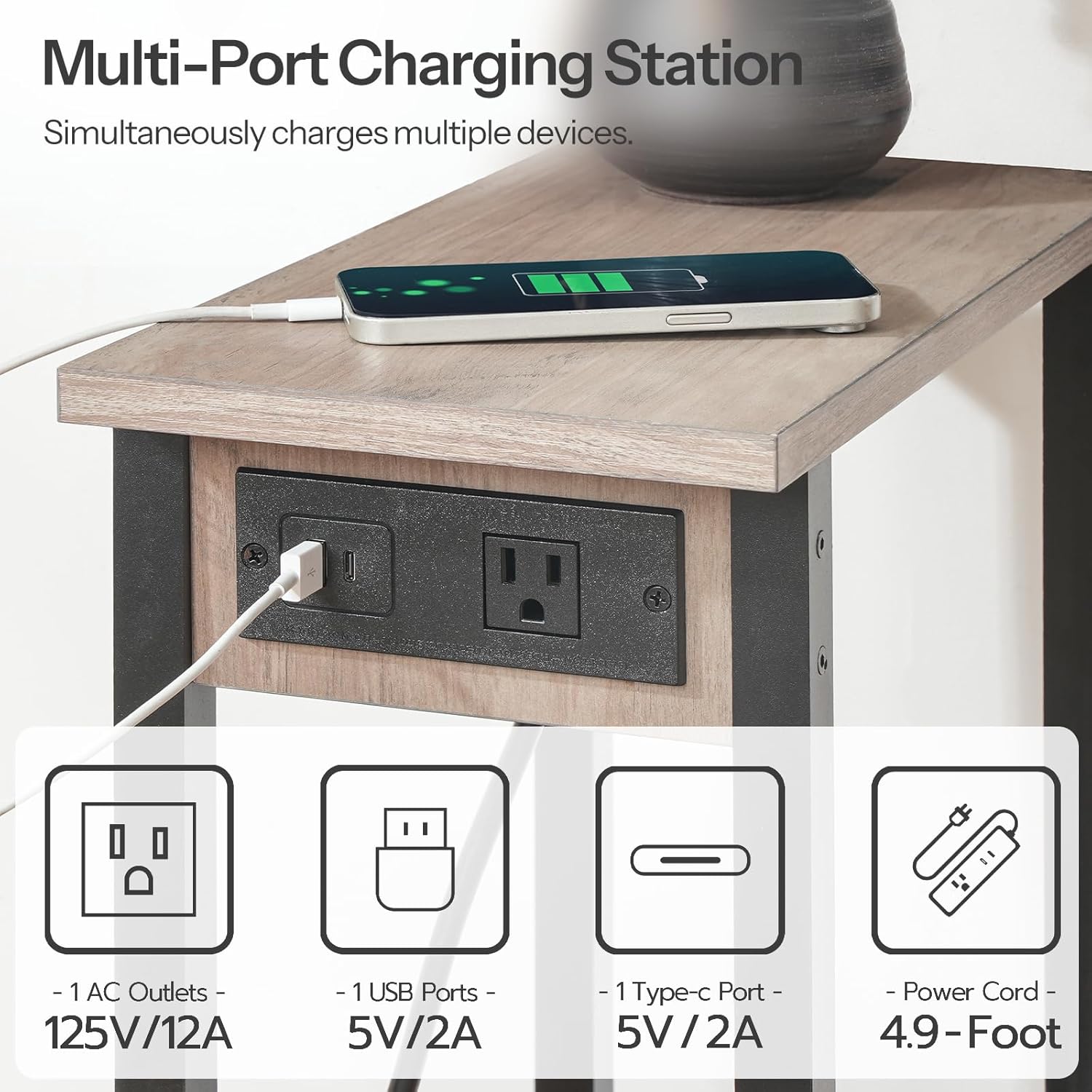
Image: A close-up view of the charging station embedded in the table top, showing one AC outlet, one USB-A port, and one USB-C port, with a phone charging via USB-A.
- Power Connection: Plug the table's 4.9-foot power cord into a standard wall outlet.
- AC Outlet Usage: The charging station includes one 125V/12A AC outlet. Plug in small appliances or chargers as needed.
- USB Charging: Utilize the one 5V/2A USB-A port or the one 5V/2A Type-C port to charge compatible electronic devices such as smartphones, smartwatches, or tablets.
Video: An official HOOBRO video demonstrating the features and usage of the Narrow Side Table with Charging Station, including its slim design, two-tier storage, and multi-port charging capabilities.
Maintenance
- Cleaning: Wipe the table surfaces with a soft, damp cloth. Avoid harsh chemicals or abrasive cleaners that could damage the finish.
- Dusting: Regularly dust the table to prevent buildup.
- Inspection: Periodically check all screws and connections to ensure they remain tight.
Troubleshooting
| Problem | Possible Cause | Solution |
|---|---|---|
| Table is wobbly | Loose screws; uneven floor | Tighten all assembly screws. Adjust the leveling feet if present, or place shims under the legs on an uneven surface. |
| Charging station not working | Power cord unplugged; device not compatible; faulty outlet | Ensure the power cord is securely plugged into a working wall outlet. Test with a different device or a different outlet. |
| Damage during assembly | Incorrect procedure; excessive force | Review the assembly guide. If parts are damaged, contact customer support for replacements. |
Specifications
- Brand: HOOBRO
- Model Name: End Table
- Model Number: BG240UBZ01
- Product Dimensions: 15.7"D x 7.9"W x 22.6"H
- Item Weight: 5.7 Pounds
- Maximum Weight Recommendation (per shelf): 22.6 lb (approx. 10.2 kg)
- Frame Material: Engineered Wood
- Top Material Type: Engineered Wood
- Color: Greige + Black
- Charging Station: 1 AC Outlet (125V/12A), 1 USB-A Port (5V/2A), 1 Type-C Port (5V/2A)
- Power Cord Length: 4.9 feet (approx. 1.5 meters)
- Required Assembly: Yes
- Recommended Number of People for Assembly: 2
Warranty and Support
For any questions, concerns, or to report missing/damaged parts, please contact HOOBRO customer support. Refer to your purchase documentation for specific warranty details. Keep your proof of purchase for warranty claims.
HOOBRO Customer Service: Please visit the official HOOBRO website or your retailer's support page for contact information.