1. Introduction
This manual provides detailed instructions for the setup, operation, and maintenance of your MechLands AJAZZ ALUX68 HE Aluminum Rapid Trigger Gaming Keyboard. Please read this manual thoroughly before using the product to ensure proper functionality and longevity.
2. Product Overview
The AJAZZ ALUX68 HE is a high-performance wired gaming keyboard featuring magnetic switches, rapid trigger technology, and an 8K polling rate. Its durable aluminum alloy construction and customizable RGB backlighting enhance both aesthetics and functionality.

Image: Overview of the ALUX68 HE Magnetic Gaming Keyboard, highlighting features like adjustable actuation, rapid trigger, Hall Effect switches, 8K polling rate, 0.125ms latency, multi-system compatibility, aluminum alloy case, aluminum plate, and south-facing RGB.
2.1 Key Features
- Durable Aluminum Alloy Design: Features a robust CNC-Anodized aluminum alloy casing with 180 mesh sandblasting for durability and aesthetics.
- Lightning-Fast Response Time: Achieves 0.125ms latency and an 8K polling rate, with a 32K scanning rate for precise inputs.
- Magnetic Switch Technology: Equipped with magnetic switches offering 0.01mm accuracy and a lifespan of over 100 million keystrokes.
- Precision Engineering for Esports: An aluminum positioning plate ensures stable button feedback and reduced key wobble, optimized for competitive gaming.
- Customizable RGB Backlighting: Offers 16 million colors of RGB backlighting with multiple customizable lighting profiles.

Image: Diagram illustrating the precision features for esports, including 0.01-2.00mm adjustable actuation, 0.125ms latency, 8K polling rate, and 32K scanning rate.
3. Package Contents
Verify that all items are present in the package:
- MechLands AJAZZ ALUX68 HE Gaming Keyboard
- USB Cable (Type-C)
- Keycap Puller
- Switch Puller
- User Manual

Image: Contents of the keyboard package, including the keyboard, USB cable, keycap puller, and documentation.
Video: An unboxing video of the MechLands ALUX68 HE Magnetic Gaming Keyboard, showing the contents of the package.
4. Setup
4.1 Connecting the Keyboard
- Locate the USB-C port on the left side of the keyboard.
- Connect the provided USB-C cable to the keyboard.
- Plug the other end of the USB cable into an available USB port on your computer or compatible device.
- The keyboard is plug-and-play and should be recognized automatically by your operating system.

Image: Close-up view of the USB-C port located on the side of the keyboard for wired connection.
4.2 System Compatibility
The ALUX68 HE keyboard is compatible with multiple platforms and systems:
- Windows
- Mac OS
- Android
- iOS
- PC, Laptops, Tablets, Smartphones

Image: Visual representation of the keyboard's compatibility with various operating systems and devices, including Windows, Mac OS, Android, iOS, tablets, laptops, phones, and PCs.
5. Operating Instructions
5.1 RGB Backlighting Control
The keyboard features 16.8 million colors of RGB backlighting with 19 effects and 9 colors. Use the following key combinations to control the lighting:
- FN + \ |: Toggle Backlight Effects
- FN + X: Turn ON/OFF Lights

Image: The keyboard displaying various RGB backlight effects, with key combinations for toggling effects and turning lights on/off.
5.2 Rapid Trigger and Adjustable Actuation
The magnetic switches allow for adjustable actuation and rapid trigger functionality, crucial for competitive gaming. These features can be configured via the customization software.
- Adjustable Actuation: Customize the actuation point of each key from 0.01mm to 2.00mm.
- Rapid Trigger: Allows keys to reset instantly upon release, enabling faster repeated inputs.

Image: Diagram showing how adjustable actuation works, allowing users to set the key's trigger point.
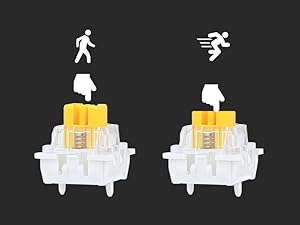
Image: Diagram illustrating the rapid trigger function, showing immediate key reset upon release for quick successive inputs.
5.3 N-Key Rollover (NKRO) and Anti-Ghosting
The keyboard supports N-Key Rollover (NKRO), allowing multiple keys to be pressed simultaneously without conflicts, and anti-ghosting for accurate input registration during intense gaming.

Image: Illustration of NKRO (N-Key Rollover) with multiple keys highlighted, indicating simultaneous input recognition, alongside an ergonomic Cherry profile diagram.
6. Customization Software
The ALUX68 HE keyboard features software programmability for advanced customization. This software is compatible with Windows systems and allows for:
- Backlight Settings
- Macro Editing
- Stroke Settings (Actuation and Rapid Trigger)
- Key Remapping
To access the software, visit the official MechLands website and download the necessary drivers. Note that some features may require specific driver installations.
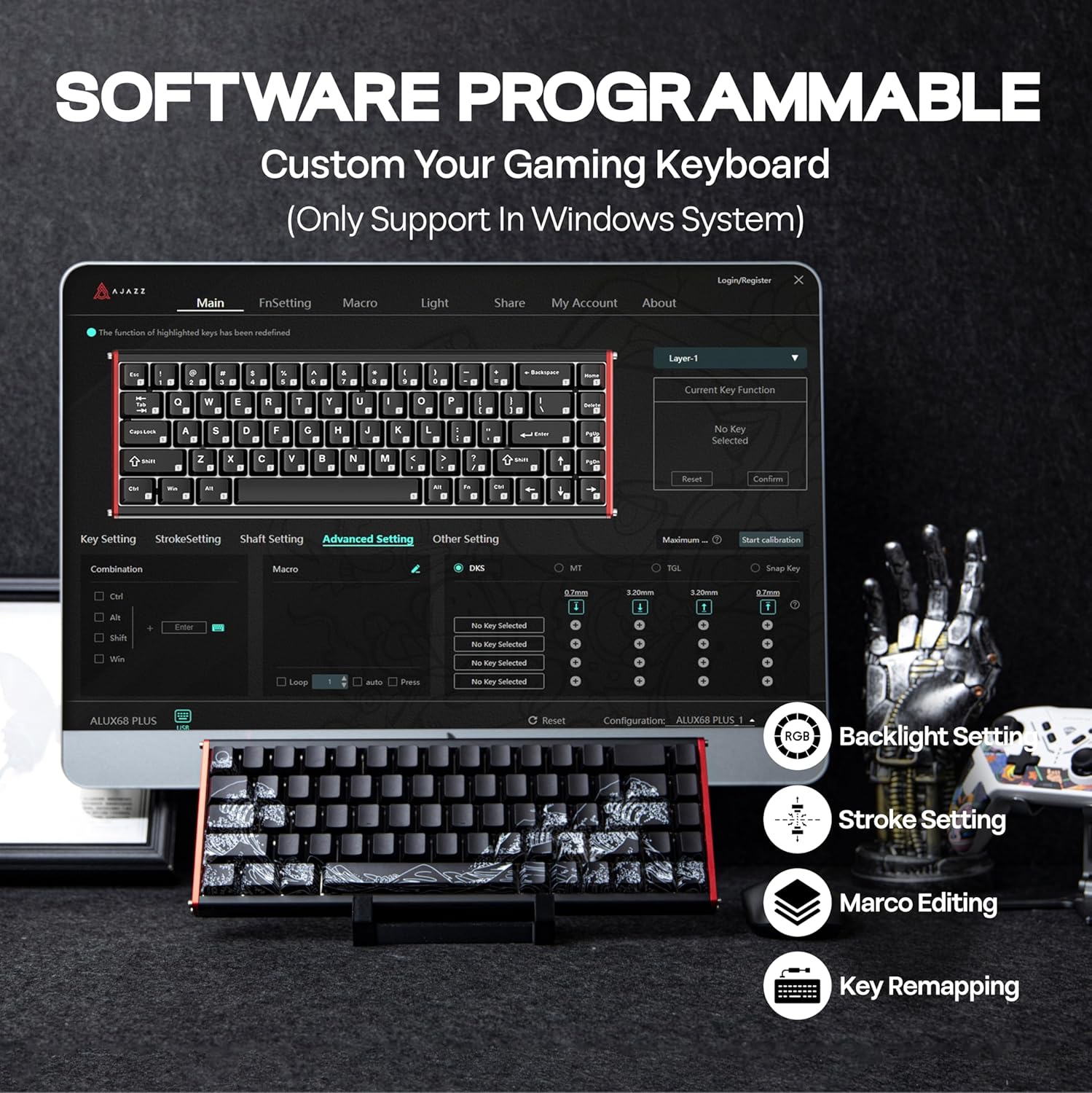
Image: Screenshot of the keyboard's customization software interface, showing options for key settings, stroke settings, advanced settings, and other configurations, including backlight, macro, and key remapping.
Video: An overview of the MechLands AJAZZ Alux68 HE Magnetic Gaming Keyboard, demonstrating its features and customization options.
7. Maintenance
7.1 Cleaning the Keyboard
- Disconnect the keyboard from your computer before cleaning.
- Use a soft, lint-free cloth to wipe down the keycaps and casing.
- For deeper cleaning, use the provided keycap puller to remove keycaps and clean underneath with compressed air or a small brush.
- Avoid using harsh chemicals or abrasive materials that could damage the finish.
7.2 Hot-Swappable Switches
The ALUX68 HE features a hot-swappable PCB, allowing you to easily change magnetic switches without soldering. Use the provided switch puller for removal and insertion.

Image: Close-up view of the hot-swappable PCB, showing magnetic linear switches being removed and inserted, along with south-facing LEDs and plate-mounted stabilizers.

Image: Exploded diagram showing the internal layers of the keyboard, including keycaps, magnetic switch, aluminum plate, sandwich foam, PCB plate, bottom foam, silicone, aluminum case, and detachable side panel.
8. Troubleshooting
| Problem | Possible Cause | Solution |
|---|---|---|
| Keyboard not responding | Loose USB connection, driver issue, or system conflict. | Ensure USB cable is securely connected. Try a different USB port. Restart your computer. Reinstall keyboard drivers if necessary. |
| RGB lights not working or flickering | Software settings, low power, or high brightness. | Check RGB settings in the customization software. Ensure the keyboard is connected to a stable power source. Reduce RGB brightness (some magnetic keyboards may malfunction above 50% brightness). |
| Keys not registering or double-typing | Switch malfunction, software calibration issue. | Recalibrate switches using the customization software. If a switch is faulty, replace it using the hot-swap feature. |
| Software settings not saving | Software bug or compatibility issue. | Ensure the software is up-to-date. Run the software as administrator. Save profiles before closing. |
9. Specifications
| Feature | Detail |
|---|---|
| Model | ALUX68 HE |
| Dimensions (L x W x H) | 12.56" x 12.56" x 0.79" |
| Item Weight | 3.43 pounds |
| Manufacturer | MechLands |
| Connectivity Technology | USB-C Wired |
| Keyboard Description | Gaming, 65% Compact Layout |
| Switches | Magnetic Hall Effect Switches (e.g., Magnetic Rice Switch Hifi Edition, Cotai Magnetic Shaft, Cotai Aquarius Magnetic Axis) |
| Polling Rate | Up to 8K Hz |
| Latency | 0.125ms |
| Actuation Accuracy | 0.01mm |
| Backlighting | RGB (16 million colors, south-facing LEDs) |
| Keycaps | Double-shot PBT (side-printed legends) |
| Special Features | Adjustable Actuation, Rapid Trigger, Hot-Swappable, Aluminum Alloy Case, Aluminum Positioning Plate, NKRO, Anti-Ghosting |
10. Warranty and Support
For warranty information and technical support, please refer to the official MechLands website or contact their customer service. Keep your purchase receipt for warranty claims.
Manufacturer: MechLands
Date First Available: March 31, 2025


