
DOOGEE U10-V
DOOGEE U10 (2025) 10-inch Tablet User Manual
Model: U10-V | Brand: DOOGEE
1. Introduction
Thank you for choosing the DOOGEE U10 (2025) 10-inch Tablet. This device is designed to provide a versatile and efficient experience for work, entertainment, and study. Running on the latest Android 15 operating system, it offers enhanced privacy, optimized performance, and intuitive multitasking capabilities. This manual will guide you through the setup, operation, and maintenance of your new tablet.
2. What's in the Box
- DOOGEE U10 Android 15 Tablet
- Bluetooth Keyboard
- Leather Protective Cover
- Mouse
- Stylus Pen
- Screen Protector (pre-applied or included)
- Charger
- Type-C USB Cable
- Tool for taking card (SIM/MicroSD tray ejector)
- User Manual
3. Product Features
Android 15 Operating System
The DOOGEE U10 tablet operates on the latest Android 15 OS, offering enhanced privacy features, smarter performance optimization, and an intuitive multitasking experience for smoother and more secure usage.
Powerful Performance
Equipped with a 2.0GHz quad-core processor, the tablet ensures smooth performance for web browsing, video playback, and light gaming, while maintaining high energy efficiency for extended battery life.
Ample Memory and Storage
The tablet features 16GB RAM (4GB physical + 12GB expandable) and 128GB internal storage, capable of handling multitasking and extensive data storage. It supports microSD card expansion up to 2TB, providing ample space for files, videos, and games.
Vibrant Display and Long-Lasting Battery
Experience immersive viewing on the 10-inch IPS HD display with a 78% screen-to-body ratio. The 5060mAh battery supports all-day use, ensuring productivity and entertainment without frequent recharging.
Advanced Connectivity
With Wi-Fi 6 and Bluetooth 5.0 support, the U10 tablet delivers faster network speeds and stable wireless connections for seamless streaming, downloading, and peripheral connectivity. It also includes PC-grade WPS Office software for document compatibility.
Portable and Stylish Design
The DOOGEE U10 features a compact 9.65×6.41×0.38 inch body and a lightweight 1.13lb design, making it highly portable. Its smooth casing offers a premium feel and resistance to daily wear.
4. Setup Guide
4.1 Initial Charging
Before first use, fully charge your tablet using the provided charger and Type-C USB cable. The charging port is located on the side of the tablet.
4.2 Power On/Off
To power on, press and hold the Power button (located on the side) until the DOOGEE logo appears. To power off, press and hold the Power button, then select 'Power off' from the options.
4.3 Initial Setup Wizard
Upon first power-on, follow the on-screen instructions to set up your tablet. This includes selecting your language, connecting to a Wi-Fi network, setting up your Google account, and configuring security options like Face ID.
4.4 Connecting Accessories
Bluetooth Keyboard and Mouse
- Ensure the keyboard and mouse are charged and powered on.
- On your tablet, go to Settings > Connected devices > Bluetooth.
- Turn on Bluetooth and scan for available devices.
- Select the keyboard and mouse from the list to pair them. Follow any on-screen prompts for pairing codes.
Stylus Pen
The stylus pen is generally passive and does not require Bluetooth pairing. Simply use it directly on the screen for navigation, drawing, or writing.
Protective Case and Screen Protector
Install the screen protector carefully to avoid bubbles, then place the tablet into the protective case for enhanced protection and use the case as a stand.
5. Operating Instructions
5.1 Basic Navigation
- Home Screen: Swipe left or right to navigate between home screens.
- App Drawer: Swipe up from the bottom of the screen to access all installed applications.
- Notifications & Quick Settings: Swipe down from the top of the screen to view notifications and access quick settings toggles (Wi-Fi, Bluetooth, Brightness, etc.).
- Multitasking: Swipe up and hold from the bottom of the screen to view recent apps. Tap an app to switch, or swipe it away to close.
5.2 App Management
- Install Apps: Download and install applications from the Google Play Store.
- Uninstall Apps: Press and hold an app icon on the home screen or app drawer, then drag it to 'Uninstall' or select 'App info' and choose 'Uninstall'.
- Split Screen: For supported apps, use the multitasking view to drag an app to the top or bottom of the screen to enable split-screen mode for dual display functionality.
5.3 Storage Management
To manage your tablet's storage, go to Settings > Storage. Here you can see storage usage, free up space, and manage files. Insert a microSD card into the designated slot to expand storage up to 2TB.
5.4 Connectivity
- Wi-Fi: Go to Settings > Network & internet > Internet to connect to Wi-Fi networks.
- Bluetooth: Go to Settings > Connected devices > Bluetooth to manage Bluetooth connections.
5.5 Camera Usage
The tablet features an 8MP rear camera and a 5MP front-facing camera. Open the Camera app to take photos or record videos. Tap on the screen to focus, and use the on-screen controls to switch between modes or cameras.
6. Media Integration
6.1 Product Images
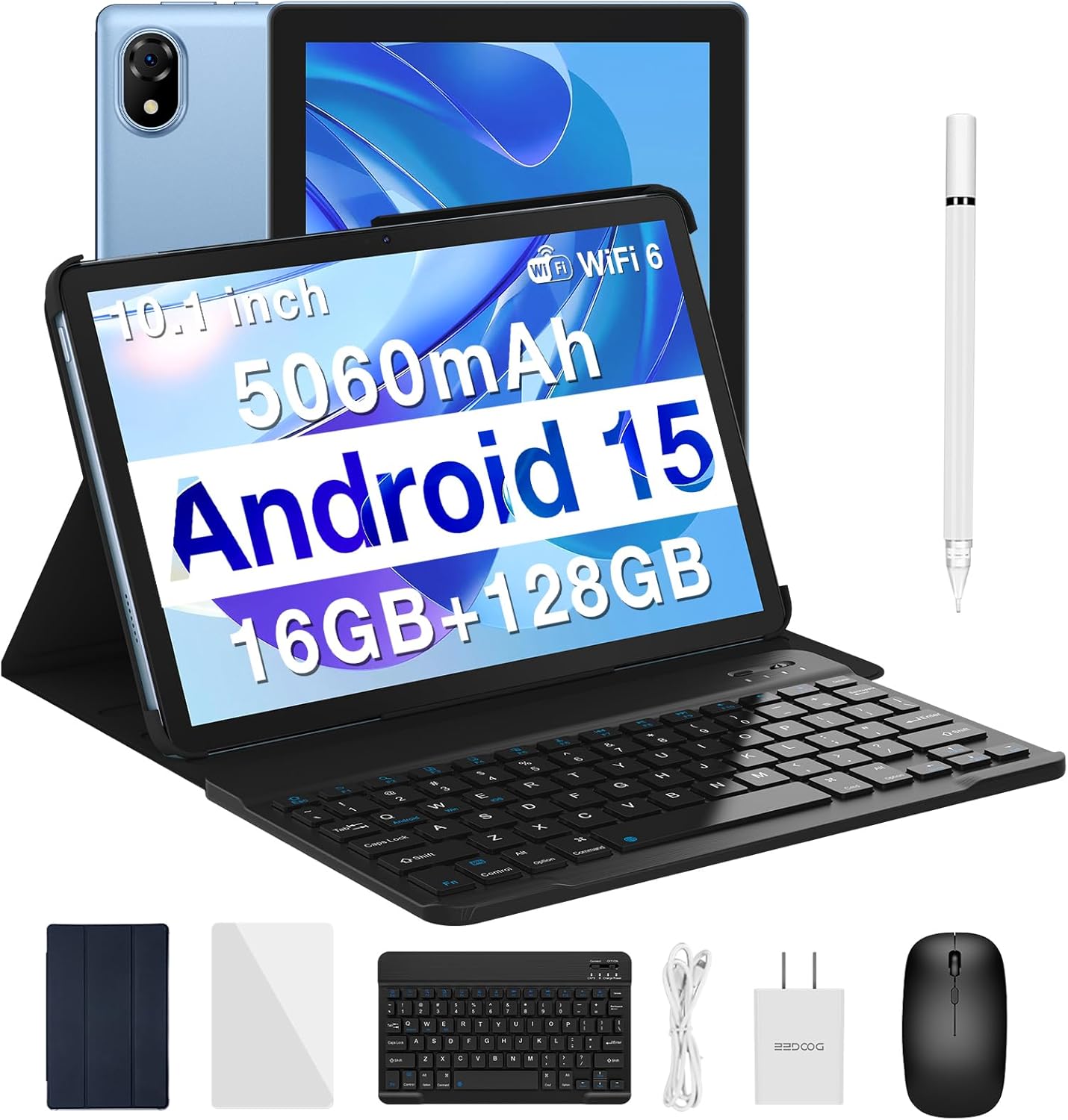
DOOGEE U10 tablet with included keyboard, mouse, stylus, protective case, charger, and screen protector.

Key specifications of the DOOGEE U10 tablet, including Android 15, Quad-core Processor, 5060mAh Battery, 16GB RAM, 128GB ROM, 10.1-inch display, up to 2TB expandable storage, and WiFi 6.

The DOOGEE U10 tablet displaying the Android 15 operating system interface.

Details of the 10.1-inch IPS HD display, showing 78% screen-to-body ratio, 800x1280 resolution, 16:10 aspect ratio, 16.7 million colors, and 300nit brightness.

Illustration of the 128GB internal storage and the ability to expand up to 2TB via microSD card.

Visual representation of the tablet's WiFi 6 connectivity, highlighting enhanced coverage, stronger signal, and advanced battery efficiency.

Diagram showing the 16GB RAM configuration (4GB Basic RAM + 12GB Extended RAM) for improved multitasking.

Overview of the enhanced accessories package, including tempered glass, Bluetooth mouse, stylus, and leather protective cover.

Information on the 5060mAh high-capacity battery, detailing standby time (225 hours), music playback (18 hours), video watching (4 hours), and web browsing (3.8 hours).
6.2 Official Product Videos
Official product video showcasing the DOOGEE U10 10-inch Tablet, highlighting its keyboard, 5060mAh battery, and 1280x800 IPS HD Touchscreen.
7. Maintenance
7.1 Cleaning
Use a soft, lint-free cloth to clean the tablet screen and body. Avoid using harsh chemicals or abrasive materials that could damage the surface. For stubborn smudges, slightly dampen the cloth with water or a screen cleaner designed for electronics.
7.2 Software Updates
Regularly check for and install system updates to ensure your tablet has the latest features, security patches, and performance improvements. Go to Settings > System > System update to check for updates.
7.3 Battery Care
- Avoid extreme temperatures, as they can degrade battery life.
- Do not let the battery completely drain frequently. Charge it before it reaches very low levels.
- Use only the original charger or certified compatible chargers.
8. Troubleshooting
8.1 Tablet Not Powering On
- Ensure the tablet is sufficiently charged. Connect it to the charger for at least 30 minutes.
- Press and hold the Power button for 10-15 seconds to force a restart.
8.2 Wi-Fi Connectivity Issues
- Toggle Wi-Fi off and on in Quick Settings.
- Restart your Wi-Fi router.
- Forget the network in Wi-Fi settings and reconnect.
8.3 Slow Performance
- Close unused background applications.
- Clear app caches (Settings > Apps > [App Name] > Storage > Clear cache).
- Ensure sufficient free storage space.
- Restart the tablet periodically.
8.4 Battery Draining Quickly
- Reduce screen brightness.
- Disable Wi-Fi, Bluetooth, and GPS when not in use.
- Identify and close power-consuming apps in Settings > Battery.
9. Specifications
| Feature | Specification |
|---|---|
| Brand | DOOGEE |
| Model Name | U10-V |
| Operating System | Android 15 |
| Processor | 2 GHz Quad Core |
| RAM | 16GB (4GB physical + 12GB expandable) |
| Storage Capacity | 128GB (Expandable up to 2TB via microSD) |
| Screen Size | 10.1 Inches |
| Screen Resolution | 800 x 1280 pixels (IPS HD Touchscreen) |
| Battery Capacity | 5060mAh |
| Wireless Type | 802.11ax (Wi-Fi 6) |
| Bluetooth | Bluetooth 5.0 |
| Front Camera | 5MP |
| Rear Camera | 8MP |
| Item Weight | 9.2 ounces |
| Product Dimensions | 9.65 x 0.38 x 6.41 inches |
10. Warranty and Support
10.1 Warranty Information
The DOOGEE U10 (2025) tablet comes with a 2-Year Limited Warranty. Additionally, a 30-Day Money Back Guarantee is offered for your peace of mind. Please retain your proof of purchase for warranty claims.
10.2 Customer Support
For technical assistance, troubleshooting, or warranty inquiries, please visit the official DOOGEE support website or contact their customer service. You can also find more information and resources on the DOOGEE Store on Amazon.
Related documentsU10-V


Ask a question about this manual
Ask about setup, troubleshooting, compatibility, parts, safety, or missing instructions. Manuals+ will review the question and use this page’s manual context to help answer it.