
1. Introduction
The Onforu 75W LED Motion Sensor Outdoor Flood Light is designed to provide efficient and reliable illumination for various outdoor spaces such as driveways, garages, pathways, and yards. This hardwired fixture features a powerful 75W LED light source, delivering 7500 lumens of 6500K daylight white light. Equipped with a sensitive motion sensor, it offers a 180° detection angle and a customizable range of 20 to 72 feet. The light is IP65 waterproof, ensuring durability and performance in diverse weather conditions.

Image 1.1: Overview of the Onforu 75W LED Motion Sensor Outdoor Flood Light.
2. Safety Information
Please read all instructions carefully before installation and operation. Failure to follow these instructions may result in electric shock, fire, or other hazards.
- Always disconnect power at the circuit breaker before installing, servicing, or cleaning the fixture.
- Installation should be performed by a qualified electrician or a person familiar with the construction and operation of the product and the hazards involved.
- Ensure the fixture is properly grounded to avoid potential electrical hazards.
- Do not install on surfaces that are unstable or prone to vibration.
- Do not look directly into the LED light source when the fixture is illuminated, as this may cause eye damage.
- Keep flammable materials away from the light fixture.
3. Package Contents
Verify that all components are present and undamaged before beginning installation.
- Onforu 75W LED Motion Sensor Outdoor Flood Light (1 unit)
- Mounting Hardware (Screws, Wire Nuts, Silicone Gasket, Mounting Bracket)
- User Manual
4. Specifications
| Feature | Specification |
|---|---|
| Brand | Onforu |
| Model | BDB75G-3 |
| Wattage | 75 Watts |
| Brightness | 7500 Lumens |
| Color Temperature | 6500K Daylight White |
| Material | Metal (Fixture), Plastic (Shade) |
| Product Dimensions | 10.7"L x 5.8"W x 4.7"H |
| Power Source | Corded Electric |
| Installation Type | Semi Flush Mount (Wall Mount & Soffit Mount) |
| Special Features | Dimmable, Energy Efficient, Motion Sensor, Timer, Waterproof |
| Motion Detection Angle | 180° |
| Motion Detection Distance | 20-72 feet |
| Timer Setting | 10 seconds to 10 minutes |
| Voltage | 120 Volts |
| Water Resistance Level | IP65 Waterproof |
| Assembly Required | Yes (for installation) |
5. Setup and Installation
This flood light is designed for hardwired installation. The recommended installation height is between 6.5 and 13.1 feet (2 to 4 meters) above the ground for optimal motion detection.
5.1 Installation Steps
- Prepare for Installation: Turn off power at the circuit breaker before starting. Ensure the mounting surface is secure and can support the fixture's weight.
- Attach Mounting Bracket: Secure the mounting bracket to the junction box (not included) using the provided machine screws. Ensure the bracket is oriented correctly.
- Wire Connections: Connect the household wiring to the fixture's wires using the provided wire nuts. Match the wires: black to black (Live), white to white (Neutral), and green/bare copper to green (Ground). Ensure all connections are secure.
- Seal and Mount Fixture: Place the silicone gasket over the mounting bracket to create a weather-tight seal. Align the fixture with the mounting bracket and secure it with the long machine screw.
- Adjust Light Heads and Sensor: Loosen the screws on the light heads and motion sensor to adjust their angles as desired. Tighten the screws once adjusted.
- Restore Power: Turn on power at the circuit breaker.
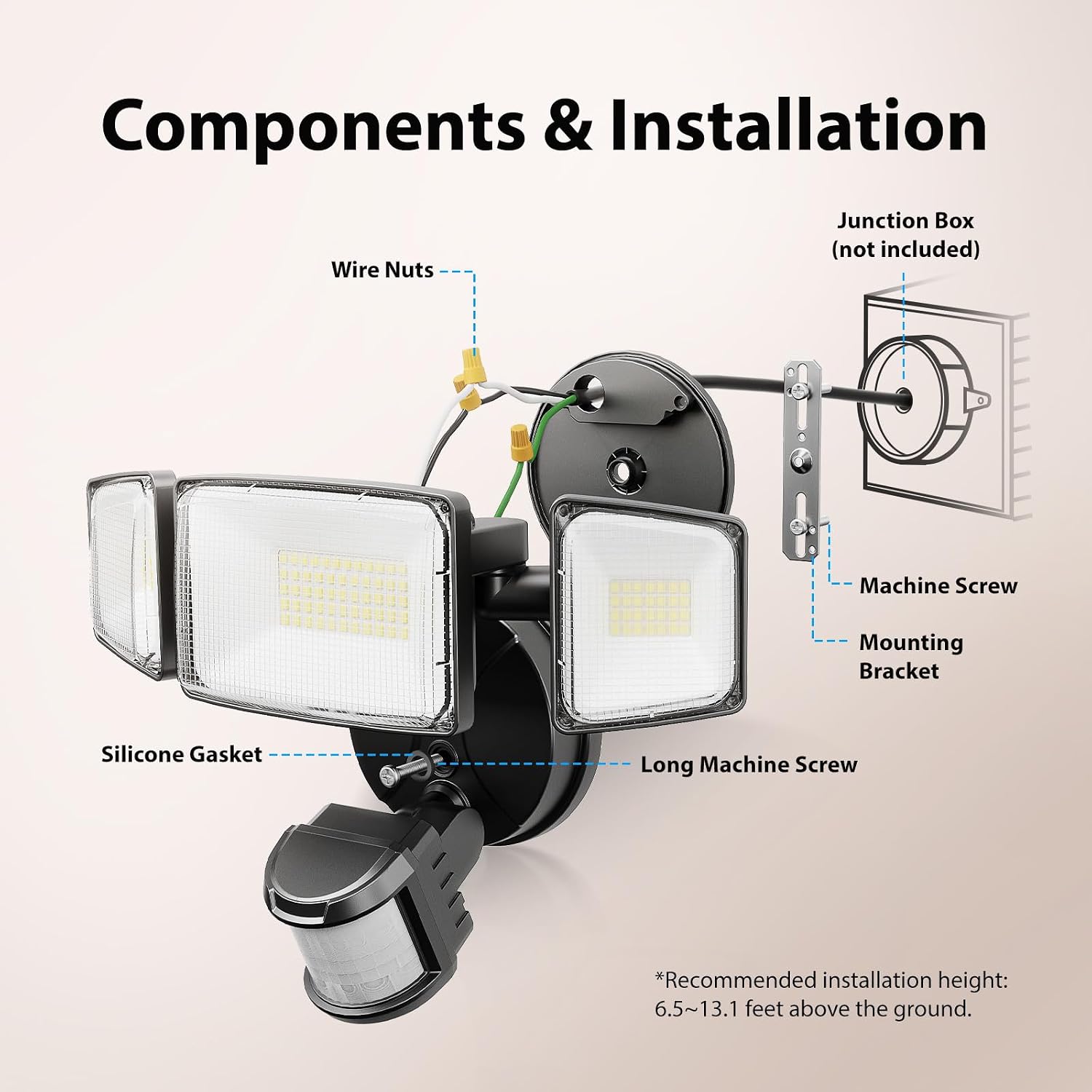
Image 5.1: Diagram illustrating the components and installation process.
6. Operating Modes and Adjustments
The Onforu flood light offers multiple operating modes and adjustable settings to suit your needs.
6.1 Operating Modes
- Motion-Activated Mode: The light turns on when motion is detected within its range and angle. It remains on for a set duration and then turns off if no further motion is detected. This mode supports dimming.
- Dusk to Dawn (D2D) Mode: The light automatically turns on at dusk and turns off at dawn, providing continuous illumination throughout the night.
- Test Mode: An initial test mode allows you to confirm the light's functionality. In this mode, the light will turn on for 5 seconds when motion is detected, regardless of ambient light conditions (day or night).
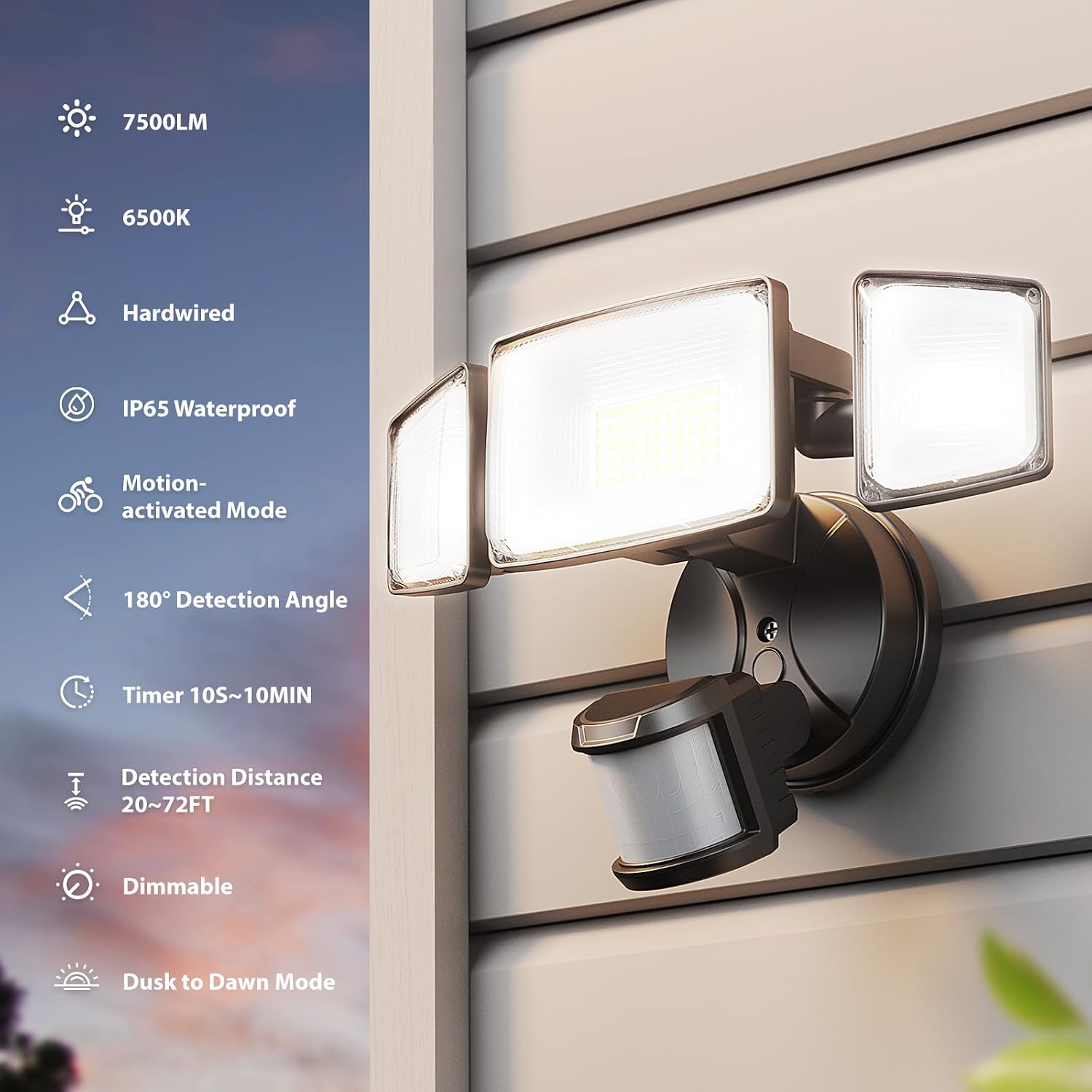
Image 6.1: Overview of key features including operating modes.

Image 6.2: Illustration of the Dusk to Dawn operating mode.
6.2 Adjustments
The motion sensor typically features rotary switches or buttons for adjustment. Refer to the labels on your specific unit for precise control.
- TIME (Timer): Adjusts the duration the light stays on after motion is detected. Settings typically range from 10 seconds to 10 minutes.
- SENS (Sensitivity/Detection Distance): Controls the motion sensor's sensitivity, affecting the detection range (20 to 72 feet). Higher sensitivity detects motion further away.
- LUX (Ambient Light Sensor): Determines the ambient light level at which the motion sensor becomes active. Set to 'Sun' for day and night operation, or 'Moon' for night-only operation. This also controls the Dusk to Dawn mode.
- DIMMING: (Applicable in Motion-Activated Mode) Allows adjustment of the light's brightness from 10% to 100%. Note: If the brightness is set between 10% and 30% in motion-activated mode, the light may remain on all night at the dimmed level.
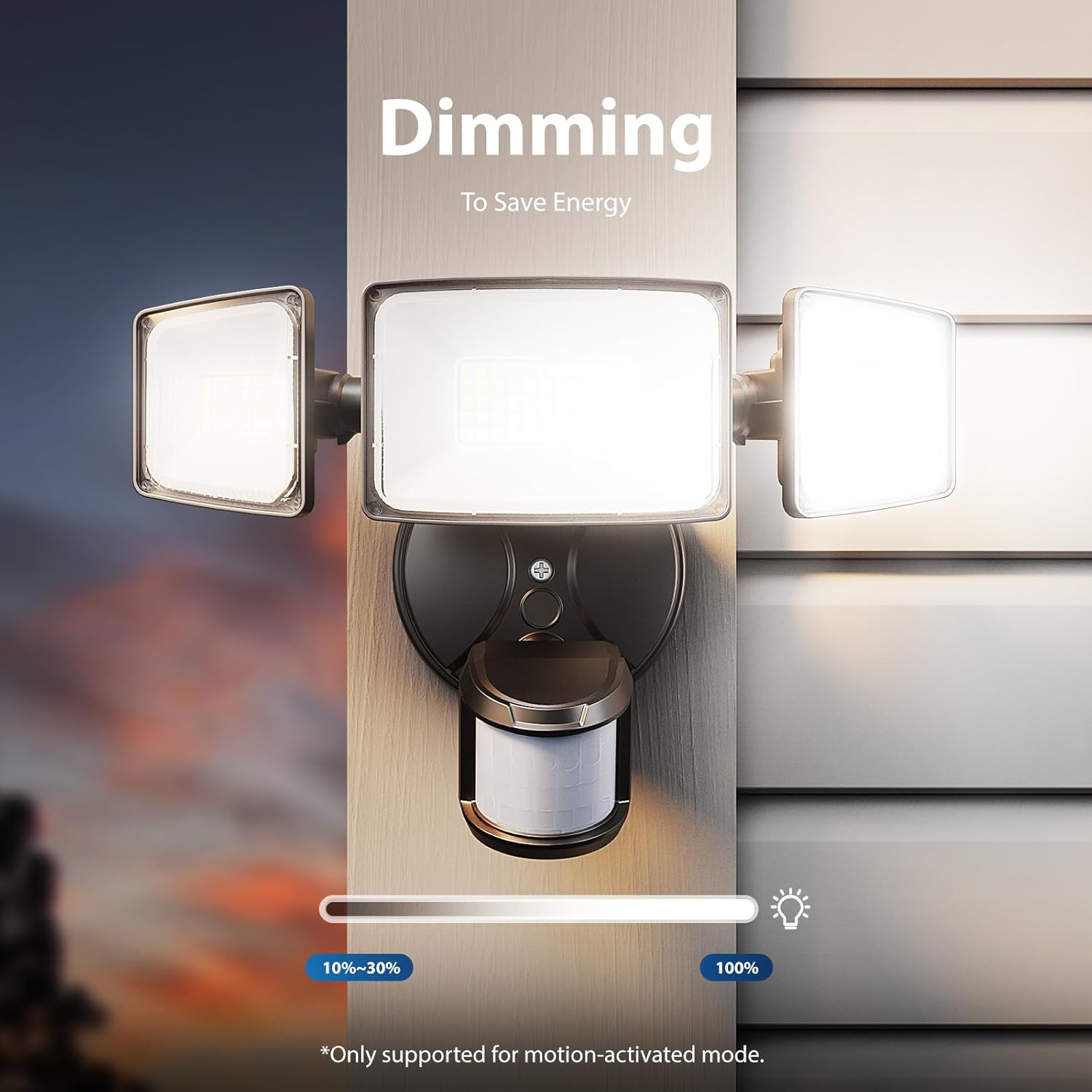
Image 6.3: Illustration of the dimming feature, supported in motion-activated mode.
7. Maintenance
Regular maintenance helps ensure the longevity and optimal performance of your flood light.
- Cleaning: Periodically clean the light fixture and motion sensor lens with a soft, damp cloth. Do not use abrasive cleaners, solvents, or harsh chemicals, as these can damage the finish or electronic components.
- Inspection: Annually inspect the wiring and connections for any signs of wear, fraying, or corrosion. Ensure all mounting screws are tight.
- Obstructions: Ensure there are no new obstructions (e.g., growing foliage, new structures) blocking the motion sensor's field of view.
8. Troubleshooting
If you encounter issues with your Onforu flood light, refer to the following common problems and solutions:
| Problem | Possible Cause | Solution |
|---|---|---|
| Light does not turn on | No power; incorrect wiring; LUX setting too high (daylight); sensor obstructed. | Check circuit breaker; verify wiring connections; adjust LUX setting; clear sensor path. |
| Light stays on continuously | TIME setting too long; continuous motion in detection zone; DIMMING set to 10-30% in motion mode. | Adjust TIME setting; remove motion sources; adjust DIMMING setting or switch to D2D mode. |
| Light turns on during the day | LUX setting too low (towards 'Sun'); Test Mode active. | Adjust LUX setting towards 'Moon'; ensure Test Mode is not active. |
| Motion not detected | SENS setting too low; sensor obstructed; incorrect sensor angle. | Increase SENS setting; clear obstructions; adjust sensor angle. |
| Light flickers | Loose wiring connection; unstable power supply. | Check and secure all wiring connections; consult an electrician if power supply is unstable. |
9. Warranty and Support
This Onforu flood light comes with a limited warranty. For specific warranty terms and conditions, please refer to the documentation provided with your purchase or contact Onforu customer support.
For technical assistance, troubleshooting beyond this manual, or warranty claims, please contact Onforu customer support directly. Contact information can typically be found on the product packaging or the official Onforu website.


