
Husky 91309
Husky 500-Lumens Dual Power Focusing Aluminum Flashlight User Manual
Model: 91309 | Brand: Husky
Introduction
The Husky 500 Lumens Ultra-Compact Dual-Power Focusing EDC Aluminum Flashlight is designed for versatile illumination with precise beam control. It offers high-definition output and a compact design for easy portability. This manual provides essential information for the safe and effective use, setup, operation, and maintenance of your flashlight.
Safety Information
- Do not look directly into the light beam to avoid eye injury.
- Keep out of reach of children.
- Do not disassemble the flashlight; this may void the warranty and cause damage.
- Ensure proper battery polarity when installing batteries.
- Dispose of batteries according to local regulations.
Package Contents
- Husky 500-Lumens Dual Power Focusing Aluminum Flashlight
- Charging Cable
- Clip
- Rechargeable Lithium-Ion Battery (pre-installed or separate)
- AA Battery Adapter (for optional AA battery use)
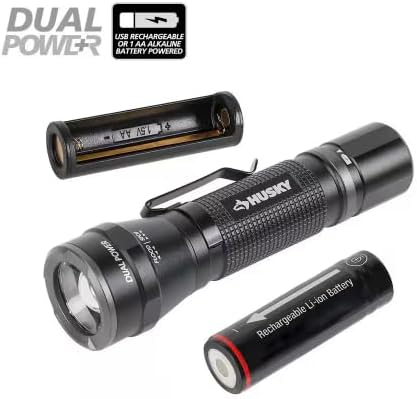
Image: The Husky flashlight shown with its rechargeable lithium-ion battery and the adapter for optional AA battery use, highlighting its dual power capability.
Setup
Battery Installation
- Unscrew the tail cap of the flashlight.
- Insert the rechargeable lithium-ion battery with the positive (+) end facing towards the head of the flashlight.
- Alternatively, if using AA batteries (not included), insert them into the provided AA battery adapter, ensuring correct polarity, then insert the adapter into the flashlight.
- Screw the tail cap back on securely.
Charging the Flashlight
The flashlight is rechargeable via its integrated USB-C port. To charge:
- Locate the USB-C input port, typically near the tail end of the flashlight.
- Connect the provided charging cable to the flashlight's USB-C port.
- Connect the other end of the charging cable to a USB power source (e.g., wall adapter, computer USB port).
- An indicator light will show charging status (refer to product for specific light behavior).

Image: The Husky flashlight displayed alongside its USB-C charging cable, illustrating the charging method.

Image: A detailed view of the USB-C input port on the flashlight, indicating where the charging cable connects.
Operating Instructions
Power On/Off and Mode Selection
- Press the power button (usually located on the tail cap or side) to turn the flashlight on.
- Press the power button repeatedly to cycle through the available modes: Turbo, High, Medium, Low, ECO, and Strobe.
- To activate Turbo Mode: Hold the button in High mode for 3 seconds.
- To activate Dimming Function: Press and hold the mode button for 3 seconds.
- The flashlight features mode memory intelligence, powering up in the last mode used if left on for 10 seconds.
- Press and hold the power button to turn the flashlight off.
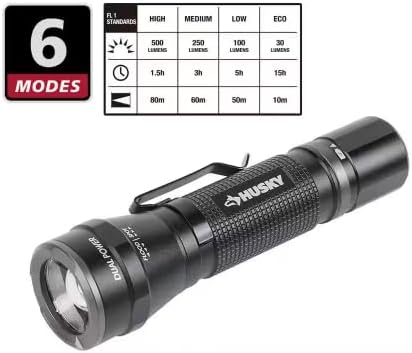
Image: The Husky flashlight accompanied by a table detailing its 6 operational modes, including lumens, runtime, and beam distance for each setting.
Focusing the Beam
The flashlight features precision twist focusing to adjust the beam from a wide flood to a narrow spot.
- Gently twist the head of the flashlight to adjust the beam focus.
- Twist in one direction for a wider floodlight beam.
- Twist in the opposite direction for a concentrated spot beam, reaching up to 80 meters.

Image: Two illustrations of the Husky flashlight demonstrating its twist-to-focus feature, showing both a wide flood beam and a narrow spot beam.
Maintenance
- Cleaning: Wipe the flashlight body with a soft, damp cloth. Do not use abrasive cleaners or solvents.
- Battery Care: If storing for extended periods, remove the battery to prevent leakage. Recharge the battery periodically to maintain its lifespan.
- Water Resistance: The flashlight is water resistant. Ensure all caps and seals are properly closed before exposure to water.

Image: A close-up of the Husky flashlight on a wet surface, with a "Water Resistant" icon, illustrating its durability against moisture.
Troubleshooting
| Problem | Possible Cause | Solution |
|---|---|---|
| Flashlight does not turn on. | Low or dead battery; Incorrect battery installation; Loose tail cap. | Recharge or replace battery; Check battery polarity; Tighten tail cap. |
| Light is dim or flickers. | Low battery; Loose connections. | Recharge battery; Ensure tail cap and head are securely tightened. |
| Cannot change modes. | Button malfunction; Software glitch. | Try turning off and on again; If problem persists, contact customer support. |
Specifications
| Feature | Detail |
|---|---|
| Brightness (High Mode) | 500 Lumens |
| Brightness (Turbo Mode) | 1000 Lumens |
| Runtime (High Mode) | 1.5 hours |
| Runtime (Medium Mode) | 3 hours |
| Runtime (Low Mode) | 5 hours |
| Beam Distance (High Mode) | 80 meters |
| Power Source | Rechargeable Lithium-Ion Battery or 1 AA Alkaline Battery (not included) |
| Light Source Type | Standard, Strobe |
| Material | Aluminum |
| Color | Black |
| Product Dimensions | 4.4"D x 1.4"W x 1.2"H |
| Water Resistance Level | Water Resistant |
| Model Number | 91309 |
| UPC | 820909913092 |
Warranty and Support
This Husky flashlight is covered by a limited lifetime warranty. For warranty claims or technical support, please refer to the contact information provided with your purchase or visit the official Husky tools website.
For further assistance, please contact Husky Customer Service.
Related documents91309


Ask a question about this manual
Ask about setup, troubleshooting, compatibility, parts, safety, or missing instructions. Manuals+ will review the question and use this page’s manual context to help answer it.