
1. Introduction
Thank you for choosing the Lefant M3 Robot Vacuum and Mop. This advanced cleaning device is designed to provide a comprehensive and hands-free cleaning experience for your home. Featuring LiDAR dToF navigation, powerful 12,000Pa suction, automatic mop washing and drying, and intelligent obstacle avoidance, the M3 ensures efficient and thorough cleaning on various floor types. Please read this manual carefully before using the product to ensure proper operation and maintenance.
2. Safety Information
To reduce the risk of injury or damage, read these safety instructions carefully and keep them for future reference.
- This appliance can be used by children aged 8 years and above and persons with reduced physical, sensory or mental capabilities or lack of experience and knowledge if they have been given supervision or instruction concerning use of the appliance in a safe way and understand the hazards involved.
- Children should be supervised to ensure that they do not play with the appliance.
- Cleaning and user maintenance shall not be made by children without supervision.
- Only use the original power adapter and charging dock provided by the manufacturer.
- Do not use the robot in wet environments or near water sources.
- Clear the cleaning area of loose cables, small objects, and fragile items before operation.
- Do not operate the robot on elevated surfaces without protective barriers.
- Ensure the dust bag and water tanks are correctly installed before use.
3. Product Overview
3.1 Robot Vacuum and Mop
The Lefant M3 robot features a sleek design with advanced sensors for navigation and cleaning.
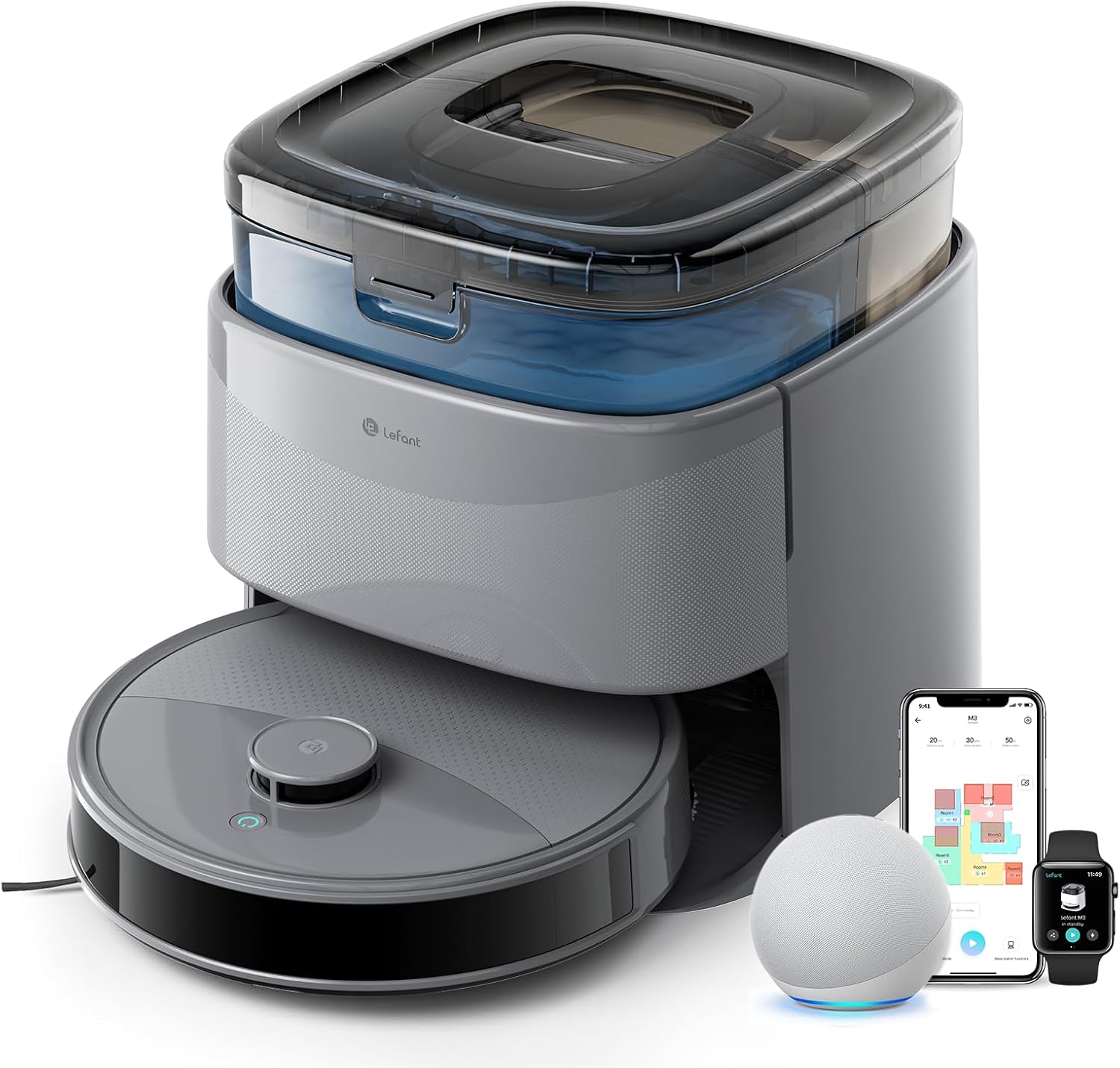
Image: The Lefant M3 robot vacuum and mop positioned next to its auto-empty and auto-wash station, with a smartphone displaying the control app and an Alexa device nearby.
3.2 Auto-Empty and Auto-Wash Station
The multifunctional station handles dust collection, mop washing, and mop drying automatically.

Image: A detailed diagram illustrating the internal workings of the auto-empty and auto-wash station, showing the automatic detergent dispensing, 45°C hot water cleaning, 3.2L dust collection bin, rapid air drying technology, and removable tray.
4. Setup
4.1 Unpacking
- Remove the robot and the auto-empty station from their packaging.
- Remove all protective films and stickers from the robot and the station.
- Ensure all accessories are present according to the package contents list.
4.2 Station Placement
Place the auto-empty station against a wall in an open area, ensuring at least 0.5 meters (1.6 feet) of clear space on both sides and 1.5 meters (4.9 feet) in front. Plug the power cord into a wall outlet.
Video: This video demonstrates the compact design of the Lefant M3's base station, showing how it can be easily placed in various locations, including under kitchen cabinets or in laundry rooms, highlighting its space-saving design.
4.3 Initial Charge
Place the robot onto the charging contacts of the station. Ensure the robot is properly aligned. The robot will begin charging automatically. For first-time use, fully charge the robot before operation.
4.4 Water Tanks & Dust Bag
Fill the clean water tank with clean water. Ensure the dirty water tank is empty and the dust bag is correctly installed in the auto-empty bin.
4.5 App Connection
- Download the 'Lefant' app from your smartphone's app store.
- Follow the in-app instructions to connect your robot to your home Wi-Fi network (supports 2.4G and 5G).
- Once connected, you can control the robot, set schedules, and manage maps via the app.
5. Operating Instructions
5.1 Starting a Cleaning Cycle
- Via Robot Button: Press the power button on the robot once to start an automatic cleaning cycle.
- Via Lefant App: Open the app and select 'Start Cleaning'.
- Via Voice Command: Use compatible voice assistants like Alexa or Google Assistant (e.g., "Alexa, start cleaning with Lefant M3").
5.2 Navigation and Mapping
The Lefant M3 uses advanced LiDAR dToF navigation for precise mapping and efficient cleaning paths. It scans its surroundings 360° to create detailed maps of your home, even in the dark.

Image: The Lefant M3 robot vacuum demonstrating its 360° LiDAR dToF navigation, scanning a room with a range of up to 15 meters to create precise maps and optimize cleaning routes across multiple floors.
5.3 Obstacle Avoidance
Equipped with 190° PSD obstacle avoidance technology, the M3 intelligently detects and avoids small objects, furniture legs, and other obstacles, protecting both the robot and your home.
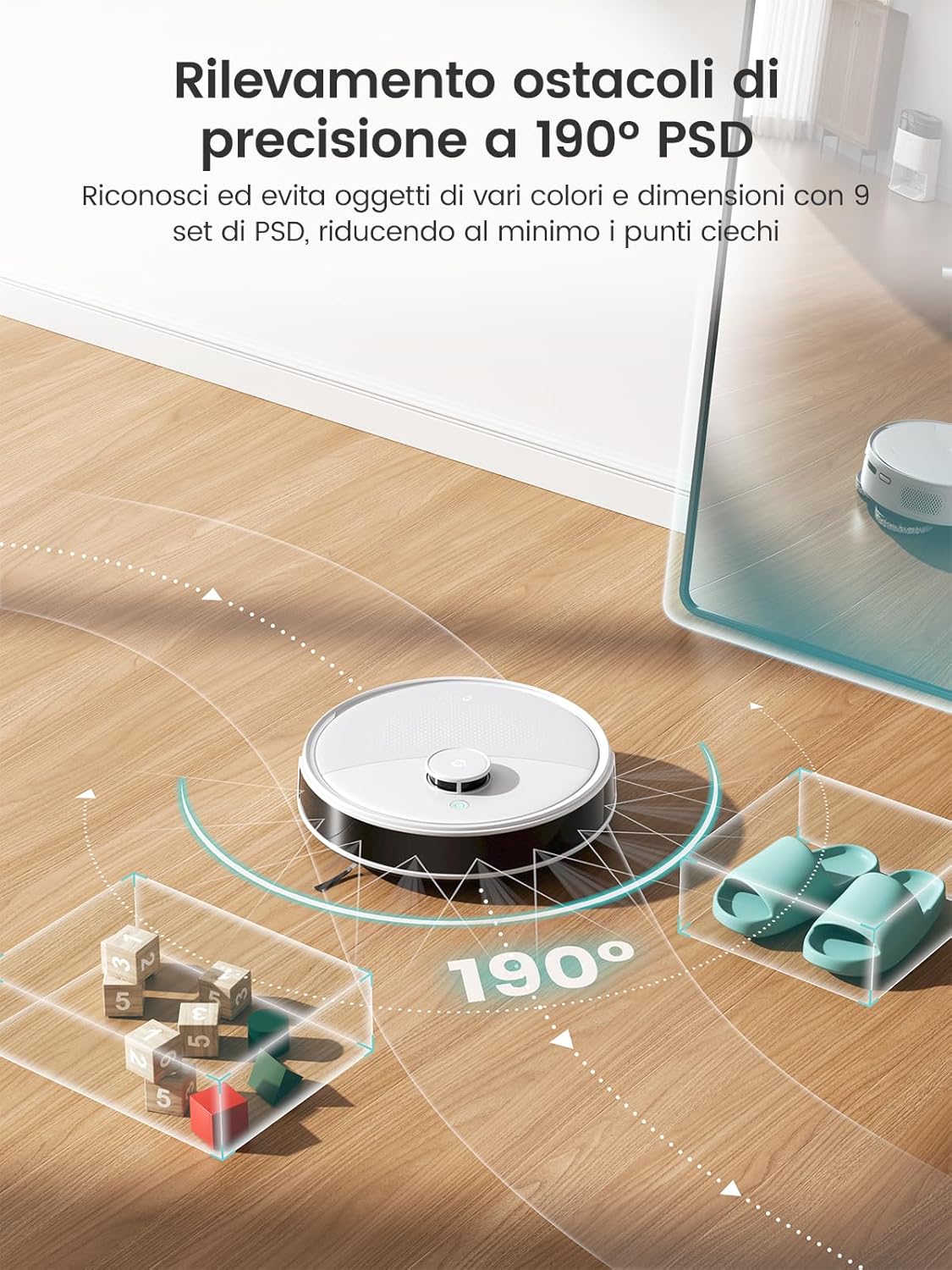
Image: The Lefant M3 robot vacuum navigating around various small obstacles like toys and chair legs, illustrating its 190° PSD wide-angle detection for precise obstacle avoidance.
5.4 Suction Power
The M3 delivers a powerful 12,000Pa suction to effectively pick up pet hair, fine dust, and debris from both hard floors and carpets. It automatically boosts suction when it detects carpets.

Image: The Lefant M3 robot vacuum demonstrating its powerful 12,000Pa suction, shown effectively cleaning up pet hair, animal food, and crumbs from a floor.
5.5 Mopping Function
The robot features dual rotating mops that spin at 200 RPM with pressure technology to remove stubborn stains. It also includes an automatic mop-lifting system that raises the mops by 9mm when carpets are detected, preventing them from getting wet.

Image: The Lefant M3 robot vacuum actively mopping a hard floor with its dual rotating mops, highlighting their 200 RPM speed for effective stain removal.
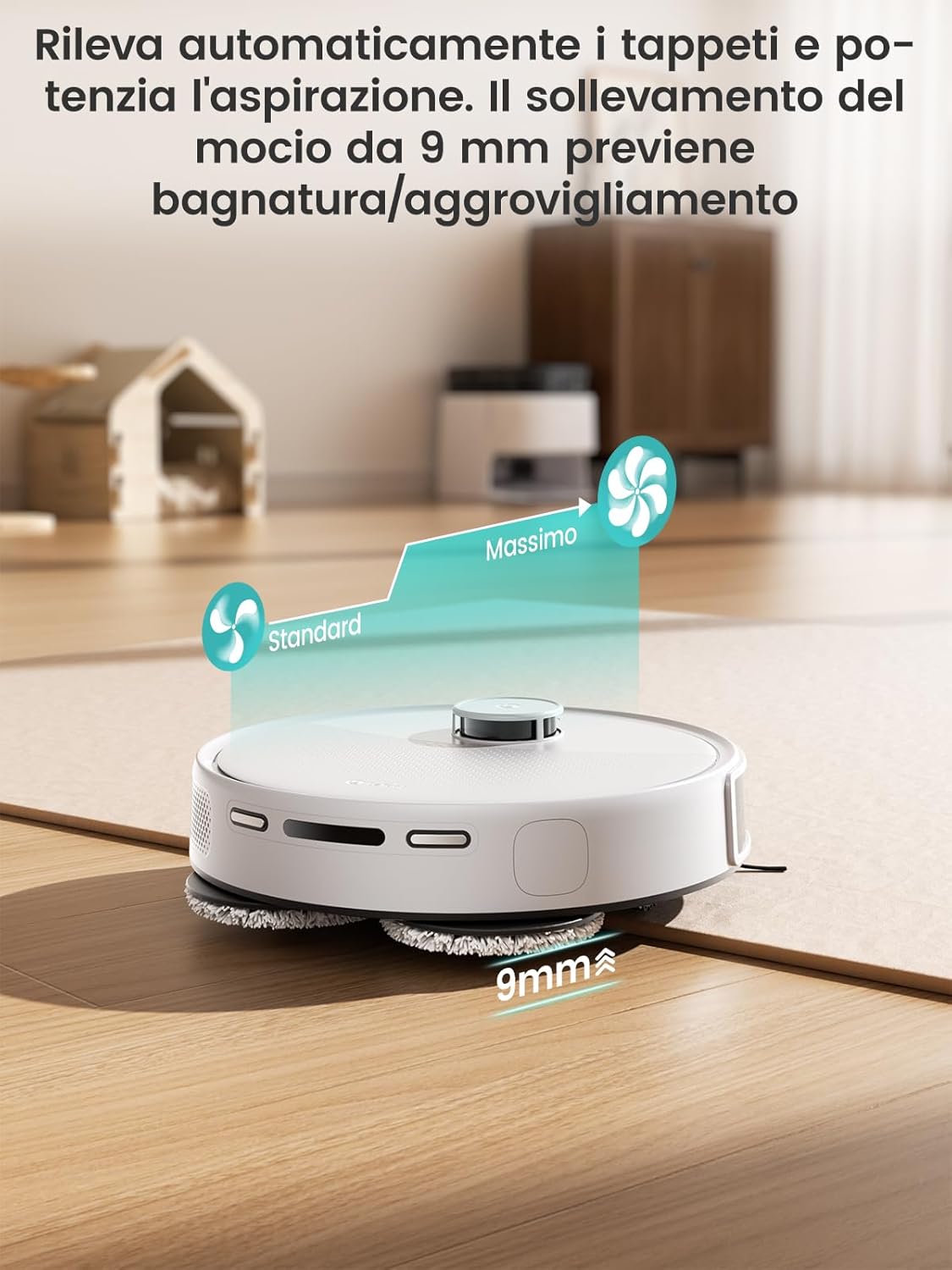
Image: The Lefant M3 robot vacuum transitioning from a hard floor to a carpet, showing its automatic mop lifting mechanism raising the mop pads by 9mm to prevent wetting the carpet and boosting suction.
5.6 App Control and Customization
The Lefant app provides comprehensive control over your robot, allowing you to:
- Create and manage multiple maps.
- Set cleaning schedules.
- Define No-Go Zones and No-Mop Zones.
- Adjust suction power and water flow levels.
- Select specific rooms for cleaning.
- Monitor cleaning progress and battery status.
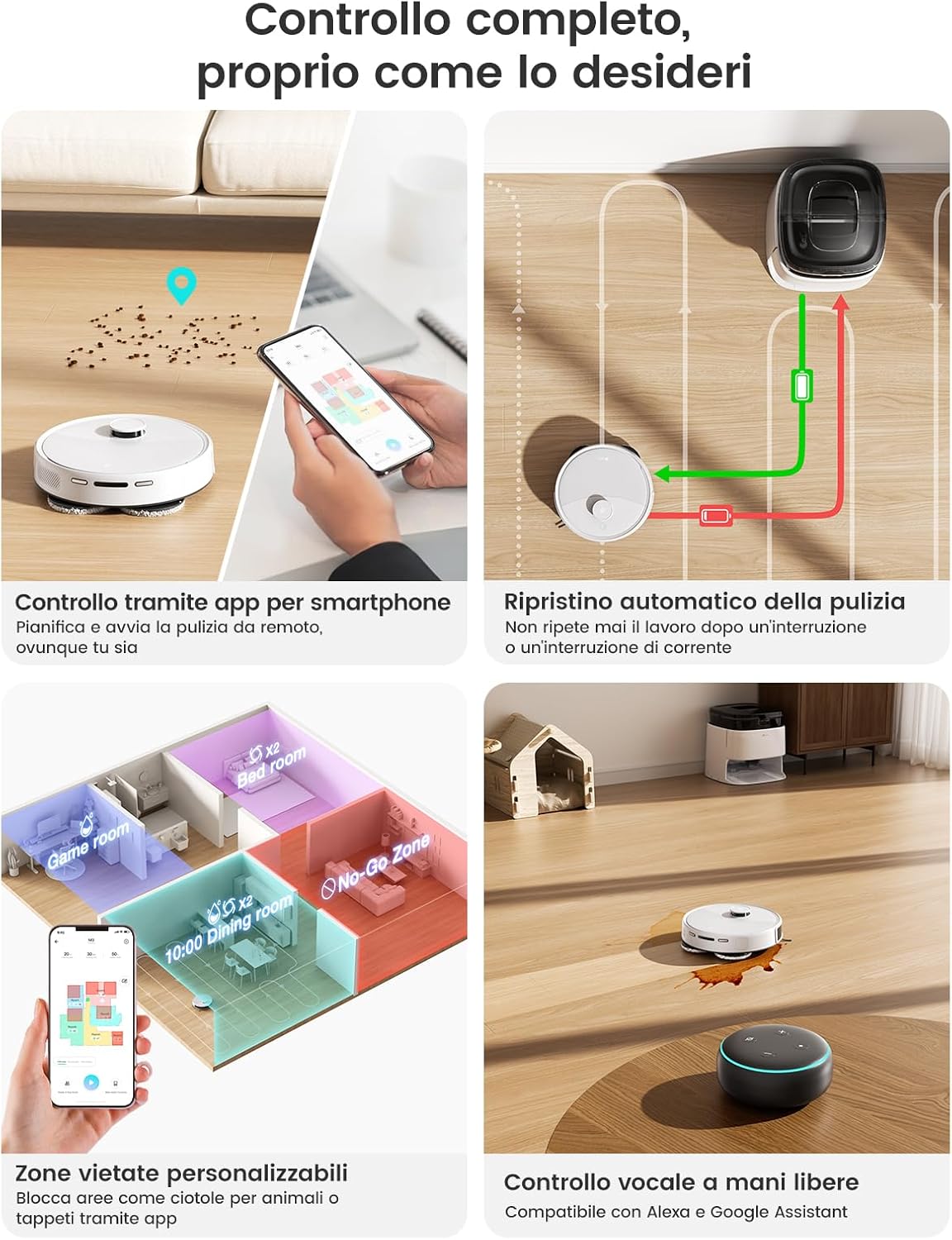
Image: A smartphone screen displaying the Lefant app interface, showcasing features like remote control, automatic cleaning resumption, customizable No-Go Zones for different rooms, and compatibility with voice assistants like Alexa.
6. Maintenance
Regular maintenance ensures optimal performance and extends the lifespan of your Lefant M3.
6.1 Auto-Empty Station Maintenance
- Dust Bag Replacement: The 3.2L dust bag typically needs replacement every 8 weeks, depending on usage. Follow the station's indicator or app notification for replacement.
- Water Tank Cleaning: Regularly empty the dirty water tank and refill the clean water tank. Clean both tanks with fresh water to prevent odor and buildup.
- Mop Pad Washing & Drying: The station automatically washes mop pads with 45°C hot water and dries them with cold air to prevent mildew and odors. Ensure the station is connected to power for this function.
Video: This short video demonstrates the automatic dust collection and mop cleaning features of the Lefant M3's base station, showing dust being vacuumed into the bin and the mop pads being washed with hot water and dried.
6.2 Robot Component Cleaning
- V-Shaped Roller Brush: Regularly remove hair and debris from the V-shaped roller brush. The anti-tangle design with dual combs helps prevent hair entanglement.
- Side Brushes: Check and clean the side brushes for tangled hair or debris. Replace them if they are worn or damaged.
- Sensors: Wipe the cliff sensors, PSD sensors, and charging contacts on the robot with a clean, dry cloth.
- Mop Pads: Although automatically washed, occasionally inspect mop pads for excessive wear and replace them as needed.

Image: A close-up view of the Lefant M3's V-shaped roller brush with dual anti-tangle combs, illustrating how it collects hair and dust centrally to prevent tangles, contrasted with a generic brush that often gets tangled.
7. Troubleshooting
If you encounter any issues with your Lefant M3, please refer to the following common problems and solutions:
- Robot not charging: Ensure the robot is correctly docked on the charging station and the station is powered on. Clean the charging contacts on both the robot and the station.
- Robot not starting: Check if the battery is sufficiently charged. Press the power button or use the app to start.
- Robot getting stuck frequently: Clear the cleaning area of obstacles. Use No-Go Zones in the app to restrict access to problematic areas.
- Poor cleaning performance: Empty the dustbin/replace the dust bag. Clean the roller brush and side brushes. Check if the mop pads are clean and properly attached.
- App connection issues: Ensure your Wi-Fi network is stable and the robot is within range. Restart your router, robot, and smartphone, then try reconnecting via the app.
- Mop pads not washing/drying: Check if the clean water tank is filled and the dirty water tank is empty. Ensure the station is powered and the robot is correctly docked.
For more complex issues, please contact Lefant customer support.
8. Specifications
| Feature | Description |
|---|---|
| Brand | LEFANT |
| Model Name | M3 |
| Suction Power | 12,000Pa |
| Mopping System | Dual Rotating Mops (200 RPM) |
| Navigation | LiDAR dToF 360° |
| Obstacle Avoidance | 190° PSD |
| Mop Lifting | Automatic 9mm Lift |
| Auto-Empty Dustbin Capacity | 3.2L (up to 8 weeks) |
| Water Tank Capacity | 2.5L (Clean Water) |
| Mop Washing | 45°C Hot Water |
| Mop Drying | Cold Air Drying |
| Battery Capacity | 5200 mAh |
| Runtime | Up to 220 minutes |
| Connectivity | WiFi 2.4G/5G |
| Voice Assistant Compatibility | Alexa, Google Assistant |
| Recommended Surfaces | Wood, Tiles, Carpets |
9. Warranty and Support
The Lefant M3 Robot Vacuum and Mop comes with a standard manufacturer's warranty. For detailed warranty terms and conditions, please refer to the warranty card included in your package or visit the official Lefant website.
If you require technical assistance, have questions about product operation, or need to report a defect, please contact Lefant customer support through the following channels:
- Official Website: Visit the Lefant official website for FAQs, support resources, and contact information.
- Lefant App: Access support directly through the 'Lefant' mobile application.
- Email Support: Refer to your product packaging or official website for the customer service email address.
Please have your product model (M3) and purchase information ready when contacting support.


