
BAOFENG UV-32
Contents
BAOFENG UV-32 Ham Radio User Manual
Model: UV-32
Introduction
The BAOFENG UV-32 is a versatile 10W handheld two-way radio designed for long-range communication. It features advanced capabilities such as GPS positioning, APP programming, frequency duplication, and NOAA weather reception. This manual provides detailed instructions for the proper setup, operation, and maintenance of your UV-32 radio to ensure optimal performance and longevity.
What's in the Box
- 1x BAOFENG UV-32 Radio
- 1x USB-C Cable
- 1x High Gain Antenna
- 1x 2500mAh Capacity Battery

Image: The BAOFENG UV-32 radio shown with its standard accessories, including the high gain antenna, USB-C cable, and charging base.
Setup
1. Battery Installation and Charging
To install the 2500mAh battery, align it with the battery compartment on the back of the radio and slide it into place until it clicks securely. For initial use, fully charge the battery. The UV-32 supports multiple charging methods:
- Desktop Charger: Place the radio in the provided charging base. The indicator light will show charging status.
- USB-C Charging: Connect the USB-C cable directly to the radio's USB-C port and a compatible power source (e.g., wall adapter, power bank, car charger).

Image: Depicts the BAOFENG UV-32 being charged via its desktop charging base, a power bank, and a USB-C car charger, illustrating its versatile charging options.
2. Antenna Attachment
Screw the high gain antenna clockwise onto the antenna connector at the top of the radio until it is finger-tight. Do not overtighten.
3. Initial Power-On
Rotate the power/volume knob clockwise to turn on the radio. Adjust the knob to your desired volume level.
Operating Instructions
1. Basic Operation
- Channel Selection: Use the up/down arrow keys to navigate through channels or frequencies.
- Transmit (PTT): Press and hold the Push-To-Talk (PTT) button on the side of the radio to transmit. Release to receive.
- Volume Adjustment: Rotate the top knob to adjust the audio volume.
2. Advanced Features
APP Programming
The BAOFENG UV-32 supports wireless programming via a dedicated mobile application. This allows for convenient modification of frequencies and settings without the need for physical cables.
Video: Demonstrates the process of programming the BAOFENG UV-32 radio wirelessly using a mobile application, highlighting the ease of connecting and modifying settings.
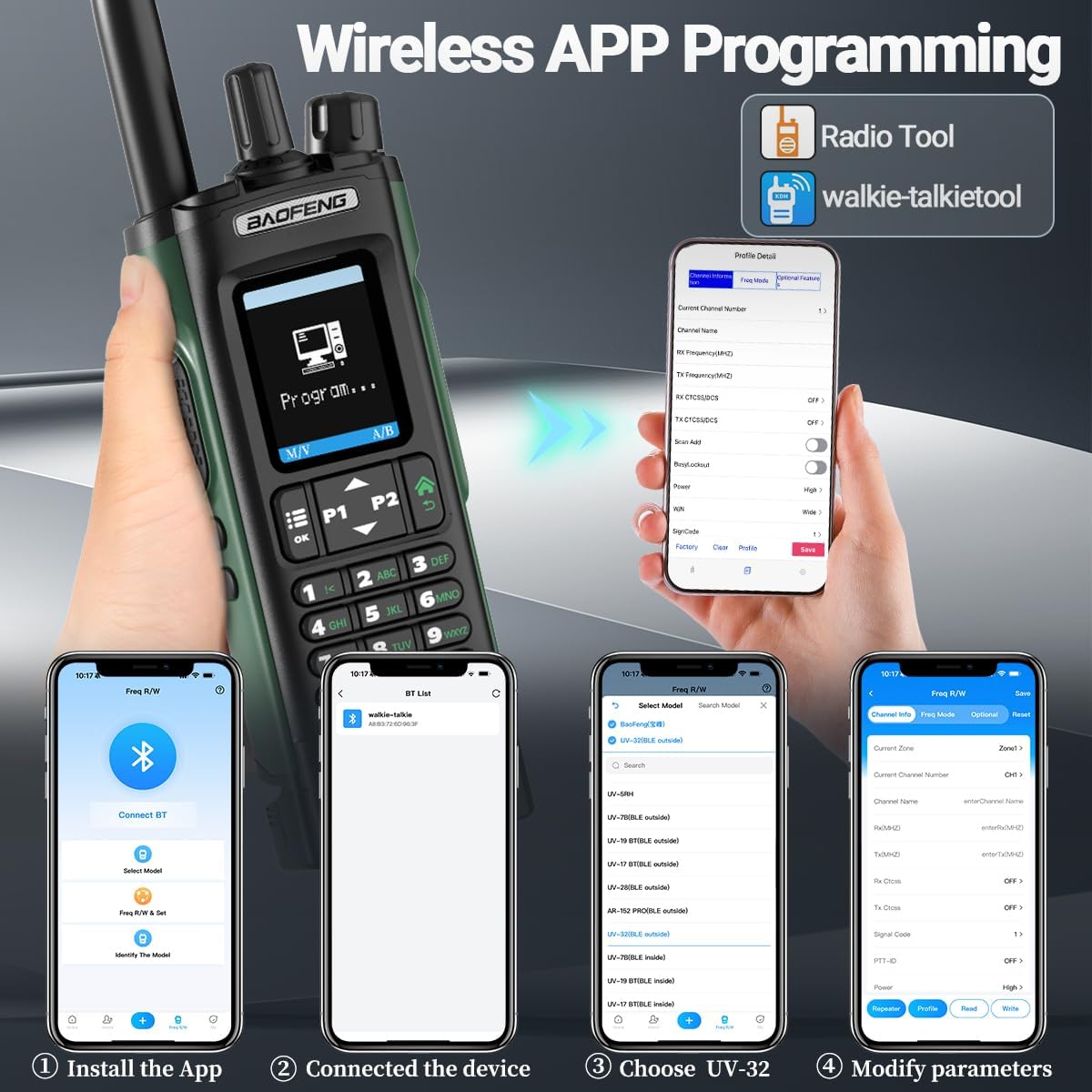
Image: Illustrates the steps for wireless APP programming, showing the radio connected to a smartphone application for frequency and parameter modification.
GPS Positioning
The built-in GPS function provides real-time location data. Access the GPS menu through the radio's settings to view your current coordinates and altitude.

Image: Two BAOFENG UV-32 radios displaying GPS positioning information on their screens, indicating their location capabilities.
10W Tri-Power Output
The UV-32 supports High (10W), Medium (5W), and Low (1W) power output settings. This allows users to adjust transmission power based on communication needs and battery conservation.

Image: Shows the BAOFENG UV-32 display with options to select High, Mid, or Low transmission power, illustrating the 10W tri-power capability.
Frequency Duplication (One Key Frequency Match)
The radio features a 'One Key Frequency Match' function, allowing for quick duplication of frequencies from another radio. This simplifies setting up communication with other devices.

Image: Demonstrates the 'One Key Frequency Match' feature, where the UV-32 can quickly scan and save the frequency from another radio.
NOAA Weather Radio
The built-in NOAA weather forecast function provides real-time weather conditions and emergency alerts for various extreme weather events, enhancing safety during outdoor activities.
Other Features
The UV-32 also includes AM reception, stopwatch timer, FM radio, LED flashlight, DTMF, VOX (Voice Operated Exchange), and Alarm functions.
Maintenance
1. Cleaning
Wipe the radio's surface with a soft, damp cloth. Do not use harsh chemicals or abrasive cleaners. Ensure the USB-C port cover is closed when not charging to prevent dust and moisture ingress.
2. Battery Care
To prolong battery life, avoid overcharging or completely draining the battery. Store the radio and battery in a cool, dry place when not in use for extended periods.
3. Storage
Store the radio in a dry environment, away from direct sunlight and extreme temperatures. Remove the battery if storing for more than a month.
Troubleshooting
| Problem | Possible Cause | Solution |
|---|---|---|
| Radio does not power on | Low or dead battery | Charge the battery fully. |
| Cannot transmit or receive | Incorrect frequency/channel; Antenna not properly attached | Verify frequency settings; Ensure antenna is securely attached. |
| Poor audio quality | Low signal strength; Volume too low/high | Move to an area with better signal; Adjust volume. |
| GPS not acquiring signal | Indoor use; Obstructions | Move to an open outdoor area with clear sky view. |
Specifications
- Model: UV-32
- Brand: BAOFENG
- Item Weight: 1.81 pounds
- Package Dimensions: 10.59 x 8.7 x 2.76 inches
- Batteries: 1 A batteries required (included)
- Number of Channels: 1000
- Frequency Range: 450-470 MHz (UHF), 136-174 MHz (VHF)
- Talking Range Maximum: 5 Kilometer
- Voltage: 7.4 Volts (DC)
- Water Resistance Level: Not Water Resistant
- Special Feature: Call Alert, GPS, APP Programming, Frequency Copy, NOAA Weather Radio, FM Radio, LED Flashlight, DTMF, VOX, Alarm
- Battery Capacity: 2500mAh

Image: A visual summary of the BAOFENG UV-32 radio's key features, including Phone APP Programming, GPS, Multi-Band, AM Aviation Band, Copy Frequency, Type-C Charger, 1000 Channels, and NOAA Weather Receiver.
Warranty & Support
The product does not come with a manufacturer's warranty as per available information. For technical support or inquiries, please refer to the BAOFENG official website or contact their customer service channels.
For additional resources and product information, you may visit the BAOFENG Store on Amazon.
Documents and downloads
Ask a question about this manual
Ask about setup, troubleshooting, compatibility, parts, safety, or missing instructions. Manuals+ will review the question and use this page’s manual context to help answer it.