
XINFUTE RC4876
Contents
XINFUTE RC4876 Telefunken TV Remote Control User Manual
Model: RC4876
Introduction
This manual provides instructions for the XINFUTE RC4876 remote control, designed for use with various Telefunken TV models including 32HB4550, TFL49UHD31B, and L500U300I4CW. Please read this manual carefully before using your new remote control.
Setup
1. Installing Batteries
The RC4876 remote control requires two AAA batteries (not included) for operation. Follow these steps to install them:
- Locate the battery compartment on the back of the remote control.
- Slide the battery compartment cover downwards to open it.
- Insert two AAA batteries, ensuring the positive (+) and negative (-) terminals match the diagrams inside the compartment.
- Slide the battery compartment cover back into place until it clicks securely.

Image: Back of the remote control with the battery compartment open, showing correct AAA battery insertion.
2. Initial Use
Once batteries are installed, the remote control is ready for use. No programming is typically required for compatible Telefunken TV models. Point the remote control directly at your television's infrared receiver.
Operating Instructions
The RC4876 remote control provides standard functions for your Telefunken TV. Below is a general guide to common buttons and their functions.
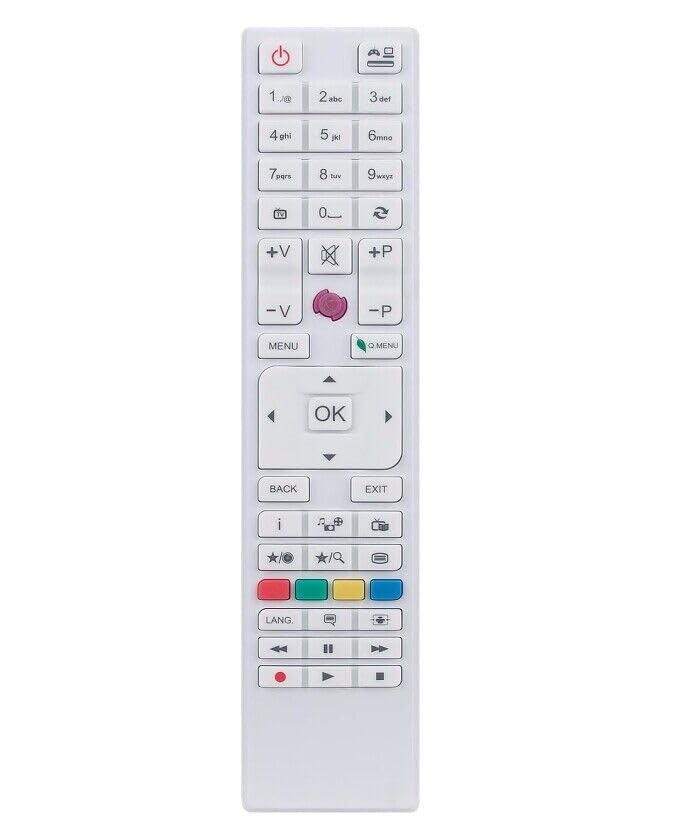
Image: Front view of the RC4876 remote control, displaying button layout.
- Power Button: Turns the TV on or off.
- Number Buttons (0-9): Selects channels directly.
- Channel Up/Down: Navigates through channels sequentially.
- Volume Up/Down: Adjusts the television's volume.
- Mute Button: Silences the television's audio.
- Source/Input Button: Changes the input source (e.g., HDMI, AV).
- Menu Button: Accesses the TV's main menu.
- Navigation Buttons (Up, Down, Left, Right, OK): Used to navigate menus and confirm selections.
- Back/Exit Button: Returns to the previous screen or exits a menu.
Refer to your Telefunken TV's user manual for specific functions and advanced settings accessible via the remote control.
Maintenance
Proper care will extend the life of your remote control.
- Cleaning: Use a soft, dry cloth to clean the remote control. Do not use liquid cleaners or abrasive materials.
- Battery Replacement: Replace batteries when the remote control's response becomes sluggish or stops working. Always replace both batteries at the same time with new ones of the same type (AAA).
- Storage: If the remote control will not be used for an extended period, remove the batteries to prevent leakage.
- Environment: Avoid exposing the remote control to extreme temperatures, direct sunlight, or high humidity.
Troubleshooting
| Problem | Possible Solution |
|---|---|
| Remote control is not working. |
|
| Remote control works intermittently. |
|
| Some buttons do not respond. |
|
Specifications
- Model: RC4876
- Brand: XINFUTE
- Compatible TV Brands: Telefunken
- Compatible TV Models: 32HB4550, TFL49UHD31B, L500U300I4CW
- Power Source: 2 x AAA Batteries (not included)
- Material: ABS Material
- Dimensions: Approximately 6 x 3 x 1 inches (15.24 x 7.62 x 2.54 cm)
- Weight: Approximately 2.82 ounces (80 grams)
- Special Feature: Ergonomic design
Warranty Information
This XINFUTE RC4876 remote control comes with a one-year warranty from the date of purchase. This warranty covers manufacturing defects. Please retain your proof of purchase for warranty claims.
Customer Support
For any questions or concerns regarding your XINFUTE RC4876 remote control, please contact the seller within 24 hours of receiving your purchase if you are not satisfied. All products are inspected before shipment to ensure quality.
For general inquiries or further assistance, please refer to the contact information provided by your retailer or the XINFUTE brand store on Amazon.
Documents and downloads
Ask a question about this manual
Ask about setup, troubleshooting, compatibility, parts, safety, or missing instructions. Manuals+ will review the question and use this page’s manual context to help answer it.