
1. Introduction
The Kooduu Synergy is a versatile 3-in-1 device combining an LED lamp, a Bluetooth speaker, and a drink holder or wine cooler. Designed for both indoor and outdoor use, it offers warm lighting, high-fidelity audio, and a convenient container for beverages. This manual provides instructions for the proper setup, operation, and maintenance of your Synergy device.

Image: The Kooduu Synergy lamp, showcasing its minimalist and elegant design.

Image: The Kooduu Synergy device highlighting its triple functionality as a light, sound system, and built-in container.
2. Safety Information
- Do not expose the device to extreme temperatures or direct sunlight for prolonged periods.
- Avoid submerging the device in water. While suitable for outdoor use, it is not waterproof.
- Use only the provided USB-C charging cable.
- Keep out of reach of children.
- Do not attempt to disassemble or repair the device yourself. Contact qualified service personnel.
3. Package Contents
Verify that all items are present in the package:
- Kooduu Synergy 3-in-1 Device (LED Lamp, Bluetooth Speaker, Drink Holder)
- USB-C Charging Cable
- User Manual

Image: Contents of the Kooduu Synergy package, including the device, charging cable, and user manual.
4. Setup
4.1. Attaching the Feet
The Synergy device comes with detachable feet. To attach them:
- Carefully turn the device upside down on a soft, stable surface.
- Locate the screw holes on the base of the device.
- Align each foot with a screw hole and secure it using the provided screws and a screwdriver. Ensure they are tightened firmly but do not overtighten.
Video: This video demonstrates the assembly and setup process for the Kooduu Synergy lamp, including attaching the feet.
4.2. Charging the Device
Before first use, fully charge the Synergy device. A full charge provides up to 10 hours of operation.
- Locate the USB-C charging port on the base of the device.
- Connect the provided USB-C cable to the device and plug the other end into a compatible USB power adapter (not included).
- The charging indicator light will illuminate during charging. It will change color or turn off once fully charged.
5. Operating Instructions
5.1. Power On/Off
Press and hold the power button (⏻) on the base of the device for 2-3 seconds to turn it on or off.
5.2. LED Light Control
The Synergy features dimmable LED lighting with four intensity levels.
- Press the light button (☀) on the base to cycle through the four brightness levels.
- Continue pressing to turn the light off and on again.

Image: The Kooduu Synergy lamp illuminating an outdoor setting with warm, dimmable light.
5.3. Bluetooth Speaker Pairing
To connect your device via Bluetooth:
- Ensure the Synergy device is powered on. The Bluetooth indicator light on the base will blink, indicating it is in pairing mode.
- On your smartphone, tablet, or other Bluetooth-enabled device, go to the Bluetooth settings.
- Select "Synergy" from the list of available devices.
- Once connected, the Bluetooth indicator light will become solid, and you will hear a confirmation sound.

Image: The Kooduu Synergy lamp demonstrating its enhanced sound experience with True Wireless Stereo pairing.
5.4. Using the Drink Holder/Wine Cooler
The top compartment of the Synergy device can be used to hold drinks or as a wine cooler.
- Simply place your bottle or drinks directly into the integrated container.
- For cooling, add ice to the container before placing beverages.

Image: The Kooduu Synergy lamp being carried, showcasing its portability and function as a drink holder.
6. Maintenance
- Cleaning: Wipe the exterior with a soft, damp cloth. Do not use abrasive cleaners or solvents. Ensure the charging port is dry before charging.
- Storage: When not in use for extended periods, store the device in a cool, dry place. Charge the battery periodically to maintain its lifespan.
- Battery Care: Avoid fully discharging the battery frequently. For optimal battery life, charge it before it completely runs out.
7. Troubleshooting
- Device does not power on: Ensure the battery is charged. Connect the device to a power source using the USB-C cable.
- No sound from speaker: Check if the device is paired correctly via Bluetooth. Ensure the volume on both the Synergy and your connected device is turned up.
- Bluetooth not connecting: Make sure the Synergy is in pairing mode (blinking Bluetooth indicator). Turn off and on Bluetooth on your source device. Try unpairing and re-pairing the device.
- Light not working: Press the light button to cycle through brightness levels. Ensure the device is powered on.
8. Specifications
| Feature | Detail |
|---|---|
| Model Name | Synergy |
| Model Number | 1207-02 |
| Material | Plastic Body |
| Product Dimensions | 12.5"D x 22"W x 12.5"H |
| Item Weight | 9.18 pounds |
| Speaker Type | Outdoor |
| Speaker Maximum Output Power | 10 Watts |
| Wireless Communication Technology | Bluetooth |
| Connectivity Technology | Bluetooth |
| Power Source | Battery Powered |
| Battery Type | Nonstandard Battery (included) |
| Control Method | Touch |
| LED Light | Dimmable, 4 intensity levels |
| Recommended Uses | Indoor/Outdoor |
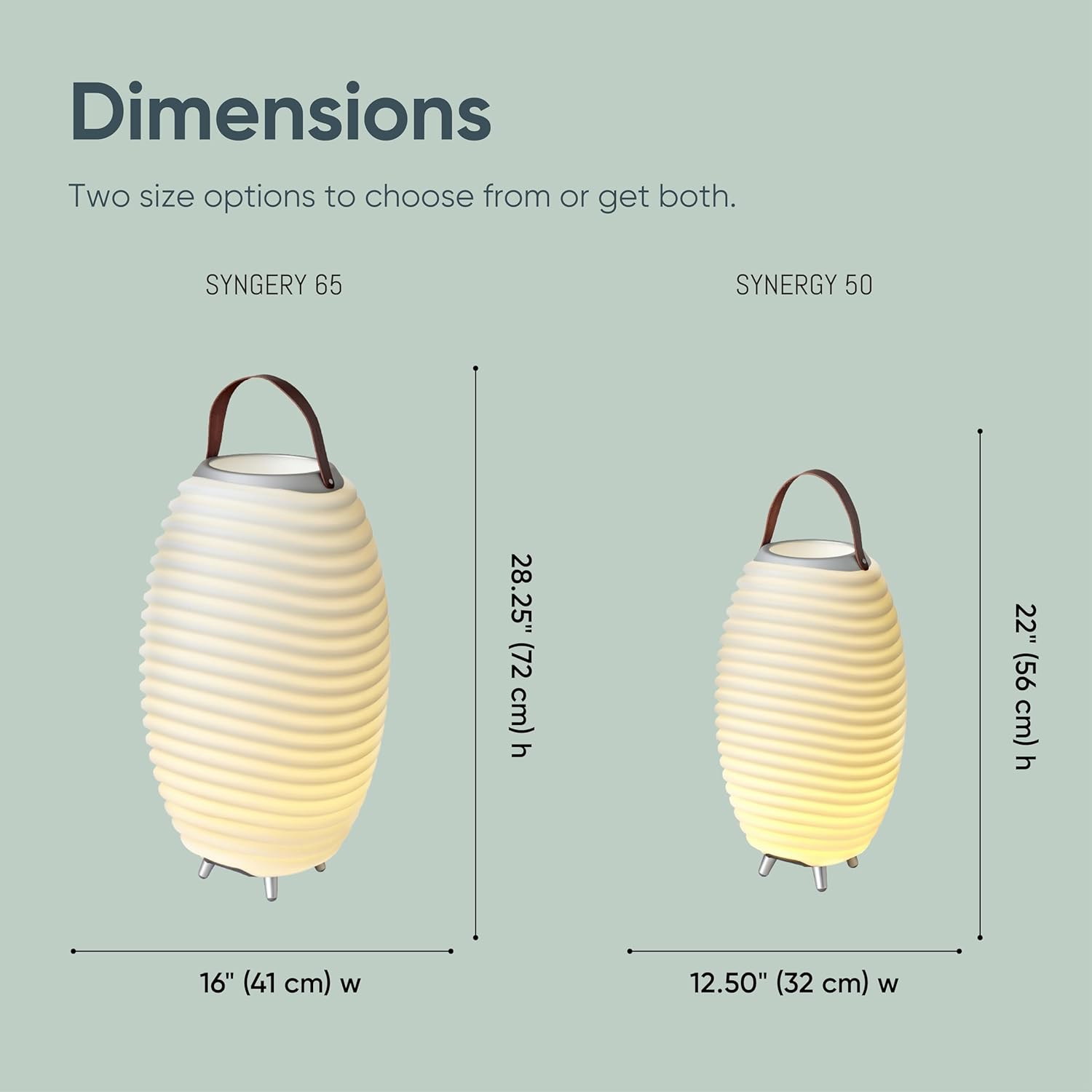
Image: Diagram showing the dimensions of the Kooduu Synergy 50 (22"H) and Synergy 65 (28.25"H) models.
9. Warranty and Support
For warranty information and customer support, please refer to the documentation included with your purchase or visit the official Kooduu website. Keep your proof of purchase for warranty claims.


