
Fafrees F20 PRO/ F20+ PRO
Fafrees F20 PRO / F20+ PRO Electric Folding Fat Bike User Manual
Model: F20 PRO / F20+ PRO
1. Introduction and Safety Guidelines
Thank you for choosing the Fafrees F20 PRO or F20+ PRO Electric Folding Fat Bike. This manual provides essential information for the safe assembly, operation, maintenance, and troubleshooting of your e-bike. Please read this manual thoroughly before your first ride and keep it for future reference.
Important Safety Information:
- Always wear a helmet and appropriate safety gear when riding.
- Familiarize yourself with local traffic laws and regulations regarding electric bicycles.
- Perform a pre-ride inspection before each use, checking brakes, tires, and all fasteners.
- Do not ride under the influence of alcohol or drugs.
- Avoid riding in adverse weather conditions or on slippery surfaces.
- Ensure the battery is securely locked in place before riding.
2. Product Overview
The Fafrees F20 PRO and F20+ PRO are versatile electric folding fat bikes designed for various terrains, offering a comfortable and powerful riding experience. They feature a robust aluminum alloy frame, a powerful 250W motor, and long-range batteries.

Image: The Fafrees F20 PRO electric folding fat bike in grey, showcasing its robust design and included storage bag.
Key Features:
- Powerful Motor: 250W brushless motor providing efficient power and speeds up to 25 km/h.
- Long-Range Battery: Available with 18Ah (F20 PRO) or 22.5Ah (F20+ PRO) 36V lithium batteries for extended range.
- Fat Tires: 20" x 3.0" puncture-resistant fat tires for stable and comfortable riding on diverse terrains.
- Folding Design: Compact and space-saving folding mechanism for easy storage and transport.
- Responsive Braking: 160mm mechanical disc brakes with power-off levers for precise and reliable stopping power.
- Comfortable Ride: Lockout front suspension enhances shock absorption for smoother rides.
- LCD Display: Real-time metrics including speed, PAS level, battery status, and distance.
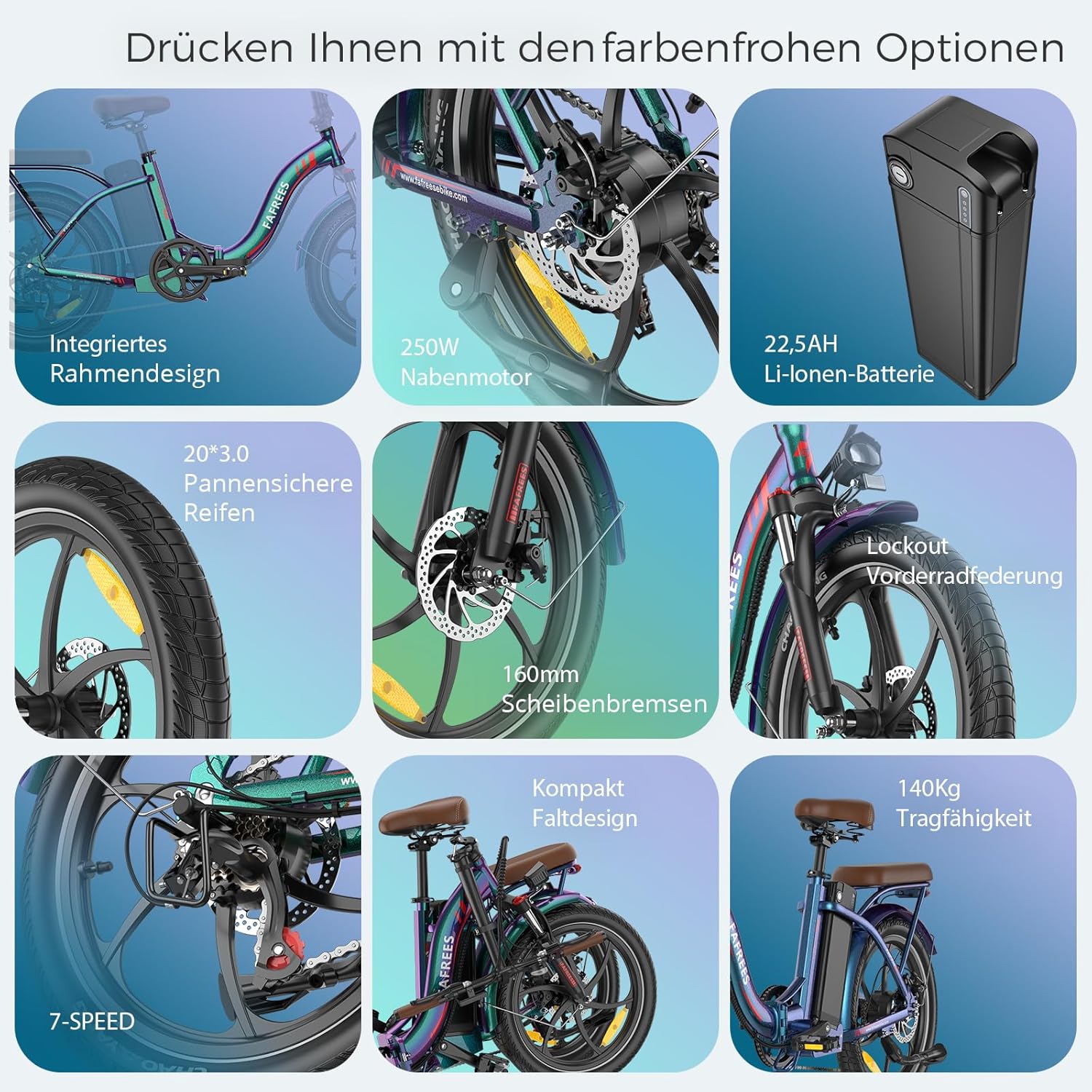
Image: An overview of the Fafrees F20 PRO's key features, including the integrated frame design, 250W hub motor, 22.5Ah Li-ion battery, 20"x3.0" puncture-proof tires, 160mm disc brakes, lockout front suspension, compact folding design, and 140kg load capacity.
3. Setup and Assembly
3.1 Unboxing and Initial Inspection
Carefully remove all components from the packaging. Inspect the bike for any signs of damage during transit. Ensure all listed components are present:
- Fafrees F20 PRO/F20+ PRO Electric Bike
- Battery (pre-installed or separate)
- Charger
- Pedals
- Tool Kit
- User Manual
3.2 Folding and Unfolding
Your Fafrees e-bike features a convenient folding design for portability and storage. Follow these steps to unfold your bike:
- Unfold Frame: Release the frame latch and carefully unfold the main frame until it locks into place. Ensure the safety clasp is engaged.
- Unfold Handlebar: Release the handlebar stem latch and raise the handlebar stem. Lock it securely in the upright position.
- Unfold Pedals: If your pedals are foldable, push them inwards and unfold them until they click into place.
- Adjust Seatpost: Insert the seatpost into the frame and adjust the height to your comfort. Secure it with the quick-release lever.
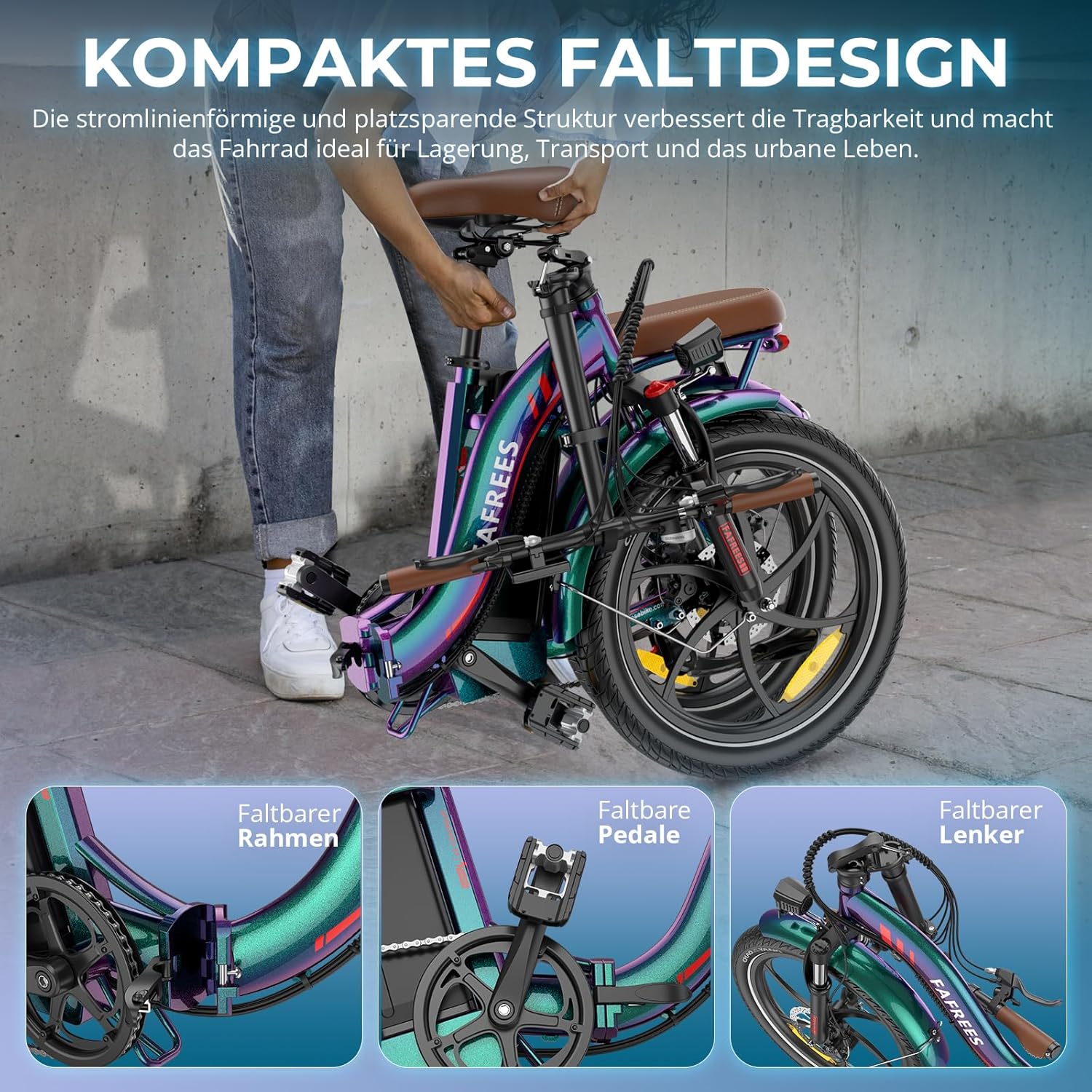
Image: Visual representation of the Fafrees F20 PRO's compact folding design, highlighting the foldable frame, pedals, and handlebar for easy storage and transport.
3.3 Battery Installation and Charging
The battery may come pre-installed or require insertion. Ensure the battery is fully charged before your first ride.
- Installation: If separate, align the battery with the frame slot and slide it in until it clicks securely. Use the key to lock the battery in place.
- Charging: Connect the charger to the charging port on the battery (or bike frame if integrated). Plug the charger into a standard wall outlet. The indicator light on the charger will show charging status (usually red for charging, green for fully charged).
- Charging Times: F20 PRO (18Ah battery) takes approximately 7-8 hours. F20+ PRO (22.5Ah battery) takes approximately 12 hours.
Note: Do not overcharge the battery. Disconnect the charger once charging is complete.
4. Operating Instructions
4.1 Powering On/Off and LCD Display
To power on your e-bike, press and hold the power button on the LCD display. The display will illuminate, showing various riding metrics.

Image: The LCD display showing real-time metrics such as speed, PAS level, battery level, and trip distance. Buttons for power, light, and assist level adjustment are also visible.
The LCD display provides the following information:
- Speed: Current riding speed.
- PAS Level: Current pedal assist level (0-5, typically).
- Battery Level: Indication of remaining battery charge.
- Distance: Trip distance or total odometer.
- Light ON/OFF: Button to control the bike's lights.
- Power ON/OFF: Main power button.
- Level UP/DOWN: Buttons to adjust the pedal assist level.
4.2 Pedal Assist System (PAS) and Throttle
Your Fafrees e-bike offers pedal assist and potentially a throttle for propulsion.
- Pedal Assist: As you pedal, the motor provides assistance based on the selected PAS level. Higher levels provide more assistance. Use the UP/DOWN buttons on the display to adjust the PAS level.
- Throttle (if equipped): Some models may include a thumb or twist throttle for power on demand, without pedaling. Use with caution and according to local regulations.
4.3 Braking System
The Fafrees F20 PRO/F20+ PRO is equipped with 160mm mechanical disc brakes for reliable stopping power.

Image: Close-up of the 160mm brake disc and the power-off brake lever, which cuts motor power when applied, enhancing safety.
- Operation: Squeeze the brake levers to engage the front and rear brakes. Apply both brakes simultaneously for optimal stopping.
- Power-Off Levers: The brake levers are designed to cut power to the motor when engaged, ensuring safety during braking.
4.4 Gear Shifting
Your e-bike features a 7-speed gear system. Use the gear shifter on the handlebar to change gears according to terrain and desired pedaling effort. Shift to lower gears for climbing hills and higher gears for flat terrain or downhill riding.
4.5 Suspension Adjustment
The front suspension fork can be adjusted to suit different riding conditions.
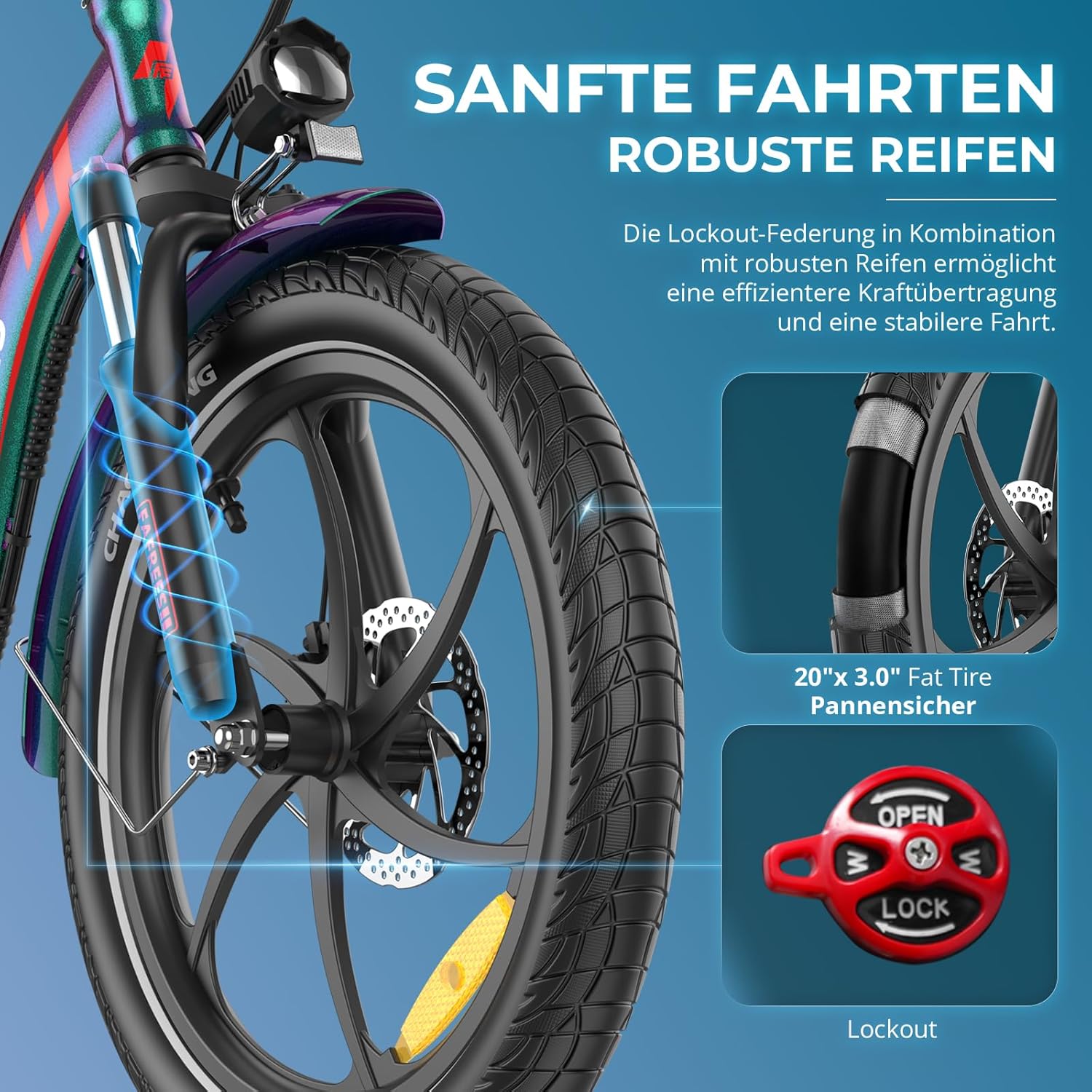
Image: Illustration of the lockout front suspension and the 20"x3.0" fat tires, emphasizing smooth rides and robust performance.
- Lockout Feature: The front suspension includes a lockout mechanism. Turn the knob on the top of the fork to lock the suspension for more efficient pedaling on smooth surfaces or unlock it for shock absorption on rough terrain.
5. Maintenance
Regular maintenance is crucial for the longevity and safe operation of your Fafrees e-bike.
5.1 Regular Checks
- Tires: Check tire pressure before each ride. Ensure tires are free from cuts or punctures.
- Brakes: Test brake effectiveness. Ensure brake levers are firm and responsive. Check brake pads for wear.
- Chain: Keep the chain clean and lubricated. Check for proper tension.
- Fasteners: Periodically check all bolts, nuts, and quick-release levers to ensure they are tight and secure.
5.2 Battery Care
- Store the battery in a cool, dry place, away from direct sunlight and extreme temperatures.
- If storing for extended periods, charge the battery to 50-70% every 2-3 months.
- Only use the original Fafrees charger.
5.3 Cleaning and Storage
- Clean your e-bike with a damp cloth and mild soap. Avoid high-pressure washing, especially near electrical components.
- Store the bike in a dry, sheltered area to prevent rust and damage to electronic components.
- Utilize the folding feature for compact storage when not in use.
6. Troubleshooting
This section addresses common issues you might encounter with your Fafrees e-bike.
| Problem | Possible Cause | Solution |
|---|---|---|
| Bike does not power on | Battery low or not installed correctly; loose connections; display issue. | Charge battery; ensure battery is fully inserted and locked; check all cable connections; contact support if issue persists. |
| Motor not assisting | PAS level is 0; brake levers engaged; motor cable loose; sensor issue. | Increase PAS level; release brake levers; check motor cable connection; contact support. |
| Brakes feel weak | Brake pads worn; cable tension too loose; air in hydraulic system (if applicable). | Inspect and replace brake pads; adjust cable tension; consult a bike mechanic for hydraulic issues. |
| Unusual noises | Loose components; chain needs lubrication; brake rub. | Check all fasteners; lubricate chain; adjust brake calipers. |
If you encounter a problem not listed here or if the suggested solutions do not resolve the issue, please provide a precise description of your problem. If possible, include photos or videos to help our engineers provide an effective solution. You can send video links as photos if direct video submission is not supported.
7. Specifications
Detailed specifications for the Fafrees F20 PRO and F20+ PRO models:
| Feature | F20 PRO | F20+ PRO |
|---|---|---|
| Unfolded Dimensions (L x W x H) | 170 x 60 x 115 cm | 174 x 60 x 118 cm |
| Folded Dimensions (L x W x H) | 88 x 38 x 70 cm | 86 x 38 x 71 cm |
| Net Weight | 25.5 kg | 28 kg |
| Battery Weight | 4 kg | 4.6 kg |
| Battery Capacity | 18 Ah / 648 Wh 36 V | 22.5 Ah / 810 Wh 36 V |
| Charging Time | 7-8 hours | 12 hours |
| Tire Size | 20 x 3.0 inches | |
| Recommended Rider Height | 160-195 cm | |
| Max Load Capacity | 140 kg | |
| Frame Material | Aluminum Alloy | |
| Motor Power | 250 W | |
| Max Speed | 25 km/h | |
| Brake Type | Mechanical Disc Brakes (160mm) | |
| Gears | 7-speed | |
| Suspension | Front Fork Suspension with Lockout | |
| Display | LCD Display | |

Image: Detailed view of the 250W brushless motor, highlighting its power output and efficiency for climbing up to 20-degree inclines.
8. Warranty and Support
Fafrees is committed to providing quality products and customer satisfaction. For any warranty claims or technical support, please contact the seller directly through your purchase platform.
Contacting Support:
When contacting support, please have your purchase details, model number (F20 PRO or F20+ PRO), and a clear description of the issue ready. Providing photos or videos can significantly expedite the support process.
For general inquiries or to explore more Fafrees products, you may visit the official Fafrees store: Fafrees Official Store
Related documentsF20 PRO/ F20+ PRO


Ask a question about this manual
Ask about setup, troubleshooting, compatibility, parts, safety, or missing instructions. Manuals+ will review the question and use this page’s manual context to help answer it.