
Introduction
Thank you for choosing the Sealy AlwayzAire 18" Queen Airbed. This manual provides essential information for the safe and efficient use of your airbed. Please read all instructions carefully before setup and operation. This airbed is designed for indoor use and offers a comfortable, supportive sleeping surface with a built-in pump for convenience.

Image: The Sealy AlwayzAire 18" Queen Airbed, fully inflated and ready for use, showcasing its design and height.
Safety Information
WARNING: To reduce the risk of electric shock, burns, fire, or injury, always follow these instructions:
- Always keep the airbed plugged in while using to ensure the AlwayzAire pump maintains firmness.
- Do not use if the airbed or power cord is damaged. Inspect for punctures or tears before each use.
- Keep the airbed away from heat sources, open flames, and sharp objects.
- Do not expose the pump or electrical components to water or excessive moisture.
- Ensure the area around the airbed is clear of obstructions during inflation and deflation.
- This product is intended for temporary sleeping purposes. Do not use as a permanent bed.
Package Contents
Verify that all components are present in your package:
- 1 x Sealy AlwayzAire 18" Queen Airbed with Built-in Comfort Pump
- 1 x Storage Bag
- 1 x Repair Patch
- Instruction Manual (this document)
Setup and Inflation
- Unpack the Airbed: Remove the airbed from its storage bag and unroll it on a clean, flat surface free of sharp objects. Ensure there is enough space around the airbed for inflation.
- Connect to Power: Locate the built-in pump on the side of the airbed. Plug the power cord into a standard 110-120V AC electrical outlet.
- Inflate the Airbed: Turn the dial on the pump to the desired firmness setting (e.g., Soft, Medium, Firm). Press the center button to begin inflation. The airbed will inflate in approximately 3 minutes. The pump will automatically stop once the selected firmness is reached.
- Adjust Firmness: After initial inflation, you can fine-tune the firmness by rotating the dial to a different setting and pressing the center button again.
- USB Charging Port: The built-in pump features a USB port for charging small electronic devices like phones or tablets. Simply plug your device's USB cable into the port.
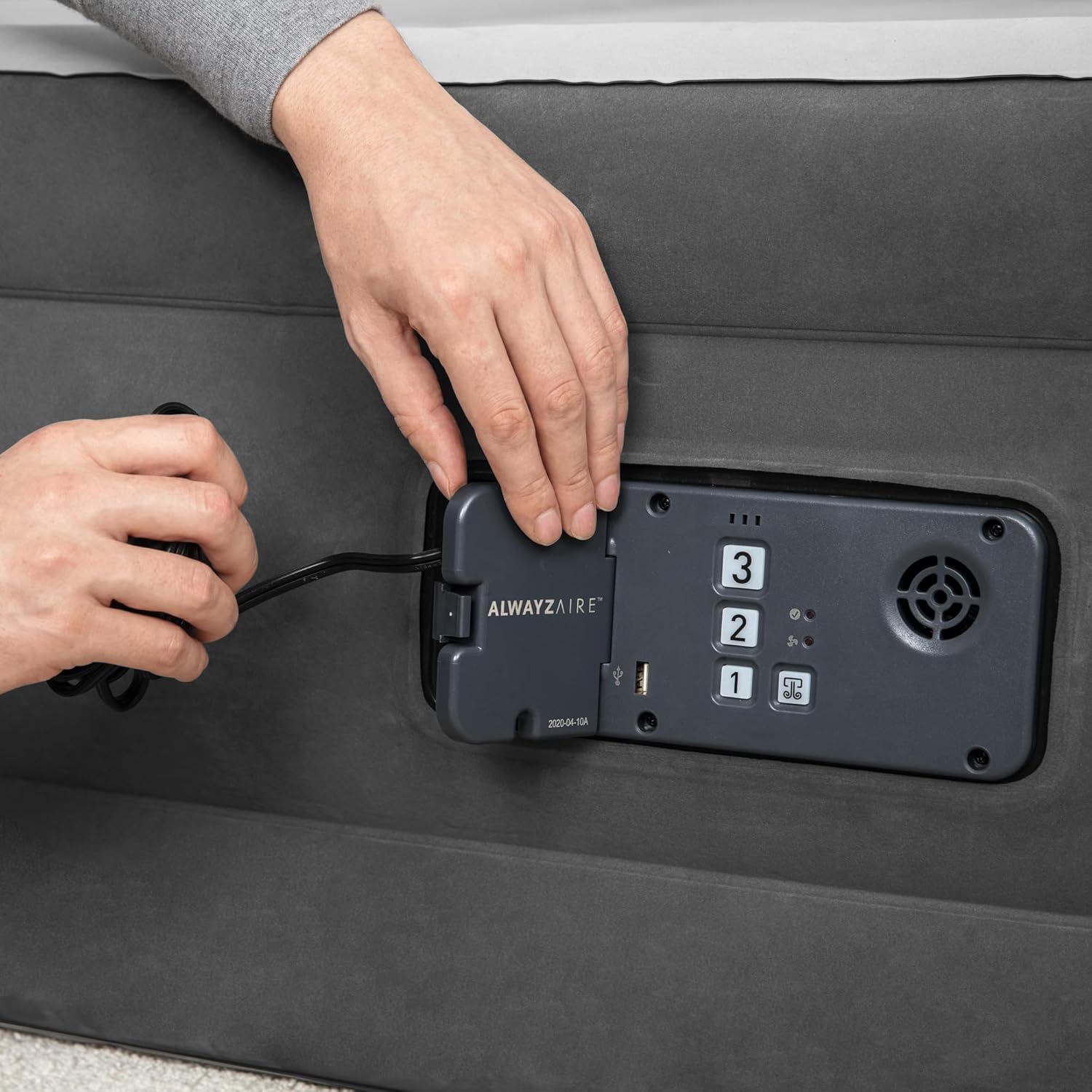
Image: A close-up of hands connecting the power cord to the integrated pump on the airbed.

Image: A hand inserting a USB charging cable into the dedicated USB port located on the airbed's control panel.
Operating the AlwayzAire System
- Automatic Firmness Maintenance: For continuous comfort, keep the airbed plugged in overnight. Internal sensors will silently monitor the air pressure and automatically reinflate the bed as needed to maintain your chosen firmness level throughout the night.
- Deflation: To deflate the airbed, turn the pump dial to the 'Deflate' setting (usually indicated by an arrow pointing downwards or a specific symbol). Press the center button to activate the deflation pump. The airbed will rapidly deflate.
- Manual Deflation (Quick Release Valve): For faster manual deflation or if power is unavailable, locate the 2-way interlocking quick-release valve. Open the valve to allow air to escape. Close the valve securely after deflation.
Maintenance and Storage
- Cleaning: Clean the airbed surface with a mild soap and water solution and a soft cloth. Do not use harsh chemicals or abrasive cleaners. Ensure the airbed is completely dry before storing.
- Repair Patch: In case of a small puncture, use the included repair patch. Clean and dry the affected area, apply the patch firmly, and allow it to cure for several hours before reinflating.
- Storage: After complete deflation, fold the airbed neatly and place it back into the provided storage bag. Store in a cool, dry place away from direct sunlight and extreme temperatures. Avoid placing heavy objects on top of the stored airbed.
Troubleshooting
| Problem | Possible Cause | Solution |
|---|---|---|
| Airbed loses air overnight | 1. Not plugged in for AlwayzAire system. 2. Small puncture or leak. 3. Natural stretching of PVC material. | 1. Ensure the airbed is plugged into a live outlet for the AlwayzAire pump to function. 2. Inspect for punctures. Use the repair patch if a small leak is found. Check valve for secure closure. 3. This is normal for new airbeds. The AlwayzAire pump will compensate if plugged in. |
| Pump is not working | 1. No power. 2. Overheating. | 1. Check power cord connection and wall outlet. Try a different outlet. 2. Allow the pump to cool down for 30 minutes before attempting to use again. |
| USB port not charging | 1. Airbed not plugged in. 2. Device incompatibility. | 1. Ensure the airbed is plugged into a live electrical outlet. 2. The USB port is designed for low-power devices. Ensure your device is compatible. |
Specifications
| Feature | Detail |
|---|---|
| Model Name | AlwayzAire: 18" Airbed - Queen - Built-In Comfort Pump |
| Model Number | 94060E |
| Size | Queen (U.S. Standard) |
| Dimensions (L x W x H) | 80"L x 60"W x 18"Th |
| Material | Polyvinyl Chloride (PVC) |
| Special Feature | Built-In Comfort Pump, USB Charging Port, Wave Beam Construction, Adjustable Firmness |
| Inflation Time | Approximately 3 minutes |
| Power Requirement | 110-120V AC |
| Water Resistance Level | Not Water Resistant |
Warranty and Support
For warranty information or technical support, please refer to the documentation included with your purchase or contact the manufacturer directly. Keep your proof of purchase for warranty claims.