
1. Introduction
The dormzie Portable Tire Inflator, Model ST06, is a versatile and compact air compressor designed for convenient and efficient inflation of various items, including car tires, motorcycle tires, bicycle tires, and sports balls. Featuring a powerful 150 PSI output, digital pressure gauge, automatic shut-off, and a built-in LED light, this device ensures accurate and safe inflation. Its dual power options, including a rechargeable 10,000mAh lithium-ion battery and a 12V car power adapter, provide reliable performance wherever you go. Additionally, it functions as an emergency power bank for your electronic devices.
2. Safety Information
Please read all safety instructions carefully before using the device to prevent injury or damage.
- Do not over-inflate: Always refer to the recommended pressure for the item being inflated. The automatic shut-off feature helps prevent over-inflation, but manual monitoring is advised.
- Not for large truck tires: This inflator is designed for cars, SUVs, motorcycles, and bicycles. It is not suitable for large truck tires.
- Keep away from children: Store the device and its accessories out of reach of children.
- Avoid extreme temperatures: Do not expose the device to direct sunlight, high temperatures, or freezing conditions.
- Proper ventilation: Ensure adequate ventilation during operation to prevent overheating.
- Power source: Use only the provided 12V DC car power adapter or the internal rechargeable battery. The device operates on 12 Volts DC.
- Inspect before use: Before each use, check the device and accessories for any signs of damage. Do not use if damaged.
3. Package Contents
Verify that all items are present in the package:
- 1 x dormzie Portable Tire Inflator (Model ST06)
- 1 x High-strength Storage Bag
- 1 x 26.6 Inch Air Tube (Inflation Hose)
- 1 x Type-C Charging Cable
- 1 x 12V Car Power Adapter
- Various Nozzle Adapters (for different inflatables)

Image: All components included in the dormzie Portable Tire Inflator package, neatly arranged.
4. Product Features
- Powerful & Fast Inflation: Max pressure of 150 PSI, inflates tires significantly faster than standard pumps.
- Smart Inflation & Auto Shutoff: Sensitive pressure sensor and advanced chip with 5 preset modes (bicycle, motorcycle, car, ball, custom). LCD provides real-time and preset pressure monitoring. Automatically shuts off when target pressure is reached. Supports 4 units: BAR, KPA, PSI, KG/CM².
- Dual Power Assurance: Features a rechargeable 10,000mAh lithium-ion battery for cordless use and a 12V car power adapter for continuous power.
- Built-in LED Light: Equipped with an LED light for use in dark conditions, offering Normal, Emergency (SOS), and Strobe modes.
- Emergency Power Bank: Includes a Type-C charging port and a 5V/2A USB output port to charge electronic devices.

Image: The inflator's digital display, highlighting the auto shut-off and intelligent inflation modes.

Image: Illustration of the dual power capability, showing both battery and 12V DC corded options.

Image: The built-in LED light in action, providing illumination for nighttime use.
5. Setup
- Charge the Device: Before first use, fully charge the inflator using the provided Type-C cable and a suitable USB power adapter (not included) or the 12V car power adapter. The battery indicator on the display will show charging status.
- Select Power Source: You can operate the inflator cordlessly using its internal battery or by connecting it to your vehicle's 12V cigarette lighter socket using the car power adapter.
- Attach Air Tube: Screw the inflation hose securely onto the inflator's air outlet.
- Select Nozzle: Choose the appropriate nozzle adapter for the item you wish to inflate (e.g., Schrader valve for car tires, needle for balls). Attach it to the end of the air tube.

Image: The main product view, illustrating the connection of the air tube to a tire.
6. Operation
- Power On: Long press the power button to turn on the inflator. The LCD display will light up.
- Connect to Item: Securely attach the nozzle adapter to the valve of the item you intend to inflate. The display will show the current pressure.
- Select Unit & Mode: Press the 'U' button to cycle through pressure units (PSI, BAR, KPA, KG/CM²). Press the mode button (icon with different vehicles/ball) to select a preset inflation mode (e.g., Car, Motorcycle, Bicycle, Ball). Each mode has a default pressure range.
- Set Target Pressure: Use the '+' and '-' buttons to adjust the target pressure. For custom inflation, select the 'Custom' mode and set your desired PSI.
- Start Inflation: Press the power button again to start the inflation process. The inflator will automatically stop when the preset target pressure is reached.
- Disconnect: Once inflation is complete, quickly disconnect the nozzle from the valve to minimize air loss.
- Power Off: Long press the power button to turn off the device.
Using the LED Light:
Press the light bulb button to cycle through the LED light modes: Normal illumination, SOS (emergency signal), and Strobe. Press again to turn off the light.
Using as a Power Bank:
Connect your electronic device to the USB output port (5V/2A) on the inflator using your device's charging cable. The inflator's battery will provide power to charge your device.

Image: Step-by-step guide for easy operation of the inflator.
7. Maintenance
- Cleaning: Wipe the exterior of the inflator with a soft, damp cloth. Do not use harsh chemicals or abrasive cleaners. Ensure the device is powered off and disconnected from any power source before cleaning.
- Storage: Store the inflator and all accessories in the provided high-strength storage bag. Keep it in a cool, dry place, away from direct sunlight and extreme temperatures.
- Battery Care: For optimal battery life, charge the device fully at least once every three months if not in regular use. Avoid completely draining the battery for extended periods.
- Hose Inspection: Periodically check the inflation hose and nozzle adapters for any cracks, kinks, or damage. Replace if necessary.
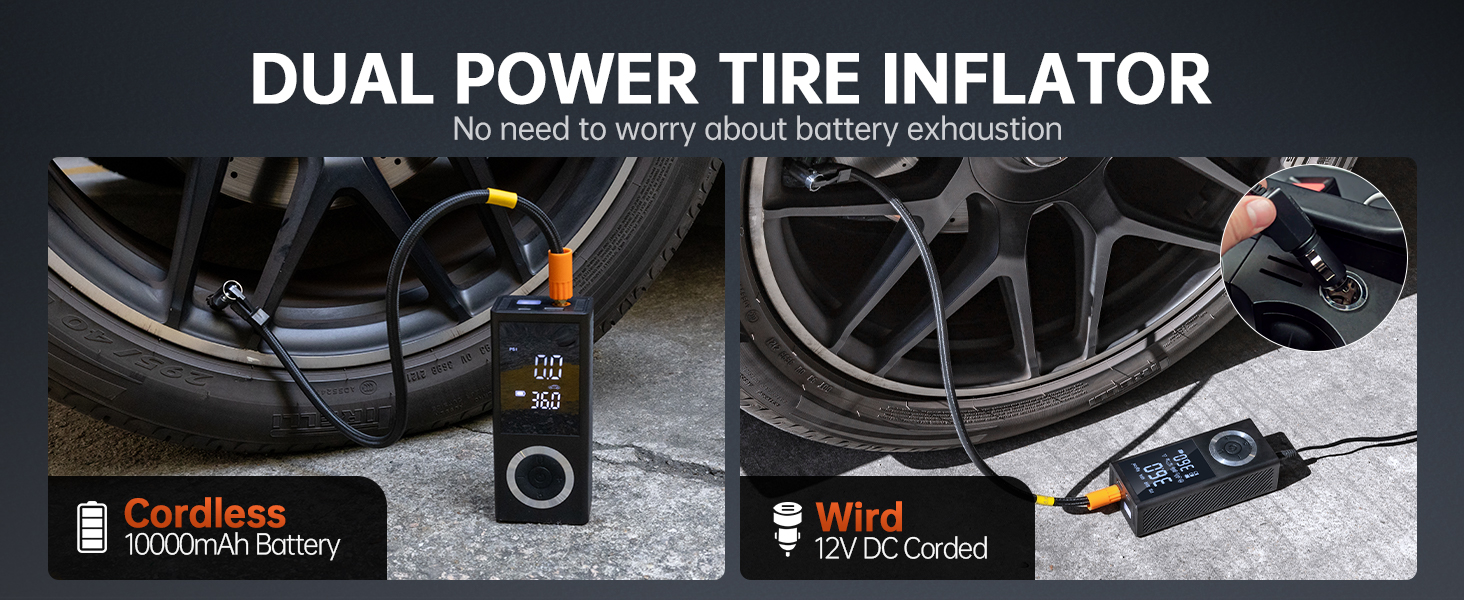
Image: The inflator and its compact storage box, ideal for keeping organized in a vehicle.
8. Troubleshooting
| Problem | Possible Cause | Solution |
|---|---|---|
| Inflator does not turn on. | Low battery or no power connection. | Charge the battery or connect to 12V car power adapter. Ensure power button is long-pressed. |
| Inflator runs but no air comes out. | Hose not securely attached; nozzle blocked; hose damaged. | Ensure hose is tightly screwed. Check nozzle for obstructions. Inspect hose for damage. |
| Inaccurate pressure reading. | Poor connection to valve; sensor calibration issue. | Ensure nozzle is fully and securely attached to the valve. Disconnect and reconnect. If issue persists, contact support. |
| Inflator stops prematurely. | Target pressure reached; overheating; low battery. | Check if target pressure is met. Allow device to cool down if hot. Recharge battery. |
| LED light not working. | Light button not pressed correctly; internal fault. | Press the light button firmly. If still not working, contact support. |
9. Specifications
| Specification | Detail |
|---|---|
| Brand | dormzie |
| Model Name | ST06 |
| Max Pressure | 150 PSI |
| Voltage | 12 Volts (DC) |
| Power Source | Battery Powered (10,000mAh Lithium Ion) / 12V Car Adapter |
| Noise Level | 85 dB |
| Special Features | Automatic Shut-Off, Built-In Gauge, Portable, LED Light, Power Bank Function |
| Item Weight | 1.96 pounds |
| Package Dimensions | 8.19 x 4.37 x 4.09 inches |
| Included Components | Smart Air Pump, Battery, Car Adapter, Nozzle Adapters, Storage Bag, Type-C Cable, Air Tube |
10. Warranty and Support
This dormzie product comes with a standard manufacturer's warranty, covering defects in materials and workmanship under normal use. Please refer to the warranty card included in your package for specific terms and conditions, including the warranty period and coverage details.
For technical support, troubleshooting assistance, or warranty claims, please contact dormzie customer service through the retailer's platform or the contact information provided on the product packaging. Please have your model number (ST06) and purchase date ready when contacting support.