
1. Introduction
This manual provides detailed instructions for the installation, setup, and operation of your ASD 20-Inch Smart RGBW Flush Mount Ceiling Light. This LED lighting fixture combines a modern design with advanced smart features, offering a versatile lighting solution for various indoor spaces. It features RGBW color-changing capabilities, dimming, and control via a remote or a smartphone app, with compatibility for Alexa and Google Assistant.
2. Safety Information
Please read all instructions carefully before installation and use. Retain this manual for future reference.
- Electrical Safety: Always turn off power at the circuit breaker before installing, servicing, or cleaning the fixture. Consult a qualified electrician if you are unsure about electrical wiring.
- Installation: Ensure the mounting surface can support the weight of the fixture. Follow all local electrical codes and ordinances.
- Handling: Do not handle the fixture with wet hands. Avoid direct eye exposure to the light source when illuminated.
- Environment: This fixture is rated for damp locations but is intended for indoor use only. Do not expose to direct water spray or submersion.
- Cleaning: Use a soft, dry cloth for cleaning. Do not use harsh chemicals or abrasive cleaners.
3. Package Contents
Verify that all components are present before beginning installation:
- ASD 20-Inch Smart RGBW Flush Mount Ceiling Light Fixture (2 units)
- Remote Control (1 unit)
- Mounting Hardware (screws, wire nuts)
- Instruction Manual
4. Product Specifications
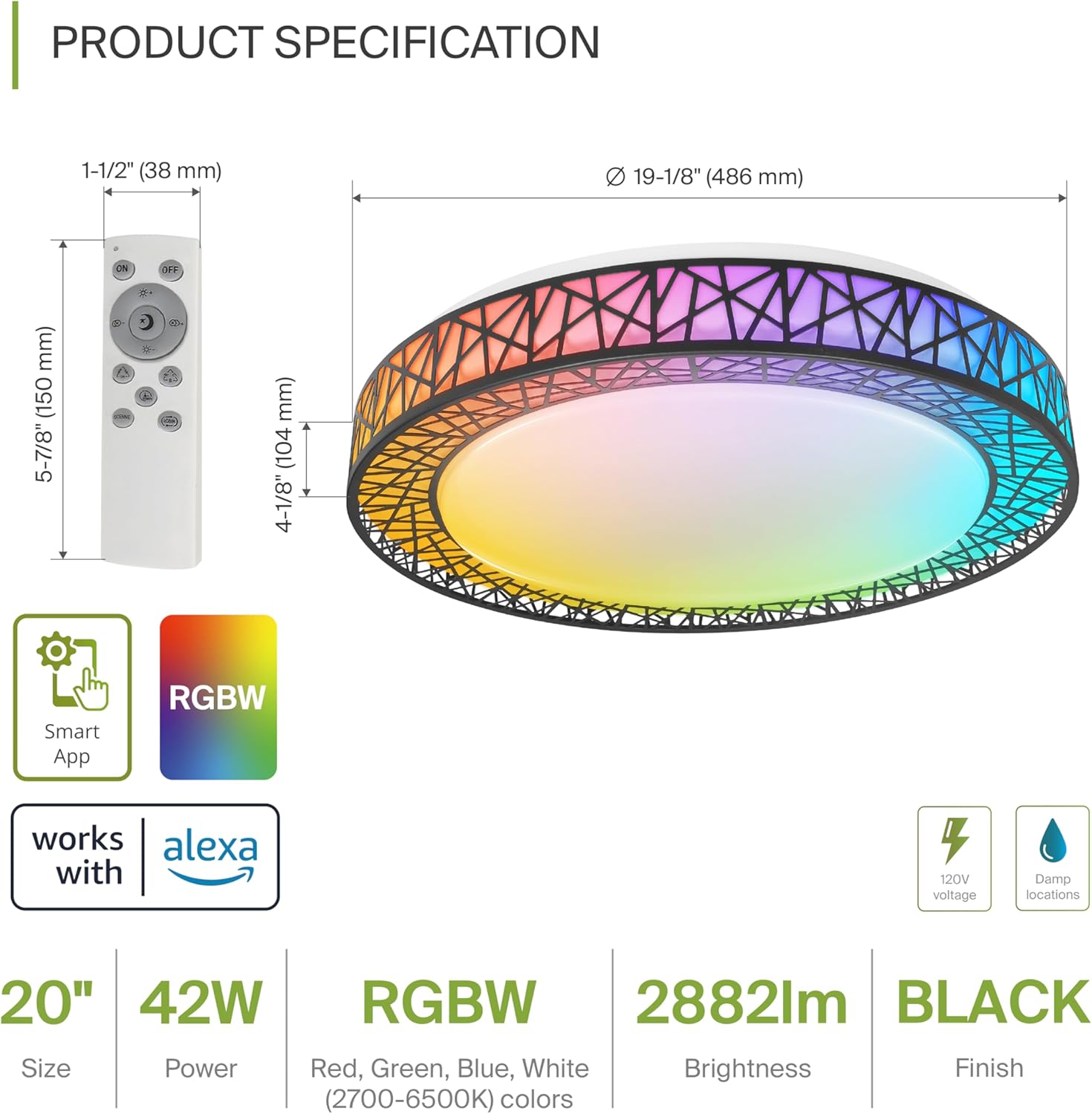
Product Specification Diagram: Dimensions, remote control, and key features.
| Feature | Detail |
|---|---|
| Brand | ASD |
| Model Name | LOFT |
| Model Number | A-LFM20D42SRGBW-B-2p |
| Color | 20" | Black | RGBW |
| Material | Acrylic, Alloy Steel |
| Product Dimensions | 19.1"L x 19.1"W x 4.1"H |
| Power Source | Hardwired |
| Wattage | 42 watts |
| Voltage | 120 Volts |
| Brightness | 2579 lumen (max) |
| Color Temperature | 2700-6500K (CCT Adjustable) |
| Special Features | RGBW, Remote Control, Smart App, Dimmable |
| Control Method | Remote, Voice (Alexa, Google Assistant) |
| Indoor/Outdoor Usage | Indoor |
| Water Resistance Level | Water Resistant (Damp Locations Rated) |
| Average Life | 50,000 Hours |
| Certification | ETL Listed |
5. Installation Instructions
Before starting, ensure the power is turned off at the circuit breaker.

Installation Diagram: Visual guide for mounting the light fixture.
- Prepare the Fixture: Remove the lens from the light fixture by rotating it clockwise.
- Mount the Bracket: Attach the two screws to the outlet box on your ceiling.
- Wire Connections: Connect the wires: Black to Black, White to White, and Ground to Ground. Secure these connections with wire nuts.
- Secure the Fixture: Carefully tuck all wires back into the outlet box. Attach the light fixture to the mounting bracket.
- Reattach the Lens: Rotate the lens counter-clockwise to secure it to the fixture.
Once installed, restore power at the circuit breaker.
6. Smart Feature Setup
6.1. ASD SMART App Control
The ASD Smart RGBW Flush Mount Ceiling Light can be controlled via the ASD SMART App on your smartphone (Wi-Fi internet connection required).
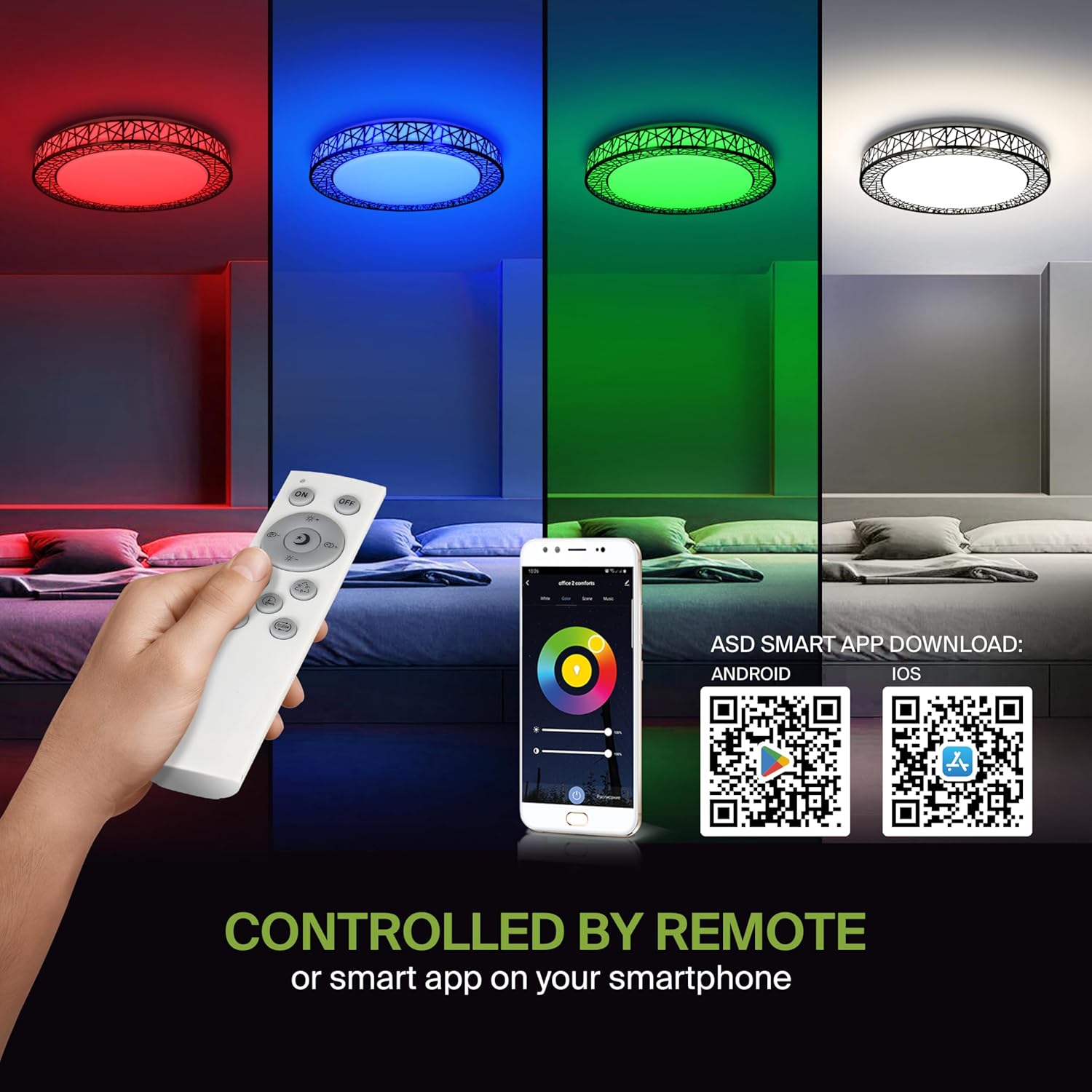
Remote control and ASD SMART App interface with QR codes for download.
- Download the App: Scan the QR code provided in the product images or search for "ASD SMART" in the Apple App Store (for iOS) or Google Play Store (for Android).
- Register/Login: Follow the in-app instructions to create an account or log in.
- Add Device: In the app, select the option to add a new device. Follow the pairing instructions to connect your ceiling light to the app via Wi-Fi.
6.2. Voice Control (Alexa & Google Assistant)
The fixture is compatible with Amazon Alexa and Google Assistant for convenient voice control.

Voice control compatibility with Alexa and Google Assistant.
- Link Account: Open your Alexa or Google Home app. Navigate to the 'Skills' or 'Works with Google' section.
- Search for ASD SMART: Search for the "ASD SMART" skill/service and enable it.
- Connect: Link your ASD SMART account with your Alexa or Google Home account.
- Discover Devices: Ask Alexa or Google Assistant to discover new devices, or manually initiate device discovery in their respective apps.
7. Operating Instructions
7.1. Remote Control Operation
Use the included remote control to manage your light fixture's functions.
Remote control for easy access to light functions.
- Power On/Off: Press the power button to turn the light on or off.
- Brightness Adjustment: Use the brightness buttons to increase or decrease the light intensity (smoothly dimmable).
- Color Selection (RGBW): Press the dedicated color buttons (Red, Green, Blue, White) or use the color wheel/mode buttons to cycle through 16.7 million colors.
- Color Temperature (CCT): Adjust the white light color temperature between 2700K (warm white) and 6500K (cool white).
- Scene Modes: Select pre-programmed lighting patterns or scenes.
7.2. App Control Operation
The ASD SMART App offers comprehensive control over your light fixture.
- Full Color Spectrum: Access the full 16.7 million RGBW color palette.
- Precise Dimming: Adjust brightness levels with fine control.
- Scheduling: Set schedules for the light to turn on/off or change modes at specific times.
- Grouping: Group multiple ASD smart lights to control them simultaneously.
- Custom Scenes: Create and save your own custom lighting scenes.
7.3. Voice Command Examples
After linking your device to Alexa or Google Assistant, use commands such as:
- "Alexa, turn on the [Light Name]."
- "Hey Google, set [Light Name] to blue."
- "Alexa, dim the [Light Name] to 50%."
- "Hey Google, make the [Light Name] warmer."
8. Maintenance
To ensure the longevity and optimal performance of your ASD Smart RGBW Flush Mount Ceiling Light, follow these maintenance guidelines:
- Cleaning: Before cleaning, ensure the power to the fixture is turned off. Use a soft, dry, or slightly damp cloth to wipe the surface. Avoid using abrasive cleaners, solvents, or harsh chemicals, as these can damage the finish or electrical components.
- Inspection: Periodically check the fixture for any signs of damage, loose connections, or wear. If any issues are found, turn off the power and consult a qualified electrician.
- Bulb Replacement: This fixture uses integrated LED technology and does not require bulb replacement. The LEDs are designed for a long lifespan.
9. Troubleshooting
If you encounter issues with your ASD Smart RGBW Flush Mount Ceiling Light, refer to the following common solutions:
| Problem | Possible Cause | Solution |
|---|---|---|
| Light does not turn on | No power, loose wiring, faulty switch | Check circuit breaker. Ensure all wire connections are secure. Test the wall switch. |
| Remote control not working | Dead batteries, remote out of range, pairing issue | Replace remote batteries. Ensure remote is within operating range. Re-pair the remote with the light (refer to app instructions for pairing). |
| App control not working | No Wi-Fi connection, incorrect app pairing, outdated app | Verify Wi-Fi connectivity. Ensure the light is correctly paired in the ASD SMART App. Update the app to the latest version. |
| Voice control not responding | Account not linked, device not discovered, incorrect commands | Ensure ASD SMART account is linked to Alexa/Google Assistant. Redo device discovery. Use correct voice commands. |
| Light flickers or dims unexpectedly | Unstable power supply, loose wiring, incompatible dimmer (if applicable) | Check power supply stability. Verify wiring. This light is dimmable via remote/app; external dimmers may cause issues. |
10. Warranty Information
ASD provides a 5-year limited warranty for this product. This warranty covers defects in materials and workmanship under normal use. Please retain your proof of purchase for warranty claims. For detailed warranty terms and conditions, please refer to the official ASD website or contact customer support.
11. Customer Support
If you have any questions, require technical assistance, or need to make a warranty claim, please contact ASD customer support through the following channels:
- Website: Visit the official ASD Lighting website for FAQs and support resources.
- Email: Refer to your product packaging or the ASD website for customer service email addresses.
- Phone: Refer to your product packaging or the ASD website for customer service phone numbers.
Please have your model number (A-LFM20D42SRGBW-B-2p) and purchase date ready when contacting support.

