
1. Introduction
This manual provides detailed instructions for the installation, operation, and maintenance of your Dasaita Android 13 Double Din Car Stereo. Please read this manual thoroughly before using the product to ensure proper function and safety. This unit is designed to enhance your driving experience with advanced features like Apple CarPlay, Android Auto, and an off-road inclinometer.
2. Vehicle Compatibility
The Dasaita 7-inch double din universal head unit is specifically designed for OEM radios with a center console size of 200x100MM. It is compatible with the following Toyota models:
- Toyota 4Runner: 2003-2009
- Toyota Tundra: 2003-2006
- Toyota RAV4: 2001-2005
- Toyota FJ Cruiser: 2007-2024
- Toyota Highlander: 2001-2007
- Toyota Matrix: 2003-2010
- Pontiac Vibe: 2003-2008
This plug-and-play radio kit is designed to retain most of your vehicle's original functions, including Steering Wheel Controls (SWC), reverse camera, and JBL amplifier.

Figure 2.1: Overview of compatible Toyota OEM radio models and the Dasaita unit after installation.

Figure 2.2: Detailed view of the Dasaita head unit's dimensions (200x100mm) and its fitment within various Toyota OEM radio slots.
3. Setup and Installation
The Dasaita head unit is designed for a plug-and-play installation in compatible vehicles. While specific installation steps may vary by vehicle model, the general process involves removing the existing OEM radio and connecting the new unit using the provided wiring harnesses.
3.1 Retaining Factory Features
This unit is engineered to integrate seamlessly with your vehicle's existing systems, preserving functionality such as:
- Steering Wheel Controls (SWC): Maintain control over audio functions directly from your steering wheel.
- Backup Camera: If your vehicle has a factory backup camera, it will be supported.
- OEM Amplifier: Compatibility with your vehicle's original amplifier, including JBL systems.
- AC Information: Display of air conditioning information on the new screen.
- Door Open Hint: Visual indication of open doors.
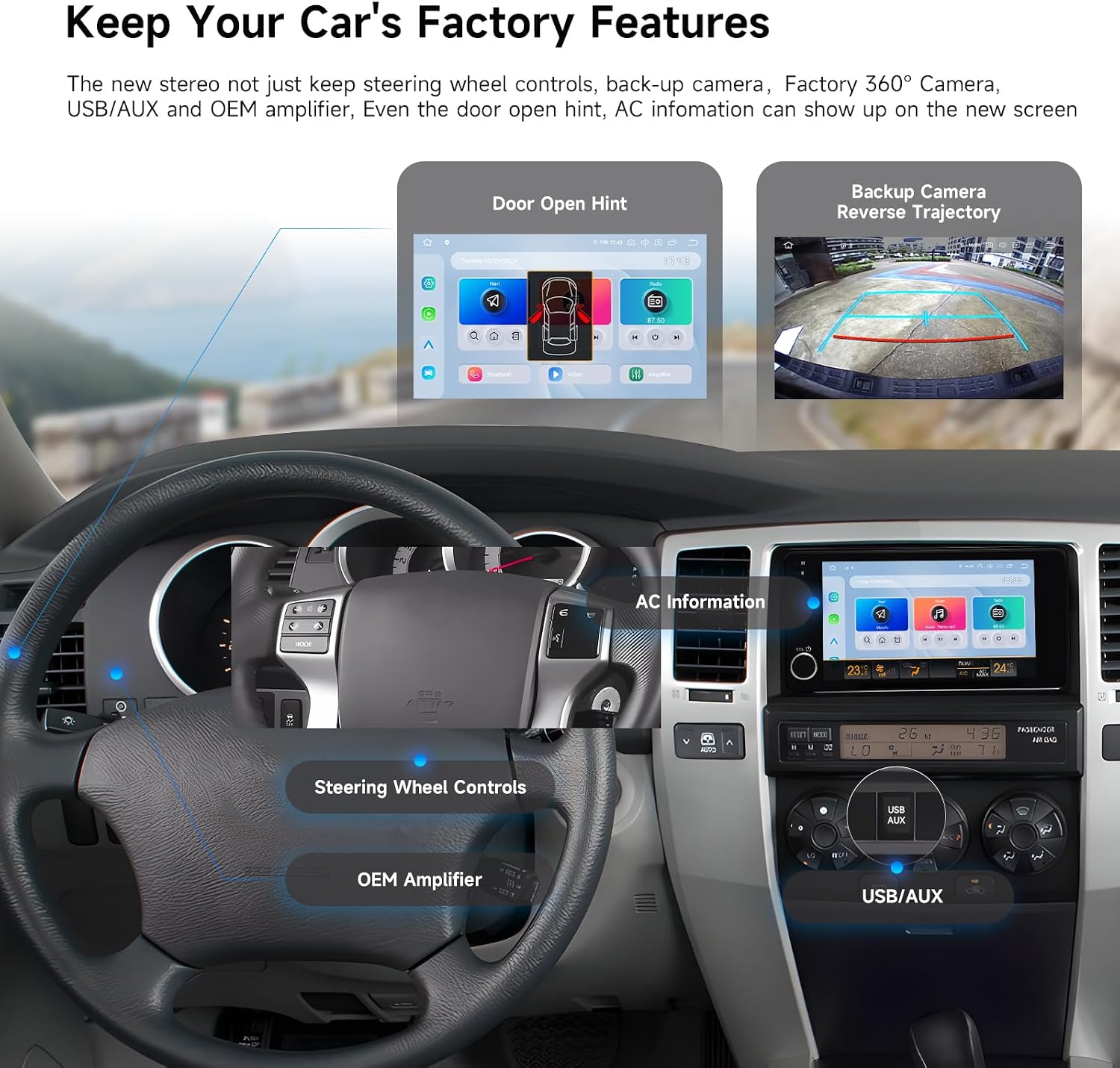
Figure 3.1: Illustration of the Dasaita head unit displaying various retained factory features, including door open hints, backup camera view, AC information, and connections for steering wheel controls, OEM amplifier, and USB/AUX.
3.2 Initial Power-Up and Configuration
Upon first power-up, the system will guide you through initial setup steps, including language selection, time zone, and network configuration. Ensure all connections are secure before powering on the unit.
4. Operating Instructions
4.1 System Performance and Connectivity
The head unit operates on Android 13, powered by an eight-core Qualcomm 665 CPU with 8GB RAM and 256GB ROM, ensuring smooth and responsive performance. For internet access and software updates, you can insert a 4G SIM card into the dedicated slot.

Figure 4.1: Visual representation of the Dasaita head unit's internal components, highlighting the Qualcomm Snapdragon 665 processor, Android 13 operating system, 8GB RAM, 256GB ROM, and 4G LTE SIM card slot for enhanced performance and connectivity.
4.2 Apple CarPlay and Android Auto
Enjoy seamless smartphone integration with wireless Apple CarPlay and wired/wireless Android Auto via Bluetooth 5.0. This allows you to access your phone's navigation, make calls, send messages, and stream music directly from the head unit's display.
- Wireless CarPlay: Connect your iPhone wirelessly for a streamlined experience.
- Wired/Wireless Android Auto: Connect your Android phone via USB or wirelessly.
- Voice Control: Use Siri or Google Assistant for hands-free operation.

Figure 4.2: The Dasaita head unit screen showing the Apple CarPlay and Android Auto interfaces, with various app icons and a visual representation of wireless and wired connectivity options.
4.3 Off-Road Inclinometer Functions
The built-in gyro sensor provides real-time monitoring of your vehicle's roll and pitch angles. An alarm will sound if these angles exceed preset safety values, enhancing driving safety, especially on challenging terrains.
- Real-time Monitoring: Displays uphill, downhill, left tilt, and right tilt angles.
- Safety Alarm: Alerts the driver when angles become critical.
- Improved Sensitivity: Free rotation feature enhances sensor accuracy.

Figure 4.3: The Dasaita head unit screen displaying the off-road inclinometer interface, showing real-time roll and pitch angles (uphill, downhill, left tilt, right tilt) and a vehicle driving on rugged terrain.
4.4 Audio System and DTS Sound Processor
The unit features a professional-grade TDA7808 amplifier chip (23W RMS/50 peak x 4 channels) with 4V audio output, delivering crisp highs and resonating lows. The DTS sound processor allows for precise audio customization, including delay time settings for an optimized listening experience.
- High-Quality Amplifier: TDA7808 chip for superior sound.
- DTS Sound Processor: Advanced audio tuning options, including equalizer and delay settings.
- Customizable Sound: Adjust audio output to personal preferences.

Figure 4.4: The Dasaita head unit screen displaying the DTS sound processor interface, showing detailed equalizer settings, delay adjustments, and volume controls, with a visual representation of sound waves in a car interior.
4.5 Backup Camera Configuration
The unit supports various backup camera configurations, including AHD (1080P) and CVBS signals. You can also customize guide lines and switch between rear and front camera modes.
- AHD/CVBS Support: Compatible with different camera signal types.
- Adjustable Guide Lines: Enable or disable parking guide lines.
- Front/Rear Camera: Configure for either rear or front view applications.

Figure 4.5: A series of images demonstrating the DIY configuration options for the backup camera, including switching between AHD and CVBS signals, enabling/disabling guide lines, and setting the camera for rear or front view.
5. Maintenance
To ensure the longevity and optimal performance of your Dasaita car stereo, follow these maintenance guidelines:
- Screen Cleaning: Use a soft, lint-free cloth to gently wipe the screen. Avoid abrasive cleaners or solvents.
- Software Updates: Regularly check for and install system updates to ensure the latest features and security patches. These can be downloaded via the 4G SIM card or Wi-Fi connection.
- Avoid Extreme Temperatures: Do not expose the unit to extreme heat or cold for extended periods.
- Cable Connections: Periodically check all cable connections to ensure they are secure and free from damage.
6. Troubleshooting
If you encounter issues with your Dasaita car stereo, refer to the following common troubleshooting steps:
- No Power:
- Check all power connections and fuses.
- Ensure the vehicle's ignition is on.
- No Sound:
- Verify speaker connections.
- Check volume levels and mute settings.
- Ensure the OEM amplifier is correctly connected and functioning.
- CarPlay/Android Auto Not Connecting:
- Ensure Bluetooth is enabled on both the head unit and your smartphone.
- For wired connections, try a different USB cable.
- Restart both the head unit and your smartphone.
- GPS Signal Issues:
- Ensure the GPS antenna is properly installed and has a clear view of the sky.
- Check GPS settings within the unit.
- System Lag/Freezing:
- Close unnecessary background applications.
- Perform a system restart.
- Consider a factory reset if issues persist (note: this will erase all user data).
For persistent issues, please contact Dasaita customer support.
7. Specifications
| Feature | Specification |
|---|---|
| Model | Android 13 Double Din Car Stereo |
| Operating System | Android 13 |
| CPU | Eight-core Qualcomm 665 (64-bit) |
| RAM | 8GB |
| ROM | 256GB |
| Display Size | 7-inch |
| Vehicle Compatibility | Toyota 4Runner (03-09), Tundra (03-06), RAV4 (01-05), FJ Cruiser (07-24), Highlander (01-07), Matrix (03-10), Pontiac Vibe (03-08) |
| Connectivity | 4G SIM Card Slot, Bluetooth 5.0, Wi-Fi |
| Smartphone Integration | Wireless Apple CarPlay, Wired/Wireless Android Auto |
| Amplifier Chip | TDA7808 (23W RMS/50 peak x 4 channels) |
| Audio Output | 4V |
| Special Features | Off-Road Inclinometer, DTS Sound Processor, Retains OEM functions (SWC, backup camera, JBL amp) |
8. Warranty and Support
For warranty information and technical support, please refer to the documentation included with your product or visit the official Dasaita website. You may also contact Dasaita customer service directly for assistance with product inquiries, troubleshooting, or warranty claims.
Contact Information: Please refer to the contact details provided on the Dasaita official website or your purchase receipt.


