
Introduction
This manual provides instructions for the safe and efficient operation of your EasyAcc 12 Inch Quiet Air Circulator Desk Fan. Please read this manual thoroughly before use and retain it for future reference.

Image: The EasyAcc 12 Inch Quiet Air Circulator Desk Fan, showcasing its compact design and powerful air circulation capabilities in a living room setting.
Safety Instructions
- Always ensure the fan is placed on a stable, flat surface.
- Do not insert fingers or foreign objects into the fan grille.
- Keep the fan away from water or other liquids.
- Unplug the fan from the power outlet before cleaning or maintenance.
- Do not operate the fan with a damaged cord or plug.
- This appliance is not intended for use by persons (including children) with reduced physical, sensory or mental capabilities, or lack of experience and knowledge, unless they have been given supervision or instruction concerning use of the appliance by a person responsible for their safety.
Package Contents
- 1 x EasyAcc 12 Inch Air Circulator Fan
- 1 x Remote Control
- 1 x User Manual
Product Features
- Powerful Air Circulation: Provides airflow up to 65 feet, circulating air throughout the room.
- 3D Oscillation: Features 90° automatic horizontal oscillation and 120° adjustable vertical tilt for comprehensive air distribution.
- Quiet Operation: Operates at a low noise level of 25dB in sleep mode, suitable for bedrooms and quiet environments.
- Convenient Control: Includes both a touch control panel and a remote control for easy adjustments.
- Multiple Settings: Offers 4 fan speeds, 2 airflow modes, and a timer function (2H, 4H, 6H, 8H, 10H, 12H).
- Compact Design: Measures 12.64"D x 13.11"W x 8.74"H, making it suitable for various spaces.
- Year-Round Use: Can be used with air conditioners in summer or heaters in winter to improve air distribution and energy efficiency.

Image: Diagram illustrating the fan's 90° horizontal and 90° vertical oscillation capabilities for 3D multi-directional airflow.
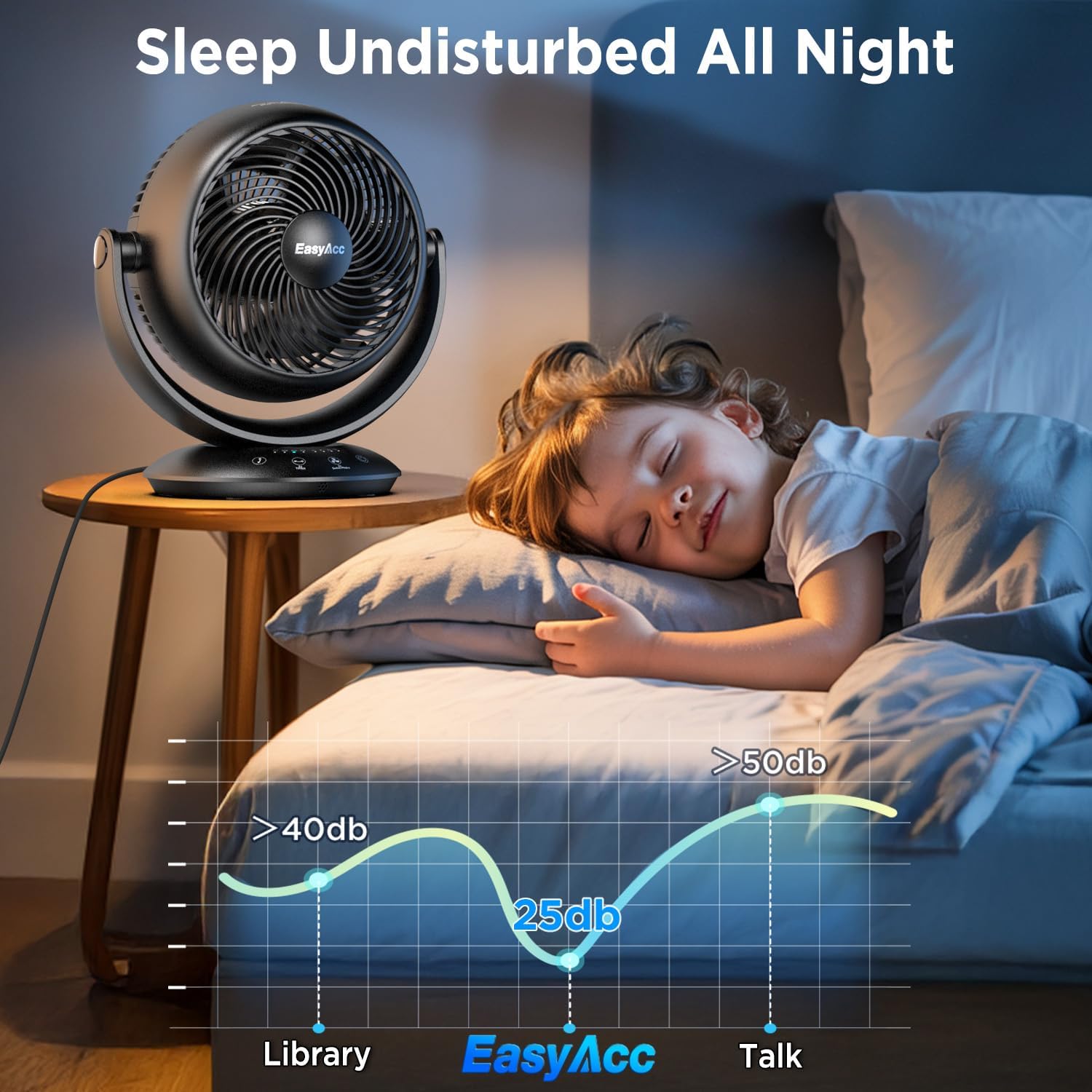
Image: The fan operating quietly in a bedroom, demonstrating its low noise level (25dB) for undisturbed sleep.
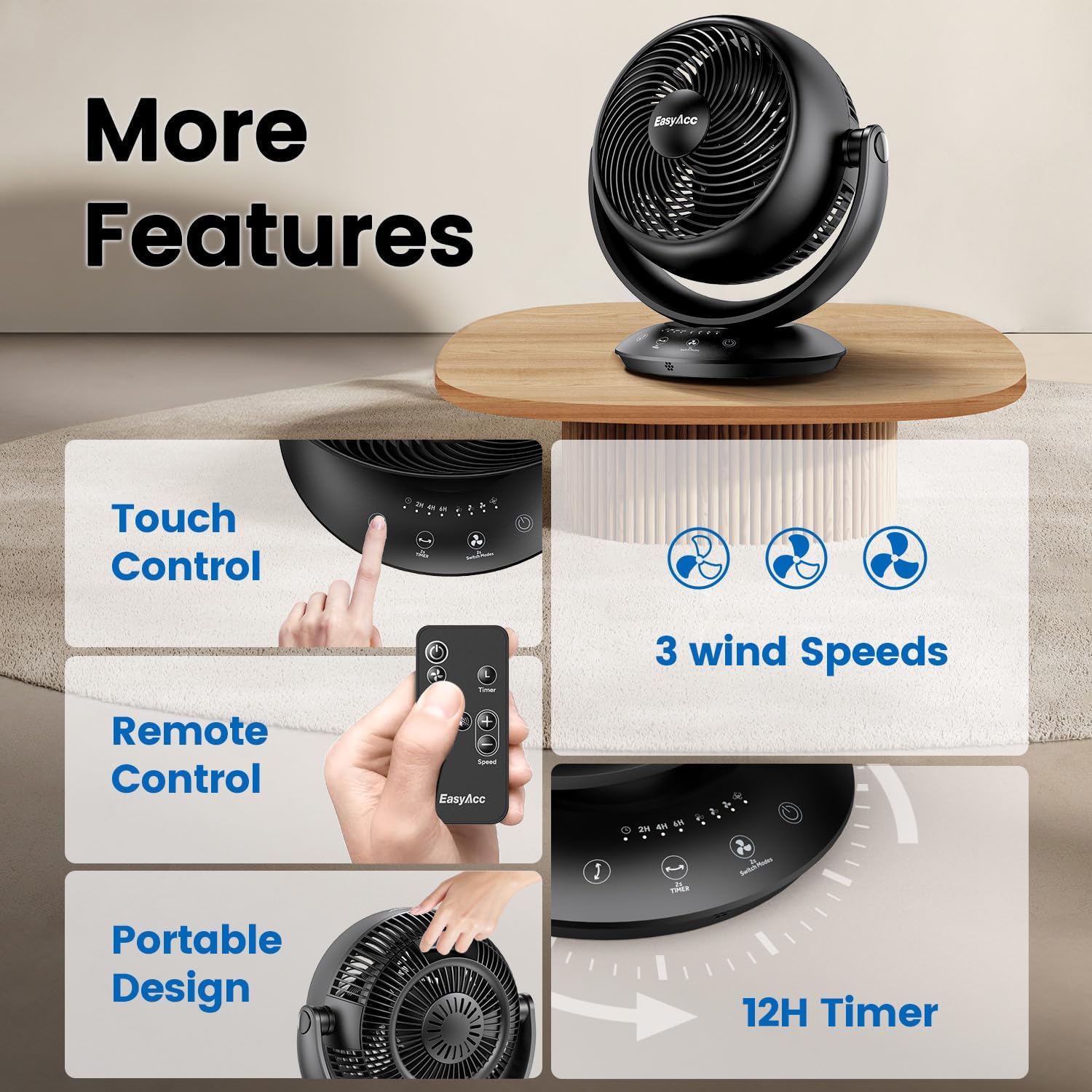
Image: Close-up of the fan's touch control panel and the included remote control, highlighting various functions like speed, mode, and timer.
Setup
- Unpack: Carefully remove the fan and all accessories from the packaging.
- Placement: Place the fan on a firm, level surface. Ensure there is adequate space around the fan for optimal airflow.
- Power Connection: Plug the power cord into a standard 120V AC electrical outlet.
Operating Instructions
Control Panel and Remote Control
The fan can be operated using the touch control panel on its base or the included remote control.

Image: The fan's fine-mesh grille, hidden carrying handle, and remote control, illustrating user-friendly features.
Functions
- Power On/Off: Press the power button (U) on the control panel or remote to turn the fan on or off.
- Speed Adjustment: Press the speed button (+/-) to cycle through the 4 available fan speeds.
- Mode Selection: Press the mode button (M) to switch between the 2 airflow modes (e.g., Normal, Sleep).
- Oscillation: Press the oscillation button (OSC) to activate or deactivate the 3D oscillation. The fan will automatically oscillate horizontally (90°) and vertically (90°).
- Timer Setting: Press the timer button (T) to set the auto-off timer for 2, 4, 6, 8, 10, or 12 hours. The display lights will indicate the selected timer duration.

Image: Close-up of the fan's control panel showing the timer settings (2H, 4H, 6H, 8H, 10H, 12H) and the ON/OFF button.
Video Demonstrations
Video: Demonstration of the EasyAcc Table Oscillating Fan's operation for whole house cooling.
Video: Overview of the EasyAcc Desk Circulation Fan's features for whole house cooling.
Video: Demonstration of the Quiet Air Circulator Fan's effectiveness for both summer and winter use.
Maintenance
- Cleaning: Before cleaning, ensure the fan is unplugged. Use a soft, damp cloth to wipe the exterior surfaces. Do not use abrasive cleaners or solvents.
- Grille Cleaning: Use a vacuum cleaner with a brush attachment to remove dust from the front and rear grilles.
- Storage: When not in use for extended periods, store the fan in a cool, dry place, preferably in its original packaging.
Troubleshooting
| Problem | Possible Cause | Solution |
|---|---|---|
| Fan does not turn on | No power supply | Check if the power cord is securely plugged into a working outlet. |
| Weak airflow | Fan speed is too low or grilles are obstructed | Increase the fan speed. Clean any dust or obstructions from the grilles. |
| Fan is noisy | Fan is not on a level surface or internal components are loose | Ensure the fan is on a stable, flat surface. If noise persists, contact customer support. |
| Remote control not working | Batteries are dead or incorrect orientation | Replace the remote control batteries. Ensure batteries are inserted with correct polarity. |
Specifications
| Feature | Specification |
|---|---|
| Brand | EasyAcc |
| Model Number | XD-1888FA |
| Product Dimensions | 12.64"D x 13.11"W x 8.74"H |
| Item Weight | 4.19 Pounds |
| Power Source | DC (120 Volts) |
| Wattage | 32 watts |
| Noise Level | 25 Decibels |
| Number of Speeds | 4 |
| Air Flow Capacity | 339 Cubic Feet Per Minute |
| Oscillation | 3D Auto Oscillating (90° Vertical + 90° Horizontal) |
| Timer | 2H, 4H, 6H, 8H, 10H, 12H |
| Control Method | Remote Control, Touchpad Control |
| Material | Plastic |

Image: Diagram showing the dimensions of the EasyAcc 12 Inch Air Circulator Desk Fan (12.64 inches deep, 13.11 inches wide, 8.74 inches high).
Warranty and Support
The EasyAcc 12 Inch Quiet Air Circulator Desk Fan comes with a 2-Year Product Warranty. For any product inquiries, technical support, or warranty claims, please contact EasyAcc customer service. You can find contact information on the official EasyAcc website or through your purchase platform.
Additional protection plans may be available for purchase:
- 3-Year Protection Plan
- 4-Year Protection Plan