1. Introduction
The Sound Town Class-D Plate Amplifier STPA-G750DSP-V is designed for custom powered PA speaker cabinets. This 2-channel amplifier provides 500W (LF) + 200W (HF) continuous power (4Ω). It includes safety features such as over current and short circuit protection. The amplifier features a rugged construction with an integrated aluminum heat sink panel for durability. It incorporates a built-in DSP for sound tuning, supporting presets and manual settings. Bluetooth 5.0 connectivity allows wireless streaming, and True Wireless Stereo (TWS) functionality enables pairing of two identical speakers for stereo sound.
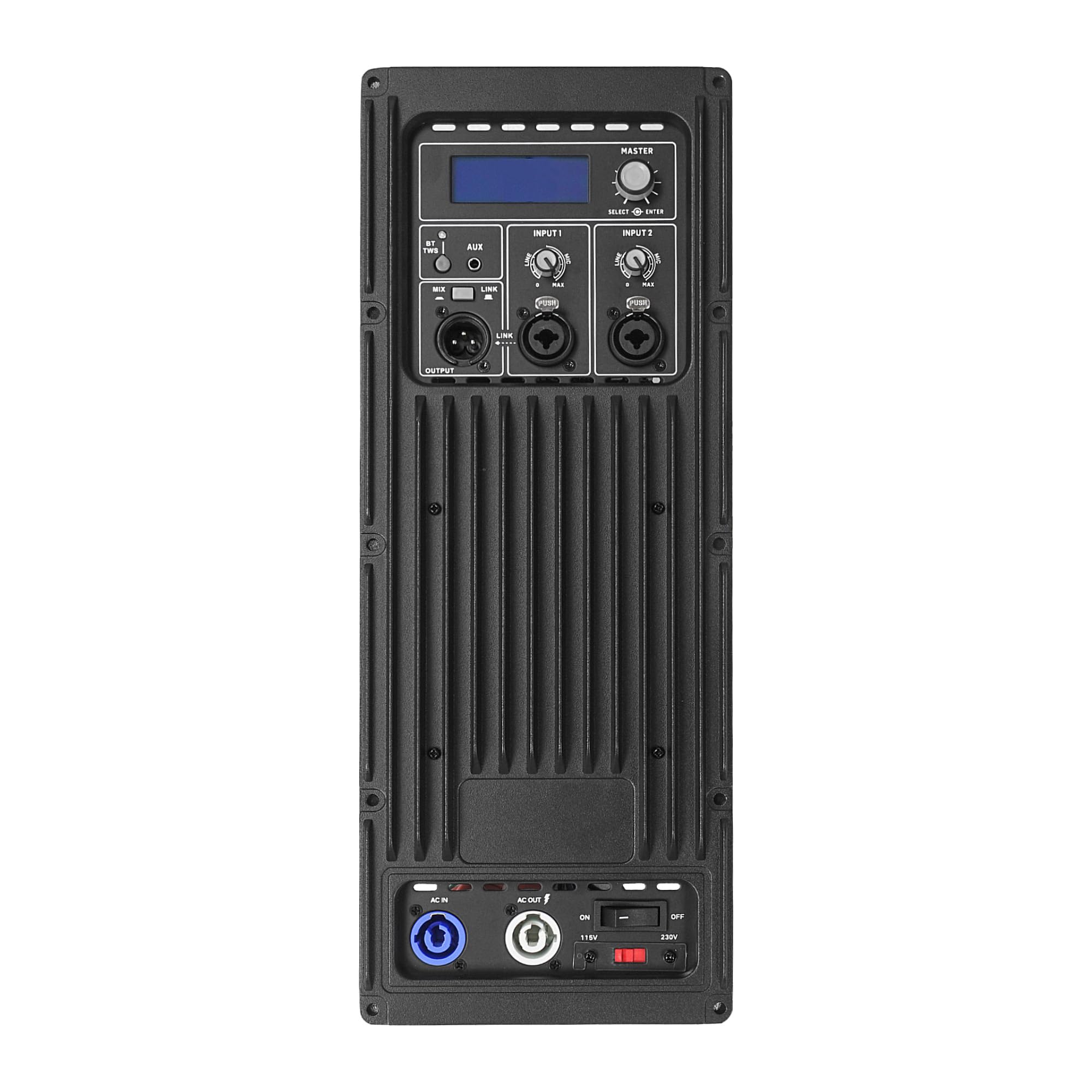
Figure 1: Front view of the Sound Town Class-D Plate Amplifier STPA-G750DSP-V.
2. Features
- Power Output: 500W (LF) + 200W (HF) continuous (4Ω) output for exceptional audio performance.
- Connectivity: Features 2 x XLR-1/4“ combo inputs for microphones and instruments, a 1/8” Aux input, and TWS Bluetooth. The XLR output can be switched between through out or mixed out.
- Digital Signal Processing (DSP): Built-in DSP boasts 4 presets and manual settings for precise EQ, bass boost, and delay controls, allowing sound tailoring.
- Wireless Connectivity: Bluetooth 5.0 for effortless music streaming from Bluetooth-enabled devices. True Wireless Stereo (TWS) allows pairing of two speakers for an immersive stereo experience.
- Protection and Durability: Equipped with over current and short circuit protection for reliable operation. Rugged construction with an integrated aluminum heat sink panel ensures long-lasting performance.
3. Setup
3.1 Unpacking and Inspection
Carefully remove the amplifier from its packaging. Inspect the unit for any signs of damage that may have occurred during transit. If damage is found, contact your dealer immediately.
3.2 Mounting the Plate Amplifier
The STPA-G750DSP-V is designed to be mounted into a compatible PA speaker cabinet. Ensure the cabinet has the appropriate cutout dimensions for a secure fit. Refer to the product dimensions for precise measurements.

Figure 2: Dimensions of the STPA-G750DSP-V plate amplifier. The unit measures approximately 16.46 inches (418mm) in height, 6.3 inches (160mm) in width, and 2.99 inches (76mm) in depth.
3.3 Speaker Wiring
Connect the internal speaker drivers (LF and HF) to the amplifier's output terminals. Ensure correct polarity for optimal sound performance. Refer to the wiring diagram below for proper connections.
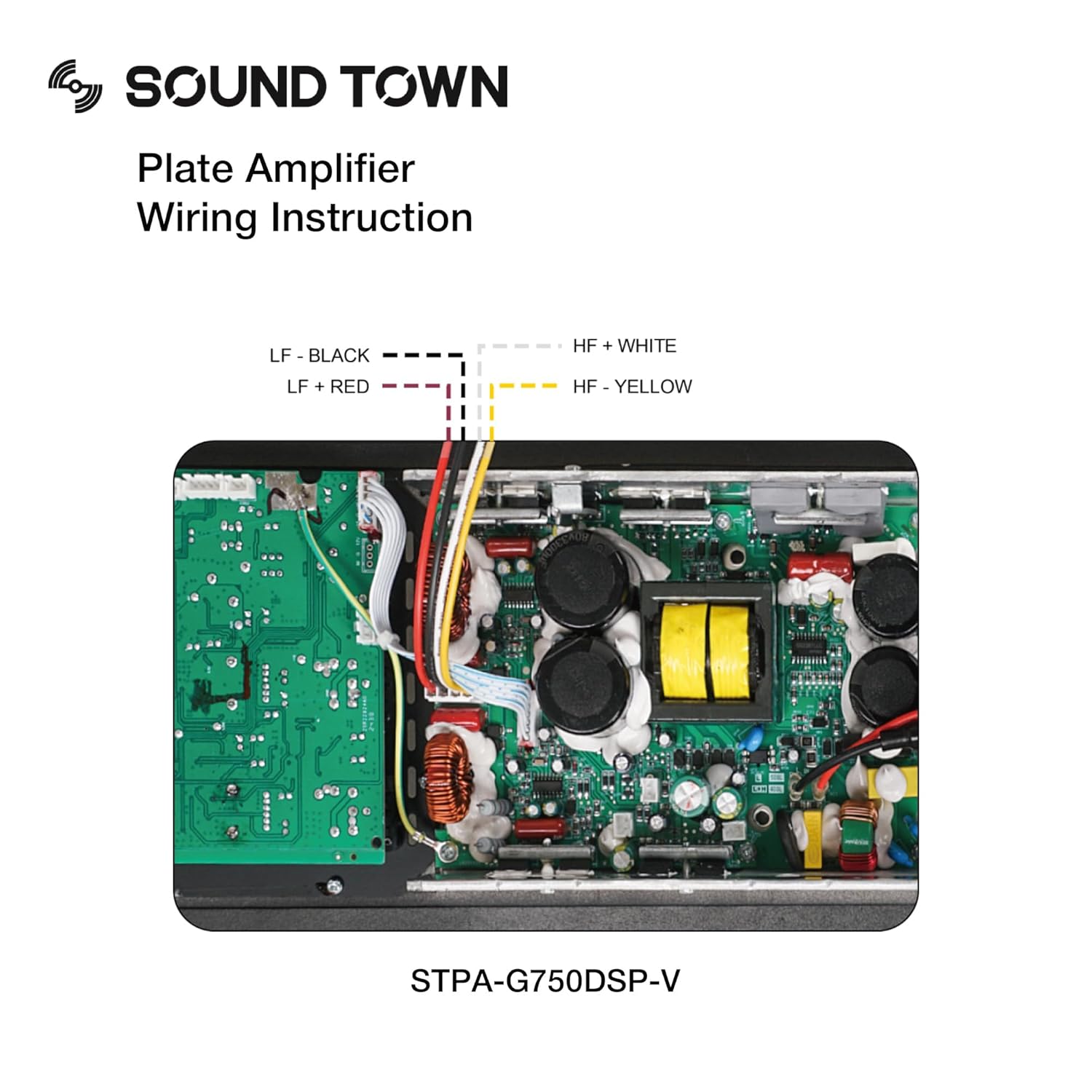
Figure 3: Wiring diagram for the STPA-G750DSP-V. LF- (Black), LF+ (Red), HF+ (White), HF- (Yellow) connections are shown for internal speaker drivers.
3.4 Power Connection
Connect the amplifier to a suitable AC power outlet using the provided power cable. Ensure the power switch is in the OFF position before connecting.
3.5 Audio Input Connections
Connect your audio sources to the amplifier's input jacks:
- XLR-1/4“ Combo Inputs: For microphones or line-level instruments.
- 1/8” Aux Input: For connecting portable audio devices.
4. Operating Instructions
4.1 Powering On/Off
To power on the amplifier, flip the power switch to the ON position. The power indicator light will illuminate. To power off, flip the switch to the OFF position.
4.2 Input Selection and Volume Control
Use the input selector to choose your desired audio source. Adjust the master volume control to set the overall output level. Individual input gain controls may also be available for fine-tuning.
4.3 Bluetooth Pairing (Bluetooth 5.0)
- Ensure the amplifier is powered on and in Bluetooth mode.
- Enable Bluetooth on your audio device (smartphone, tablet, etc.).
- Search for available devices and select “Sound Town STPA-G750DSP-V” (or similar name) to pair.
- Once paired, audio from your device will stream wirelessly to the amplifier.
4.4 True Wireless Stereo (TWS) Functionality
To use TWS, you need two identical STPA-G750DSP-V amplifiers. Follow these steps:
- Power on both amplifiers.
- Put both amplifiers into Bluetooth pairing mode.
- On one amplifier, initiate TWS pairing (refer to the amplifier’s display or specific button if available).
- The two amplifiers will connect to each other.
- Then, pair your audio device to the primary amplifier. Audio will now play in stereo across both units.
4.5 DSP Settings Adjustment
The built-in DSP allows for sound customization. Use the controls on the amplifier to:
- Select from 4 preset equalization curves.
- Manually adjust EQ, bass boost, and delay settings to suit your preferences and acoustic environment.
5. Maintenance
5.1 Cleaning
Wipe the amplifier’s exterior with a soft, dry cloth. Do not use abrasive cleaners, solvents, or harsh chemicals, as these can damage the finish. Ensure no liquids enter the unit.
5.2 Storage
If storing the amplifier for an extended period, disconnect it from power and store it in a cool, dry place away from direct sunlight and extreme temperatures.
5.3 Safety Precautions
- Do not expose the unit to rain or moisture.
- Do not block ventilation openings.
- Do not attempt to service the unit yourself. Refer all servicing to qualified personnel.
6. Troubleshooting
6.1 No Power
- Check if the power cable is securely connected to both the amplifier and the AC outlet.
- Verify that the power outlet is functional.
- Ensure the power switch on the amplifier is in the ON position.
6.2 No Sound Output
- Check all audio input cables for secure connections.
- Ensure the correct input source is selected on the amplifier.
- Increase the master volume and individual input gain controls.
- Verify that the connected speaker drivers are properly wired and functional.
- If using Bluetooth, ensure the device is paired and playing audio.
6.3 Distorted Sound
- Reduce the input gain or master volume to prevent clipping.
- Check the audio source for distortion.
- Inspect speaker wiring for loose connections or incorrect polarity.
- Adjust DSP settings to ensure they are appropriate for your audio and environment.
6.4 Bluetooth Connection Issues
- Ensure the amplifier is in Bluetooth pairing mode.
- Move your Bluetooth device closer to the amplifier.
- Try unpairing and re-pairing the device.
- Ensure no other devices are actively connected to the amplifier via Bluetooth.
7. Specifications
| Specification | Detail |
|---|---|
| Model | STPA-G750DSP-V |
| Brand | Sound Town |
| Output Wattage | 700 Watts (500W LF + 200W HF continuous at 4Ω) |
| Material | Aluminum |
| Color | Black |
| Compatible Devices | All |
| Manufacturer | Sound Town |
| ASIN | B0F1CWBRBN |
8. Warranty and Support
For warranty information or technical support, please contact Sound Town customer service. Keep your purchase receipt as proof of purchase for any warranty claims.
You can typically find contact information on the official Sound Town website or through your product retailer.


