
1. Introduction
The dockteck M.2 NVMe SATA SSD Enclosure Adapter (Model DH0005) provides a convenient and efficient solution for converting your M.2 NVMe or SATA SSD into a portable external storage device. Featuring a tool-free design and high-speed USB 3.2 Gen 2 interface, this enclosure supports data transfer rates up to 10Gbps for NVMe SSDs and 6Gbps for SATA SSDs. It is compatible with various M.2 SSD sizes (2230, 2242, 2260, 2280) and operating systems, making it a versatile accessory for data management and expansion.
2. Package Contents
Please verify that all items are present in your package:
- 1 x dockteck M.2 SSD Enclosure Adapter
- 1 x USB-C to C Cable (approx. 9.8 inches / 25 cm)
- 1 x USB-A to C Cable (approx. 9.8 inches / 25 cm)
- 1 x Thermal Pad
- 1 x Spare Mounting Pin
- 1 x User Manual (this document)
3. Features
- High-Speed Data Transfer: USB 3.2 Gen 2 Type-C interface supports up to 10Gbps for NVMe SSDs and 6Gbps for SATA SSDs.
- UASP/TRIM Protocol Support: Enhances SSD read and write speeds for efficient large file transfers.
- Tool-Free Installation: Easy slide-open design for quick SSD insertion and removal without tools.
- Effective Heat Dissipation: Constructed with an aluminum alloy shell and includes a silicone thermal pad to maintain optimal operating temperatures and ensure data stability.
- Broad Compatibility: Supports M-Key and B+M Key M.2 NVMe and SATA SSDs of sizes 2230, 2242, 2260, and 2280, up to 4TB capacity.
- Wide Device Support: Compatible with Windows, Mac OS, Linux, and Android systems, connecting to PCs, laptops, tablets, smartphones, game consoles, and smart TVs.
- Automatic Sleep Mode: Enters sleep mode after 15 minutes of inactivity to protect your SSD and conserve power.
4. Setup and Installation
Follow these steps to install your M.2 SSD into the enclosure:
- Open the Enclosure: Press the button on the end of the enclosure and slide the internal tray out.
- Insert the SSD: Gently insert your M.2 SSD into the slot at a 45-degree angle. Ensure the key type (M-Key or B+M Key) matches the enclosure's slot.
- Secure the SSD: Push the SSD down until it is flat, then secure it with the provided rubber mounting pin at the end of the SSD.
- Apply Thermal Pad: Peel off the protective films from both sides of the thermal pad and place it onto the SSD chip. This helps dissipate heat to the aluminum casing.
- Close the Enclosure: Slide the internal tray back into the aluminum shell until it clicks into place.

Figure 1: Easy Installation Steps for M.2 SSD
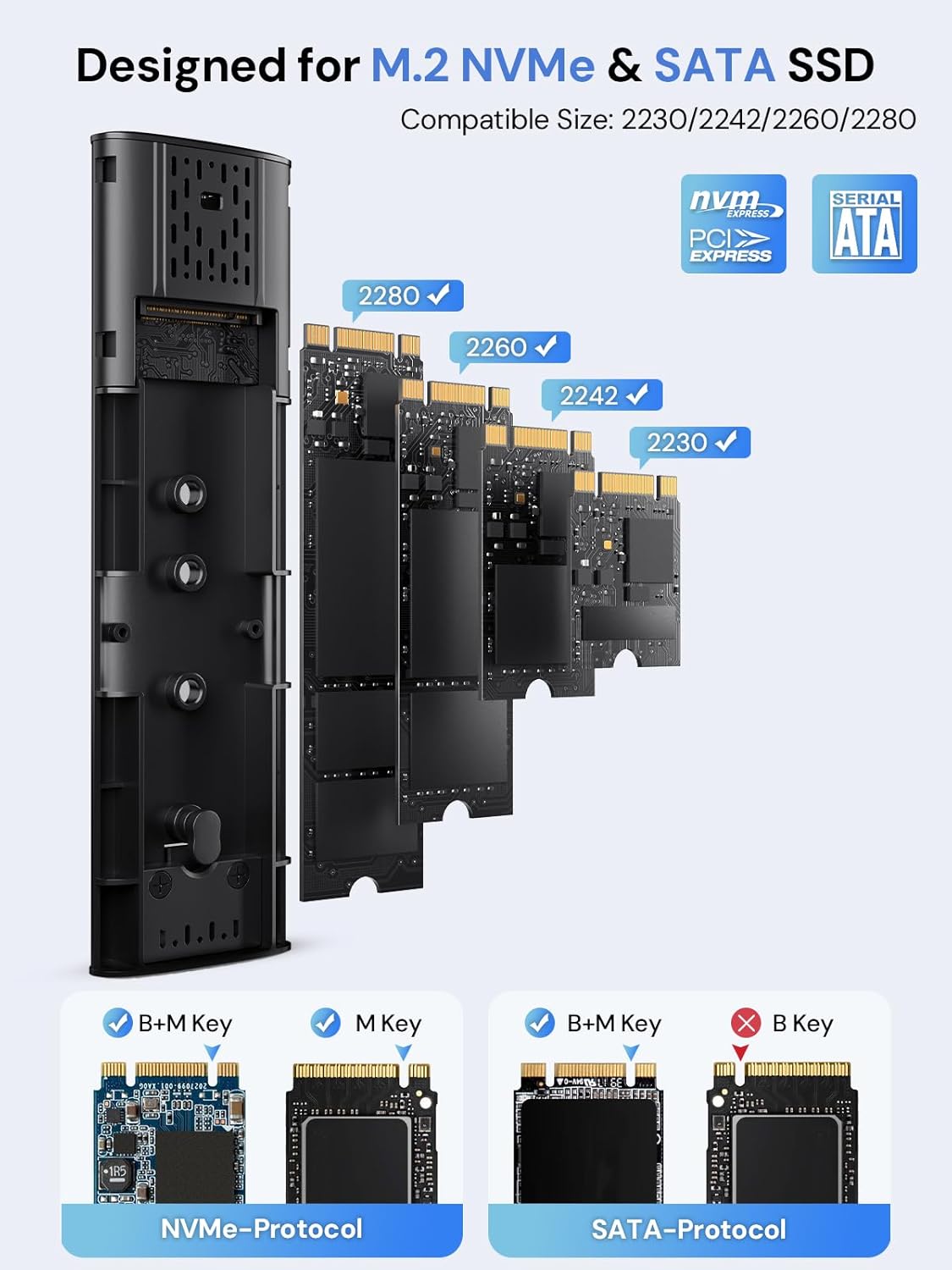
Figure 2: Compatible M.2 SSD Sizes and Key Types
5. Operating Instructions
Once your SSD is installed, connect the enclosure to your device using one of the provided USB cables. The enclosure is plug-and-play, requiring no additional drivers for most operating systems.
- Connection: Use the USB-C to C cable for devices with a USB-C port, or the USB-A to C cable for devices with a standard USB-A port.
- Data Transfer: The enclosure will appear as an external drive on your computer or compatible device. You can drag and drop files, or use your system's file management tools to transfer data.
- LED Indicator: A clear LED indicator on the enclosure will show activity during data transfer.
- Automatic Sleep: To protect your SSD and conserve power, the enclosure will automatically enter sleep mode after 15 minutes of no read/write activity.
Video 1: Demonstration of M.2 SSD Enclosure Adapter usage, including tool-free installation, high-speed data transfer, heat dissipation features, and connectivity with various devices like smartphones and laptops.
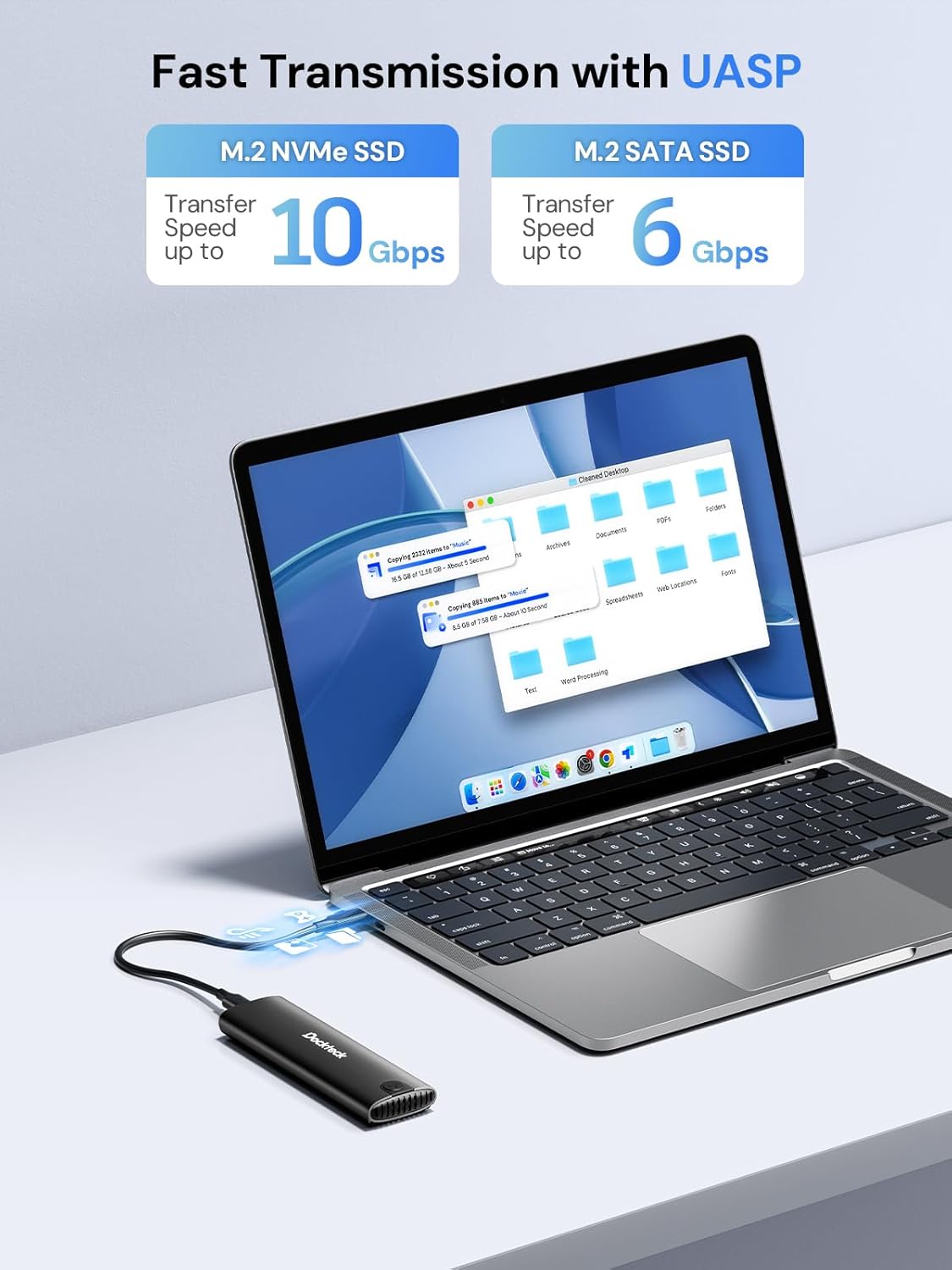
Figure 3: Fast Data Transmission with UASP
6. Heat Dissipation
The dockteck M.2 SSD Enclosure is designed with effective heat dissipation in mind to ensure stable performance and prolong the life of your SSD.
- Aluminum Alloy Shell: The robust aluminum casing acts as a heatsink, drawing heat away from the SSD.
- Silicone Thermal Pad: The included thermal pad creates efficient contact between the SSD and the aluminum shell, further enhancing heat transfer.
- Heat Dissipation Holes: Strategically placed holes on the enclosure facilitate airflow and heat release.

Figure 4: Effective Heat Dissipation Design
7. Compatibility
This enclosure offers broad compatibility with various M.2 SSDs and host devices.
- SSD Protocols: Supports both NVMe (PCIe) and SATA protocols.
- SSD Key Types: Compatible with M-Key and B+M Key M.2 SSDs. (Note: B-Key only SATA SSDs are not supported).
- SSD Sizes: Supports M.2 SSDs of form factors 2230, 2242, 2260, and 2280.
- Maximum Capacity: Supports M.2 SSDs up to 4TB.
- Operating Systems: Works with Windows, Mac OS, Linux, and Android systems.
- Compatible Devices: Can be connected to PCs, laptops, tablets, smartphones (with USB-C), game consoles, and smart TVs.

Figure 5: Wide Device and System Compatibility
8. Troubleshooting
If you encounter issues, please refer to the following common troubleshooting steps:
- SSD Not Detected:
- Ensure the M.2 SSD is correctly inserted and secured within the enclosure.
- Verify that your SSD is either NVMe (M-Key or B+M Key) or SATA (B+M Key). B-Key only SATA SSDs are not supported.
- Check if the SSD is initialized and formatted. New SSDs typically need to be initialized and formatted in Disk Management (Windows) or Disk Utility (Mac OS) before use.
- Try connecting the enclosure to a different USB port on your device.
- Test with a different USB cable if available.
- Slow Transfer Speeds:
- Ensure your device's USB port supports USB 3.2 Gen 2 (10Gbps) for optimal performance. Older USB 2.0 or 3.0 ports will result in lower speeds.
- Verify that your operating system and drivers are up to date.
- Confirm that the SSD itself is capable of high speeds (e.g., NVMe SSDs are faster than SATA SSDs).
- Avoid transferring many small files simultaneously, as this can reduce overall transfer speed.
- Enclosure Gets Warm:
- It is normal for the aluminum enclosure to become warm during heavy use, as it is designed to dissipate heat from the SSD.
- Ensure the thermal pad is correctly installed on the SSD to facilitate heat transfer to the enclosure.
- Avoid placing the enclosure in enclosed spaces that restrict airflow.
- Intermittent Disconnections:
- Ensure the USB cable is securely connected to both the enclosure and your device.
- Try a different USB port or cable.
- Check for power management settings on your computer that might be turning off USB ports to save power.
9. Specifications
| Feature | Detail |
|---|---|
| Model Number | DH0005 |
| Product Dimensions | 4.9 x 1.5 x 0.6 inches (12.4 x 3.8 x 1.5 cm) |
| Item Weight | 1.92 ounces (54.4 g) |
| Interface | USB 3.2 Gen 2 Type-C |
| Data Transfer Speed | Up to 10Gbps (NVMe), Up to 6Gbps (SATA) |
| Supported SSD Protocols | NVMe (PCIe) and SATA |
| Supported SSD Key Types | M-Key, B+M Key |
| Supported SSD Sizes | 2230, 2242, 2260, 2280 |
| Max SSD Capacity | 4TB |
| Compatible Operating Systems | Windows, Mac OS, Linux, Android |
| Material | Aluminum Alloy |
| Color | Black |
| Manufacturer | dockteck |
10. Warranty and Support
dockteck products are designed for reliability and performance. For warranty information, technical support, or any inquiries regarding your M.2 NVMe SATA SSD Enclosure Adapter, please contact dockteck customer service through their official website or the retailer where the product was purchased.
You can visit the official dockteck store for more information: dockteck Store on Amazon.