
1. Safety Instructions
Please read these instructions carefully before installation and use. Keep this manual for future reference.
- Electrical Safety: Installation should be performed by a qualified electrician or competent person. Ensure the power supply is disconnected before installation or maintenance.
- Voltage: This product operates at 230 Volts. Verify your power supply matches this requirement.
- Outdoor Use: The floodlight is IP66 rated, making it resistant to dust and powerful water jets. However, avoid submerging it in water.
- Mounting: Ensure the mounting surface is strong enough to support the floodlight securely.
- Heat: Do not cover the floodlight during operation, as this can impede heat dissipation and cause overheating.
2. Package Contents
Verify that all components are present in the package:
- 1x CLY 35W LED Outdoor Motion Sensor Floodlight
- 1x Remote Control (requires 2 AAA batteries, included)
- 1x Set of Mounting Accessories
3. Product Overview
The CLY 35W LED Outdoor Motion Sensor Floodlight provides powerful and efficient illumination for various outdoor areas. It features a highly sensitive motion sensor, multiple operating modes, and convenient remote control for easy adjustments.
Key Features:
- High Brightness: 35W, 3290 Lumens, 6500K Cool White light.
- Wide Coverage: 120° beam angle and 180° motion detection angle.
- Intelligent Modes: Constant Light, PIR Motion Sensor (Day/Night), and Timer functions.
- Remote Control: Adjust settings conveniently from a distance.
- Durable Design: IP66 waterproof, heat and frost resistant, made from die-cast aluminum for a long lifespan of up to 50,000 hours.
- Adjustable: 180° adjustable mounting bracket and rotatable sensor.
4. Setup and Installation
Follow these steps for proper installation of your floodlight.
4.1 Mounting Options
The floodlight comes with a 180° adjustable stand, allowing for versatile mounting:
- Wall Mounting: Secure the bracket to a wall.
- Ground Mounting: Attach the bracket to a stable ground surface.
- Ceiling Mounting: Install the bracket on a ceiling or overhang.
The ideal mounting height is between 3.5 to 5 meters (11.5 to 16.4 feet) for optimal motion detection and light coverage.

Figure 1: Product dimensions, wiring, adjustable stand, and various mounting positions.
4.2 Wiring Connections
The floodlight includes a 1-meter cable for connection to your electrical supply. Ensure the power is OFF before wiring.
- Brown Wire: Connect to Live (L)
- Blue Wire: Connect to Neutral (N)
- Yellow/Green Wire: Connect to Earth (E)
4.3 Sensor Adjustment
The motion sensor can be rotated 180° to optimize its detection area after installation.

Figure 2: Features including heat dissipation, impact resistance, and sensor adjustability.
5. Operating Instructions
Your CLY floodlight is controlled via the included remote control, offering various modes and settings.
5.1 Remote Control Functions
The remote control allows for convenient adjustment of all floodlight functions from a distance of up to 12 meters (39 feet).

Figure 3: Overview of the remote control and its functions.
5.2 Operating Modes
The floodlight offers four intelligent operating modes:
- Day and Night Sensing Mode: The light turns on when motion is detected, regardless of ambient light conditions.
- Night Sensing Mode: The light turns on only when motion is detected in low light or darkness.
- Constant Light Mode: The light stays on continuously until manually turned off.
- Timing Mode: The light can be set to stay on for 1, 2, or 3 hours.
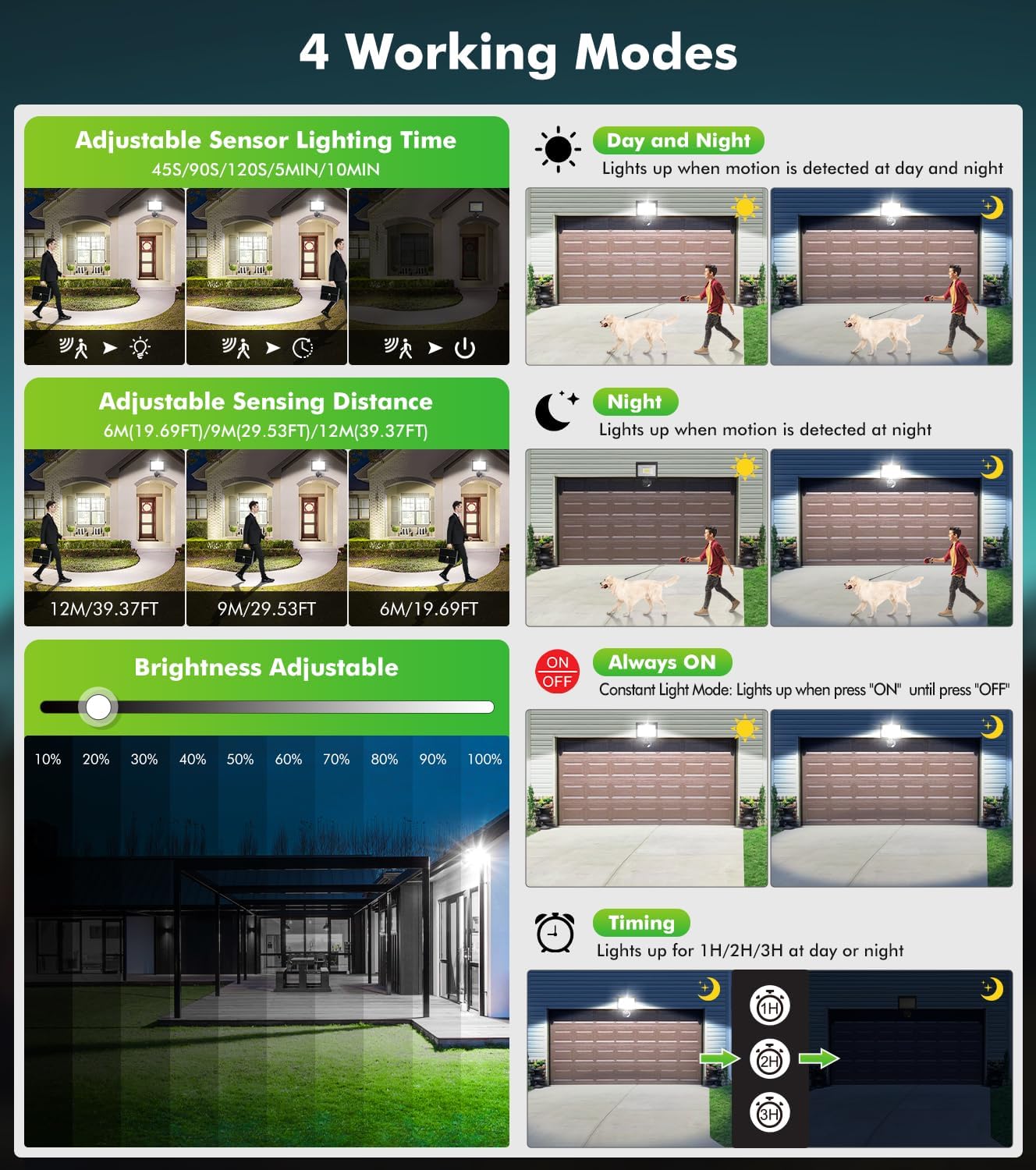
Figure 4: Detailed explanation of the four operating modes.
5.3 Adjustable Settings
Use the remote control to fine-tune the floodlight's performance:
- Brightness Adjustment: Choose from 10 levels of brightness (10% to 100%) in any mode.
- Sensing Distance: Adjust the motion detection range to 6 meters (19.69 ft), 9 meters (29.53 ft), or 12 meters (39.37 ft).
- Lighting Duration: Set how long the light stays on after motion is detected: 45 seconds, 90 seconds, 120 seconds, 5 minutes, or 10 minutes.

Figure 5: Visual representation of adjustable settings and light coverage.
6. Maintenance
The CLY floodlight is designed for durability and requires minimal maintenance.
- Cleaning: Periodically wipe the floodlight and sensor lens with a soft, damp cloth to remove dust and debris. Do not use abrasive cleaners.
- Durability: The IP66 rating ensures resistance to harsh weather conditions, including heat and frost. The die-cast aluminum housing provides excellent corrosion resistance and heat dissipation.
- Lifespan: With a rated lifespan of up to 50,000 hours, the LED components are designed for long-term use.

Figure 6: Floodlight's weather resistance features.
7. Troubleshooting
If you encounter issues with your floodlight, refer to the following common problems and solutions:
| Problem | Possible Cause | Solution |
|---|---|---|
| Light does not turn on. | No power supply. Remote control batteries are dead. Incorrect mode selected. | Check electrical connections and circuit breaker. Replace AAA batteries in the remote control. Ensure the correct operating mode (e.g., Constant Light or Sensing Mode) is selected. |
| Motion sensor not detecting. | Sensor obstructed or dirty. Sensing distance set too low. Sensor angle incorrect. | Clean the sensor lens. Remove any obstructions. Increase the sensing distance using the remote control. Adjust the sensor's physical angle to cover the desired area. |
| Light stays on continuously in sensing mode. | Constant motion in detection area. Sensor sensitivity too high. Incorrect mode selected. | Check for continuous movement (e.g., swaying branches, pets). Reduce the sensing distance or adjust sensor angle. Ensure Constant Light Mode is not accidentally activated. |
| Remote control not working. | Batteries dead or incorrectly inserted. Obstruction between remote and floodlight. Out of range. | Replace batteries (2 AAA). Ensure correct polarity. Ensure a clear line of sight to the floodlight's sensor. Move closer to the floodlight (max 12m/39ft). |
8. Specifications
Detailed technical specifications for the CLY 35W LED Outdoor Motion Sensor Floodlight:
| Feature | Specification |
|---|---|
| Brand | CLY |
| Model Number | CLY-35W-LED-MOTION |
| Power Consumption | 35 Watts |
| Luminous Flux | 3290 Lumens |
| Color Temperature | 6500 Kelvin (Cool White) |
| Number of LEDs | 42 |
| Beam Angle | 120° |
| Motion Sensor Angle | 180° |
| Adjustable Sensing Distance | 6M / 9M / 12M |
| Adjustable Lighting Duration | 45S / 90S / 120S / 5MIN / 10MIN |
| Remote Control Distance | Up to 12M (39FT) |
| Input Voltage | 230 Volts |
| Waterproof Rating | IP66 |
| Material | Aluminum |
| Product Dimensions (L x W x H) | 16 x 5 x 18 cm |
| Item Weight | 640 grams |
| Cable Length | 1 Meter |
| Battery (Remote) | 2 AAA (included) |
9. Warranty and Support
CLY products are manufactured to high-quality standards. For warranty information or technical support, please refer to the retailer's policy or contact CLY customer service.
- Warranty: Please retain your proof of purchase for any warranty claims.
- Customer Support: If you have any questions or require assistance, please contact the seller or CLY customer support through their official channels.


